













🛒 18 Best OpenCart templates for business and services 2026
A store engine can be installed in an evening. But a theme gets chosen over weeks, and still turns out to be the wrong one: the mobile version breaks, it is not tailored to the niche, or the author abandoned the project a year ago.
That is exactly where OpenCart shines: there is a separate template for every industry, not a "one-size-fits-all store". Pharmacy, building materials, optics, HVAC equipment, each has its own catalog logic and product card. Below are 18 themes for business and services that we selected based on responsiveness, speed, and active support. Screenshots from demos and marketplaces, not renders.
💡 Quick overview:
- Define the store niche: clothing, building materials, medicine, printing, real estate. The selection includes a tailored template for each.
- Compare the leaders using the table below: responsiveness, Ajax cart, mega menu, multilingual support. This is the baseline without which a store loses conversions.
- Open a candidate's demo and walk the buyer's path: search, product card, cart, checkout. If there is friction at any step, the template is not for you.
- Check the theme's last update date. An abandoned template drags along security holes and conflicts with the new OpenCart version.
Template | Niche | Ajax cart | Mega menu | Multilingual |
|---|---|---|---|---|
eShop | Fashion and clothing | No | Yes | Yes |
StoreFlex | Building materials | Yes | Yes | Yes |
Buildex | Building materials | Yes | Yes | Yes |
Securax | Security systems | No | Yes | Yes |
DrugStore | Pharmacy | No | Yes | Yes |
1. EShop
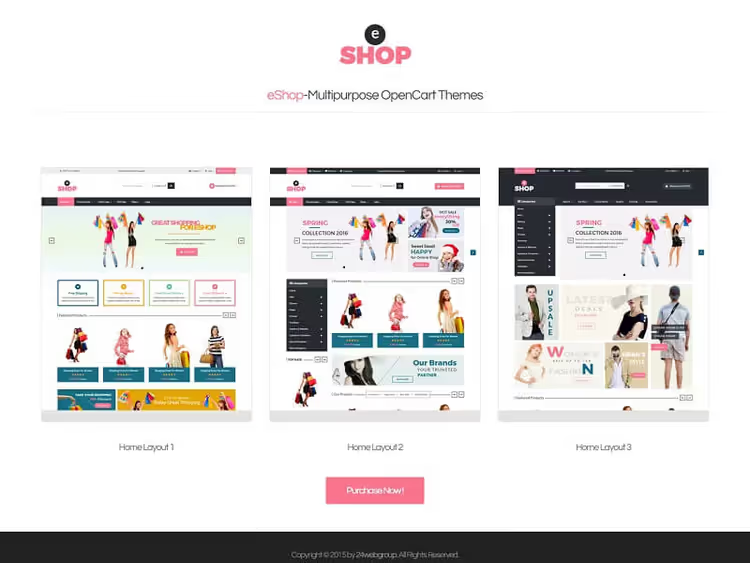
A vibrant template for fashion retail: clothing, footwear, accessories. The Bootstrap grid keeps blocks aligned on any screen, and the first screen fits a slider, categories, and a new arrivals block. The shopper sees the assortment right away, without three scrolls down.
Colors are adjusted from the theme panel, no CSS editing needed. Multilingual support is included, so expanding to neighboring markets requires no extras. For a collection-based assortment where visuals matter, eShop looks lively.
- Pros: rich design without overload, flexible color settings, multilingual out of the box.
- Cons: no built-in Ajax search, only the standard one.
- Price and purchase: from $25 for a single-use license, 🔗 eShop on ThemeForest
2. Wholesale
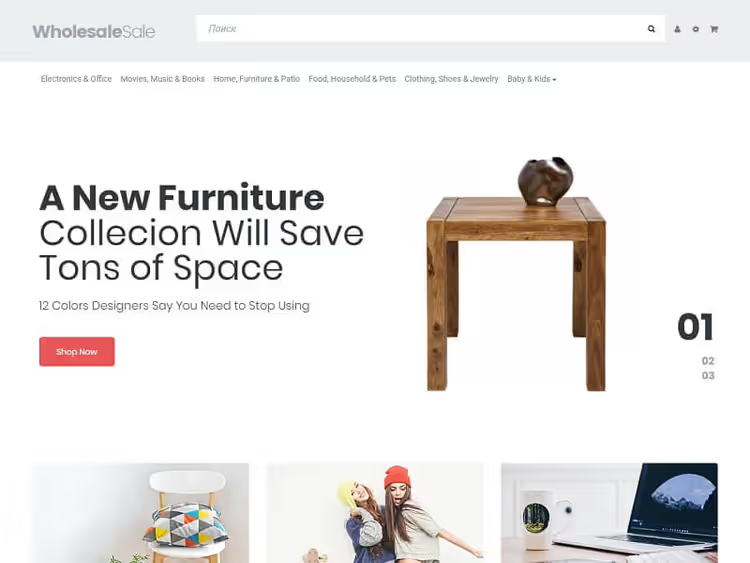
Wholesale is built for wholesale and B2B. There are no subscription pop-ups and "deal of the day" banners here: instead you get a clean product grid, wholesale prices, and quick access to categories via a mega menu.
The theme handles SEO properly: product microdata, clean HTML5, customizable meta tags. It installs without any hassle, you upload the archive via the admin panel, activate it, and the store already looks operational. According to marketplace reviews, support responds within 24 hours.
- Pros: tailored for wholesale, SEO out of the box, simple installation, mega menu.
- Cons: modest customization without coding, wholesale-only focus.
- Price and purchase: from $75 for a single-use license, 🔗 Wholesale on TemplateMonster
3. Securax
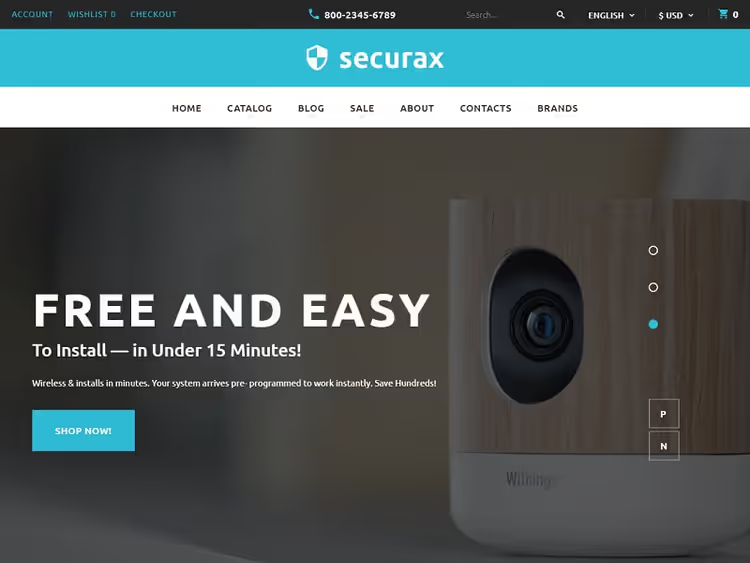
Securax covers a narrow task: a security company website with a catalog of services and equipment. The dark palette with blue accents plays on the "security and technology" association, and for this niche that works better than colorful templates.
Multilingual and multi-currency support are built in. If equipment is sold in several countries, no extra plugins are needed. Navigation is short: three clicks from the homepage to the product card. Documentation is included and covers basic setup.
- Pros: niche design for security, multilingual and multi-currency support, clear navigation.
- Cons: no Ajax cart, checkout follows the standard flow.
- Price and purchase: from $83 for a single-use license, 🔗 Securax on TemplateMonster
4. Wood Finishes
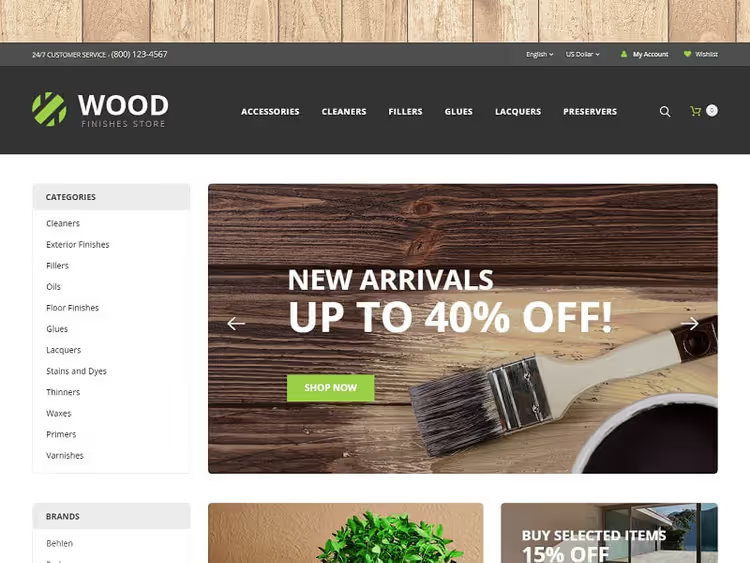
Wood Finishes is made for flooring, varnishes, paints, and finishes. A warm wood palette comes out of the box, and a color scheme switcher helps quickly adjust the theme to the brand.
The homepage features a tidy slider and a category grid with large previews. The product card displays specifications in a businesslike manner: coating type, consumption per square meter, drying time. For a building supply store, this level of detail saves managers' time, resulting in fewer clarifying calls.
- Pros: niche design, palette switcher, detailed product card.
- Cons: narrow specialization, can't move to another niche without recoding.
- Price and purchase: from $80 for a single license, 🔗 Wood Finishes on TemplateMonster
5. StoreFlex
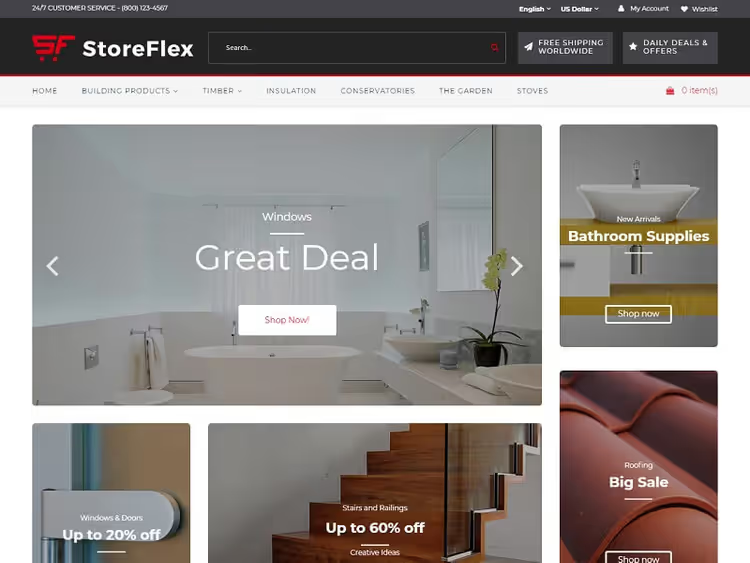
StoreFlex is built on a card grid: products sit in neat tiles with a consistent rhythm, no visual chaos. A mega menu with grouping, live search with suggestions, and attribute-based sorting make navigation predictable.
The details are nice: a category accordion in the sidebar, quick product view without a page reload, a carousel for promotions. The theme works well with Google Fonts and modern browsers. In our test, the building materials demo is one of the most thoughtfully designed options on the market.
- Pros: card design, mega menu and live search, quick view, promotions carousel.
- Cons: price tag is above the OpenCart theme market average.
- Price and purchase: from $80 for a single license, 🔗 StoreFlex on TemplateMonster
6. Amkorte
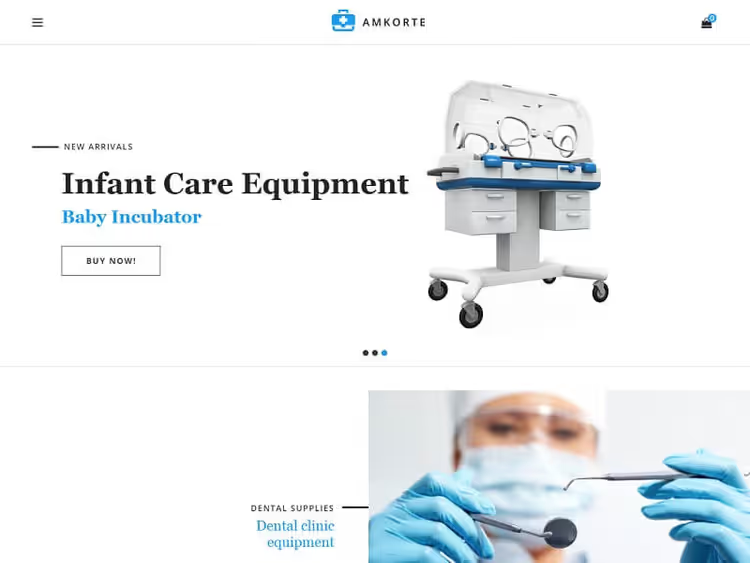
Amkorte is designed for medical equipment and consumables. Minimalism with a white background and restrained accents: nothing distracts from the product cards, which matters where buyers compare specifications.
The catalog filters by manufacturer, equipment type, and compatibility. The theme is responsive, no mobile tweaks were needed, we checked on the demo. It works with the OpenCart blog module out of the box, handy for SEO via expert articles.
- Pros: clean medical design, specification filters, blog-friendly.
- Cons: no homepage slider, sparse animation.
- Price and purchase: from $60 for a single license, 🔗 Amkorte on TemplateMonster
7. Paper Market
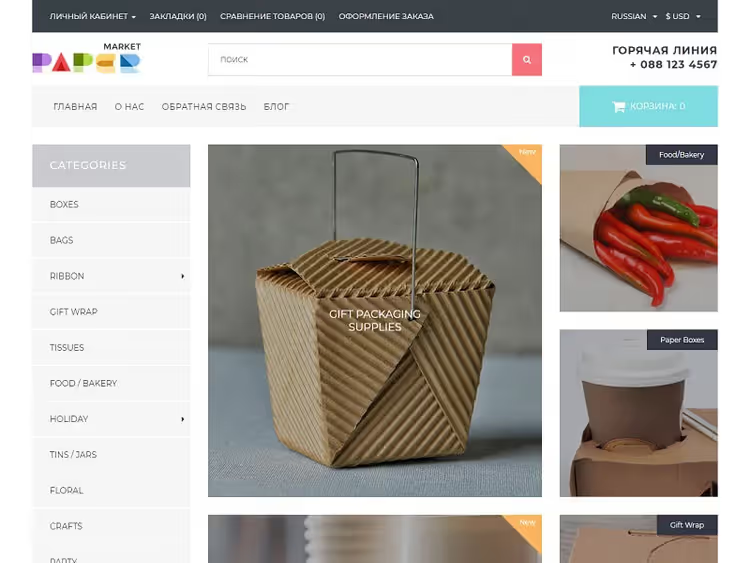
Paper Market targets packaging and printing. Minimalism with subtle scroll animation gives a premium feel without unnecessary pomp. Live search, quick view, and a responsive carousel work toward conversion.
It loads fast: clean code without heavy frameworks. Categories collapse into an accordion, which helps when you have hundreds of packaging items in different formats and uses.
- Pros: tidy design with animation, live search and quick view, lightweight code.
- Cons: niche-specific, limited customization options.
- Price and purchase: from $75 for a single license, 🔗 Paper Market on TemplateMonster
8. Buildex
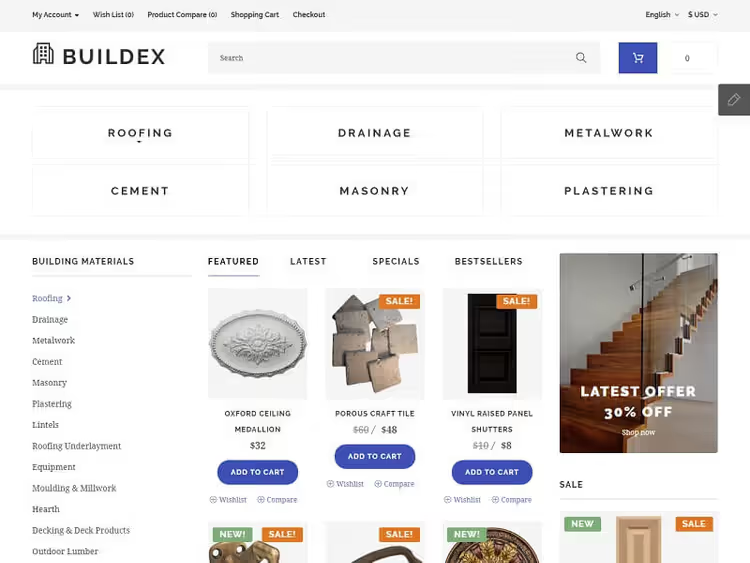
Buildex bets on Ajax: add-to-cart without a page reload, live search with instant results, on-the-fly filtering. For building materials with hundreds of SKUs, this is not decoration, it's a necessity. No one will wait three seconds for every click.
The mobile version is well thought out: the "Add to Cart" button is large and visible, filters hide in an off-canvas menu, cards don't stick together. A demo is available on the author's site, walk through a purchase on your phone before installing.
- Pros: Ajax cart and search, fast filtering, solid mobile UX.
- Cons: generic construction design, similar to competitors.
- Price and purchase: from $60 for a single license, 🔗 Buildex on TemplateMonster
9. Contact Lens
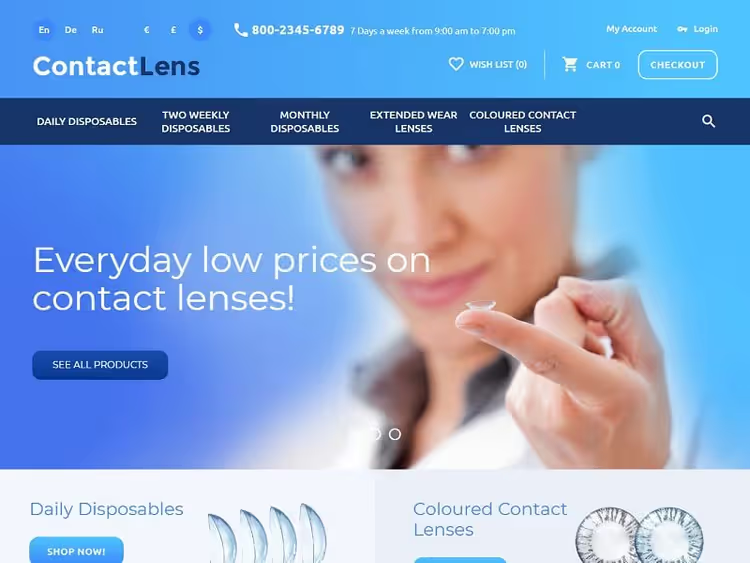
Contact Lens is tailored for online eyewear stores and contact lens sales. The blue color scheme evokes cleanliness and a medical feel. Two sliders on the homepage surface promotions and new arrivals at the same time, so you don't have to pick just one.
A sidebar with filters for lens parameters (prescription, base curve, manufacturer) narrows down the selection in a couple of clicks. The product card shows the full spec without scrolling. For a medical niche where people compare numbers, that's spot on.
- Pros: niche design for eyewear, dual slider, filters for medical parameters.
- Cons: the blue palette isn't universal; you'd need to recolor it for a different product category.
- Price and purchase: from $80 for a one-time license, 🔗 Contact Lens on TemplateMonster
10. Status
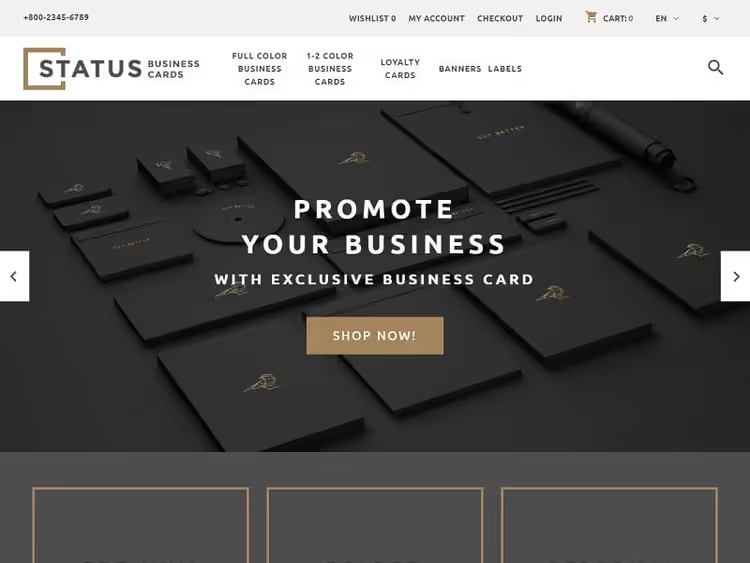
Status is built for print shops and printing services. The full-screen slider on the homepage acts as a focal point: you load it with print samples, business cards, booklets, posters. The buyer immediately assesses the quality.
A thumbnail of the next slide is visible at the side, a technique borrowed from portfolio sites, and it fits right in for showcasing services. The layout is responsive, slides remain readable on a phone. Multilingual support is in place: an export-oriented print shop can switch the interface to the required language.
- Pros: full-screen slider with previews, responsive layout, multilingual.
- Cons: the slider is a bit heavy for mobile, adds a fraction of a second to load time.
- Price and purchase: from $70 for a single license, 🔗 Status on TemplateMonster
11. Medical Equipment
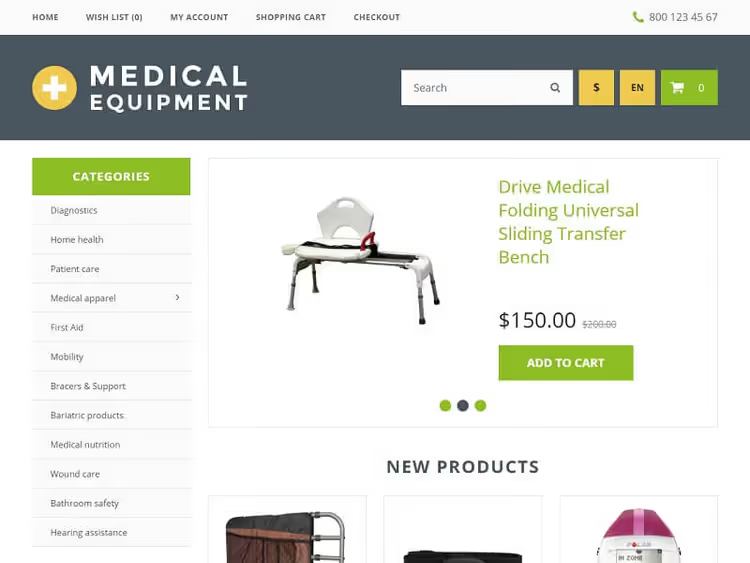
Medical Equipment is designed for medical, sports, and electronic products. The green-and-yellow palette is non-aggressive, a calm background for product cards where specs matter more than emotion.
The theme's admin panel offers flexible display management: grouping by categories, tabs for "New Arrivals", "Popular", "Special Offers", and block order settings. Installation is standard, via uploading an archive to the OpenCart admin. Documentation is included.
- Pros: calm professional design, flexible admin panel, category tabs.
- Cons: the green-and-yellow color scheme won't suit every medical brand.
- Price and purchase: from $56 for a single license, 🔗 Medical Equipment on TemplateMonster
12. Nutrition
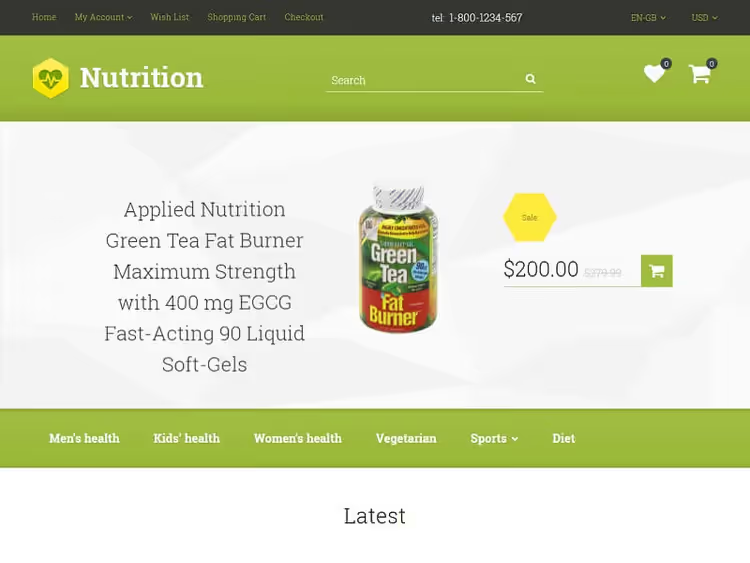
Nutrition is built for sports nutrition and supplements. The green-and-white color scheme is refreshing, without the acid neon colors that plague many "sports" templates. The menu is placed below the slider: a debatable but deliberate choice, product first, then navigation.
Product cards are neat, with serving sizes, ingredients, and certifications. The theme works well with the OpenCart reviews module, and for sports nutrition, social proof is the main purchase trigger.
- Pros: fresh green-and-white design, product-focused, reviews support.
- Cons: the unusual menu placement may confuse an older audience.
- Price and purchase: from $56 for a single license, 🔗 Nutrition on TemplateMonster
13. DrugStore
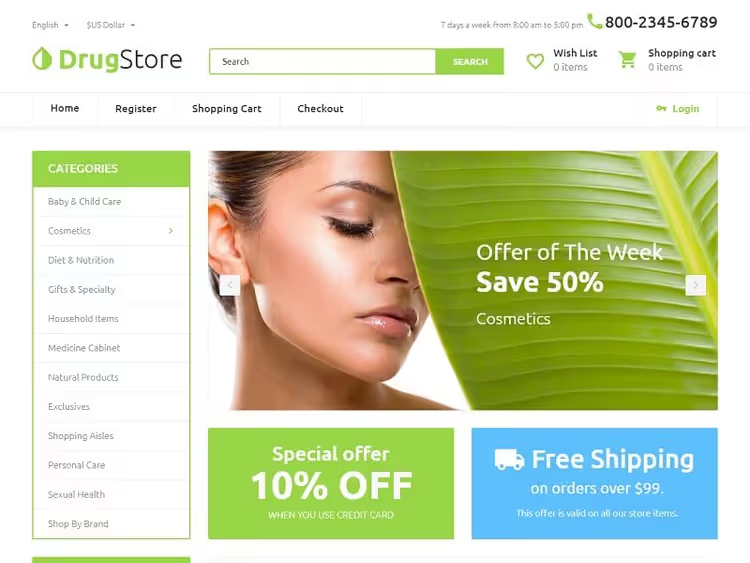
DrugStore solves the online pharmacy challenge: organizing hundreds of medications so the buyer doesn't get lost. Products are grouped into carousels, and tabs for "New Arrivals", "Popular", "Special Offers" act as additional filters.
Sidebars are used effectively: the left one for the category tree, the right one for special offers and a filter by active ingredient. On mobile, they collapse into a slide-out menu, so the screen stays uncluttered. Responsiveness has been tested on real devices.
- Pros: well-thought-out categorization, carousels and tabs, responsive sidebars.
- Cons: the abundance of blocks on the homepage causes slight lag on weak hosting.
- Price and purchase: from $75 for a single license, 🔗 DrugStore on TemplateMonster
14. Plumbing
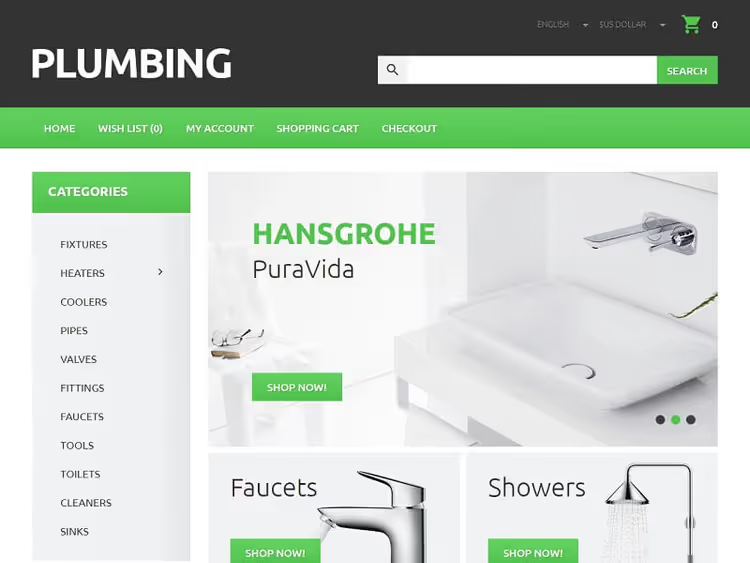
Plumbing is made for plumbing supplies and tools. A no-frills design: large photos, a clear grid, minimal distracting details. A plumbing buyer is looking for a specific part, not inspiration, and the theme understands that.
The catalog filters by manufacturer, connection type, and diameter. The product card presents technical specifications in a structured way. The responsive layout keeps them readable even on a smartphone screen.
- Pros: businesslike design, technical filtering, readable product card.
- Cons: the author's description is sparse, you only discover some features on the demo.
- Price and purchase: from $49 for a single license, 🔗 Plumbing on TemplateMonster
15. Real Estate
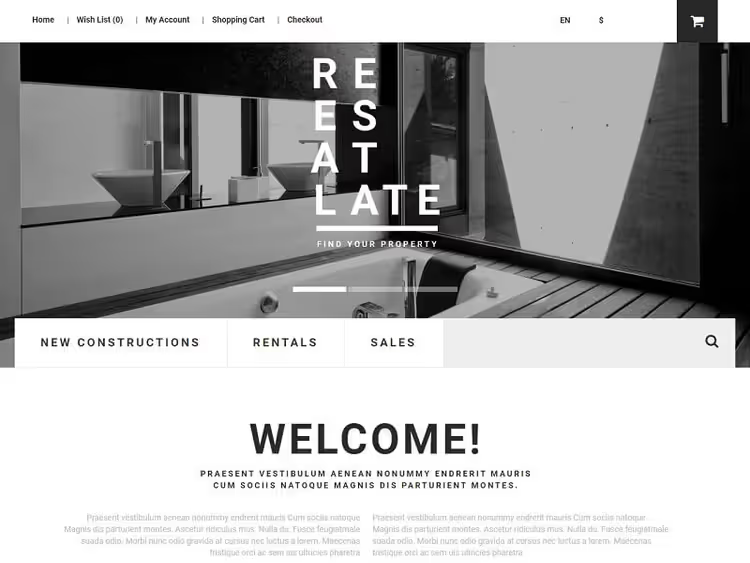
Real Estate, a black-and-white template for real estate agencies. The monochrome palette conveys solidity and cedes color to property photos, which become the focal point. Dropdown menus for the cart and navigation save screen space.
The search bar is placed below the slider, following the same logic as Nutrition: property visuals first, then the search tool. The theme holds property cards with floor plans, specs, and a gallery.
- Pros: premium monochrome, dropdown menus, cards with a gallery.
- Cons: black-and-white doesn't suit every developer, the palette is almost not customizable.
- Price and purchase: from $60 for a single-use license, 🔗 Real Estate on TemplateMonster
16. Magazine
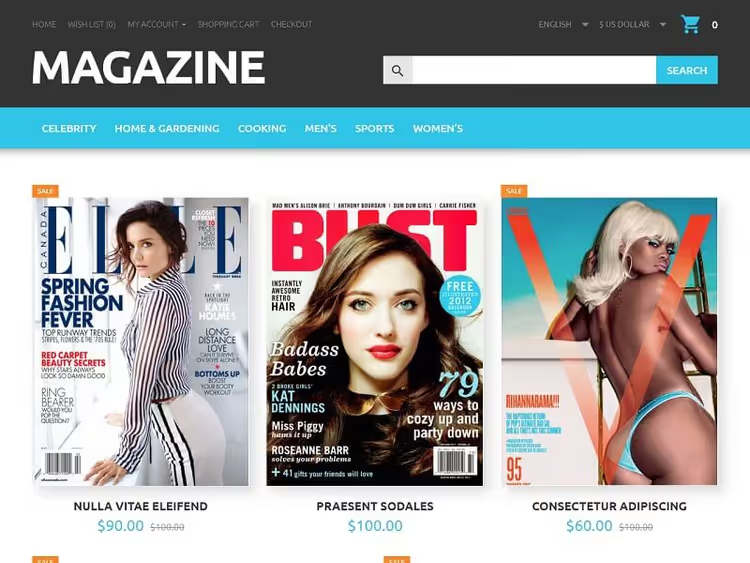
Magazine is built for online publications, newspapers, and magazines that sell subscriptions and print issues. Products are laid out in rows, with images smoothly shrinking as you scroll, a technique borrowed from content sites that creates a "page-turning" feel.
The grid is responsive: four products per row on desktop, two on tablet, one on smartphone. The typography is solidly crafted, headlines are readable, and line spacing is on point. For a magazine where text is the product, this is critical.
- Pros: content-style layout with shrinking cards, strong typography, responsive grid.
- Cons: the non-standard grid requires careful tuning for your content.
- Price and purchase: from $60 for a single-use license, 🔗 Magazine on TemplateMonster
17. Air Conditioning
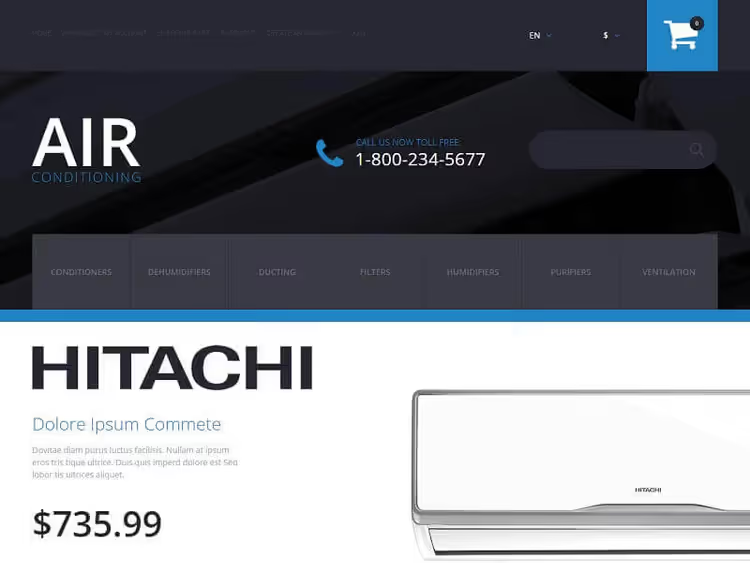
Air Conditioning is tailored for air conditioners and climate control equipment. The cool blue-and-white color scheme evokes a sense of chill. Slides on the homepage carry the price, description, and an "Add to Cart" button right on the image, so a product can be added without opening its card.
The layout is strict and clean, free of animation excess, and projects professionalism. Filters by equipment type (split system, multi-split, industrial) and room area simplify selection for a non-expert buyer.
- Pros: "Add to Cart" button on the slider, niche climate-control design, filters by type.
- Cons: the cool palette doesn't work for heating equipment stores.
- Price and purchase: from $60 for a single-use license, 🔗 Air Conditioning on TemplateMonster
18. Quickstore
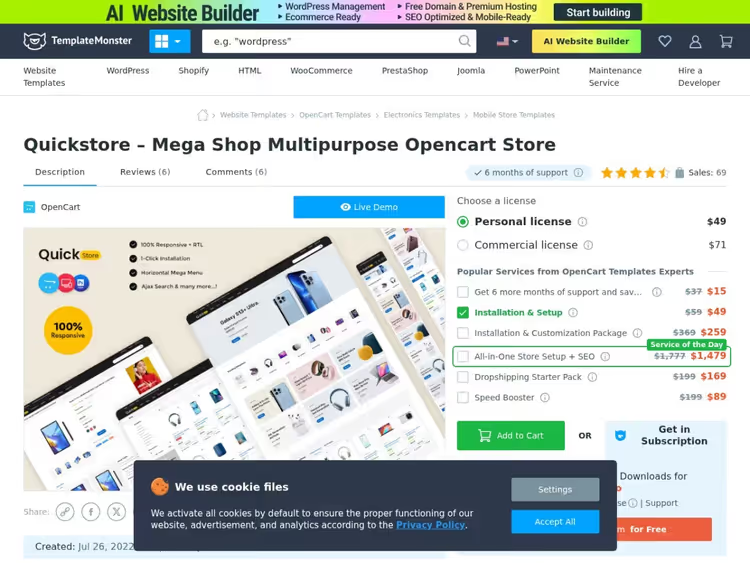
The old Secux theme's spot has been taken by a lively replacement: Quickstore, a universal multi-store that is being sold and updated right now. It plays the same role Secux did, a store for any niche, from electronics to home goods, but with current code for modern OpenCart versions.
Navigation is built on a mega menu with a sidebar category layout, so the category tree doesn't eat into the width available for product cards. It features Ajax add-to-cart and several homepage variants for different product assortments. Judging by the marketplace listing, the theme was updated recently, which means support is active.
- Pros: versatile across niches, mega menu with side navigation, Ajax cart, frequent updates.
- Cons: templates tailored for a narrow niche look more polished out of the box.
- Price and purchase: from $49 for a one-time license, 🔗 Quickstore on TemplateMonster
Before launching, it helps to understand the engine itself, not just its themes. Below is an English-language video overview of OpenCart: the platform's market position, strengths, and pitfalls.
⁉️🤔 FAQ
Are these themes compatible with the new version of OpenCart?
Most templates in this roundup are built for the current stable OpenCart branch, which is also the recommended one for a new store. Before buying, open the theme card and check the list of supported versions. If you are planning a move to a fresh major version, ask the author about the update timeline. In practice, migrating a template between major versions almost always requires reworking the layout.
Which matters more: design or load speed?
Speed. A beautiful template that takes four seconds to load loses a noticeable share of mobile shoppers before they even see the first product card. Run the demo through Google PageSpeed Insights: a low mobile score means script and image bloat. Look for themes with lazy loading for images and a minimum of JavaScript libraries, they load faster.
Can I use one theme for multiple languages?
Yes, all templates in this roundup are listed as multilingual. OpenCart handles localization at the engine level, and the theme simply displays the translated content. Check on the demo that Cyrillic text does not break the layout in product cards and menus. In themes with fixed block widths, Russian text sometimes overflows the boundaries.
Do I need separate hosting for OpenCart?
OpenCart is lighter than WooCommerce and Magento, so at the start a solid shared hosting plan with a modern PHP version and SSD disks is enough. Once you grow to a large catalog and significant traffic, move to a VPS. The main thing: do not pick a plan with "WordPress optimization", it will not have the right caching or PHP-FPM settings for OpenCart out of the box.
How do I test a theme before buying?
Open the live demo and walk through the full cycle: search by name, filter by parameters, add to cart, checkout. View the mobile version on a real phone, not in a browser emulator. Browse a category with fifty products and check whether scrolling lags. And read the reviews: if the same complaint keeps coming up, the problem is systemic.
Which OpenCart template should you pick for your niche?
Clothing store, go with eShop: bright, fast, with a clean grid. Building materials and renovation, look at StoreFlex with its card design and Ajax or the more standard Buildex. Wholesale and B2B is covered by Wholesale, no pop-ups or discount banners, just business.
Pharmacy and medical, the choice is between DrugStore with strong categorization and Medical Equipment with a calm design. Narrow needs like lenses or climate are covered by Contact Lens and Air Conditioning. If you need a store for any niche right away, pick the universal Quickstore.
The general rule is simple: do not buy a theme "for future growth" with a pile of features you do not need right now. Every extra script is a speed penalty and a higher risk of conflict with a future OpenCart update. Choose for your current task. Your store will reward you with speed and conversions.
Which OpenCart template has saved you on a real project, tell us in the comments.

A professional team of writers and editors specializing in creating quality content.