













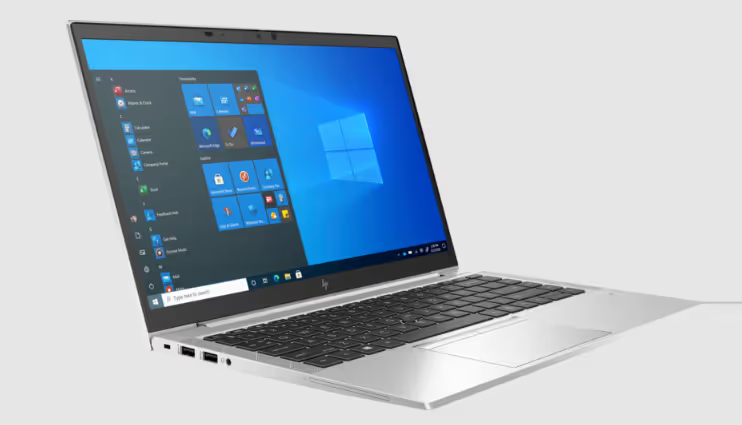
🔍 HP EliteBook 845 G8: review of a business ultrabook on AMD in 2026
A new business-class laptop costs several times more, yet the tasks are typical: email, documents, video calls. There is no point overpaying for flagship features you never use. Especially when the market offers three-year-old business models that still cover your needs with room to spare.
The HP EliteBook 845 G8 is one of that breed. A metal chassis, a 14-inch IPS display, a six-core AMD Ryzen 5 PRO, and 10 hours of battery life. In 2026, a laptop like this on the secondary market costs a third of the price of a new equivalent, with no compromise on reliability. Let's break down what it can do and who it suits.
💡 Quick overview:
- The AMD PRO hardware platform handles multitasking without throttling or overheating; six cores are more than enough for office work, a browser with 30 tabs, and video conferences running simultaneously.
- The magnesium-alloy chassis and 1.4 kg weight let you carry the laptop all day without fatigue, and the battery lasts a full workday away from an outlet.
- The AMD Secure Processor hardware coprocessor and built-in HP Wolf Security tools protect data at the hardware level, which matters for anyone working with commercial information.
A short video overview of the EliteBook 845 G8's capabilities, from unboxing to performance tests:
AMD PRO platform and display: what's inside

The heart of the HP EliteBook 845 G8 is the AMD Ryzen 5 PRO 5650U processor on the Zen 3 architecture. Six physical cores with a clock speed from 2.3 GHz (base) to 4.2 GHz in Boost mode. 7 nm process technology. By 2021 standards, this was one of the most energy-efficient chips for ultrabooks, and in 2026 it remains relevant for office work.
16 MB of L3 cache plus 8 GB of DDR4-3200 RAM. The built-in 256 GB NVMe drive boots the system from a cold state in 5-7 seconds. Heavy applications like Premiere Pro open without delays, and running a browser, messengers, and the Office suite in parallel causes no slowdowns.
A distinct plus is the integrated AMD Radeon RX Vega 7 graphics with seven compute units. This is an atypically powerful solution for a business laptop: you can edit Full HD video, work with graphics in Photoshop, and even run undemanding games at minimum settings. A discrete GPU in a corporate machine is generally unnecessary, and the Vega 7 bridges that gap.
The cooling system with six fans operates almost silently. Under office workloads, the fans do not spin up at all; under rendering, you hear a light rustle, not a turbine howl. The chassis stays cool even after an hour of stress testing, thanks to the magnesium alloy, which dissipates heat better than aluminum.
Display
A 14-inch IPS panel with Full HD resolution. The numbers are not record-breaking, but they are right for a work screen size: according to Notebookcheck, the pixel density is 157 PPI. 4K at this size just wastes battery with no noticeable gain in sharpness. Full HD delivers exactly the picture you need: text is crisp, spreadsheets are readable without zooming, and your eyes do not tire after an eight-hour workday.
The panel is built on IPS technology. Viewing angles are 178 degrees horizontally and vertically, with uniform color reproduction and no inversion when you tilt the lid. The brightness headroom, around 400 nits, is enough for working by a window on a sunny day. The key advantage over OLED: IPS does not burn in. The Windows taskbar and the Excel header will not leave a ghost image on the screen after a year or two of active use. For a machine bought to last 3-4 years, this is a strong argument.
The coating is anti-glare, matte. In meetings or a coworking space, reflections from overhead lights do not turn the screen into a mirror.
Battery life: a workday without a charger
A 53 Wh battery paired with an energy-efficient 7 nm processor delivers around 10 hours of real-world work. This is not a lab measurement at minimum brightness, but a live scenario: browser, office applications, video calls, Wi-Fi always on, brightness at a comfortable level for the eyes.
What this means in practice:
- A full workday without recharging, from morning email to the evening call.
- A one-day business trip: you can leave the power adapter at the hotel.
- Working from a café or coworking space, you are not tied to a wall outlet.
Charging via USB-C (Power Delivery). The same adapter powers the laptop, your phone, and your earbuds, meaning fewer cables in your bag. Fast charging restores half the capacity over a lunch break; a full cycle takes about an hour and a half.
Enterprise-grade security
The HP EliteBook 845 G8 is a machine from the business lineup, and data protection here is on a different level compared to consumer models.
The AMD Secure Processor coprocessor is a hardware module that isolates critical operations (encryption, BIOS signature verification) from the main operating system. Even if the OS is compromised, the Secure Processor prevents an attacker from accessing encryption keys.
The HP Wolf Security suite includes:
- HP Sure Start, a self-healing BIOS. If the firmware is damaged (virus, failed update), the laptop rolls it back to a factory copy without user intervention.
- HP Sure Click, which isolates every browser tab and email attachment in a micro-VM. A malicious script on a website cannot reach the files on your disk.
- HP Sure Sense, a behavioral antivirus based on machine learning. It blocks zero-day attacks by detecting anomalous behavior, not by signatures.
Physical security is also top-notch: a fingerprint scanner, an infrared camera for Windows Hello (facial recognition), a webcam shutter, and a Kensington lock slot. You will not accidentally leave the laptop open with work data exposed.
⁉️🤔 Frequent questions
Is the HP EliteBook 845 G8 still relevant in 2026?
For office work, video calls, and browsing, absolutely. Six Zen 3 cores and 8 GB of RAM cover typical business tasks with room to spare. The processor is not outdated: the Zen 3 architecture still appears in budget 2024-2025 models under rebranding. The only compromise is no official support for Windows 12 (if Microsoft releases it), but Windows 11 runs perfectly.
Can the RAM be expanded?
Yes, unlike many modern ultrabooks with soldered memory, the EliteBook 845 G8 has two SODIMM slots. You can replace the stock 8 GB with 16 or 32 GB. The drive is also replaceable, a standard M.2 NVMe 2280.
Is the integrated graphics enough for video editing?
The Radeon RX Vega 7 handles Full HD editing in DaVinci Resolve or Premiere Pro without real-time effects. Heavy 4K projects with color grading will require a discrete GPU, but for cutting training videos and presentations, the power is sufficient.
How noisy is the laptop under load?
Under office tasks it is passive; the fans do not spin up. Under rendering or a stress test, the noise level is around 35 dB, which is quieter than a typical office air conditioner. There is none of the high-frequency coil whine characteristic of cheap consumer models.
How does the G8 differ from the G7 and G9?
The G7 (2020) runs on Ryzen 4000 (Zen 2), which is weaker and less energy-efficient. The G9 (2022) got Ryzen 6000 (Zen 3+) with RDNA 2 graphics and DDR5 support, but costs noticeably more even on the secondary market. The G8 is the sweet spot: Zen 3, a proven platform, a reasonable price.
Is the HP EliteBook 845 G8 worth buying in 2026
If you are looking for a workhorse for the office, not a gadget for the sake of having a gadget, the EliteBook 845 G8 covers all the needs of a business user. Performance is sufficient, the screen does not strain your eyes, the battery lasts a workday, and data protection meets a corporate standard. The difference from new models boils down to benchmark numbers that are invisible in real work with documents and a browser.
The main trump card is the price. On the secondary market, a laptop like this in good condition costs three to four times less than a new business ultrabook of a comparable class. A new equivalent with similar reliability (metal chassis, business class, hardware security) will cost several times more. If you are not chasing "the newest thing" and value a rational approach, go for it.

A professional team of writers and editors specializing in creating quality content.