













 AIIllustrative image: AI-generated
📁 10 best flat file CMS 2026: no database, fast and secure
A WordPress site crashes after a plugin update, and you spend half an hour hunting for the cause in database logs. The admin panel is sluggish because your hosting has run out of IOPS. Sound familiar?
Flat File CMS solves both problems radically: there's no database at all. Content is stored in text files, Markdown, JSON or XML. No MySQL, no 2 GB wp_posts tables, no dollar-sign hosting with "WordPress plans".
We've collected 10 active, maintained Flat File CMS systems for 2026. Three products from the 2019 list have left the market, replaced by up-to-date alternatives. Each CMS can be installed in 5 minutes and tested hands-on.
💡 Quick overview:
- Comparison table of all 10 CMS by price, storage type and entry barrier, right below the intro.
- Detailed breakdown of each product: admin panel screenshot, pros, cons, price, links.
- EN video explaining flat-file architecture for those who want to understand the topic in 15 minutes.
- At the end, an "If you need X, choose Y" matrix and an honest answer about who Flat File CMS doesn't suit.
Comparison table: all 10 Flat File CMS
Product | For whom | Price | Storage | Entry barrier |
|---|---|---|---|---|
Grav | Universal: blog, landing, docs | Free / Premium skins | Markdown + YAML | Medium |
Kirby | Agencies and freelancers | €105/site (one-time) | Text files + panel | Medium |
Statamic | Laravel developers | Free (Solo) / Pro $259/year | Markdown + YAML / JSON | High |
Bludit | Beginners, personal blogs | Free / Pro via Patreon | JSON | Low |
Pico | Minimalists, dev-oriented | Free | Markdown + Twig | Medium |
GetSimple | Small business, landing pages | Free | XML | Low |
HTMLy | Bloggers, content projects | Free | Markdown | Low |
Automad | Designers, creative sites | Free | File-based + templates | Low |
WonderCMS | Landings, portfolios | Free | JSON | Minimal |
Monstra | Small sites, admin panels | Free | XML | Low |
1. Grav
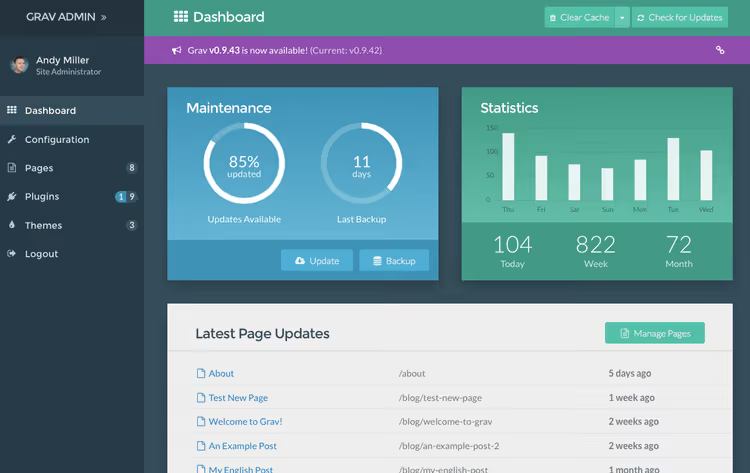
Grav is the most feature-rich Flat File CMS on this list. It's built by the RocketTheme team, and in 2024 Grav won the CMS Critic award as the best Open Source CMS. Main advantage: the GPM package manager, through which themes, plugins and even entire site "skeletons" are installed.
In practice, Grav covers virtually any scenario. Blog, portfolio, documentation, landing, each task has a ready-made skeleton. The admin panel (Admin Pro plugin) is fast, with live Markdown preview and drag-and-drop media uploads. For developers, a powerful API and flexible Twig templating system.
- Pros: GPM package manager, dozens of ready-made skeletons, flexible taxonomy, active community.
- Cons: abundance of features scares beginners, some advanced plugins are paid.
- Price: core is free. Admin Pro, skins and advanced plugins, from $30 to $100.
- Download: 🔗 Grav at getgrav.org | 🔗 Live admin demo
2. Kirby
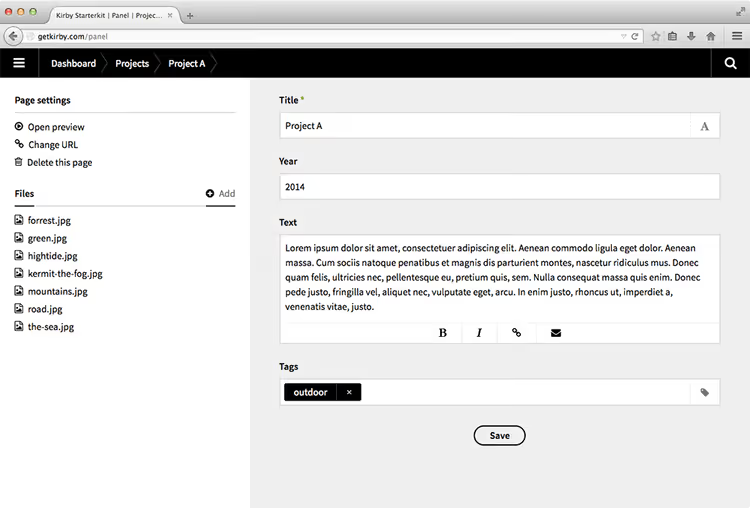
Kirby is a commercial Flat File CMS with the "folder = page" philosophy. The interface is built on Vue and resembles WordPress just enough that a former WP user won't get lost. Main trump card: content is stored in regular text files inside folders, no import/export, just copy the content folder and transfer the site.
Unlike WordPress, where content structure is tightly coupled to wp_posts, in Kirby you design "blueprints", field schemas for each page type. Suitable for sites with non-standard architecture: catalogs, multilingual portals, showcases. Built-in XSS and CSRF protection comes out of the box.
- Pros: intuitive Vue-based admin panel, blueprints for arbitrary structures, headless mode, one-time payment.
- Cons: no free version (trial only), fewer ready-made themes than Grav.
- Price: €105 per site, one-time. Free trial period.
- Download: 🔗 Kirby at getkirby.com | 🔗 Trial version
3. Statamic

Statamic is built on Laravel, one of the most popular PHP frameworks. This means any Laravel developer can extend it without learning a new API. In spirit, Statamic is closer to WordPress among flat-file systems: familiar sidebar, sections "Collections", "Forms", "Users", visual Bard editor on ProseMirror.
Version 5 (released in 2024) brought improved multitenancy, you can serve multiple sites from one installation. Supports both flat-file mode and database connection via Eloquent. Headless mode with REST API out of the box.
- Pros: Laravel ecosystem, visual Bard editor, multitenancy, REST API, excellent documentation.
- Cons: high entry barrier without Laravel knowledge, Pro version is paid.
- Price: Free (Solo, 1 user), Pro, $259/year, Enterprise, by request.
- Download: 🔗 Statamic at statamic.com | 🔗 Statamic on GitHub
4. Bludit

Bludit is perhaps the easiest entry into the world of flat-file CMS for a former WordPress user. The admin panel is styled like WP: familiar left menu, editor with Markdown and HTML, media library. Data is stored in JSON files, a human-readable format that's easy to back up and transfer.
Installation takes exactly one minute: upload files to hosting, open site, set password. No database configuration, no wp-config.php. In the official marketplace, several dozen themes and plugins (SEO, sitemap, Disqus comments).
- Pros: one-minute installation, WP-like interface, JSON storage, low resource consumption.
- Cons: fewer themes and plugins than Grav, not suitable for complex custom structures.
- Price: free. Bludit Pro, via Patreon (access to additional plugins).
- Download: 🔗 Bludit at bludit.com | 🔗 Live demo
5. Pico

Pico is a Markdown-oriented CMS for those who don't need an admin panel. Pages are created as .md files in the content folder, templating on Twig. No control panel: edit Markdown in your favorite editor and upload via FTP or Git.
Paradoxically, the absence of an admin panel is the feature. The entire site is under version control in Git, loading speed is minimal (no PHP sessions and admin overhead), attack surface is zero. For a blog or landing page that updates once a month, Pico is the perfect choice.
- Pros: Markdown-first, works via Git, minimal footprint, high security.
- Cons: no web admin, not for novice clients, small community.
- Price: free, open source.
- Download: 🔗 Pico at picocms.org | 🔗 Pico on GitHub
6. GetSimple
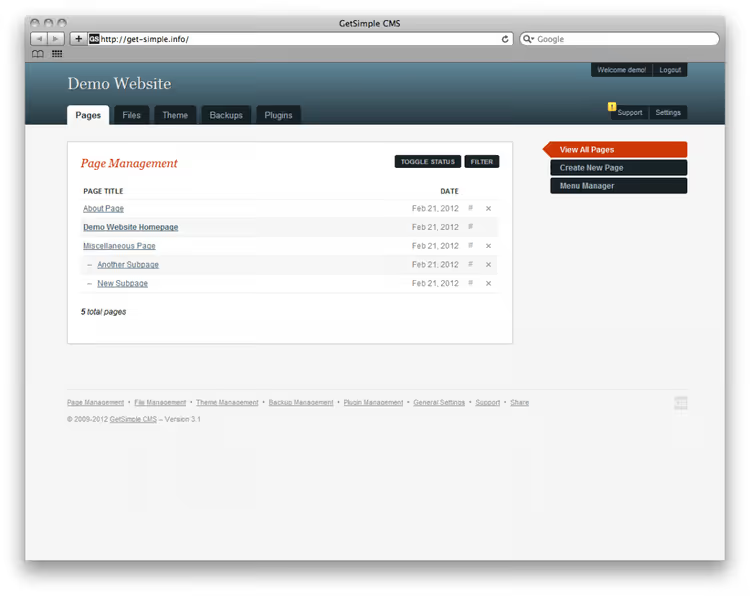
GetSimple has been around since 2009 and has accumulated a solid base of themes and plugins. Data in XML, admin panel simple and clean, without visual noise. The stated goal, "simplicity", is maintained: 5-minute installation, page editor with WYSIWYG, user management with roles.
This CMS is good for small corporate sites and landing pages. The MultiUser plugin provides a role model, and the marketplace has solutions for contact forms, galleries and SEO. Important nuance: core development pace has slowed in the last two years, there are no critical bugs, but major releases shouldn't be expected.
- Pros: admin panel simplicity, 120,000+ downloads, built-in WYSIWYG, role model.
- Cons: slowing core development, XML (not Markdown), admin design is dated.
- Price: free, GPL.
- Download: 🔗 GetSimple at get-simple.info | 🔗 GetSimple on GitHub
7. HTMLy
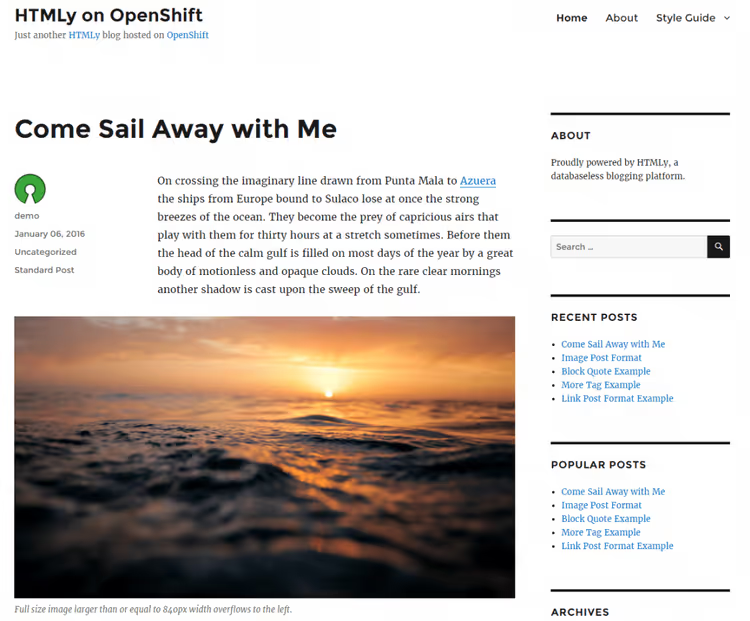
HTMLy is tailored for blogging. This is not a universal CMS, but a blog platform: categories, tags, date archives, RSS out of the box. The content search algorithm works without indexing, even with tens of thousands of posts speed remains high.
Installation: copy files to server and log in. Themes switch directly from the admin panel, editor supports Markdown and HTML. Supports PHP from 7.4, works even on the cheapest shared hosting.
- Pros: tailored for blogs, fast search without DB, Markdown + HTML editor, low system requirements.
- Cons: not a universal CMS, fewer themes, community smaller than Grav.
- Price: free, open source.
- Download: 🔗 HTMLy on GitHub
8. Automad
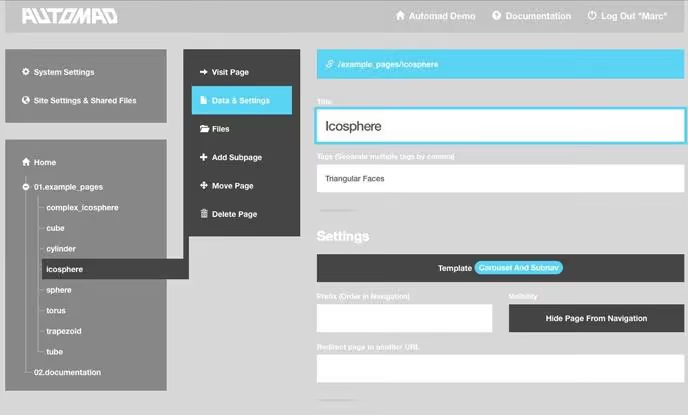
Automad is a flat CMS with a strong focus on design and templating. The core combines CMS and template engine functions: developer describes page structure in a proprietary template language, content manager fills fields in the admin panel. Two-stage caching provides high page delivery speed.
In 2025, the alpha version of Automad 2 was released with a redesigned API, headless mode support and an improved block system. The product is moving toward modern flat-file, keeping simplicity but adding flexibility for developers. Supports Git and Mercurial for content versioning.
- Pros: built-in template engine, Git versioning, two-stage caching, headless mode (v2).
- Cons: version 2 is still in alpha, small community, documentation in English.
- Price: free, open source.
- Download: 🔗 Automad at automad.org | 🔗 Automad on GitHub
9. WonderCMS
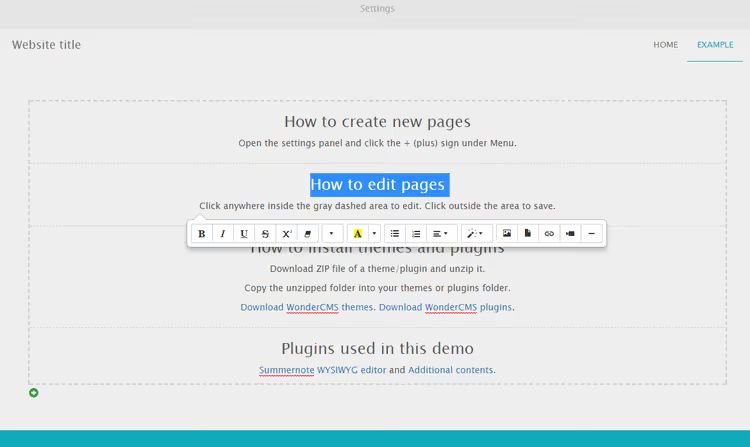
WonderCMS is the lightest CMS on this list: the entire distribution is 5 files. Installation: one step (upload, open, set password). Data is stored in JSON, admin panel is a minimalist page with editor and settings.
For a landing, portfolio or one-pager, WonderCMS is the choice without alternatives by the criterion "code size per megabyte of functionality". There are themes and plugins (summer 2024 marketplace was updated), customization via CSS and JS is supported directly from the admin panel.
- Pros: 5 files in distribution, one-step installation, minimal resource consumption, updated marketplace.
- Cons: not for large sites, modest theme selection, minimal out-of-the-box functionality.
- Price: free, MIT license.
- Download: 🔗 WonderCMS at wondercms.com | 🔗 WonderCMS on GitHub
10. Monstra
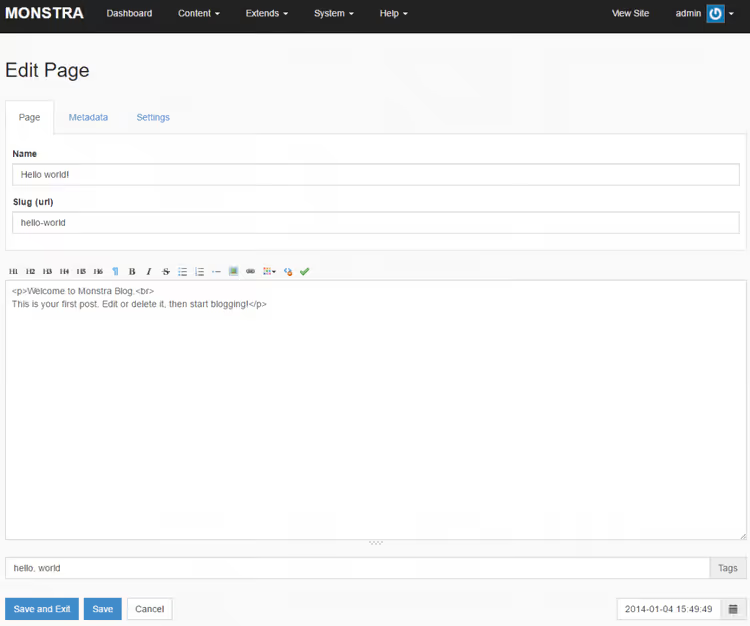
Monstra is an XML-oriented CMS with a tree-structured page hierarchy. Multi-user: you can create separate administrators, editors and users. Built-in frontend optimization (minification and concatenation of CSS/JS) reduces the number of HTTP requests without additional plugins.
On the Monstra forum, the community answers questions, the product is not abandoned. Nevertheless, there have been no major core updates since 2021. If you need a simple XML system with user roles and built-in SEO, Monstra closes the task. For a growing project, better look at Grav or Kirby.
- Pros: multi-user mode, built-in minification, SEO-friendly, simple installation.
- Cons: core hasn't been updated in a while, XML storage (not Markdown), small community.
- Price: free, MIT license.
- Download: 🔗 Monstra at monstra.org | 🔗 Monstra forum
Video: how Flat File CMS works inside
If you're hearing about the "CMS without a database" concept for the first time and want to understand the architecture in 15 minutes, watch this video. The author breaks down the difference between database-driven and flat-file approaches with concrete examples: from file structure to disk queries.
⁉️🤔 Frequently asked questions
Is Flat File CMS the same as a static site?
No. A static site is ready-made HTML files that are served "as is". Flat File CMS generates pages dynamically, but instead of a database it reads text files (Markdown, JSON or XML). When editing, content is rewritten to a file, without SQL queries. Essentially, a flat CMS gives the convenience of an admin panel without the overhead of a database.
Can I migrate a site from WordPress to Flat File CMS?
You can, but there's no automatic "one-click" migrator. Content is exported from WordPress (via XML export or WP All Export), then converted to Markdown, there are utilities like
wordpress-to-markdownor the Export to Markdown plugin for this. Then files are laid out in folders according to the structure of the chosen CMS. Media files are transferred separately, URL redirects are configured via.htaccess.
What hosting is needed for Flat File CMS?
Almost any shared hosting with PHP 7.4+ (for most systems) or 8.1+ (for Statamic and recent Grav versions). CPU and memory requirements are lower than WordPress, no database, no
wp-cron. For Pico and Grav, you can use static hosting in combination with a generator. In practice, a site on Grav with a couple dozen pages lives comfortably on inexpensive shared hosting.
Is Flat File CMS slower than a database?
On small and medium sites, faster. Disk operations reading a file (especially on SSD/NVMe) often take less time than an SQL query with JOINs. Problems start on sites with hundreds of thousands of pages, where the file system starts losing to an indexed DB. For a typical blog, portfolio or landing, flat-file gives a speed gain without caching plugins.
Is Flat File CMS secure?
Objectively, more secure. No SQL injections (no SQL). No
wp-adminwith a million password guessing attempts. Attack surface is reduced to PHP vulnerabilities in the core and write permissions to the file system. Minus: no mature security plugins like Wordfence, security falls on the developer and hoster.
What to install in 2026: breakdown by tasks
If you need maximum features and community, take Grav. Want a commercial product with support and are designing a non-standard structure, Kirby for €105. Laravel developer, definitely Statamic: you get the framework ecosystem plus a visual editor. Beginner who wants the simplest transition from WordPress, Bludit.
Minimalists who are ready to write in Markdown without an admin panel will suit Pico. For a landing or portfolio "quick and forget", WonderCMS. Bloggers, HTMLy. If a site with 5-10 pages for small business, GetSimple (time-tested) or Monstra (user roles out of the box). Designers who care about a template engine, Automad.
Flat File CMS doesn't replace WordPress for an online store, forum or site with complex user logic. But for everything else, personal blog, portfolio, landing, documentation, it's a faster, more secure and cheaper path. Try Grav or Bludit today: installation takes a minute, and there may be no way back to wp_posts.

A professional team of writers and editors specializing in creating quality content.