














📧 Free email without phone number: 5 working services in 2026
Five years ago, registering an email account took 30 seconds: username, password, done. Today Gmail, Yahoo, Outlook, and Zoho demand a phone number. Without an SMS code you can't get past the form.
The situation is familiar. Your main inbox is already linked to your number, and the system won't let you create a second one on the same phone, duplicates are automatically blocked. Buying a SIM card just for email is absurd, disposable numbers get blocked within a month or two.
Fortunately, in 2026 five email services work that don't need your phone at all. Some offer end-to-end encryption, some gigabytes for files, some both advantages at once. We manually registered with each service and gathered an honest breakdown: what you get free, where the catch is, and which one to choose for your task.
💡 Quick overview:
- Choose ProtonMail if priority is confidentiality and end-to-end encryption (Switzerland, 500 MB free with expansion to 1 GB).
- Choose Tuta if you need quantum-resistant encryption and complete rejection of PGP (Germany, 1 GB free, registration via Tor).
- Choose Mail.com if a choice of 200+ domains and maximum free storage matters (2 GB, requires existing email for verification).
- Choose GMX Mail if you need IMAP/POP3 for a desktop client and cloud storage (Germany, 1 GB mail + 2 GB cloud).
- Choose Mailfence if you're looking for a Belgian service with end-to-end encryption and built-in office suite (500 MB mail + 500 MB documents).
Why email services require a phone number
Mass bot registrations, spam campaigns, and phishing forced major providers to introduce SMS verification. According to the FBI, cybercrime damages in the US reached $16.6 billion in 2024. A phone number for them is a quick way to filter out automated registration without complicating the interface.
The price for such "protection" is loss of privacy. A SIM card becomes a single point of failure: through number porting (SIM-swap) an attacker intercepts the SMS code and hijacks the account. CISA confirms: a hardware key or TOTP app reduces compromise risk by 99%, SMS is the weakest two-factor authentication method.
Five services from this selection solve the problem differently: they don't require a phone during registration, and for account protection offer TOTP or a hardware key.
Comparison table: 5 services in numbers
A quick snapshot of key parameters before detailed analysis.
Service | Encryption | Free storage | Jurisdiction | Apps |
|---|---|---|---|---|
ProtonMail | E2EE (PGP) | 500 MB → 1 GB | Switzerland | iOS, Android, Web |
Tuta | Post-quantum E2EE | 1 GB | Germany | iOS, Android, Web |
Mail.com | TLS | 2 GB | Germany / USA | iOS, Android, Web |
GMX Mail | TLS | 1 GB + 2 GB cloud | Germany | iOS, Android, Web |
Mailfence | E2EE (OpenPGP) | 500 MB + 500 MB documents | Belgium | Web |
1. ProtonMail
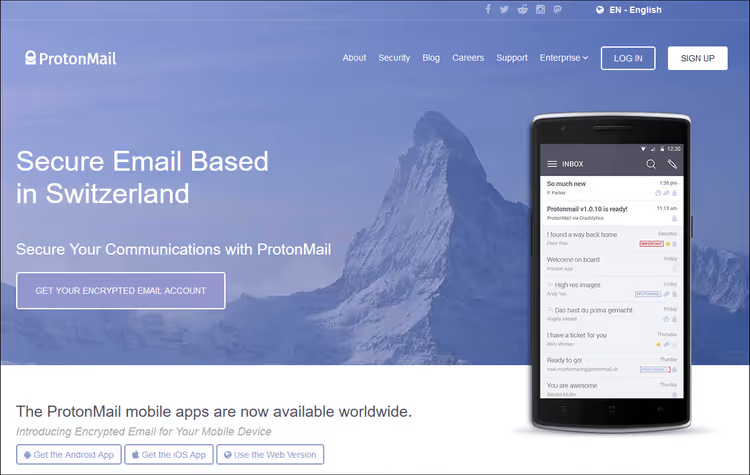
ProtonMail is a Swiss email service with zero access to messages. Even Proton engineers can't read your correspondence: encryption keys are stored on the user's device, the server only sees encrypted blocks. End-to-end encryption via PGP standard works by default between Proton users, and for external recipients there's sending password-protected messages with automatic expiration.
The free tier includes 500 MB storage, 150 messages per day, and one username. Upon completing onboarding tasks (recovery setup, contact import) storage expands to 1 GB. Registration is three steps: login with domain choice (@proton.me or @protonmail.com), password, optional recovery email. Phone is not requested at any stage.
In our experience, ProtonMail's interface is intuitive, mobile apps work stably, and message delivery speed doesn't differ from Gmail. The only noticeable downside of the free version is absence of IMAP/POP3: you can only connect a desktop client through paid Proton Mail Bridge.
Pros:
- Registration without phone: 3 steps, less than a minute
- Zero access: messages aren't read even by service administrators
- iOS, Android apps and web access
- Password-protected messages to external recipients with auto-expiration
- Open source and regular independent audits
Cons:
- Only 500 MB free (too little for mail with attachments)
- IMAP/POP3 absent in free tier
- 150 messages per day limit for free account
🔗 ProtonMail free tier | 🔗 Pricing comparison
2. Tuta

Tuta is a German email service that in March 2024 became the first in the world to implement post-quantum encryption TutaCrypt. This means messages are protected not only from today's attacks but also from future quantum computer attacks. Everything is encrypted: message body, subject, contacts, search index, and calendar. IMAP, POP3, and SMTP are disabled intentionally to preserve encryption integrity (an email client would store an unencrypted copy on the device).
A free account gives 1 GB storage. Registration without phone: email, password, and you're in. New accounts may undergo manual moderation for up to 48 hours (anti-spam measure, doesn't affect everyone). Tuta supports cryptocurrency payment and registration via Tor.
We tested Tuta alongside ProtonMail: the interface is more minimalist, performance is comparable, and 1 GB "out of the box" (without onboarding tasks) is an objective advantage. For a paranoid "complete anonymity" scenario Tuta fits better: Tor + cryptocurrency payment for Revolutionary tier leaves no digital trace.
Pros:
- Quantum-resistant TutaCrypt encryption
- 1 GB free storage (twice ProtonMail's starting amount)
- Subjects, contacts, and calendar encrypted, not just message body
- Anonymous cryptocurrency payment and Tor registration
- Full GDPR compliance (Germany jurisdiction)
Cons:
- IMAP/POP3/SMTP absent (only web and mobile apps)
- Possible delay up to 48 hours for manual moderation
- Fewer integrations than ProtonMail (no Bridge equivalent)
🔗 Tuta free tier | 🔗 Tuta pricing
3. Mail.com
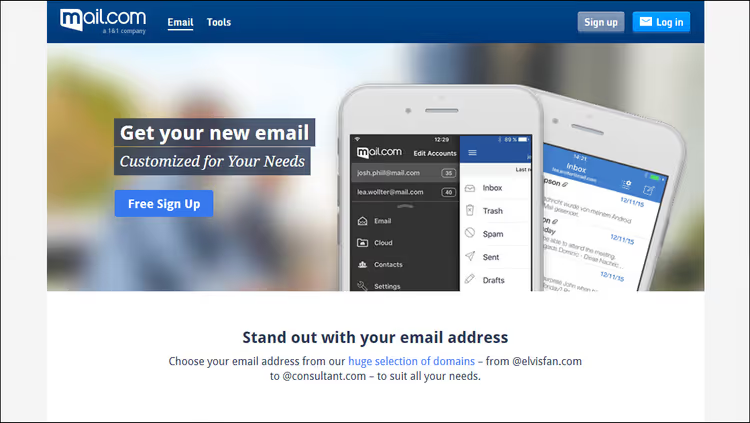
Mail.com is a product of German holding United Internet AG with a unique market feature: over 200 domain names to choose from. Want @consultant.com, @engineer.com, or @musician.org, any of them is available free. This is the only service in the selection where you can match the address to a profession or hobby rather than settle for standard @proton.me.
The free tier includes 2 GB storage, spam filter, antivirus, online calendar, and iOS/Android apps. Attachments up to 50 MB, three times the standard 15-25 MB of other services.
Important nuance: during registration the system offers two verification methods, SMS (default) and backup email. Choose the second option to bypass the phone requirement. You need an existing email address to receive a confirmation code. Without either method you can't complete registration, but the phone itself is not mandatory.
In practice this means Mail.com is an excellent second inbox when you already have a main email. For "clean" anonymous registration without any links, better look at ProtonMail or Tuta.
Pros:
- 200+ domain names for address personalization
- 2 GB storage, the largest free volume in the selection
- Built-in calendar, antivirus, and spam filter
- Apps for smartphone, tablet, and web access
- Attachments up to 50 MB
Cons:
- Requires existing email for verification (SMS alternative)
- Ads in free version
- Only TLS encryption in transit, no end-to-end encryption
🔗 Mail.com free tier | 🔗 Premium Mail.com
4. GMX Mail

GMX Mail is another United Internet AG product, Mail.com's "sibling". Key difference: GMX is the only one in the selection that gives IMAP and POP3 on the free tier. Connect the inbox to Thunderbird, Outlook, or Apple Mail without a paid bridge, works out of the box.
Free package: 1 GB mail storage plus 2 GB cloud space in GMX Cloud for files. Attachments up to 50 MB, built-in calendar, mobile apps. Registration without phone: CAPTCHA and backup email.
The flip side is only TLS encryption in transit. No end-to-end encryption, messages on the server are technically accessible to the provider. For everyday correspondence this is acceptable, but for confidential data GMX doesn't fit.
In our experience, GMX is the best choice if you live in a desktop email client and don't want to pay for IMAP. Thunderbird + GMX works like Gmail + Outlook connection out of the box, but without phone linking.
Pros:
- IMAP and POP3 on free tier (only one in the selection)
- 1 GB mail + 2 GB cloud storage
- Attachments up to 50 MB
- Built-in calendar and file cloud
- Free mobile apps
Cons:
- No end-to-end encryption (only TLS in transit)
- Ads in free account
- Fewer domain names than Mail.com
5. Mailfence

Mailfence is a Belgian email service with OpenPGP end-to-end encryption and digital signatures. The free tier gives 500 MB for mail and another 500 MB for documents. Together with built-in calendar, contacts, and file storage you get a mini office suite right in the web interface.
Registration without phone: email, name, password. Jurisdiction is Belgium, one of the strictest in Europe regarding privacy. Mailfence publishes a warrant canary and regular transparency reports, which matters for business users.
Main limitation of the free version is no mobile apps, only web access. For smartphone you'll need a paid tier with Exchange ActiveSync. Storage volume is also modest: one gigabyte total yields to both Mail.com (2 GB) and GMX (3 GB combined).
We recommend Mailfence to those who need Belgian jurisdiction (GDPR plus local privacy laws) and built-in office tools without installing additional apps.
Pros:
- OpenPGP end-to-end encryption with digital signatures
- 500 MB mail + 500 MB documents free
- Built-in calendar, contacts, and file storage
- Belgian jurisdiction with strict privacy laws
- Warrant canary and transparency reports
Cons:
- Free volume yields to Mail.com and GMX
- No mobile apps in free tier (web only)
- Less recognition and community than ProtonMail and Tuta
Video: registration without phone number in 2 minutes
Step-by-step ProtonMail registration without SMS confirmation. The principle is the same for most services in the selection.
⁉️🤔 Frequently asked questions
Why bypass phone verification if it increases security?
SMS verification security is a myth. A SIM card can be cloned or reissued through social engineering in 15 minutes. A hardware key (YubiKey) or TOTP app provides stronger protection: according to CISA, compromise risk drops by 99% compared to SMS. A phone linked to a dozen services becomes a single point of failure. All five services in the selection support two-factor authentication via app or key, enable it immediately after registration.
Which service gives the most free storage?
Mail.com with 2 GB storage is the absolute record of the selection. In second place is GMX Mail: 1 GB for mail plus 2 GB cloud space (3 GB total, but heterogeneous). Tuta gives 1 GB with full encryption. ProtonMail starts with 500 MB, but onboarding tasks expand to 1 GB. Mailfence: 500 MB mail and 500 MB for documents. If volume is critical, Mail.com or GMX. If privacy matters more than space, Tuta (1 GB, everything encrypted).
Can these services be used for work emails?
Yes, but with caveats. ProtonMail and Tuta on free tier don't give IMAP/POP3/SMTP, only web interface and mobile apps. GMX Mail supports IMAP/POP3 out of the box, can connect to any desktop client. For business correspondence we recommend paid tiers: Proton Mail Plus from €3.99/month (annual payment, 15 GB, custom domain, Bridge) or Tuta Revolutionary from €3/month (20 GB, custom domains). Free tier is good as a second inbox for registrations, test projects, and personal correspondence.
How are temporary inboxes (Guerrilla Mail, Temp Mail) worse than services from the selection?
Temporary inboxes don't require registration at all: you visit the site, get an address. But messages are deleted in an hour, there's no end-to-end encryption, you can't send a message from such an address. They solve exactly one task: receive a confirmation email and forget. For permanent correspondence, storing messages and contacts, only full-fledged services from this selection. In addition, many sites have learned to block temporary inbox domains during registration.
Which service to choose for complete anonymity?
Tuta via Tor with cryptocurrency payment for Revolutionary tier: IP is not logged, payment not linked to identity, jurisdiction is Germany (GDPR). ProtonMail also allows registration via Tor, but with suspicious traffic may request backup email or CAPTCHA. For everyday confidentiality ProtonMail is enough: three registration steps, zero questions about phone.
Are these services blocked in Russia and Belarus?
The situation changes. ProtonMail is periodically blocked by Roskomnadzor (accessible via VPN or Tor). Tuta as of mid-2026 is directly accessible. Mail.com, GMX, and Mailfence work without blocks, but without end-to-end encryption. If you're in a region with unstable access, keep a backup channel: VPN or Tor.
What to use for your task: final breakdown
Five services cover almost any scenario. A short selection matrix by priorities:
If you need maximum encryption and Swiss privacy, ProtonMail. Three registration steps, not a single question about phone, open source.
If priority is quantum-resistant encryption and anonymity, Tuta. Registration via Tor, cryptocurrency payment, 1 GB "out of the box".
If you need large volume and a nice address, Mail.com. 2 GB and 200+ domains cover basic needs with margin.
If you work in a desktop email client, GMX Mail. The only free service in the selection with IMAP and POP3 without a paid bridge.
If you need a Belgian service with built-in office suite, Mailfence. Mail, calendar, contacts, and documents in one web interface with end-to-end encryption.
Create a test inbox in a couple of services that made your shortlist and check where the interface is more convenient for you personally. All five options register without a phone right now, in June 2026.

A professional team of writers and editors specializing in creating quality content.