














🐛 Contact Form 7 - fixing the refill caching issue
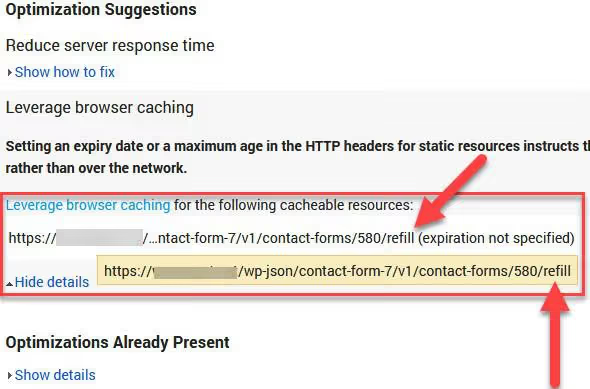
Contact Form 7 runs on 5+ million sites. It works for years without surprises: install, configure, forget. But turn on caching, and PageSpeed Insights reports start showing a persistent line: /wp-json/contact-form-7/v1/contact-forms/<id>/refill. The site doesn't crash, everything looks clean visually, just an orange speed indicator that ruins the picture.
The culprit isn't the plugin itself, but the refill mechanism. When CF7 sees WP_CACHE in wp-config.php, it triggers AJAX updates for CAPTCHA and dynamic elements, which makes sense for cached pages. The problem is that refill hits the server globally. Even on pages where there's no form whatsoever.
The fix is a surgical edit of one file, controller.php. Three lines, five minutes, and refill requests disappear from reports. The method works on all current Contact Form 7 versions (including 6.1.6, May 2026) and WordPress from 6.0 to 7.0.
💡 Quick overview:
- Open the controller.php file in the plugin folder
- Find the block with WP_CACHE check, three lines
- Comment them out or delete them
- Save the file and clear cache at all levels
What refill does and why it hurts speed
When the define('WP_CACHE', true) constant is set in wp-config.php, Contact Form 7 treats every page as cached. The developer's logic is transparent: static HTML doesn't update CAPTCHA by itself, you need an AJAX endpoint that pulls a fresh verification code. Refill is exactly that endpoint.
But it works without regard for context. Requests to /wp-json/contact-form-7/v1/contact-forms/<id>/refill go out from all pages in a row: homepage, blog, archive, anything. On weak hosting or a project with decent traffic, dozens of unnecessary REST calls per pageview noticeably slow down load time. GTmetrix and PageSpeed Insights highlight refill as a resource blocking rendering.
And the most insidious part: visually the site works. You just get a "yellow" speed score and don't immediately understand where to dig. The browser console is silent, no errors, just numbers in the report.
Video: what else you can do with Contact Form 7 scripts
This short English-language video shows an alternative approach, conditional loading of CF7 scripts and styles. The techniques from the video combine perfectly with our fix (we'll cover it below).
Step-by-step fix: disable refill in controller.php
Step 1. Get to the file
Path to the file inside the plugin folder:
1 wp-content/plugins/contact-form-7/includes/controller.php
Two ways to get there. Through the hosting panel: file manager in cPanel (File Manager) or equivalent, expand the folder tree along the path above. Via FTP: connect with a client like FileZilla and navigate to the site directory.
Step 2. Find the WP_CACHE block
Open controller.php in any text editor. Find three lines:
1 if ( defined( 'WP_CACHE' ) && WP_CACHE ) { 2 $wpcf7['cached'] = 1; 3 }
The mechanics are simple: if WP_CACHE is defined and active, the plugin sets the cached = 1 flag. This flag triggers a cascade of refill requests. According to the Contact Form 7 source code, in version 6.1.6 (May 2026) the block is in the same place and hasn't changed, throughout the entire 6.x branch history it hasn't been touched once.
Step 3. Comment out or delete
It's safer to comment. Put // at the beginning of each line:
1 // if ( defined( 'WP_CACHE' ) && WP_CACHE ) { 2 // $wpcf7['cached'] = 1; 3 // }
Why commenting instead of deleting: on the next plugin update controller.php will be overwritten, and the edit will be lost. You'll recognize the commented block immediately: opened the file, saw //, remembered. Deletion works just as well, but in a month or two it's easy to forget what exactly you cut. Save the file.
Step 4. Clear cache and recheck
After the edit, make sure to clear cache at all levels:
- Plugin cache: WP Rocket → Dashboard → Clear Cache; W3 Total Cache → Performance → Purge All Caches; LiteSpeed Cache → LiteSpeed Cache → Purge All; FlyingPress → FlyingPress → Clear Cache.
- Server cache: if the host runs Varnish, Nginx FastCGI or server-level LiteSpeed LSCache, there's a clear button in the hosting panel.
- CDN: Cloudflare or QUIC.cloud → Purge Everything.
Now run a repeat test in PageSpeed Insights or GTmetrix. Open in incognito mode, browser cache might show the old version of the report.
The error with /wp-json/contact-form-7/v1/contact-forms/<id>/refill should disappear from the "Eliminate render-blocking resources" or "Reduce unused JavaScript" section. Still there? Check controller.php (the edit might not have saved) and object cache (Redis/Object Cache sometimes keeps the old file version in memory).
What you need to know after the fix
The edit isn't permanent. Every Contact Form 7 update overwrites controller.php, and the three lines come back. After an update, open the file, make sure the block is active again, and comment it out anew. A minute of work, but easy to forget, keep a checklist.
CAPTCHA might break. Refill was originally designed for CAPTCHA on cached pages. If you use Contact Form 7's built-in CAPTCHA (not Google reCAPTCHA), after disabling refill the verification code will stop updating, and the form won't submit. Two solutions: switch to Google reCAPTCHA v3, it works through a separate API and doesn't depend on refill; or don't comment out controller.php, but set up conditional loading of CF7 assets through filters (more on this below). Tested after the edit, form submits normally? Great, forget about it.
Alternative approach, filters wpcf7_load_js and wpcf7_load_css. They don't disable refill, but prevent Contact Form 7 from loading scripts and styles on pages without a form. Add to the theme's functions.php:
1 add_filter( 'wpcf7_load_js', '__return_false' ); 2 add_filter( 'wpcf7_load_css', '__return_false' );
And on the page with the form, inside the wp_head hook, return the flags to true. This removes unnecessary assets from everywhere except pages with forms. Combine with disabling refill through controller.php to get maximum performance.
⁉️🤔 Frequently asked questions
Is it mandatory to edit controller.php if I don't use CAPTCHA?
Yes, mandatory. Refill requests to
/wp-json/contact-form-7/v1/contact-forms/<id>/refillare sent on every AJAX cycle regardless of CAPTCHA settings. Visually you don't notice them, but GTmetrix and Query Monitor record unnecessary REST API calls. After commenting out the three lines, the endpoint stops responding, and speed increases.
Why not just disable WP_CACHE in wp-config.php?
The
WP_CACHEconstant is a signal for the entire WordPress ecosystem that pages can be cached. WP Rocket, W3 Total Cache, FlyingPress and other plugins rely on it. RemovingWP_CACHE, you'll destroy caching entirely, the speed drop will be far more noticeable than one refill request. The right way: keep caching, but cut out its side effect in CF7.
Will the fix work on multisite?
It will work, but
wp-content/plugins/contact-form-7/includes/controller.phpis shared across the entire network. The edit will affect all child sites simultaneously. Before making changes, check if other sites in the network have forms with Contact Form 7's built-in CAPTCHA. If yes, test submission on each one after the edit, or consider a filter exception instead of a global edit.
Can you automate returning the edit after a plugin update?
The Contact Form 7 documentation doesn't have a ready-made filter for replacing exactly these three lines. In practice, a checklist "after CF7 update → check
controller.php" is more reliable than any custom mu-plugin. The file changes rarely, throughout the entire 6.x branch theWP_CACHEblock hasn't been edited once.
The form stopped submitting after the edit, what to do?
First check the CAPTCHA type: Contact Form 7 → Integration. The plugin's built-in CAPTCHA (not reCAPTCHA) depends on refill to change the verification code. Switch to Google reCAPTCHA v3, it works through its own API and isn't tied to refill. Second option: revert the
controller.phpedit, leave refill enabled and set up conditional loading of CF7 assets only on pages with forms throughwpcf7_load_jsandwpcf7_load_css.
Contact Form 7 and caching: what to do in 2026
Editing controller.php is microsurgery that removes the plugin's single narrow bottleneck. A minute of time, no additional plugins, works on WordPress from 6.0 to 7.0 and all current Contact Form 7 builds.
Want to squeeze out the maximum? Combine: disable refill through controller.php and set up conditional asset loading through wpcf7_load_js and wpcf7_load_css filters. The first removes refill requests, the second prevents form scripts from hanging on pages without forms. Together they take Contact Form 7 out of PageSpeed Insights reports as a source of problems, completely.

A professional team of writers and editors specializing in creating quality content.