














🚀 Cookie-free domain in WordPress: complete setup guide
GTmetrix gives your page a 72/100, and the recommendations show "Serve static content from a cookieless domain." You click and see a list of 40 CSS files, each dragging a Set-Cookie header along with it. Images, fonts, scripts, dozens of requests, and every one carries an HTTP header these files absolutely don't need.
The problem isn't your code. It's an architectural feature: the server sets cookies at the domain level, and the browser dutifully attaches them to every request, even those where authentication and sessions make no sense. The result: extra kilobytes in every response, slower static loading, and a red flag in GTmetrix and Pingdom reports.
Good news: this takes 15 minutes to fix without changing hosting. You don't need a second server, you don't need an expensive enterprise plan. A separate subdomain or CDN is enough, and static files will go without cookies while your GTmetrix score jumps 10-15 points.
💡 Quick overview:
- Understand why cookies "leak" onto static content and when it's actually a problem
- Set up a separate subdomain for wp-content through cPanel, step by step, including SQL URL replacement
- Connect KeyCDN via the CDN Enabler plugin as a modern alternative (5 minutes, from $4/month)
- Learn why Cloudflare doesn't remove the GTmetrix warning, and when you can ignore it
Why cookies end up on static content
Cookies are set at the domain level. But there's a nuance often overlooked: subdomains inherit cookie settings from the parent. If the site lives on example.com and sets cookies for that domain, they automatically go to www.example.com and static.example.com.
That's why simply creating a static.example.com subdomain isn't enough. While the main site stays on the bare domain, cookies will "leak" to the subdomain. The solution is simple but counterintuitive: move the site to www.example.com and put static content on static.example.com. Then cookies apply to www, while static stays clean.
The second option, a completely separate domain. Technically works, but buying a domain for this task is almost never justified: proper subdomain handling is sufficient.
And another thing: on managed WordPress hosts like Kinsta, WP Engine, or SiteGround, the problem is often already solved at the server level. If the plan includes "edge caching" or "CDN included," additional setup isn't needed.
Method 1. Separate subdomain for static content through cPanel
The basic method that works on any hosting with cPanel. No third-party services, no monthly payments. The idea: create a subdomain, link it to /wp-content, and tell WordPress to serve static content through it.
Create a subdomain
Go to cPanel → "Domains" section → "Subdomains". Create subdomain static.yoursite.com. In the Document Root field, specify the path to wp-content: usually it's public_html/wp-content.
Check: the main site should be on www.yoursite.com. If you're sitting on the bare domain without www, first move the site to www, otherwise the method won't work.
Add constants to wp-config.php
Open wp-config.php in the site root and add two lines BEFORE the comment /* That's all, stop editing! Happy publishing. */:
1 define('WP_CONTENT_URL', 'https://static.yoursite.com'); 2 define('COOKIE_DOMAIN', 'www.yoursite.com');

WP_CONTENT_URL tells WordPress to serve all content from /wp-content/ through the new subdomain. COOKIE_DOMAIN restricts cookie scope to the www subdomain, preventing them from spreading to static.
Replace URLs of existing files in the database
Already published posts store links to old image URLs. They need to be replaced in bulk through phpMyAdmin.
Enter phpMyAdmin (cPanel → Databases), select the WordPress database, SQL tab. Execute:
1 UPDATE wp_posts SET post_content = REPLACE(post_content, 'www.yoursite.com/wp-content/', 'static.yoursite.com/');
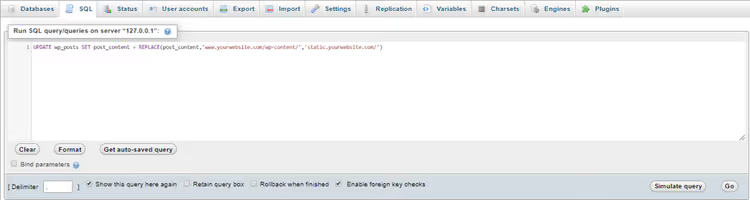
Before executing, back up the database. SQL replacement is irreversible. Get the URL wrong, images on the site will break, you'll have to restore from a backup.
Pros and cons
The method works without third-party services and additional expenses. But: manual editing of wp-config.php and database, risk of SQL mistakes, need to maintain configuration of two subdomains. On VPS with NGINX you'll also need to edit server configuration, which adds complexity.
For most sites today there's a simpler option, CDN.
Method 2. CDN as a modern solution
Content Delivery Network takes static content to its servers and by default doesn't use cookies for files. You get two things at once: static content without cookies plus a global delivery network that speeds up loading for visitors from anywhere in the world.
KeyCDN service, pay-as-you-go CDN with pricing from $0.04/GB of traffic and minimum payment of $4/month. For an average site, costs are $4-10 per month. 60+ points of presence, built-in Strip Cookies option that forcibly removes Set-Cookie headers from responses.
Connection through CDN Enabler
CDN Enabler, official KeyCDN plugin for WordPress. Version 2.0.8, 10,000+ active installs, tested up to WordPress 6.9. It intercepts pages and rewrites static file URLs to the CDN domain.
Setup steps:
Create a KeyCDN account. The service gives a trial period, you can test without payment.
Install CDN Enabler from the WordPress repository: Plugins → Add New → search "CDN Enabler" → Activate.
Create a Pull zone in the KeyCDN dashboard. The zone defines what content the CDN will pull from your site. Specify the origin URL, your site address.

- Copy the zone URL, it looks like
https://yourzone.kxcdn.com, and paste it in CDN Enabler settings: Settings → CDN Enabler → CDN Hostname.

Enable Strip Cookies in KeyCDN: Zone Settings → Strip Cookies = Enabled. This option guarantees that static files are served without Set-Cookie headers.
Clear site cache and check the result in GTmetrix.
CDN Enabler works with any CDN. If you're already using Cloudflare, BunnyCDN, or StackPath, simply specify your provider's CDN Hostname.
Important point: after disabling CDN and removing the plugin, image URLs may remain rewritten to the CDN domain. Before deactivating, clear the plugin cache and make sure URLs have returned to original.
Method 3. Cloudflare, free but with a caveat
Cloudflare, the largest CDN with a completely free tier. Works at DNS level: switch the domain to Cloudflare nameservers, and all traffic goes through its network.
But there's a nuance. Cloudflare uses a service cookie _cfduid for every request for security purposes. It's critical for DDoS protection and bots, even if you enable "Strip Cookies" on the Pro tier, this cookie doesn't get removed.
Because of _cfduid, GTmetrix will continue showing the warning "Serve static content from a cookieless domain." Achieving 100/100 in the YSlow metric with free Cloudflare is technically impossible. But this is a false positive: static content through Cloudflare still loads fast, and one service cookie doesn't affect actual performance.
If maximum GTmetrix score matters to you, KeyCDN with Strip Cookies. If the priority is free service and DDoS protection, Cloudflare handles it completely.
When to ignore the GTmetrix warning
Common situation: CDN is configured, Strip Cookies is enabled, but GTmetrix still shows a cookieless domain error. The reason is that YSlow, the GTmetrix engine, doesn't check whether Strip Cookies is enabled on the CDN side. It sees a URL similar to the main domain and mechanically flags a warning.
30-second check: open Chrome DevTools (F12) → Network → select any static file, CSS, JS, or PNG → Headers tab → Request Headers. If there's no Cookie: line there, static content goes without cookies, you can ignore the GTmetrix warning.
Another source of false positives, server cookies from analytics and A/B testing (Google Analytics, Hotjar, VWO). They also appear in the report as "extra," though they minimally affect page speed.
Real traffic reduction from removing cookies from static content, around 5-15% of total requests. Not revolutionary, but every millisecond counts: Google research showed that a 1-second delay reduces mobile visitor conversion by 20%.
⁉️🤔 Frequently asked questions
Is setting up a cookieless domain mandatory?
No, it's not a hard requirement. But if you're fighting for speed, eliminating unnecessary cookies from static content gives measurable gains, especially on sites with heavy media: online stores, photo blogs, and news portals. For a three-block landing page the effect will be negligible.
What to do if after editing wp-config.php the site stopped opening?
Almost certainly you made a mistake in constant URLs or placed them AFTER the line
/* That's all, stop editing! */. Connect to the site via FTP, openwp-config.phpand check: constants should be BEFORE this comment. If the site still won't load, comment out the added lines (//at the beginning of each), the site will return to its original state, after which try again with correct URLs.
Can CDN Enabler be used with other caching plugins?
Yes, no problem. CDN Enabler is compatible with Cache Enabler, WP Rocket, W3 Total Cache, and LiteSpeed Cache. One nuance: if you have WP Rocket, CDN is configured in WP Rocket itself, a separate CDN Enabler plugin isn't needed. With other caching plugins it works in parallel, no conflicts recorded.
Which CDN to choose for a small site?
Depends on budget and priorities. KeyCDN pricing (from $0.04/GB, minimum $4/month), a good start: pay-as-you-go, you only pay for traffic. Cloudflare, free but with a service cookie and false GTmetrix warning. BunnyCDN (from $0.01/GB on volume plans, from $1/month minimum), cheaper but with fewer points of presence. For a site with traffic up to 10,000 per month, CDN costs will be $2-7.
Is a cookieless domain needed if hosting is modern?
Managed WordPress hosts, Kinsta, WP Engine, SiteGround, often include built-in CDN or server caching that already solves the cookie problem. Check your plan: if the description includes "edge caching" or "CDN included," additional setup isn't needed. On cheap shared hosting without CDN, setting up a cookieless domain will give a noticeable boost.
What to do if images disappeared after the SQL query?
Either you made a mistake in the URL (check domain matching in the query and subdomain settings), or the
static.yoursite.comsubdomain points to the wrong directory. Restore the database from backup and check: the subdomain Document Root should bepublic_html/wp-content, and the domain in the SQL query should match what was created in cPanel (withwww.or without, depends on main site setup).
Which method to choose for your task
If the site is on cheap hosting without CDN and without budget for paid services, set up a separate subdomain through cPanel. That's 15 minutes of work: subdomain, two lines in wp-config.php, and one SQL query. Static content will go without cookies, GTmetrix will rise. Downside, manual maintenance and no global acceleration.
If you're ready to pay $4-10 per month, use KeyCDN + CDN Enabler combo. The same task is solved automatically, plus you get a delivery network from 60+ points, compression, and acceleration for visitors from anywhere in the world. For a project that earns or plans to earn, CDN pays for itself immediately.
And most importantly, don't obsess over GTmetrix scores. Real speed for users matters more than numbers in a report. If static content goes without cookies (checked via DevTools), and the site loads faster than 2 seconds, the task is solved.
To refresh the full picture on speeding up WordPress, the official guide from the WordPress.com team helps, from caching to CDN, with live measurements and setup:

A professional team of writers and editors specializing in creating quality content.