













📋 JavaScript key codes: complete table of event.key, event.code and event.which
A user presses Escape, and the modal doesn't close. They hit Enter in the search field, and nothing happens. Sound familiar? Keyboard handling in JavaScript looks simple until you start dealing with three events, a dozen properties, and a zoo of browser differences.
Every keydown or keyup spawns a KeyboardEvent object with two dozen fields. Some have been deprecated since the IE era, others behave differently in Firefox and Chrome. And MDN documentation is riddled with "do not use" notes. Developers don't need another specification, they need a cheat sheet that works.
Below is a complete reference on keyboard events: from the anatomy of KeyboardEvent to ready-made snippets for hotkeys. Keep the code table bookmarked, you'll need it in every other project.
💡 Quick overview:
- Use
keydowninstead ofkeypress: it works for any keys. event.keygives the key's symbol,event.codereturns its physical code.event.keyCodeandevent.whichare deprecated, don't use them in new code.- The table below collects codes for all standard keys in modern browsers.
What's inside KeyboardEvent
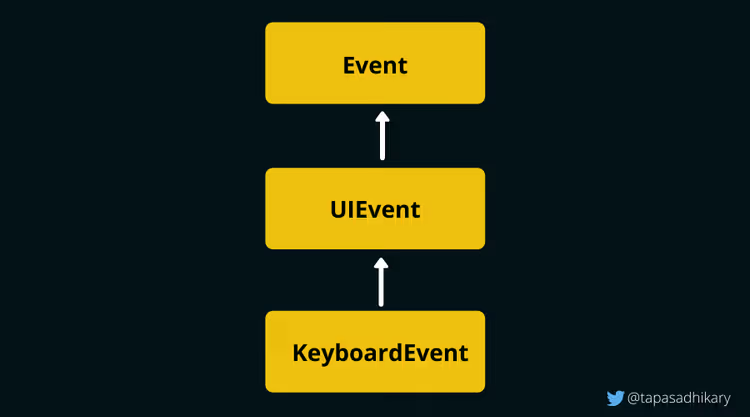
When a user presses any key, the browser creates a KeyboardEvent object, a descendant of UIEvent, which in turn extends the base Event. Inside are the key's properties, modifier state, layout information.
The UI Events specification is evolving: new properties appear, old ones go to deprecated. The main change in recent years is the move away from numeric codes (keyCode / charCode / which) in favor of event.key and event.code. All modern browsers support this pair, and you should build your logic on them.
Browser support is nearly complete: Chrome 51+, Firefox 29+, Safari 10.1+, Edge 79+. If your project isn't stuck with IE11, you can forget about event.which.
Three events: keydown, keypress and keyup
The browser distinguishes three keyboard events. The firing order is fixed:
- keydown, key is pressed (moment of contact);
- keypress, key is held and generates a character (only for character keys);
- keyup, key is released.
Subscribing to keydown via addEventListener:
1 const input = document.getElementById('type-here'); 2 3 input.addEventListener('keydown', function (event) { 4 console.log('Нажата:', event.key, '| Код:', event.code); 5 });
For inline handlers, use an element attribute:
1 <input type="text" id="type-here" onkeyup="handleKey(event)">
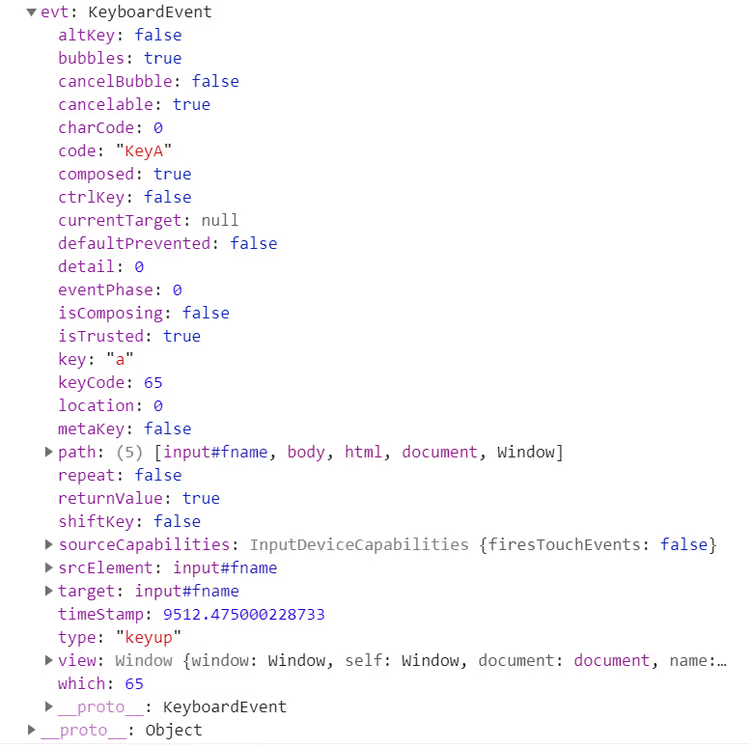
If you output the event object to the console, you'll see the full structure with all inherited fields from UIEvent and Event:
Why keydown is the main choice
keypress is officially recognized as deprecated. It only fires for keys that produce a character value, and doesn't catch modifiers: not Alt, not Ctrl, not Shift, not Meta. You can't handle Ctrl+Z or Shift+Tab through keypress.
The difference between keydown and keyup: keydown fires before the browser processes the key; keyup fires after. An important consequence follows: event.preventDefault() inside keydown cancels the browser action (for example, entering a character in a field), but inside keyup it doesn't. For hotkeys, input validation and game controls, you need keydown.
KeyboardEvent properties table
Property / Method | What it returns | Status |
|---|---|---|
| Character value of the pressed key: | Current |
| Physical code of the key on the keyboard: | Current |
|
| Current |
|
| Current |
|
| Current |
|
| Current |
|
| Current |
| Numeric key code (for example | Deprecated |
| Unicode code of the character | Deprecated |
| Numeric key code (analog of | Deprecated |
The bottom three rows are deprecated. Wherever possible, switch to event.key. If you have to support an old browser, make a fallback:
1 window.addEventListener('keydown', function (event) { 2 const key = event.key !== undefined ? event.key : event.which; 3 if (key !== undefined) { 4 console.log('Клавиша:', key); 5 } 6 });
But in 2026, such code is only for legacy projects. event.key works everywhere.
Modifier keys and combinations
Control, Shift, Alt and Meta keys don't perform actions by themselves, but change the behavior of other keys. Pressing Z gives the letter "z", while Ctrl+Z performs undo.
Boolean properties of the event help track a modifier:
1 document.getElementById('editor').addEventListener('keydown', function (event) { 2 if (event.ctrlKey && event.key === 'z') { 3 event.preventDefault(); 4 undoAction(); 5 } 6 7 if (event.ctrlKey && event.shiftKey && event.key === 'z') { 8 event.preventDefault(); 9 redoAction(); 10 } 11 });
The same approach applies to any combinations: Ctrl+S (save), Ctrl+Shift+N (new window), Alt+Tab (switch). Check order: first modifiers via boolean flags, then event.key for the specific key. This makes the logic readable instead of drowning in numeric codes.
Complete key codes table
Below is the current table for all standard keys. The values event.key and event.code are given as modern browsers (Chrome, Firefox, Edge, Safari) return them.
Navigation and actions
Key | event.which | event.key | event.code | Note |
|---|---|---|---|---|
Backspace | 8 | Backspace | Backspace |
|
Tab | 9 | Tab | Tab |
|
Enter | 13 | Enter | Enter |
|
Shift (left) | 16 | Shift | ShiftLeft |
|
Shift (right) | 16 | Shift | ShiftRight |
|
Ctrl (left) | 17 | Control | ControlLeft |
|
Ctrl (right) | 17 | Control | ControlRight |
|
Alt (left) | 18 | Alt | AltLeft |
|
Alt (right) | 18 | Alt | AltRight |
|
Pause / Break | 19 | Pause | Pause |
|
Caps Lock | 20 | CapsLock | CapsLock |
|
Escape | 27 | Escape | Escape |
|
Space | 32 |
| Space |
|
Page Up | 33 | PageUp | PageUp |
|
Page Down | 34 | PageDown | PageDown |
|
End | 35 | End | End |
|
Home | 36 | Home | Home |
|
Arrow Left | 37 | ArrowLeft | ArrowLeft |
|
Arrow Up | 38 | ArrowUp | ArrowUp |
|
Arrow Right | 39 | ArrowRight | ArrowRight |
|
Arrow Down | 40 | ArrowDown | ArrowDown |
|
Print Screen | 44 | PrintScreen | PrintScreen |
|
Insert | 45 | Insert | Insert |
|
Delete | 46 | Delete | Delete |
|
Number row (main keyboard)
Key | event.which | event.key | event.code |
|---|---|---|---|
0 | 48 | 0 | Digit0 |
1 | 49 | 1 | Digit1 |
2 | 50 | 2 | Digit2 |
3 | 51 | 3 | Digit3 |
4 | 52 | 4 | Digit4 |
5 | 53 | 5 | Digit5 |
6 | 54 | 6 | Digit6 |
7 | 55 | 7 | Digit7 |
8 | 56 | 8 | Digit8 |
9 | 57 | 9 | Digit9 |
Letters A-Z
Key | event.which | event.key | event.code |
|---|---|---|---|
A | 65 | a | KeyA |
B | 66 | b | KeyB |
C | 67 | c | KeyC |
D | 68 | d | KeyD |
E | 69 | e | KeyE |
F | 70 | f | KeyF |
G | 71 | g | KeyG |
H | 72 | h | KeyH |
I | 73 | i | KeyI |
J | 74 | j | KeyJ |
K | 75 | k | KeyK |
L | 76 | l | KeyL |
M | 77 | m | KeyM |
N | 78 | n | KeyN |
O | 79 | o | KeyO |
P | 80 | p | KeyP |
Q | 81 | q | KeyQ |
R | 82 | r | KeyR |
S | 83 | s | KeyS |
T | 84 | t | KeyT |
U | 85 | u | KeyU |
V | 86 | v | KeyV |
W | 87 | w | KeyW |
X | 88 | x | KeyX |
Y | 89 | y | KeyY |
Z | 90 | z | KeyZ |
event.key returns the lowercase value for letters. event.code doesn't depend on case or layout: KeyA means the physical A key, even if the layout is Russian and the input is "Ф".
Special keys
Key | event.which | event.key | event.code | Note |
|---|---|---|---|---|
Left Windows | 91 | Meta | MetaLeft |
|
Right Windows | 92 | Meta | MetaRight |
|
Context menu | 93 | ContextMenu | ContextMenu |
|
Numeric keypad (Numpad)
Key | event.which | event.key | event.code |
|---|---|---|---|
Numpad 0 | 96 | 0 | Numpad0 |
Numpad 1 | 97 | 1 | Numpad1 |
Numpad 2 | 98 | 2 | Numpad2 |
Numpad 3 | 99 | 3 | Numpad3 |
Numpad 4 | 100 | 4 | Numpad4 |
Numpad 5 | 101 | 5 | Numpad5 |
Numpad 6 | 102 | 6 | Numpad6 |
Numpad 7 | 103 | 7 | Numpad7 |
Numpad 8 | 104 | 8 | Numpad8 |
Numpad 9 | 105 | 9 | Numpad9 |
Numpad Multiply | 106 | * | NumpadMultiply |
Numpad Add | 107 | + | NumpadAdd |
Numpad Subtract | 109 | - | NumpadSubtract |
Numpad Decimal | 110 | . | NumpadDecimal |
Numpad Divide | 111 | / | NumpadDivide |
Function keys
Key | event.which | event.key | event.code |
|---|---|---|---|
F1 | 112 | F1 | F1 |
F2 | 113 | F2 | F2 |
F3 | 114 | F3 | F3 |
F4 | 115 | F4 | F4 |
F5 | 116 | F5 | F5 |
F6 | 117 | F6 | F6 |
F7 | 118 | F7 | F7 |
F8 | 119 | F8 | F8 |
F9 | 120 | F9 | F9 |
F10 | 121 | F10 | F10 |
F11 | 122 | F11 | F11 |
F12 | 123 | F12 | F12 |
System and multimedia
Key | event.which | event.key | event.code | Note |
|---|---|---|---|---|
Num Lock | 144 | NumLock | NumLock |
|
Scroll Lock | 145 | ScrollLock | ScrollLock |
|
Mute | 173 | AudioVolumeMute | AudioVolumeMute | In Firefox |
Volume Down | 174 | AudioVolumeDown | AudioVolumeDown | In Firefox |
Volume Up | 175 | AudioVolumeUp | AudioVolumeUp | In Firefox |
Media Player | 181 | LaunchMediaPlayer | LaunchMediaPlayer | In Firefox |
Launch App 1 | 182 | LaunchApplication1 | LaunchApplication1 | In Firefox |
Launch App 2 | 183 | LaunchApplication2 | LaunchApplication2 | In Firefox |
Punctuation and symbols
Key | event.which | event.key | event.code | Note |
|---|---|---|---|---|
Semicolon (;) | 186 | ; | Semicolon | In Firefox |
Equal (=) | 187 | = | Equal | In Firefox |
Comma ( | 188 |
| Comma |
|
Minus (-) | 189 | - | Minus | In Firefox |
Period (.) | 190 | . | Period |
|
Slash (/) | 191 | / | Slash |
|
Backquote ( | Backquote |
|
|
|
Bracket Left ([) | 219 | [ | BracketLeft |
|
Backslash () | 220 | \ | Backslash |
|
Bracket Right (]) | 221 | ] | BracketRight |
|
Quote (') | 222 | ' | Quote |
|
Important table notes
event.whichis a deprecated property, useevent.key.event.codeis identical for lowercase (a) and uppercase (A) letters, it's the physical key.event.keyreturns the actual character considering case.- In Firefox,
event.whichvalues forEqual,SemicolonandMinuskeys differ from Chrome/Edge/Safari (noted in the table). Another reason not to useevent.which. - Chromium-based browsers and Firefox give identical
event.keyandevent.codefor all listed keys. - Virtual keyboards: the UI Events specification requires that a virtual keyboard (mobile, on-screen) repeating a standard layout return correct
event.code. In practice, mobile browsers (Chrome Android, Safari iOS) correctly handlekeydown/keyupfor main keys, butevent.codemay be empty for non-standard layouts.
Interactive trainer

For quick verification of any code from the article, use the keyboard trainer: keyevents.netlify.app. Move your cursor to the area, press keys, and see the values of event.key, event.code and event.which, as well as modifier flag states in real time. Source code is available on GitHub.
Video: keyboard events in practice
A short practical breakdown of keydown and keyup, working with modifiers and hotkeys with live examples:
⁉️🤔 Frequently asked questions
What's the difference between event.key and event.code?
event.keyreturns the character value considering layout and case: for the A key it's"a"(or"A"with Shift), for Russian layout,"ф".event.codereturns the physical key code, identical for all layouts:"KeyA". For hotkeys,event.codeis more reliable, it doesn't depend on input language. For text input, useevent.key.
Why is keypress no longer used?
The W3C specification marked
keypressas deprecated: it only fires for character keys and doesn't catch modifiers. You can't handleCtrl+C,Shift+Taband other combinations throughkeypress.keydowncovers all keys and is supported identically in all modern browsers.
Can you completely abandon event.which and event.keyCode?
Yes, in 2026 you can.
event.keyis supported in Chrome 51+, Firefox 29+, Safari 10.1+, Edge 79+. If your project doesn't target IE11 or Firefox 28, use onlyevent.keyandevent.code.
How do you handle a long key press?
Combine
keydownandkeyup. Onkeydownstart a timer orrequestAnimationFrame, onkeyup, reset it. For game input, this is the standard pattern: key is held, character moves, released, stops.
Do keyboard events work on mobile devices?
keydownandkeyupwork in mobile browsers when using an external Bluetooth keyboard. The on-screen keyboard generatesinputevents, notkeydown/keyupfor all keys, so for text fields on mobile it's better to use theinputevent.
How do you distinguish left Shift from right?
Through
event.code:"ShiftLeft"or"ShiftRight".event.keyreturns"Shift"for both. Same forControl,AltandMeta.
What to use in your project
If you're writing new code, take keydown as the main event, and for key identification, event.key (symbol) and event.code (physical key). This combination covers all scenarios: hotkeys, navigation, game input, form validation.
If you maintain a product with legacy code on event.which or event.keyCode, plan a refactor. The work volume is small: replacement in handlers, but the benefit is clean, predictable code without a zoo of browser differences.
Keep the table above bookmarked. When you next need the code for a specific key, open it and copy the needed event.code value without recalling numeric codes from the IE6 era.

A professional team of writers and editors specializing in creating quality content.