


📄 15 Html templates for different niches: templatemonster 2026 selection
CMSs like WordPress or Joomla drag along PHP hosting, a database, dozens of updates a month, and plugin vulnerabilities. For a business-card site, landing page, or portfolio, that is overkill. A static HTML template loads instantly, needs no updates, and runs on any hosting, even free GitHub Pages.
TemplateMonster remains one of the largest HTML template marketplaces in 2026: thousands of items, a catalog organized by niche, and every template comes with a lifetime license. For anyone who understands at least a little HTML and CSS, a template like this is a blank canvas: no builders, no unnecessary code, just markup you can edit in any editor.
Below are 15 field-tested HTML templates from the TemplateMonster catalog for different niches, from photographer to car rental. Each one uploads to a server in a minute and opens in a browser with no installation.
💡 Quick overview:
- 15 HTML templates from the TemplateMonster catalog, one per niche, from portfolio to e-commerce
- Pricing: $17-$25 for a lifetime license (TemplateMonster data), no free demo versions, but a live demo of each item is available on the marketplace site
- All templates are built on Bootstrap 3 or 4, responsive, with a set of ready-made pages and UI elements
- Any code editor will do for editing: Notepad++, VS Code, or Sublime
Template | Niche | Pages | Price |
|---|---|---|---|
Indigo | Photographer / lookbook | 50+ | $17 |
Daniel Smith | Personal page | 4 layouts | $17 |
Natural Cosmetics | Cosmetics store | 35+ | $17 |
EasyCorp | Corporate | 100+ | $25 |
Brave | Multipurpose | 100+ | $25 |
1. Indigo: fashion photographer and lookbook
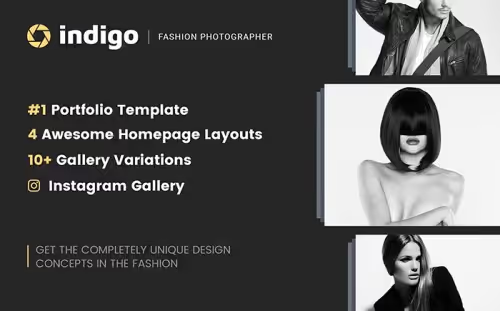
Indigo is a multi-page HTML template for a photographer's site or a fashion lookbook. Four homepage variants: fullscreen image, slider, video, or parallax, the hero section looks different depending on the variant you choose.
The package includes over 50 ready-made pages and more than 10 gallery options. It integrates with MailChimp and CampaignMonitor for newsletters and pulls in social media feeds.
- Pros: 4 radically different homepage designs, a rich set of galleries, email marketing integration
- Cons: old Bootstrap 3, the grid is less flexible than modern Bootstrap 5 counterparts; created in 2017, not updated since
- Price: from $17 (Personal), $25 (Commercial)
- Download: 🔗 Indigo on TemplateMonster | 🔗 Live demo
2. Daniel Smith: personal page with blog and store
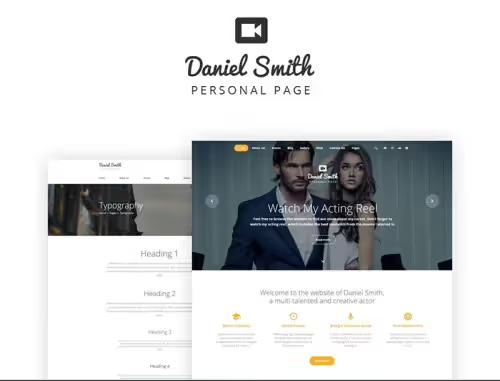
Daniel Smith is a responsive personal-page template with a modern design and a large set of UI blocks. Four blog layouts: you can display posts as a list, a grid, or a masonry layout.
The template is e-commerce-ready: store, cart, and product-detail pages work out of the box. It suits freelancers who want to combine a portfolio with selling services or digital products.
- Pros: blog + store in one template, 4 blog layouts, rich UI kit
- Cons: the design is traditional, no wow factor; Bootstrap 3
- Price: from $17
- Download: 🔗 Daniel Smith on TemplateMonster | 🔗 Live demo
3. Natural Cosmetics: cosmetics store with 35+ pages
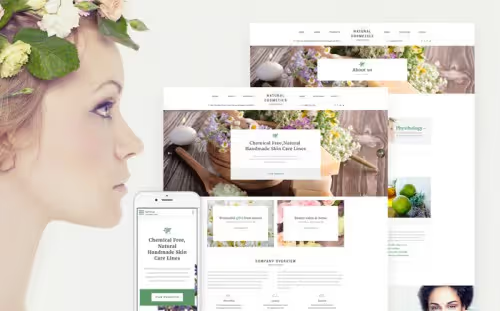
A fresh, clean HTML template for a cosmetics store. Cross-browser compatible, responsive, with 35+ HTML5 pages included. The UI kit is rich: animated progress bars, circular counters, charts, tabs, banners, blockquote.
All forms work out of the box: social login, newsletter subscription, registration, and a contact form with reCAPTCHA. No server-side logic is required.
- Pros: excellent set of forms right after download, 35+ pages cover 95% of store scenarios, reCAPTCHA out of the box
- Cons: narrow niche (cosmetics), harder to repurpose for a different product
- Price: from $17
- Download: 🔗 Natural Cosmetics on TemplateMonster | 🔗 Live demo
4. Virginia Anderson: accounting services for small business

Virginia Anderson, an HTML template with a convenient structure, professional design, and comfortable typography. It opens with an unconventional left-side header featuring a CTA button that leads directly to services. The menu is hidden behind a hamburger button on the right, which is easy to find.
A good option for a solo accountant or a small audit firm: service pages, contacts with a form, an "About the company" block.
- Pros: unconventional navigation draws attention to the CTA, professional typography, fast loading
- Cons: very narrow niche, only a few page types
- Price: from $17
- Download: 🔗 Virginia Anderson on TemplateMonster
5. EasyCorp: multipurpose corporate with an admin panel
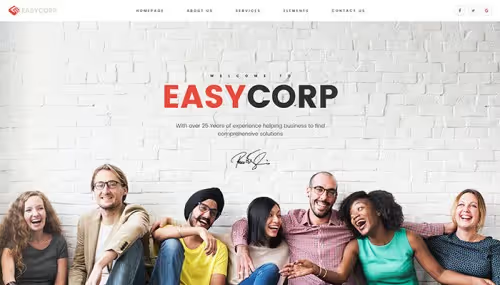
EasyCorp, a business template with a light, modern design and a unique feature: its own administrative panel. The package includes the Novi Builder visual editor, 100+ custom pages, several color schemes, and layout options.
Suitable for companies that need a solid corporate website without being tied to a CMS: team, services, portfolio, blog, it's all already there.
- Pros: built-in visual editor (no coding needed for edits), 100+ pages, several color schemes
- Cons: visual editor is tied to the template (cannot be transferred to another project), Bootstrap 3
- Price: from $25
- Download: 🔗 EasyCorp on TemplateMonster | 🔗 Live demo
6. BabyTime: nanny and childcare
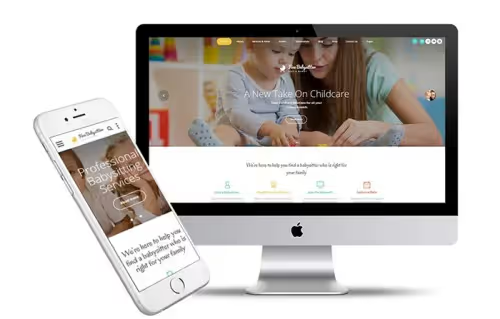
A bright, welcoming template for a nanny service or daycare. An informative mega-footer collects contacts, hours, and links in one place. Built-in toy store functionality, and all premium images are included in the download package, no need to pay extra for stock photos.
Forms work out of the box: service request, contacts, tour booking.
- Pros: premium images included in the price, mega-footer with key information, built-in store
- Cons: babysitting niche, reworking it for another service is labor-intensive
- Price: from $17
- Download: 🔗 BabyTime on TemplateMonster | 🔗 Live demo
7. Basketball Fandom: basketball club and sports community
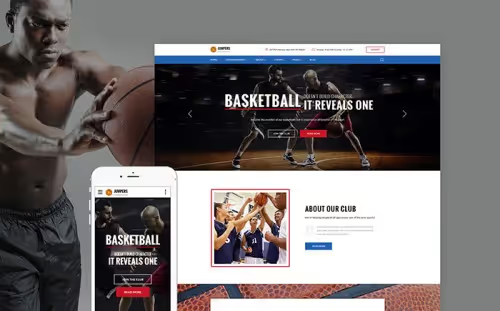
A vibrant template with an energetic fullscreen slider on the homepage. Large images, plenty of breathing room, and clean layouts, everything works to drive fan engagement. Four blog layouts: list, grid, and masonry.
Suitable for an amateur basketball club, a school team, or a sports blog.
- Pros: striking visuals, 4 blog layouts, built-in slider
- Cons: sports-only theme, no e-commerce
- Price: from $17
- Download: 🔗 Basketball Fandom on TemplateMonster | 🔗 Live demo
8. Brave: multipurpose with 11 skins and a visual editor
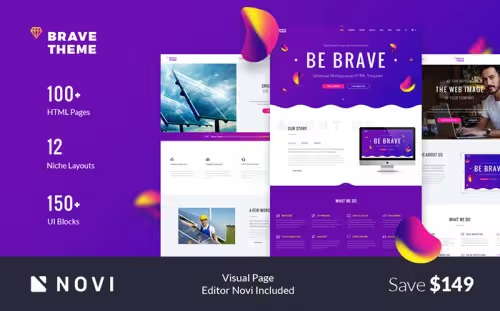
Brave uses flat design elements with rich colors for visual presentation. 11+ preset skins let a beginner quickly assemble a niche site. The package includes 100+ HTML5 pages, 6 navigation and footer styles, Isotope and Parallax plugins, and integration with Campaign Monitor and MailChimp.
The built-in Novi Builder lets you edit content visually, without touching code.
- Pros: 11 skins cover almost any topic, visual editor, 6 navigation styles
- Cons: old Bootstrap 3, visual editor is tied to the template
- Price: from $17
- Download: 🔗 Brave on TemplateMonster | 🔗 Live demo
9. Cookster: culinary school with e-commerce
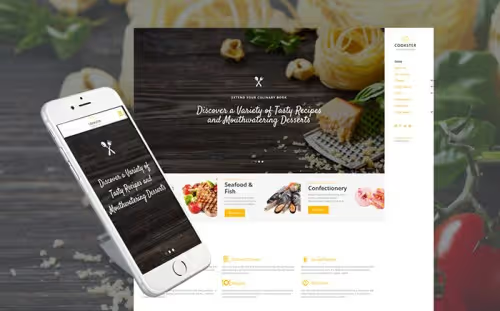
Cookster is memorable for its creative, content-centered design: the top navigation is replaced by a hamburger menu that expands into a sidebar. A full-fledged online store is built in, so you can sell cookbooks and kitchen utensils.
The template includes both blog/corporate site pages and all the necessary store pages.
- Pros: bold, unconventional design, e-commerce and blog in one template, memorable navigation
- Cons: the side menu is not familiar to all users, Bootstrap 3
- Price: from $17
- Download: 🔗 Cookster on TemplateMonster | 🔗 Live demo
10. Aviato: stylish clothing store
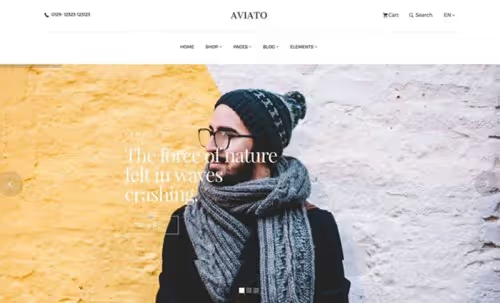
Aviato, a fashionable and minimalist template for a clothing store. Large typography, a clean product grid, plenty of breathing room. Product carousels work on the homepage immediately after loading.
A product card with size and color selection, a cart, a checkout page, and a wishlist are built in. Cross-browser compatible and responsive.
- Pros: stylish minimalism, complete e-commerce workflow out of the box, excellent typography
- Cons: only for the fashion niche, looks a bit empty without demo content
- Price: from $17
- Download: 🔗 Aviato on TemplateMonster | 🔗 Live demo
11. Sheltek: real estate with search and MegaMenu
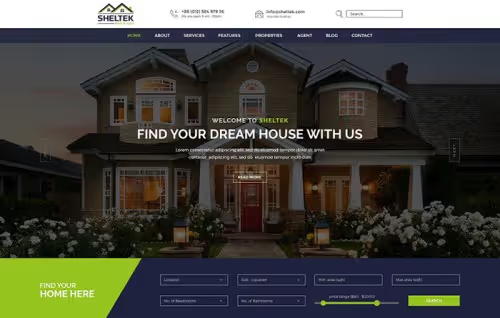
Sheltek delivers a quality experience for searching and submitting viewing requests for properties. The homepage contains a detailed search form: the user sets filters by price, area, and location and gets a selection of listings.
The package includes 11 homepage variations, 5 property pages, 28+ shortcodes, and a MegaMenu for multi-level navigation.
- Pros: powerful property search form on the homepage, MegaMenu, 28+ shortcodes for customization
- Cons: Bootstrap 3, created in 2017 and not updated
- Price: from $17
- Download: 🔗 Sheltek on TemplateMonster | 🔗 Live demo
12. CarRent: car rental with advanced search
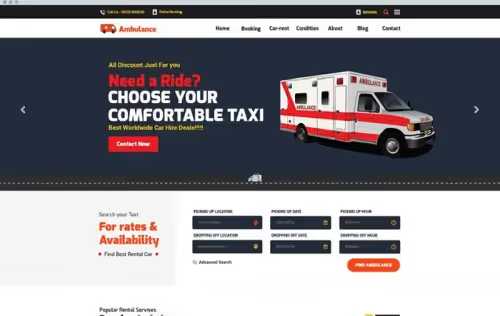
An adaptive SEO-optimized template for car rental, also suitable for taxi services, ambulances, and boat rentals. Advanced vehicle search: availability check and cost calculation right on the site.
Visually pixel-perfect design with animated dividers and a pre-installed Revolution Slider for the top section of the site.
- Pros: built-in availability and cost calculator, Revolution Slider out of the box, fits several transportation niches
- Cons: old Bootstrap 3, Revolution Slider pulls in jQuery and slows down loading
- Price: from $17
- Download: 🔗 CarRent on TemplateMonster | 🔗 Live demo
13. Go.arch: architecture and interior design
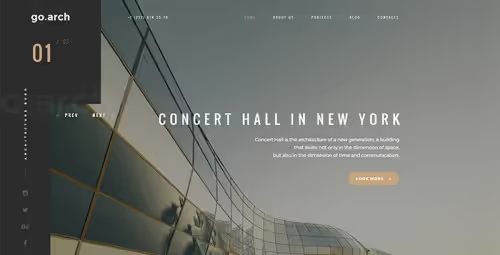
Go.arch stands out with a futuristic mood: dark or light color scheme to choose from, rich project images, a fixed social panel on the left above the fold. The social buttons are impossible to miss.
Two color options, Dark and Light, let you match the look to the firm's corporate style.
- Pros: memorable futuristic design, two color schemes included, prominent social buttons
- Cons: few pages (only portfolio and contacts), Bootstrap 3
- Price: from $17
- Download: 🔗 Go.arch on TemplateMonster | 🔗 Live demo
14. MoneyWise: financial news and magazine
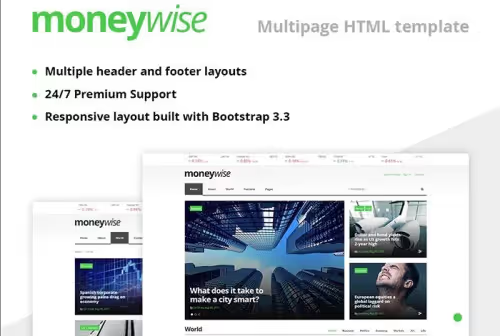
MoneyWise, a professional HTML template for a financial news publication. Clean layout, valid code, responsive via Bootstrap 3.3. The package includes HTML5 pages for a full-fledged news portal: a homepage with an article grid, categories of financial news, a single article page, contacts.
Displays correctly on desktop, tablet, and smartphone thanks to Bootstrap's fluid grid.
- Pros: layout built specifically for a news portal, valid code, responsive
- Cons: Bootstrap 3.3, morally outdated, narrow financial news niche
- Price: from $17
- Download: 🔗 MoneyWise on TemplateMonster
15. Canvas: interior and furniture portfolio
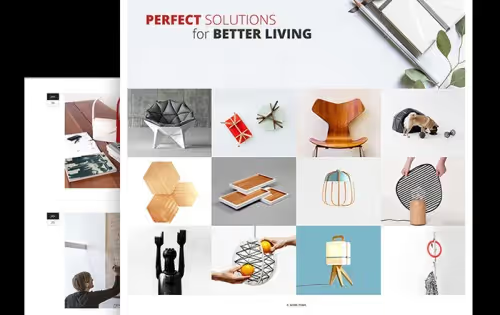
Canvas turns a website into an art gallery: card-based design with images at the center, SEO-optimized markup, WooCommerce support for selling interior items. Built-in Isotope and Parallax sliders add dynamics, and 600+ Google Fonts let you pick a typeface to match the studio's style.
A solid choice for an interior designer, furniture workshop, or showroom.
- Pros: card-based design for portfolios, Isotope and Parallax out of the box, 600+ Google Fonts
- Cons: Bootstrap 3, no direct demo on TemplateMonster, check before purchasing
- Price: from $17
Take a look at the selection in action, a short video with examples of modern HTML templates and what to pay attention to when choosing:
⁉️🤔 FAQ
How is an HTML template better than a WordPress theme?
An HTML template doesn't need PHP or a database. It loads 3-5 times faster than a dynamic site, requires no security updates, and runs on any hosting, from cheap shared plans to free GitHub Pages. For a landing page or a 5-page brochure site, it's the optimal choice. But if you need a blog with an admin panel, an HTML template won't work: you'd have to edit content directly in the code.
Do I need to know how to code to use an HTML template?
A basic understanding of HTML and CSS is enough. To replace text and images, any code editor will do, Notepad++, VS Code, or Sublime. Major changes to page structure will require actual layout skills. Some templates in this roundup (EasyCorp, Brave) include the Novi Builder visual editor, which lets you edit content without touching the code.
What is a lifetime license on TemplateMonster?
You pay once and get the template forever, with no annual subscription. According to the TemplateMonster catalog data, the Personal license ($17) allows use on one personal site, and the Commercial license ($25) covers up to five client sites. Template updates are not included: you get the version that was current at the time of purchase. Author support is valid for 6 months.
Why are all the templates built on Bootstrap 3 instead of Bootstrap 5?
This roundup is compiled from time-tested items in the TemplateMonster catalog. Many of them were created between 2016 and 2018 and haven't been updated since, which is common practice for budget HTML templates. Bootstrap 3 remains fully functional in 2026: the grid, responsiveness, and components all work. If you strictly need Bootstrap 5 or Tailwind CSS, look for templates marked "Bootstrap 5" in the marketplace filters.
Can I repurpose a template from one niche to another?
Technically, yes, any HTML template can be re-laid out for a different theme. But the amount of work may outweigh the benefit of a ready-made solution. It's better to pick a template for your niche right away: the category filter in the TemplateMonster catalog works correctly. For instance, you could rework Natural Cosmetics into an electronics store, but you'd have to change the color scheme, typography, and product card structure.
Is it worth buying an HTML template in 2026?
Static HTML templates are not dead. For a simple site without a blog or complex logic, this is still the fastest way to launch, and in terms of loading speed they wipe the floor with any builder.
- If you need a photographer's or designer's portfolio, go with Indigo or Go.arch.
- If you're launching an online clothing store, Aviato with its full e-commerce workflow.
- If you need a corporate site with a visual editor for the client, EasyCorp or Brave.
- If you're building a landing page for a service (nanny, accountant, rentals), BabyTime, Virginia Anderson, or CarRent fit the bill.
Before buying, be sure to open the live demo of the template on TemplateMonster: the images in the screenshots may differ from the actual content. Check how the grid behaves on mobile and see whether all the advertised pages are included in the package.
Let us know in the comments: have you used HTML templates, or do you prefer WordPress with a builder?

A professional team of writers and editors specializing in creating quality content.