



📱 Recovering abandoned WooCommerce carts via WhatsApp: 10 working methods
A customer added an item to the cart, got to checkout, and left. A familiar picture for any WooCommerce store owner. According to Baymard Institute, the average cart abandonment rate in ecommerce hovers around 70%. Seven out of ten potential sales are lost at the final step.
Email reminders work, but open rates are dropping and messages land in spam. WhatsApp offers a fundamentally different channel: the message is seen within minutes, replies come in far more often, and the conversation feels live rather than templated.
Below is a working scheme for recovering customers via WhatsApp: from a button on the cart page to automated sequences with personalization. No lock-in to a single plugin, with specific tools for different scenarios.
💡 Quick overview:
- Step 1: add a WhatsApp button to the cart and checkout pages
- Step 2: connect automated abandoned cart reminders
- Step 3: set up manual follow-ups for high-value orders
- Step 4: choose a plugin for the task, from a free start to full automation
Why carts are abandoned: triggers you can defuse via WhatsApp
The standard set of abandoned cart reasons: unexpected shipping costs, a complicated checkout, forced registration, no suitable payment method. Some of these are solved by optimizing the WooCommerce checkout itself. But there is a category of triggers that page improvements cannot address.
These are last-minute doubts. The customer has already picked the item but is hesitating: will the size fit? Is the delivery date accurate? What about returns if I don't like it? The form on the site gives no answer, and the person leaves.
WhatsApp closes this gap. A live dialogue with a real person (or a well-tuned bot) removes objections in a minute. According to WhatsApp Business statistics, message open rates in the messenger exceed 90%, versus 20-25% for email.
WhatsApp vs. email: why the messenger wins the race for the customer
The difference is not just in open rate numbers. An abandoned cart email sequence is three messages: after one hour, after one day, after three days. By the time the customer sees the second one, they have already found the item at a competitor or cooled off.
WhatsApp works in real time. The first message goes out 15-30 minutes after leaving the site, while the customer still remembers why they visited. The reply comes in the same messenger where the person chats with friends and family, not in an overflowing inbox with a hundred unread newsletters.
Plus, multimedia. On WhatsApp you can send not only text and a link, but also a product photo, a voice message, a PDF with the warranty. This turns a "cart reminder" into a full-fledged consultation.
10 Ways to win back a customer via WhatsApp
Below are specific techniques that work in WooCommerce right now. Each one can be implemented independently, and together they produce a cumulative effect.
1. WhatsApp button on the cart and checkout pages
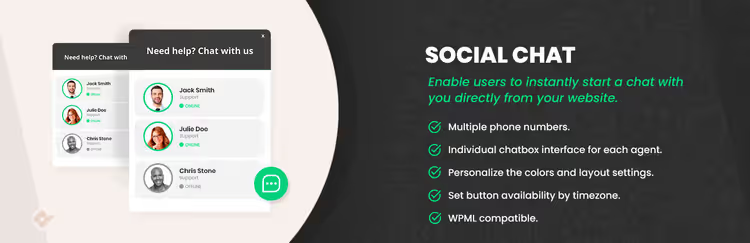
The simplest and fastest method: place a chat button where the customer makes the final decision. Not on the homepage, not in the footer, but specifically on the cart and checkout pages.
Technically this is done via the Social Chat plugin on WordPress.org (free version). In the settings you specify operator numbers, a greeting text, and the button position. Visibility is limited to the cart and checkout pages only.
The button must not overlap the "Place order" button; position it on the left or at the bottom. Hint text: "Have a question about your order? Message us on WhatsApp, we'll reply within 2 minutes." This reduces anxiety: the customer knows help is at hand.
2. WhatsApp widget on product pages
Don't wait for a hesitant customer to reach the cart. Place a WhatsApp button on product pages, where people study specs, price, and delivery terms.
The same Social Chat plugin lets you flexibly configure visibility: all pages, products only, or cart and checkout only. For stores with complex products (electronics, furniture, clothing with size charts) this is critical: the question "what connector does this model have?" is easier to ask in chat than to hunt for in the description.
3. Automatic abandoned cart reminders
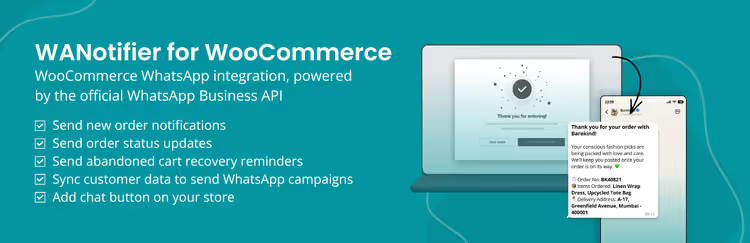
Manually sending messages to every lost customer is unrealistic when you're processing more than 5-10 orders a day. Automation solves this: the plugin tracks the "cart abandoned" event and sends a message on a schedule.
The WANotifier plugin is purpose-built for automatic notifications: abandoned cart, order status, shipment tracking. Setup involves choosing a trigger, a message template, and a delay before sending. It makes sense to send the first message 20-30 minutes after abandonment: the person hasn't gone far, and the pause is long enough not to feel pushy.
A second message follows after 24 hours, with different copy. A third after 48 hours, with a discount or free shipping offer. After three, pause to avoid being marked as spam.
4. Personalization: name, product, amount
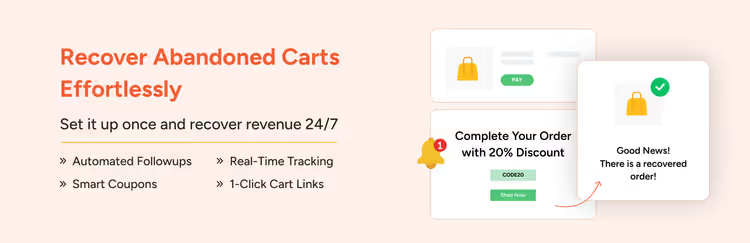
"You left items in your cart" versus "Alexey, your Levi's 501 jeans (size 32/34, 5,990 ₽) are waiting, last size in stock" are two different approaches with a conversion difference measured in multiples.
Personalization via This plugin pulls specific fields into the template: customer name, product names, cart URL. The plugin works in a WhatsApp + email combo: you can duplicate reminders to both channels or set up escalation (no reply on WhatsApp → an email is sent).
5. Real-time assistance at checkout
Checkout is the point of maximum friction. The customer sees the final total with shipping, and if it's higher than expected, they leave.
A WhatsApp button at checkout with the text "Having second thoughts? Message us, we'll find a cost-effective delivery option" gives you a chance to retain the customer in the moment. The operator sees the cart contents (if the plugin passes this information) and can offer an alternative: cheaper shipping, pickup, a discount for paying online.
The combination of the free Social Chat plugin + the WhatsApp Business app on the operator's phone covers this scenario with minimal setup.
6. Manual follow-ups for high-value carts
A cart worth $20,000+ deserves a personal message from a manager, not a templated auto-send.
Mechanics: set up an alert for an abandoned cart above a given threshold (for example, via Cart Abandonment Recovery, cart logger) → the agent sees the contents and total → writes a personal WhatsApp message with no template: "Alexey, we noticed you were looking at a professional espresso machine. If you still have questions about models or delivery, I'm here and will reply within 5 minutes."
Conversion from these manual messages is several times higher than from automated ones, and the labor cost is justified by the margin.
7. Exclusive offers via WhatsApp
A promo code in WhatsApp works differently than in email. It gets seen, it gets clicked, and it doesn't get lost among a hundred other campaigns.
Mechanics: the second or third message in the cart recovery sequence includes a personal promo code for a small discount or free shipping. The code is generated dynamically through WooCommerce Coupons and lives for 24 hours, which creates urgency without the aggressive "today only" pressure.
The same WANotifier supports inserting coupons into message templates.
8. Post-purchase support in the same chat
After a successful cart recovery, the chat shouldn't go dead. The buyer is already in a conversation, so use this channel for order confirmation, delivery tracking, and a "how's everything?" check-in a week after delivery.
This turns a one-off cart rescue action into a retention channel. According to WhatsApp research, repeat purchases through a messenger channel are 40% more likely than through email campaigns, because the conversation already exists and the buyer will reply in the same chat instead of opening their inbox.
9. Centralized chat management
When the WhatsApp channel starts generating dozens of inquiries a day, keeping them on an agent's personal phone doesn't work. You need a single interface where all conversations are visible, along with customer history and cart status.
The same plugin with WhatsApp Business API connection provides a dashboard inside the WordPress admin: all chats in one window, message history linked to the order, and the ability to hand off conversations between agents. This solves the "manager went on vacation, customer got no reply" problem.
10. A/B testing of timing and copy
There is no universal recipe: one store gets results with a message after 15 minutes, another after an hour. One works with a discount text, another with just a product reminder.
Approach: run two sequences with different timing and copy. After 2-4 weeks, compare the cart recovery conversion and keep the winner. Most plugins (WANotifier plugin, Cart Recovery module) log sends and clicks, so there is enough data for comparison.
Plugins for WhatsApp cart recovery: comparison
Each task has its own tool. The table below will help you choose.
Plugin | Free version | Automated sequences | Personalization | WP dashboard | WhatsApp API |
|---|---|---|---|---|---|
Yes - WordPress.org | Via integrations | Basic | Yes | Yes (Pro) | |
Yes - WordPress.org | Yes, configurable | Full (products, names) | Via API | Yes | |
Yes - WordPress.org | Yes, email + WhatsApp | Full | Yes, built-in | Via integrations | |
Yes - WordPress.org | Yes | Basic | Yes | Yes |
WhatsApp messaging best practices for abandoned carts
Six rules that separate a "helpful reminder" from spam that annoys customers:
- Timing. First message within a 15-30 minute window after they leave. Later than an hour, the purchase is already forgotten and the message feels like spam.
- Brevity. 2-3 sentences: what happened, what to do, why now. No walls of text, people don't read long messages in a messenger.
- Personalization. Name and the specific product, no exceptions. "You left items in your cart" without details gets ignored.
- Direct link. A button or URL that takes them straight to the cart with the items restored. Fewer clicks mean higher conversion.
- Tone. Friendly, not corporate. "Alex, those jeans are still available, grab them?" instead of "Dear customer, we remind you of your incomplete order #1247."
- Consent. The phone number is collected at checkout with explicit opt-in for WhatsApp notifications. Without it, complaints and a blocked WhatsApp Business API account.
Mistakes that kill conversion
Even a properly configured sequence can fail because of small details.
Message without store identification. A customer receives "You left items in your cart" from an unknown number with no store name, and blocks the contact. The first message always starts with the store name and the reason: "This is Alex from BrandShop. You were putting together an order yesterday, the jeans are still waiting."
Too many messages. Three touches in 48 hours, that's the ceiling. A fourth message means a complaint to WhatsApp. If the customer hasn't responded after three reminders, they won't buy.
Discount in the very first message. "Come back, here's a discount!" without first asking "why did you leave?" trains customers to abandon carts just to get a promo code. A discount belongs in the second or third message, after the basic reminder hasn't worked.
Ignoring time zones. A message at 3 a.m. local time for the customer equals a guaranteed complaint. Plugins using the WhatsApp Business API account for time zone based on the phone number, turn this setting on.
⁉️🤔 Frequent questions
Does WhatsApp cart recovery work for small stores?
Yes, for small stores the effect is even more noticeable. With 5-10 orders a day, each recovered one is a tangible percentage of revenue. Messages via basic Social Chat are free (WhatsApp Business, not API), and personal contact with the buyer builds loyalty that large chains don't have.
Do I need customer consent for WhatsApp messages?
Absolutely. The phone number is collected at checkout with a separate checkbox "Receive order updates on WhatsApp." Without explicit consent, messaging violates WhatsApp policy, and if complaints come in, the WhatsApp Business API account gets blocked. GDPR and similar privacy regulations also require this.
What's the optimal delay for the first message?
15-30 minutes after leaving the site. Less than 10 minutes looks like surveillance. More than an hour, the buyer has already cooled off. Exception: products with a long decision cycle (furniture, complex electronics): for those, the first message can be sent after 2-4 hours.
Can WhatsApp recovery be automated for free?
Yes. Pairing the free same widget with the WhatsApp Business app on a phone gives you a chat button on the site. For automated sequences you'll need the Pro version or the same notification plugin with a free plan for low message volume.
How does WhatsApp recovery differ from a regular email scenario?
Response speed and conversion. Email gets opened within 6-12 hours, WhatsApp within 5-10 minutes. The average conversion of abandoned cart email sequences is 5-10%. The WhatsApp channel, when set up properly, delivers 15-25% according to industry research, because the dialogue starts while the buyer still remembers their intent.
See WhatsApp cart recovery setup in action, from plugin installation to the first auto-sequence:
What actually works, and what's just noise
WhatsApp for cart recovery is not a magic pill, it's a channel. By itself it won't save a store with uncompetitive pricing or a broken checkout. But paired with a properly configured WooCommerce, it recovers a noticeable share of lost sales that email can no longer reach.
Start with the free minimum: free Social Chat widget for a button on the site + WhatsApp Business on your phone for replies. After a month, look at the conversion of recovered carts. If the numbers look good, add automation via WANotifier for auto-sequences or Cart Recovery and build full sequences with personalization.

A professional team of writers and editors specializing in creating quality content.