



🔍 Product filters for WooCommerce: 6 plugins for any catalog and budget
A customer walks into a store with 2,000 products, looks for a blue size-M t-shirt under $3,000, and leaves after 40 seconds. Because nobody is going to flip through a catalog page by page.
Product filters are not a "nice add-on" for WooCommerce. They are the navigational skeleton of the store. Without them, search becomes a lottery, and conversion becomes a statistical error. A good filter shortens the path from storefront to cart to a couple of clicks.
We tested six current WooCommerce filtering plugins, from completely free to premium solutions with indexing and hierarchical chains. An honest comparison: what each one can do, how much it costs, and what kind of store it is built for.
💡 Quick overview:
- Choosing a filter type for the task: AJAX, hierarchical, with or without an indexer
- Looking at what is on the market: HUSKY, BeRocket, Barn2, JetSmartFilters, WooBeWoo, and Themify
- Comparing prices, filter types, and page builder compatibility
- Matching a plugin to a specific scenario: large catalog, mobile results, Elementor
Why a WooCommerce store needs product filters
A user is not looking for "some product". They are looking for a specific item with specific characteristics. Price, color, size, material, brand are eliminated in seconds if the interface allows it.
A store without filters forces the visitor to browse relevant and irrelevant products mixed together. The result is predictable: frustration and a closed tab. Baymard Institute data confirms this: 88% of users are less likely to return to a site after a poor experience, and bad catalog navigation is one of the main triggers for abandonment.
AJAX filtering solves the second problem: speed. Without a page reload, the customer instantly sees the result of each click. The chain "selected a filter → saw products → bought" is not broken by waiting.
1. Husky, products filter professional (formerly Woof)

HUSKY (previously known as WOOF), a veteran among WooCommerce filters. The plugin went through a full rebranding but retained its architectural flexibility: shortcodes, widgets, AJAX search by products and SKU, a text filter by content and meta fields.
HUSKY's strong point is three operating modes. Turbo Mode delivers instant results on catalogs of 20,000+ products without heavy MySQL queries. Quick Search lets you skip AJAX entirely: filtering works at the level of a preloaded index. And the step-by-step wizard mode (step-by-step) guides the customer through sequential selections: first category, then brand, then model.
The premium version adds color and image filter swatches, range sliders, hierarchical dropdowns, and search statistics collection. Price: $39 one-time on CodeCanyon.
2. Advanced Ajax product filters (BeRocket)

BeRocket bet on zero-config: a catalog analysis wizard automatically identifies useful filters, creates groups for desktop and mobile, and avoids duplication. You get working filtering a minute after activation, without manually configuring a single parameter.
The plugin supports 6 display types: checkboxes, dropdowns, radio buttons, range sliders, color swatches, and image swatches. You can filter by categories, attributes, tags, price, rating, meta fields, and stock status. A separate plus: SEO-friendly URLs with canonical links and meta tags for filtered pages (Pro version).
The free version is generous: AJAX pagination, drag-and-drop builder, custom CSS, compatibility with Elementor, Divi, Beaver Builder, ACF Pro, WPML, and Polylang. The Pro plan unlocks filters by stock status, range sliders for attributes, date pickers, and variation display. Starting price: $44/year with a 30-day refund.
3. WooCommerce product filters (Barn2)
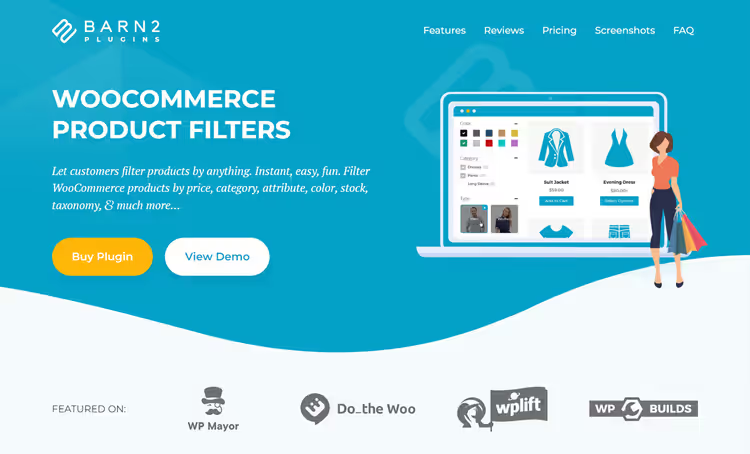
Barn2 takes a different approach: it is a purely premium solution built for usability. 11 filter types, an indexer for huge catalogs, separate configuration for desktop and mobile views. On mobile, filters automatically move into a slide-out panel, not scrolling down past the product list but a proper drawer.
Barn2 filters are grouped into sets: one set for the shop page, another for a category, a third for a brand. The setup wizard offers ready-made popular filters, and 7 display styles (dropdowns, checkboxes, radio buttons, text labels, images, color swatches, range sliders) cover any scenario.
🔗 Barn2 WooCommerce Product Filters
The plugin works together with WooCommerce Product Table (B2B orders) and Restaurant Ordering. Price: 79 USD/year for 1 site, 129 USD for up to 5 sites, 229 USD for up to 50 sites. A lifetime license is available. 30-day refund.
4. JetSmartFilters (Crocoblock)
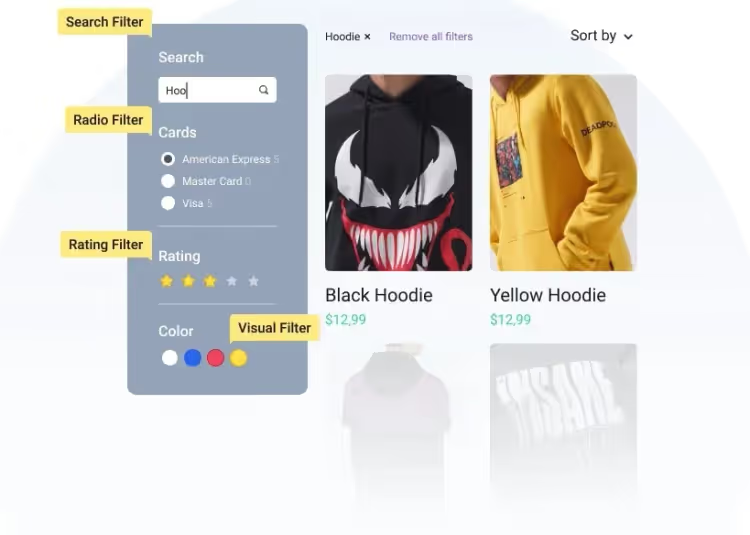
JetSmartFilters, the choice for those on Elementor or Gutenberg who use the Crocoblock ecosystem (JetEngine, JetWooBuilder). The plugin offers 17 filter types plus auxiliary widgets: active filters, reset, an "Apply" button, result counters.
The indexer is the killer feature. Each filter element shows the number of products that will remain after it is activated. The shopper does not click blindly; they see that "Size M (14 products)" is available, while "Size XXL (0)" is grayed out. Hierarchical filtering completes the picture: chains like "Category → Brand → Model" are built without code.
🔗 JetSmartFilters on Crocoblock
The plugin is fully premium. Starting price: 24 USD/year for 1 site as part of a Crocoblock subscription. A 30-day money-back guarantee is included. Compatibility: Gutenberg, Elementor, ACF, JetEngine, JetWooBuilder, WooCommerce, native integrations without extra bridges.
5. Product filter for WooCommerce (WooBeWoo)
WooBeWoo, the plugin with the largest user base in this roundup: 70,000+ active installs and a 5-star rating. A drag-and-drop filter builder, horizontal and vertical layouts, AJAX filtering by any attributes, tags, custom fields, price (range slider), rating, and stock status.
A neat feature: instant preview in the admin. You configure a filter and immediately see how it looks on the storefront. No need to switch between tabs and clear the cache.
The free version covers basic scenarios. Premium adds hierarchical filters, live search, usage analytics, and configuration export/import. Price: 49 USD/year for 1 site.
6. Themify, WooCommerce product filter
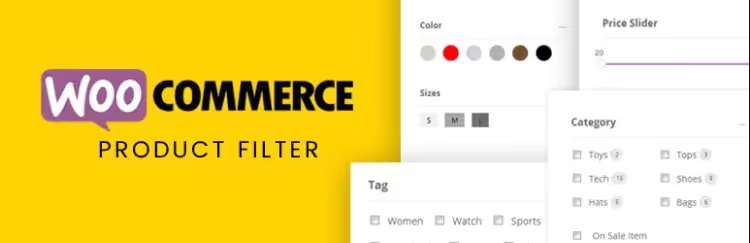
Themify, a completely free plugin with no premium tiers. 20,000+ active installs, a drag-and-drop form builder, filtering by price, categories, attributes, tags, and ranges. Filter combinations work through multi-select; you can narrow down products by color AND size AND brand simultaneously.
The main limitation: no AJAX out of the box in the free version (results appear on a separate page or after clicking "Apply Filters"). For a small catalog this is not critical; for a store with 500+ products, it is noticeable.
The plugin is compatible with Divi, Elementor, and Themify Builder. Layout: horizontal or vertical. Live search displays results on a new page. Free, with no ad banners or upsells.
Comparison table
Plugin | Free version | Price (from) | Filter types | Indexer | Builders |
|---|---|---|---|---|---|
HUSKY | Yes | 39 USD one-time | 8+ | Turbo Mode | Shortcodes, widgets |
BeRocket | Yes | 44 USD/year | 6+ | No (Pro) | Elementor, Divi, Beaver |
Barn2 | No | 79 USD/year | 11 | Yes | Elementor, Divi, Bricks |
JetSmartFilters | No | 24 USD/year | 17 | Yes | Elementor, Gutenberg |
WooBeWoo | Yes | 49 USD/year | 10+ | No | Elementor, Gutenberg |
Themify | Yes | Free | 6+ | No | Divi, Elementor |
What to pick for your store
Choosing a plugin comes down to three questions: catalog size, whether you need a builder, and budget.
If your catalog is modest (up to 500 products) and the budget is tight, Themify gets the job done with zero dollars invested. You get a drag-and-drop builder and filter combinations, no AJAX, but for a small store that is an acceptable trade-off.
For a mid-size catalog (500-2000 products) on Elementor or Gutenberg, WooBeWoo. The free version gives you AJAX, all the core attributes, and a price range slider. 70,000 installs don't lie: the plugin is stable and predictable.
Your store is growing, you need indexing and filter hierarchy, JetSmartFilters at 24 USD/year. The Crocoblock ecosystem works seamlessly, counters on every filter save clicks, and 17 types cover virtually any scenario.
Large catalog (2000+) and mobile traffic is a priority, Barn2. Indexer, separate desktop/mobile settings, an off-canvas panel on smartphones. Pricier than the rest (79 USD/year), but the usability pays for itself in conversions.
You need maximum flexibility and a one-time payment, HUSKY. Turbo Mode for 20,000+ products, shortcodes anywhere on the site, search statistics collection, and 39 USD forever. Formerly WOOF, now HUSKY, same architecture, more capabilities.
⁉️🤔 Common questions
Do I need AJAX for product filtering?
Strictly speaking, no, but without AJAX every filter change reloads the page. On a catalog of 200+ products this noticeably slows the buyer down. All plugins in this roundup except Themify support AJAX mode out of the box. Themify requires clicking an Apply button and opens results on a new page, tolerable for a store up to 500 SKUs, for anything larger, pick a plugin with AJAX.
Do filters slow down the site?
Poorly written ones, yes. HUSKY and Barn2 use indexing: filter data is cached, the query does not hit the raw database on every click. HUSKY's Turbo Mode avoids heavy MySQL queries altogether. BeRocket and WooBeWoo minimize JS/CSS, in practice the delay is unnoticeable. Problems start when you pile 3-4 filtering plugins onto one page. Don't do that.
Are the filters compatible with Elementor and Divi?
All plugins in this roundup declare Elementor compatibility. Barn2, BeRocket, Themify, and JetSmartFilters also work with Divi. Barn2 additionally supports Bricks and Avada Fusion Builder. If your theme is built to WooCommerce standards, you won't have issues.
Can I filter products by custom fields?
Yes, but not in every free version. HUSKY lets you connect meta fields through the settings panel (text and number). BeRocket filters by custom fields via ACF Pro in the Pro version. Barn2 supports custom fields and taxonomies out of the box. WooBeWoo, through the premium version.
Which plugin should I pick for a B2B store?
Barn2 paired with WooCommerce Product Table. The combo gives you a filterable product table with quick ordering, exactly what a wholesaler who knows SKUs and doesn't want to browse a storefront needs. JetSmartFilters with its hierarchical chain is also good for B2B catalogs with complex structures (category → subcategory → brand → model).
The bottom line
Six plugins, six different approaches to the same task. Themify wins on price (free), WooBeWoo and BeRocket on the price/features balance, Barn2 and JetSmartFilters on the indexer and usability, HUSKY on architectural flexibility and a one-time payment.
There is no universal "best". There is the one that fits your specific catalog. Start from your product count, mobile traffic, and what your front end is built on, the right filter doesn't get in the buyer's way, it disappears from their field of view exactly at the moment they add a product to the cart.

A professional team of writers and editors specializing in creating quality content.