













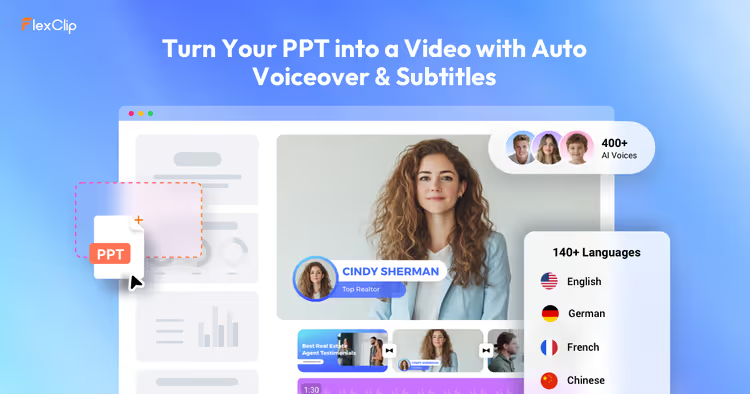
🎬 How to turn a presentation into a video with AI: FlexClip converter review
What is an AI PPT to Video Converter?
Presentations are a working tool, but they have an inherent flaw: they are static. Slide after slide, text and graphics, the viewer has to click through, absorb, and stay engaged on their own. And modern users have short attention spans. Research shows that video holds a viewer's attention 12 times longer than text with static images.
FlexClip solved this problem radically: in March 2026, the platform launched FlexClip's AI PPT to Video Converter. You upload a PowerPoint file, and the AI-powered system turns the slides into a finished video in seconds. With a script, voiceover, transitions between scenes, and export up to 4K.
No manual screen recording, no editing from scratch. The tool itself analyzes the presentation structure, extracts key points from the slide text, and builds a coherent video. This saves hours of work, whether you are a teacher, a marketer, or a content creator.
💡 Quick overview:
- Upload your presentation. PPT, PPTX, and PDF are supported (up to 100 pages). The file is uploaded to FlexClip's browser-based converter.
- Configure the script and voiceover. AI analyzes the slides, generates narration text, and selects an AI voice for the voiceover (dozens of languages).
- Assemble the video. The system adds smooth transitions between scenes and syncs the voiceover with the slides.
- Download or publish. Export to MP4 (from 480p to 4K), publish directly to social media, or save to the cloud.
How the conversion works: a step-by-step breakdown
The process is built so that the user needs to do as little as possible. Here is what happens under the hood at each stage.
Step 1: upload the presentation
You go to the AI PPT to Video Converter section and upload a file. PPT, PPTX, and PDF formats are supported. The size limit is up to 100 pages per file. FlexClip works in the browser: you don't need to install anything, all computation happens on the platform's cloud servers.
Step 2: script and voiceover generation
The most important stage. The AI reads the text on the slides, identifies the main points, and expands them into a coherent script, the narration that will accompany the video. You can choose the script length (short, medium, detailed), the language, and the tone of delivery. The system then selects a voice for the voiceover: dozens of realistic AI voices in different languages, with adjustable speed and pitch.
No live voice recording is needed. No studio microphone is needed. No equipment at all is needed, just a browser.
Step 3: video assembly
After you approve the script and voice, FlexClip renders the video. Each slide becomes a separate scene, with transitions automatically added between them. The system syncs the voiceover with the slide display so that the voice plays exactly when the viewer sees the corresponding content.
Generation speed depends on the number of slides, but the platform claims that with a good internet connection, the video is ready in less than 20 seconds. Faster than you can finish your coffee.
Step 4: editing and export
The finished video can be downloaded immediately or refined first in FlexClip's built-in editor. Add background music, replace some visuals, insert additional video clips, text, or animation. Export is available in 480p, 720p, 1080p, and 4K resolutions, in MP4 format.
You can share the result in three ways: download to your device, save to a cloud service, or publish directly to social networks and video platforms via a short link.

Key platform features
The AI PPT to Video Converter is not the only AI tool inside FlexClip. After converting your presentation, you have access to an entire ecosystem of features that turn a rough cut into a professional video.
Automatic voiceover (text-to-speech). Hundreds of voices in dozens of languages with adjustable speed and pitch. The quality is on par with commercial TTS services, the voice sounds natural, without a "robotic" accent.
AI subtitle generation. The system automatically creates subtitles for the voiceover with high recognition accuracy. Multiple languages are supported. Subtitles can be edited manually to adjust wording, synchronization, or display style.
Image generation. The built-in AI image generator creates graphics from a text description. This is useful when a slide lacks visuals or you need to replace a stock image with something unique.
Template and media library. Thousands of ready-made video templates, stock photos and videos, music tracks, and animation effects. All of this is available inside the editor and applied via drag and drop.
AI tools beyond PPT. FlexClip can turn text notes (AI Text to Video), blog articles (AI Blog to Video), and PDF files (AI PDF to Video) into videos. For marketers, there is a "Product URL to Video Ads" converter: you upload a product link and get an ad video.
Who will benefit from the AI PPT to Video Converter
The tool is universal, but there are four scenarios where it is especially useful.
Teachers and trainers. A 40-slide lecture becomes a 15-minute video for pre-studying the material. Students watch the video before class, and during the session itself you tackle difficult points and answer questions. This is the "flipped classroom" model, which in practice improves material retention.
Marketing and sales. A 20-slide product presentation becomes a 3-minute video for LinkedIn, an email campaign, or a landing page. The video format in marketing communications consistently shows higher conversion rates; according to Wyzowl data for 2025, 89% of companies call video a key element of their marketing strategy.
HR and internal communications. Onboarding a new employee, presenting company policy updates, a quarterly report, all of this can be quickly packaged into a video and sent to the team. This is especially relevant for distributed teams where gathering everyone in a meeting room is not possible.
Content creators. An idea for a YouTube video that started as a presentation becomes a finished video without hours of editing. Bloggers and educational content creators save their most valuable resource: time on post-production.
How much it costs
FlexClip has a transparent pricing system with a free tier for testing.
The free plan gives access to the converter's basic functionality but imposes limitations: a watermark on the video and a maximum export resolution of 720p. This is enough to evaluate the tool's capabilities.
The Plus plan ($11.99 per month with monthly billing, FlexClip data) removes the watermark, unlocks 1080p export, and increases usage limits for AI features. This is the optimal choice for individual content creators and teachers who work with video regularly.
The Business plan ($19.99 per month, FlexClip pricing) is designed for small teams: it adds collaboration features, video branding, and expanded limits for AI tools. For a marketing department of 3 to 5 people, this is a sufficient set.
All paid plans include access to the template library and stock media content at no extra charge.
⁉️🤔 Frequent questions
Can I convert PPT to video without losing quality?
Yes. FlexClip delivers video in 480p, 720p, 1080p, and 4K resolutions. The quality of the original presentation is not reduced; you simply choose the desired resolution when exporting.
The slides themselves are converted into HD images, not low-resolution screenshots. Text remains sharp, graphics are not blurred. This matters for presentations with small elements: tables, charts, interface screenshots.
What file formats are supported?
The input accepts PPT, PPTX, and PDF. The maximum size is up to 100 pages per file. The output is MP4, a universal video format that opens on any device and uploads to any platform (YouTube, Vimeo, social networks).
Can I add background music to the video?
Yes. After automatic conversion, the video opens in the FlexClip editor, where you can add a background track from the built-in library or upload your own audio file. The music volume is adjusted separately from the voiceover, so the narrator won't get lost behind the soundtrack.
How safe is it to upload corporate presentations to a cloud service?
FlexClip runs on PearlMountain cloud servers with stated "highest security standards." Files are stored in a protected environment, and only the account owner has access to them. Presentations are not indexed by search engines and do not become publicly accessible. For confidential corporate materials, this level is sufficient, but for documents classified as "secret," it is more sensible to use on-premise solutions.
Is the AI PPT to Video Converter different from manual screen recording with sound?
Fundamentally. Manual screen recording requires speaking the text in real time: slips of the tongue, pauses, background noise, all of this remains in the final video. The FlexClip converter builds a script from the slide text, selects a voice, and applies the voiceover with perfect synchronization. The result looks like a professionally edited video, not a screencast with a dictaphone recording.
Try it or not: the final verdict
FlexClip's AI PPT to Video Converter solves a specific task quickly and cleanly. You hand over a presentation, you get a video. No editing, no microphone, no hiring a voice actor. The tool does not try to replace a professional video production studio, but for most real-world scenarios, from an educational lecture to a marketing video, its capabilities are more than enough.
If you regularly work with presentations and have at least once thought, "I should record this as a video," start with FlexClip's free plan. Convert one presentation, evaluate the script and voiceover quality, and then decide whether the time savings justify upgrading to Plus. In our testing, the tool performed consistently: a 40-page presentation turned into a coherent 12-minute video with clean sound and smooth transitions in about three minutes from file upload to the finished result.
Try FlexClip's free tier and see for yourself that your next presentation deserves the video format.

A professional team of writers and editors specializing in creating quality content.