














🤖 9 best captcha plugins for WordPress 2026 (Free and Pro)
Spam bots never take a vacation. While you sleep, they hammer your login form, flood comments with casino links, and register dozens of fake accounts through the WooCommerce checkout. Adding a CAPTCHA should be one of the first things you do after installing WordPress, yet many people skip it. That's a mistake.
The WordPress CAPTCHA plugin market is over a thousand solutions in the WordPress.org directory. Among them are actively maintained projects with weekly updates, abandoned plugins with open vulnerabilities, and outright junk. Captcha Bank, which appeared in similar roundups not long ago, has been closed since October 2024 due to an unpatched vulnerability.
We combed through the directory and selected nine plugins that actually work in 2026. From invisible Cloudflare Turnstile to a classic text-based code with no external APIs. Each one was tested hands-on: installed, configured, and run through standard WordPress forms.
💡 Quick overview:
- Identify which forms need protection: just login, or also comments, registration, WooCommerce, Contact Form 7.
- Choose the CAPTCHA type that fits your priority: invisible (Turnstile), privacy-focused (hCaptcha, Friendly Captcha), familiar (reCAPTCHA), or fully self-hosted with no external services (Captcha Code).
- Don't install two CAPTCHA plugins at the same time. Double verification doesn't double your protection; it just annoys visitors and breeds conflicts.
- After installation, monitor logs for the first week: if you see false blocks, lower the sensitivity or enable failover.
Plugin | CAPTCHA type | Best for | Free? | Active installs |
|---|---|---|---|---|
Google Captcha | reCAPTCHA v2/v3 | Most sites | Yes / Pro from $23.90 | 100,000+ |
Really Simple CAPTCHA | Text-based (module) | Developers, CF7 | Fully | 300,000+ |
Simple Cloudflare Turnstile | Invisible, private | Privacy and simplicity | Fully | 100,000+ |
CAPTCHA 4WP | Multi-provider | Maximum flexibility | Yes / Premium | 100,000+ |
hCaptcha | Private + revenue | GDPR and micropayments | Yes / Pro | 300,000+ |
Simple Login Captcha | Three-digit code | Login protection only | Fully | 10,000+ |
Login No Captcha reCAPTCHA | reCAPTCHA v2 | Login and registration only | Fully | 60,000+ |
Friendly Captcha | Proof-of-work | GDPR, European projects | Yes / Pro | 10,000+ |
Captcha Code | Visual code | Self-hosted, no API | Fully | 100,000+ |
1. Google Captcha (reCAPTCHA): standard protection for all forms

Google Captcha by BestWebSoft is a veteran of the directory with over 100,000 active installs. The plugin supports reCAPTCHA v2 ("I'm not a robot" checkbox) and v3 (invisible behavioral score verification), covering standard forms: login, registration, comments, and password reset.
In practice, this is enough for most WordPress sites. You register your site with Google reCAPTCHA, get a Site Key and Secret Key, paste them into the plugin settings, and protection is live. The admin panel stays clean with no extra menus, and we noticed no conflicts with popular themes.
Nice touches include multisite support, dark and light widget themes, and switching between v2 and v3 right from the admin panel. WooCommerce forms are also covered; just check the relevant pages in the settings.

- Pros: free version covers all standard forms, minimal configuration, compatible with WooCommerce and multisite, actively updated (v1.87, April 2026).
- Cons: only Google reCAPTCHA; hCaptcha and Turnstile are not supported; the Pro version is required for non-standard custom forms.
- Price: Free (basic version in the WordPress.org directory), Pro from $23.90 at the BestWebSoft website.
- Download: 🔗 Google Captcha on WordPress.org
2. Really Simple CAPTCHA: a text-based module for developers

Really Simple CAPTCHA is less of a standalone plugin and more of a module that other plugins use to generate text-based CAPTCHAs. Its creator, Takayuki Miyoshi, is also the author of Contact Form 7. The 300,000+ install count is easy to explain: the module typically comes bundled with CF7, the most popular form plugin for WordPress.
The mechanics are straightforward: a PNG image with random text is generated, and a temporary file with the hash of the correct answer is created alongside it. No PHP sessions, just files on disk. That means there are virtually no conflicts with caching plugins.
There is a caveat, though: security here is "really simple," as the plugin description honestly states. The module blocks casual spam bots, not targeted attacks. For an online store or a site handling sensitive data, this is not enough.
- Pros: 300,000+ installs, native compatibility with Contact Form 7, no PHP sessions (no cache conflicts), no API keys required.
- Cons: not a standalone protection solution (needs a consumer plugin); basic security, not suited for serious attacks; no major updates for a year (v2.4).
- Price: Free.
- Download: 🔗 Really Simple CAPTCHA on WordPress.org
3. Simple Cloudflare Turnstile: invisible protection without data collection

Cloudflare Turnstile is the newest player in the CAPTCHA market, and it changes the game. Unlike reCAPTCHA, Turnstile does not collect personal data, does not set cookies, and does not require visitors to click a checkbox or solve image puzzles. Verification happens entirely in the background: a JavaScript call on Cloudflare's side analyzes behavioral browser signals in a fraction of a second.
The Simple Cloudflare Turnstile plugin by Elliot Sowersby (RelyWP) is the most popular way to add Turnstile to WordPress: 100,000+ installs, 248 reviews, and a 4.9 rating in the directory. It supports standard WordPress forms, WooCommerce, Contact Form 7, WPForms, Gravity Forms, and Elementor out of the box.
In our experience, setup takes exactly two minutes: register your site on Cloudflare (free), get a Site Key and Secret Key, paste them into the plugin, select the forms, done. No Google, no third-party privacy policies.
- Pros: fully invisible verification, zero personal data collection, 100% free, supports popular form plugins, 4.9 rating.
- Cons: requires a Cloudflare account (free in itself, but an extra step); custom forms need manual integration.
- Price: completely free.
- Download: 🔗 Simple Cloudflare Turnstile on WordPress.org
4. CAPTCHA 4WP: multi-provider with fine-tuned configuration
This plugin used to be called Advanced NoCaptcha & Invisible Captcha and was owned by Melapress. In 2025, WPKube acquired it. Now it's CAPTCHA 4WP, one of the most flexible CAPTCHA plugins for WordPress with 100,000+ active installs.
The main selling point is support for three providers in a single plugin. The free version works with Google reCAPTCHA (v2 checkbox, v2 invisible, v3 score-based). Premium adds hCaptcha and Cloudflare Turnstile, along with one-click integration with WooCommerce, Contact Form 7, Gravity Forms, WPForms, and Elementor.
A useful feature is the failover for reCAPTCHA v3. If Google returns a low score and flags a visitor as a bot, the plugin shows a v2 checkbox as a fallback. In practice, this prevents situations where a real person can't log in or submit a form because of a false positive from v3.
- Pros: three providers in one plugin, failover for v3, visual setup wizard, automatic visitor language detection, geo-blocking (Premium).
- Cons: hCaptcha and Turnstile only in Premium; last update was a year ago (v7.6.0); some negative reviews mention conflicts after updates.
- Price: Free (basic version with reCAPTCHA), Premium at the WPKube website.
- Download: 🔗 CAPTCHA 4WP on WordPress.org
5. hCaptcha: privacy and revenue from every CAPTCHA solve

hCaptcha is a direct competitor to Google reCAPTCHA with two unique traits. First: privacy. hCaptcha does not build an advertising profile of the user and complies with GDPR and CCPA out of the box. Second: the site owner receives micropayments every time a visitor solves a CAPTCHA. The amounts are small, but for a site with thousands of form submissions per day, they add up.
The hCaptcha for Forms and More plugin covers virtually any form: standard login, registration, comments, WooCommerce, Contact Form 7, WPForms, BuddyPress, bbPress. The free version is more than sufficient for a typical site.
An interesting detail: the plugin uses machine learning to distinguish bots from humans and becomes more accurate over time. Advanced reports in the Pro version show how many visitors passed the check and the likelihood of bots among them.
- Pros: doesn't compromise privacy, pays the site owner for solved CAPTCHAs, covers most popular form plugins, actively updated.
- Cons: requires registration on hCaptcha.com; the widget is more visible than invisible alternatives; custom forms require manual integration.
- Price: Free (basic), Pro at the hCaptcha website.
- Download: 🔗 hCaptcha on WordPress.org
6. Simple Login Captcha: a three-digit code for the login page
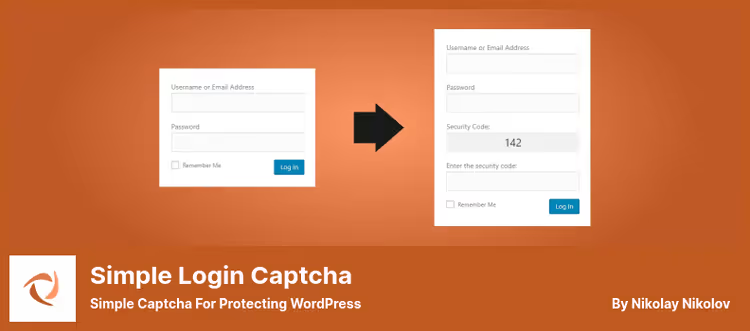
The most minimalist plugin in this roundup. Simple Login Captcha does exactly one thing: it adds a field with a three-digit number to the WordPress login page. No settings, API keys, images, cookies, or server sessions. Install it, and it works.
A random number is generated via JavaScript and displayed above the input field. The visitor enters the correct number, and access is granted. It supports WooCommerce login and multisite.
The plugin honestly warns: the protection is designed for casual bots trying brute-force password attacks. If someone specifically analyzes the plugin's code and writes a bot tailored to it, the protection can be bypassed. But for a site without forms where you only need login protection against the background noise of brute-force attacks, it's a simple and functional solution.
- Pros: zero configuration, doesn't collect data, works immediately after activation, compatible with WooCommerce.
- Cons: protects only the login page; can be bypassed in a targeted attack; 3.9 rating, some users report false blocks.
- Price: Free.
- Download: 🔗 Simple Login Captcha on WordPress.org
7. Login no Captcha reCAPTCHA: lightweight reCAPTCHA for login and registration

Another narrowly specialized plugin, this time by Robert Peake. Login No Captcha reCAPTCHA adds Google reCAPTCHA (v2 checkbox) to login, registration, and password reset pages, both standard WordPress and WooCommerce.
Unlike Google Captcha by BestWebSoft, this plugin solves exactly one task and doesn't try to cover every form on the site. It's minimal in size, doesn't add menus to the admin panel (just a settings page), and starts working right after you enter the keys.
The developer has paid close attention to the plugin's own security: version 1.8.1 closed several potential XSS vectors, removed an insecure cURL fallback, and raised the minimum PHP version to 7.4.
- Pros: minimalist, proven (60,000+ installs), regular security updates, WooCommerce out of the box.
- Cons: only reCAPTCHA v2 checkbox; doesn't protect comments or custom forms; IP whitelist is a potential vulnerability if misconfigured.
- Price: Free.
- Download: 🔗 Login No Captcha reCAPTCHA on WordPress.org
8. Friendly Captcha: proof of work with no user interaction

Friendly Captcha takes a fundamentally different approach: instead of making visitors click on traffic lights or type distorted text, the plugin solves a cryptographic puzzle in the background. This is proof of work: the visitor's browser spends a few seconds of compute time solving the puzzle, proving that there's a human behind the screen, not a script.
For the user, the process is completely invisible. No checkboxes, no picking images of buses, no typing distorted text. And, critically, no personal data collection. Friendly Captcha is GDPR-compliant by design: it doesn't use cookies, doesn't store IP addresses, and doesn't build behavioral profiles.
With 10,000+ active installs and 18 reviews, it's not a giant yet, but the approach deserves attention. Especially for European projects where privacy is a strict regulatory requirement.
- Pros: zero user interaction, full privacy, GDPR-compliant by design, no third-party cookies.
- Cons: requires JavaScript (without it, the protection doesn't work); fewer installs and reviews than competitors; on low-powered devices, background computation may be noticeable.
- Price: Free (basic), Pro plans at the Friendly Captcha website.
- Download: 🔗 Friendly Captcha on WordPress.org
9. Captcha Code: a classic visual code with no external services
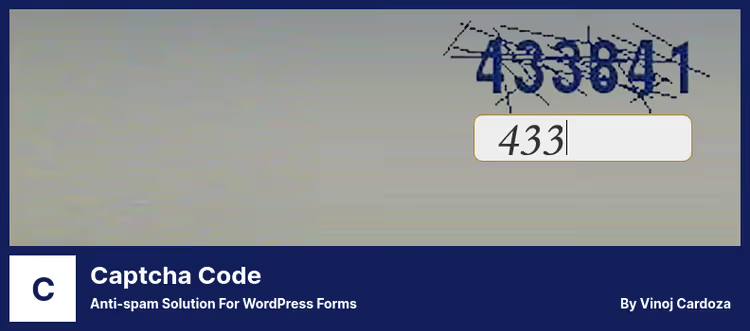
Captcha Code by WebFactory is a classic text-based CAPTCHA with no external services. The plugin generates an image with letters and numbers; the visitor types the code, and the form submits. No Google keys, no external APIs, no registrations; everything happens on your server.
100,000+ installs and a recent update (v3.31, April 2026) confirm the plugin is alive and maintained. Configuration is straightforward: select the forms (login, registration, comments, password reset), the code type (letters, numbers, or both), case sensitivity, and you're done.
The plugin is fully self-contained. That's both a plus (no dependency on Google or Cloudflare) and a minus (no machine learning to distinguish bots from humans, as with hCaptcha or reCAPTCHA v3). But for projects where independence from external services matters, it's an excellent option.
- Pros: fully self-contained (no external API dependencies), recently updated, 100,000+ installs, Russian-language interface support.
- Cons: visual verification only (can be bypassed with OCR), no invisible mode, some reviews mention repeating codes.
- Price: Free.
- Download: 🔗 Captcha Code on WordPress.org
⁉️🤔 Frequently asked questions
Is a CAPTCHA still necessary for a website in 2026?
Yes. Spam bots have gotten smarter, and mass spam through contact forms and comments hasn't gone anywhere. According to Akismet's 2025 report, automated systems block over 99% of spam comments on WordPress, and CAPTCHA remains the first line of defense for forms that don't go through Akismet. If your site has a contact form, registration, or comments, a CAPTCHA is a must.
Which CAPTCHA is better: reCAPTCHA, hCaptcha, or Turnstile?
It depends on your priority. If privacy matters most, go with Turnstile (invisible, no data collection). If you want to earn from your CAPTCHA, hCaptcha pays for every solve. If you need maximum coverage and a familiar interface, reCAPTCHA. In practice, for a typical site the difference in protection is minimal: all three handle bots very well. Turnstile wins on convenience (the visitor sees nothing at all), hCaptcha wins on privacy plus micropayments, and reCAPTCHA wins on ecosystem and number of integrations.
Can you use two CAPTCHAs at the same time?
Technically yes, but in practice it worsens the user experience and creates conflicts between plugins. Double verification doesn't provide double protection: a bot that bypassed one CAPTCHA will very likely bypass the second. It's better to install one reliable plugin and supplement it with a CAPTCHA-free anti-spam solution such as Akismet or CleanTalk.
What should I do if a CAPTCHA blocks real users?
Check the sensitivity settings. For reCAPTCHA v3, lower the score threshold (the default is 0.5; try 0.3). For hCaptcha, switch from "always challenge" to "auto." For CAPTCHA 4WP, enable failover: when the v3 score is low, the plugin shows a v2 checkbox instead of blocking. And be sure to monitor logs for the first couple of days after installation; that will resolve most issues.
Does a CAPTCHA replace other security measures?
No. A CAPTCHA protects forms from automated submissions but doesn't protect against exploiting plugin vulnerabilities, brute-forcing passwords via XML-RPC, or session hijacking. A CAPTCHA is one layer in a defense strategy. The minimum security stack for WordPress: CAPTCHA on forms + a firewall (Wordfence or Solid Security) + XML-RPC disabled (if not in use) + automatic updates for plugins and core.
Which CAPTCHA plugin is the lightest on the server?
Simple Login Captcha: under 10 KB of code, zero settings, creates no database tables. But it only protects the login page. Among universal options, Simple Cloudflare Turnstile: verification happens on Cloudflare's side, and your server only validates the response through a lightweight API request.
Do I need a CAPTCHA if I already have Akismet?
Akismet only protects comments. Registration, login, password reset, and contact forms remain open. A CAPTCHA on login guards against brute force, on registration it blocks fake accounts, and on contact forms it stops spam submissions. These are different layers of defense; they complement each other, not replace each other.
What to install on WordPress in 2026: the final breakdown
Nine plugins cover the entire range of scenarios, from "just protect the login" to "full control over every form with analytics and geo-blocking." Here's a quick decision matrix:
- If you want minimum effort, go with Simple Cloudflare Turnstile. Two minutes to set up, completely free, invisible to visitors. Our top pick for a typical site in 2026.
- If privacy and GDPR matter, choose Friendly Captcha or hCaptcha. Neither collects personal data; Friendly Captcha doesn't even show the visitor anything at all.
- If you need maximum features in a single plugin, pick CAPTCHA 4WP. Three providers, failover, geo-blocking, a flagship feature set.
- If you already have Contact Form 7, Really Simple CAPTCHA is most likely already running. Check it and add something from the main list for the rest of your forms.
- If you only need login protection, choose Simple Login Captcha or Login No Captcha reCAPTCHA. The first requires zero configuration, the second uses the familiar Google checkbox.
Start with the free version of any plugin from this list on a test site. Make sure forms submit, users aren't blocked, and spam stops coming in. Then activate it on your production site and monitor logs for a couple of days. Which CAPTCHA plugin do you use? Share in the comments; it would be interesting to compare real-world experiences.

A professional team of writers and editors specializing in creating quality content.