














🛡️ 12+ best anti-spam plugins for WordPress 2026
Spam in WordPress comments is like cockroaches: relax for a moment, and they're everywhere. You open the admin panel in the morning, and there are three hundred "guest posts" about cheap sneakers and online casinos. Sound familiar?
The good news is that the anti-spam plugin market for WordPress in 2026 is mature and competitive. Developers figured out long ago: CAPTCHA annoys people, while quiet algorithmic checks work without sabotaging user experience. We tested more than two dozen solutions and selected the ones that actually work without turning your site into an obstacle course for readers.
Below is an honest list of 12+ plugins that hold the line in 2026, from free open source to cloud enterprise solutions. At the end, a bonus: how to squeeze the most out of WordPress's built-in discussion settings without a single plugin.
💡 Quick overview:
- If your site needs free protection without registrations, install Anti-Spam Bee or Spam Destroyer.
- If your budget allows monthly expenses and accuracy is critical, go with Akismet or CleanTalk.
- If you need a firewall and malware scanner in addition to spam protection, take a look at Wordfence or WP Ghost.
- If you want machine learning and adaptive protection from new patterns, your choice is OOPSpam or SpamAnvil.
- If your site gets fewer than a hundred comments per day, start with the bonus settings at the end of the article.
Comparison table: all plugins at a glance
Plugin | Free | Protection type | CAPTCHA | Statistics | Active installations |
|---|---|---|---|---|---|
Akismet | For personal sites | Cloud API | No | Yes, on paid plans | 5M+ |
Anti-Spam Bee | Yes, completely | Local | No | Yes, monthly | 700K+ |
WP Ghost (Hide My WP) | Freemium | Firewall + hiding | No | Yes | 300K+ |
CleanTalk | 14-day trial, from $8/year | Cloud API | No | Yes, detailed | 200K+ |
Titan Anti-Spam | Yes, premium addons | Local + scanner | No | No | 200K+ |
SpamAnvil | Yes, completely | Machine learning (LLM) | No | Yes, analytics | 1K+ |
Spam Destroyer | Yes, completely | Local (cookies) | Fallback text | No | 6K+ |
Wordfence Security | Yes, premium plan | Firewall + scanner | No | Yes, detailed | 5M+ |
WordPress Zero Spam | Yes, completely | JS key (client+server) | No | No | 50K+ |
Stop Spammers | Yes, premium plan | Multi-check (20+) | OpenCaptcha/reCAPTCHA/SolveMedia | Yes, dashboard | 30K+ |
OOPSpam Anti-Spam | 40/month free | Machine learning (API) | No, honeypot | Yes, analytics | 5K+ |
Captcha Plus | Premium ($25) | Captcha (math/slide/OCR) | Yes, several types | No | Paid, CodeCanyon |
Stop WP Comment Spam | Yes, Pro version | Local + ML (Pro) | No | Yes (Pro) | 20K+ |
1. Akismet

Akismet is the de facto anti-spam standard for WordPress. The plugin is developed by the Automattic team (the same people behind WordPress.com, Jetpack, and WooCommerce), and comes pre-installed on every fresh WordPress site. All you need to do is activate it and connect an API key.
The principle is cloud-based: every incoming comment is sent to Akismet servers, where it runs through hundreds of verification algorithms. Clean comments publish instantly, suspicious ones go to the spam folder. Out of the box you get status history for every comment: you can see what was moderated manually and what was filtered automatically.
Pros: corporate-level accuracy, no CAPTCHA required, zero configuration after API key activation, over 5 million active installations.
Cons: free only for personal and non-commercial sites; commercial use requires a paid subscription.
🔗 Akismet on WordPress.org | 📋 License terms
2. Anti-Spam Bee

🔗 Anti-Spam Bee on WordPress.org
Anti-Spam Bee is Akismet's main open source competitor. Completely free, including for commercial use, and requires no registration or sending data to third-party servers. Works locally, fully GDPR compliant.
Functionally, the plugin covers practically everything you need from an anti-spam solution: trusted commenters, IP address verification, country blocking, direct spam deletion (bypassing trash), administrator notifications, integration with Fail2Ban, automatic database cleanup of spam after a specified number of days, and monthly statistics on the dashboard.
Pros: completely free, no external dependencies, GDPR compliant, regular updates.
Cons: no cloud "collective immunity" like Akismet/CleanTalk, spam from unique templates may slip through more often.
🔗 Anti-Spam Bee on WordPress.org | 🖼 Screenshots
3. WP Ghost (Hide My WP)
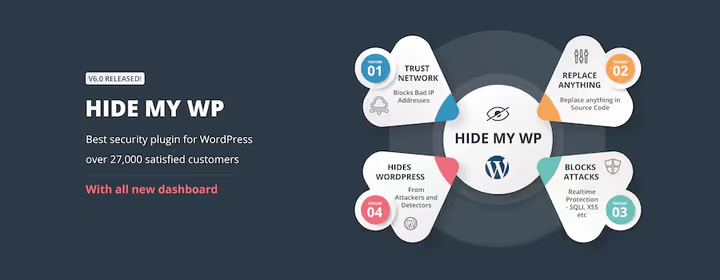
The plugin was formerly called Hide My WP and sold exclusively on CodeCanyon (where it accumulated 27,000+ sales). Today it's available as WP Ghost on WordPress.org with a free core and premium addons. This isn't just anti-spam, it's a full-fledged firewall and WordPress masking system.
WP Ghost hides standard URLs: wp-login, wp-admin, wp-content, plugins and themes, from detectors, bots and hackers. At the same time, the plugin blocks SQL injection and XSS attacks before they reach the database. Anti-spam here is a side effect of the general "invisibility" policy: bots simply can't find the entry point.
Pros: maximum WP masking from bots and scanners, compatibility with BuddyPress and bbPress, proactive protection at the URL level.
Cons: renaming system URLs can break some plugins, requires careful configuration, full functionality is paid.
4. CleanTalk Spam Protection
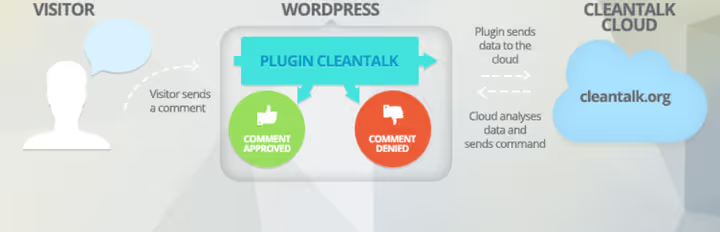
CleanTalk is a cloud anti-spam service with impressive coverage: it protects not only comments, but also registrations, contact forms, WooCommerce orders, bookings, subscriptions, polls and even spam in widgets. All without a single CAPTCHA, puzzle or math problem.
How it works: every user action is uploaded to CleanTalk cloud servers, where it undergoes a series of checks, too-fast submission, disabled JavaScript, HTTP links from blacklists and other heuristics. Clean requests pass, spam gets blocked. In addition, the plugin can retrospectively check and delete existing spam comments and users.
Pros: wide coverage of forms and plugins (Contact Form 7, Ninja Forms, WPForms, MailChimp, BuddyPress, WooCommerce), very low price for commercial sites.
Cons: requires paid subscription after 14-day trial, depends on cloud service.
🔗 CleanTalk on WordPress.org | 🖼 Screenshots
5. Titan Anti-Spam & Security
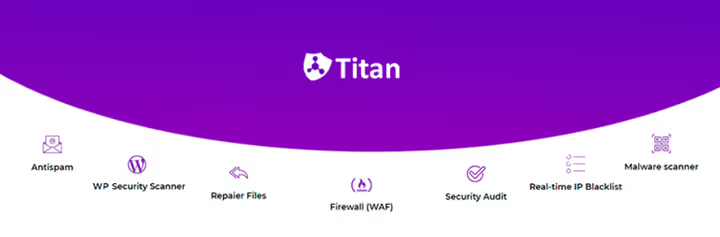
Titan started as a simple spam blocker, but after a major update it turned into a WordPress security combine. Today it's simultaneously: anti-spam, malware scanner, firewall, security audit and damaged file recovery system.
The interface is intuitive: you see a dashboard with key metrics and can launch a scan or enable real-time IP blacklisting with one click. There's no CAPTCHA, the plugin uses behavioral analysis.
Pros: multi-functionality (security + anti-spam in one), simple interface, free core.
Cons: some features are behind premium addons, full scanning can load CPU on weak servers.
🔗 Titan on WordPress.org | 🖼 Screenshots
6. SpamAnvil

SpamAnvil is a representative of the new wave of anti-spam plugins using large language models to analyze comments. Unlike Akismet (which requires a paid plan for commercial sites) or simple keyword filters, SpamAnvil understands the meaning of a comment and identifies even the most sophisticated spam.
The plugin is completely free and requires no registration. The LLM model analyzes text and context, not just searching for stop words. This allows filtering semantic spam, messages that look meaningful but are advertising or malicious. Open source means you can verify exactly how filtering works.
Pros: AI analysis of comment meaning, completely free and open, no CAPTCHA or registrations.
Cons: relatively new plugin with few installations, requires compatibility testing with non-standard themes.
7. Spam Destroyer

🔗 Spam Destroyer on WordPress.org
Spam Destroyer is the minimalism champion. The plugin has no settings page, no admin menu item, no nothing except the blocking mechanism itself. Install, activate, forget. Works through a combination of cookies and JavaScript checks, inherited from the legendary Cookies for Comments and WP Hashcash.
If a bot doesn't execute JavaScript, its comment is blocked instantly and irreversibly. For rare cases when a real user falls under the check, there's a fallback text CAPTCHA. The plugin is supported and updated to this day: the latest version came out in April 2026, compatibility tested up to WordPress 7.0.
Pros: absolutely zero configuration, doesn't load the database with spam, completely free.
Cons: no statistics, no log, no fine-tuning, won't work for sites with high reporting requirements.
🔗 Spam Destroyer on WordPress.org
8. Wordfence Security

Wordfence is the most popular WordPress security plugin with 5 million active installations. Although its core is a firewall and malware scanner, the built-in anti-spam protection effectively blocks spam in comments and forms as part of a comprehensive security perimeter.
The Wordfence firewall works at the endpoint level: it identifies and blocks malicious traffic before it reaches WordPress. The scanner checks core files, themes and plugins against repository versions, detecting unauthorized changes. Anti-spam here isn't a separate function, but part of the firewall rules: requests matching spam bot patterns are blocked along with other threats.
Pros: most popular WordPress firewall, comprehensive protection (firewall + scanner + anti-spam + two-factor authentication), free core with real-time web rules.
Cons: full functionality (endpoint firewall, real-time IP blacklist) requires premium plan, may be overkill for a site that only needs anti-spam.
🔗 Wordfence on WordPress.org | 🖼 Screenshots
9. WordPress Zero Spam

WordPress Zero Spam blocks virtually all automated spam through JavaScript key verification on both client and server sides simultaneously. If a user has JavaScript disabled, the comment doesn't pass, period. For the vast majority of real visitors this isn't a problem, but for bots it's an insurmountable barrier.
The plugin works out of the box: install, activate, spam disappears. Integration with Contact Form 7, Gravity Forms, Ninja Forms, BuddyPress and WPForms is built in by default. Additionally, you can block spammer IP addresses permanently, they won't even see your site.
Pros: minimal configuration, wide integration with form builders, free.
Cons: blocks comments without JavaScript, which may filter out a tiny fraction of real users.
10. Stop Spammers

🔗 Stop Spammers on WordPress.org
Stop Spammers is an anti-spam movement veteran with over 50 settings and 20+ different checks for spam and malicious events. Unlike many competitors, the plugin gives the user a second chance: if a comment or login attempt is flagged as spam, the visitor lands on a page with CAPTCHA (OpenCaptcha, Google reCAPTCHA or SolveMedia) and can prove they're human.
The plugin protects comments, registrations, login attempts and contact forms. The built-in dashboard shows spam activity in real time, there are diagnostic tests and a premium plan of the same name with extended dynamic protection.
Pros: very flexible configuration, second chance for real users, detailed diagnostics.
Cons: CAPTCHA on the recovery page still appears (though not on first comment), interface may seem overloaded.
🔗 Stop Spammers on WordPress.org | 🖼 Screenshots
11. OOPSpam Anti-Spam

OOPSpam is a representative of the new generation of anti-spam plugins using machine learning and AI for filtering. According to developers, the system blocked over 1 billion spam attempts across 3.5 million sites with 99.9% accuracy. Unlike static algorithms, the model constantly learns from new spam patterns.
The plugin uses honeypot technique instead of CAPTCHA: an invisible field is created for bots, filling which instantly disqualifies the request. A real user doesn't see or fill this field. The free tier covers 40 checks per month, paid plans expand the limit. Integrations include Contact Form 7, WPForms, Elementor Forms, WooCommerce and many others.
Pros: machine learning adapts to new spam patterns, no CAPTCHA, detailed spam analytics.
Cons: free limit (40/month) is small for active sites, depends on cloud API.
12. Captcha Plus

Captcha Plus is a premium plugin from BestWebSoft that goes against the "anti-CAPTCHA" trend. Sometimes a client needs a captcha specifically: for example, on a corporate portal login form or password recovery page, where an extra barrier isn't a bug but a feature.
The plugin offers a choice of mathematical calculations, invisible captcha, character recognition and slide captcha. Each type is configured for a specific form: login, registration, password recovery, comments. This isn't a mass solution for a blog, but a targeted tool for forms that need additional verification.
Pros: several CAPTCHA types to choose from, flexible binding to specific forms, compatibility with most themes and plugins.
Cons: premium solution on CodeCanyon, the CAPTCHA concept itself reduces comment conversion.
13. Stop WP Comment Spam (Fullworks)

🔗 Stop WP Comment Spam on WordPress.org
Stop WP Comment Spam (also known as Fullworks Anti-Spam) is a fast, simple and free way to keep the comments section clean. The plugin uses automatic filters and gives you a choice: either send suspicious comments to manual moderation, or delete them immediately or after storing for a specified number of days.
The Pro version adds machine learning for recognizing human spam (yes, that exists too), protection of all forms on the site, prevention of fake registrations in WordPress and WooCommerce, plus spam statistics with convenient visualization.
Pros: simple installation and immediate operation, flexible spam deletion/retention policy, affordable Pro version.
Cons: machine learning and form protection only in Pro, basic filters may miss sophisticated spam.
🔗 Stop WP Comment Spam on WordPress.org
Video: how to choose an anti-spam plugin for WordPress
The topic is complex, but video explains faster. Watch this breakdown of the three best anti-spam solutions for 2026, visual, with installation and testing demonstration:
Bonus: WordPress discussion settings for fighting spam without plugins
WordPress's standard settings in the Settings → Discussion section can cut up to half of spam traffic without a single plugin. This is especially relevant for small sites with a couple dozen comments per day. Let's break down each settings block.
Default article settings

Disable trackbacks and pingbacks. This one checkbox removes about half of incoming spam traffic: trackback notifications are generated automatically and are almost always spam. Leave comments open only for new articles: this way you won't get a spam comment on a five-year-old post that everyone forgot about.
Other comment settings

Requiring name and email before commenting is enabled by default, which is correct. Additionally, you can close comments on posts older than 90 days: on an active blog this prevents spam on archive pages. If you regularly update old articles, don't forget to update the publication date so the 90-day limit doesn't trigger on current content.
Email notifications

Enable notifications for every new comment if the flow doesn't exceed a couple dozen per day. You'll see every emerging comment in real time and can instantly mark spam. With thousands of comments, this option turns into a spam attack on your inbox, then it's better to disable it and switch to any plugin from the list above.
Approval after first comment

Allow users whose comment is already approved to leave new ones without pre-moderation. This reduces the moderation queue and automatically filters out new bot accounts: those commenting for the first time who haven't passed manual verification end up in quarantine.
Comment moderation
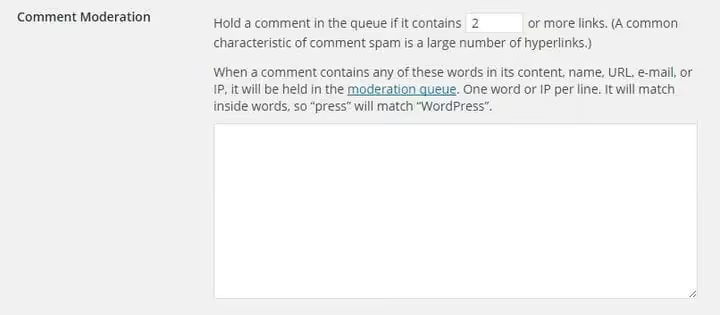
The value "2" in the link limit field is the golden mean. Guest bloggers can leave one outbound link, while standard spam comments with dozens of links go to moderation. The moderation blacklist field can be used as a profanity filter: add obscene words, and all such comments will be flagged for review.
Comment blacklist
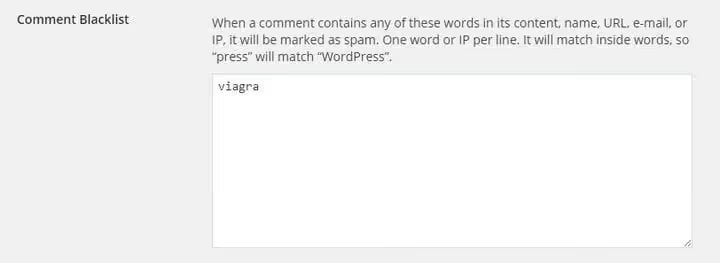
The comment blacklist is a stricter version of moderation: a comment containing a word from the list is sent not to moderation, but straight to the spam folder. This saves your time, but requires caution: an overly aggressive list can send legitimate comments to spam.
⁉️🤔 Frequently asked questions
Do you even need an anti-spam plugin for WordPress in 2026?
You do, if you have comments, registration forms or contact forms open. Automated spam bots scan the internet around the clock and make no allowances for site size. In 2025, spam traffic volume in the WordPress ecosystem grew by about 18% according to Akismet reports: spammers use generative AI to create convincing comments that pass simple filters. For a site with a dozen comments per day, discussion settings are enough. For everything else, a plugin.
Akismet or Anti-Spam Bee: which to choose?
Akismet is more accurate due to its cloud-based spam pattern database (collective immunity), but is free only for personal sites. Anti-Spam Bee is completely free and works locally without sending data to third parties. For a commercial site with a budget, Akismet. For everything else, Anti-Spam Bee covers the vast majority of needs without spending a penny.
Why is CAPTCHA bad for anti-spam?
CAPTCHA adds friction to user experience. According to Baymard Institute, each extra step on the path to a target action cuts off 10-20% of users. Math captcha or choosing traffic lights in pictures is annoying, especially on mobile devices. Modern algorithmic checks (JavaScript keys, honeypot fields, behavioral analysis) handle bots without human involvement. CAPTCHA is justified only in high-risk scenarios: login form, password recovery.
What to do if the plugin mistakenly blocked a real comment?
Most plugins send suspicious comments to the spam folder rather than deleting them irreversibly. Make it a habit to check the spam folder for false positives once a week: go to Comments → Spam and quickly scroll through. If your plugin deletes spam immediately (like Spam Destroyer), configure email notifications for every comment so you'll notice if something didn't get through.
Can you use two anti-spam plugins simultaneously?
You can, but you shouldn't. Two anti-spam plugins create conflicts: one already blocked a comment, and the second is trying to check what isn't there. Exception, a combination of "anti-spam plugin + firewall" (for example, Anti-Spam Bee and WP Ghost), where the firewall works at the URL level and doesn't intersect with comment filtering logic.
Which plugin to choose if the site is on WooCommerce?
CleanTalk and OOPSpam have native WooCommerce integration and protect not only comments, but also order checkout and registration forms. Stop WP Comment Spam in the Pro version also covers WooCommerce forms. If the budget is zero, Anti-Spam Bee plus standard discussion settings.
What to install on your site in 2026: final breakdown
We went through 13 plugins and one built-in method, and the choice comes down to a simple matrix:
- Personal blog, minimal budget, Anti-Spam Bee or Spam Destroyer, plus bonus discussion settings.
- Commercial site, budget a few dollars per month, Akismet or CleanTalk: cloud accuracy without headaches.
- Need comprehensive security, not just anti-spam, Wordfence or WP Ghost cover both spam and hacks.
- Want the most modern AI solution, OOPSpam or SpamAnvil with machine learning adapt to new attacks faster than rules.
- Need CAPTCHA specifically for specific forms, Captcha Plus gives a choice of captcha type for each form separately.
Don't put off protection. Spammers don't wait for you to choose a plugin. Install Anti-Spam Bee right now (it's two minutes), then calmly explore the alternatives from the table above. Here's to clean comments.

A professional team of writers and editors specializing in creating quality content.