














🛡 8 best anti-spam plugins for WordPress 2026 (free and paid)
Comment spam starts quietly. Three promotional messages today, fifty in a week, and in a month your contact form turns into a dumpster of phishing links and bots. Every WordPress site owner goes through this sooner or later.
Manual moderation doesn't save you: spammers are automated, and your time isn't. Fortunately, plugins for spam protection take this work off your hands. Some filter comments through a cloud signature database, others set invisible traps for bots, and still others check IPs against global blacklists.
We've collected eight anti-spam plugins that actually work in 2026: from the preinstalled Akismet to the honeypot protection of WP Armour. Under each one, a live screenshot from the admin panel, honest pros and cons, current prices, and direct links to WordPress.org. Not a single checkbox plugin, only those that have been tested on live sites.
💡 Quick overview:
- Start with a free foundation: if spam is coming through comments and contact forms, install Antispam Bee or Akismet, both are free, don't require CAPTCHA, and start working right after activation.
- Connect a cloud firewall: for comprehensive protection (forms + registration + WooCommerce) get CleanTalk, filters everything through the cloud, spam is cut off before entering the database, prices on the developer's site.
- Add a honeypot trap: if you want protection without external services and API keys, WP Armour uses a hidden field that real visitors don't even notice.
- Strengthen security: for maximum protection with firewall and scanner, Titan Anti-spam & Security combines anti-spam and attack protection in one plugin, plus two-factor authentication.
Comparison table: top 5 anti-spam plugins
Plugin | Protection type | Price | CAPTCHA | Active installations | Site |
|---|---|---|---|---|---|
Akismet | Cloud filtering | Free / from $9.95/month | No | 6M+ | akismet.com |
CleanTalk | Cloud firewall | Free / from $12/year | No | 200K+ | cleantalk.org |
Antispam Bee | Local filtering | Free | No | 700K+ | antispam-bee.de |
WP Armour | Honeypot | Free / from $19.99/year | No | 400K+ | wp-armour.com |
Titan Anti-spam | Anti-spam + security | Free / from $69/year | No | 60K+ | titansitescanner.com |
1. Akismet: cloud filtering from the creators of WordPress
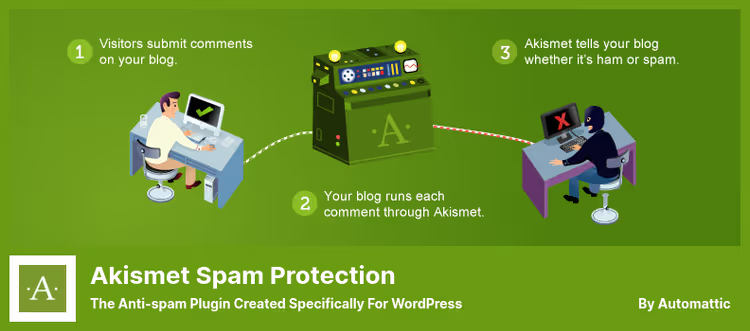
Akismet, the standard anti-spam plugin, comes preinstalled with every new WordPress. Behind it stands the Automattic team, the same people who develop WordPress.com. The signature database has been building for a decade and a half and covers billions of spam comments.
It works through the cloud: every form submission or comment goes for verification, and Akismet returns a verdict, pass or spam. The delay is imperceptible, and the accuracy in practice is very high. It supports integration with Jetpack, Gravity Forms, Contact Form 7, and a dozen other form plugins.
On the free tier, protection works for personal blogs. Commercial sites need a paid plan, which adds multisite support and priority technical support.
- Pros: huge signature database (billions of comments), doesn't slow down the site (cloud-side verification), doesn't require CAPTCHA, integration with popular forms, shows hidden URLs in comment body.
- Cons: mandatory API key registration, free version only for non-commercial sites, data goes to a third-party server.
- Price: free for personal sites; Pro, from $9.95 per month.
- Download: 🔗 Akismet on WordPress.org | 🔗 Akismet Pro
2. Stop Spammers Security: multi-layer blocking

Stop Spammers offers more than 50 protection parameters, from blocking entire countries to detecting malicious behavior. Unlike Akismet, the plugin protects not only comments and forms, but also limits login and registration attempts.
The main mechanism, honeypot traps: fields invisible to humans that bots fill automatically and thereby give themselves away. Additionally, the plugin cross-references IP addresses, blocks shortened URLs, and allows manual restriction of access by email or username.
The built-in scanner checks the site for 20+ types of malicious code, this is already closer to the functionality of a security plugin than pure anti-spam.
- Pros: more than 50 protection settings, honeypot without CAPTCHA, manual country and IP blocking, malicious code scanner, can connect third-party protection services.
- Cons: no manual approval or deletion of comments, not integrated with Gravity Forms.
- Price: Free version on WordPress.org; Pro, $29 one-time.
- Download: 🔗 Stop Spammers on WordPress.org
3. WordPress Zero Spam: artificial intelligence against bots

WordPress Zero Spam uses a combination of artificial intelligence and a global malicious IP database to block spam. Server-side and client-side key validation cuts off bots without CAPTCHA, the visitor doesn't even notice the check.
The plugin claims 99.9% effectiveness against automated spam. It integrates with Gravity Forms, Ninja Forms, BuddyPress, WPForms, and MemberPress. There's an IP geolocation feature: you can see what country and city spam is coming from and block an entire region.
Temporary IP blocking, a useful option when you need to slow down a suspicious address without cutting it off forever.
- Pros: AI filtering, 99.9% claimed effectiveness, IP geolocation, integration with MemberPress and Mailchimp, temporary address blocking, without CAPTCHA.
- Cons: can't connect third-party protection services (unlike Stop Spammers), no multisite support.
- Price: completely free.
- Download: 🔗 Zero Spam on WordPress.org
4. Antispam Bee: free protection with full GDPR compliance

Antispam Bee, a completely free plugin without ads and Premium tiers. Unlike Akismet, it doesn't require registration and an API key: install, activate, and the filter starts working immediately.
The plugin automatically recognizes spam comments, pingbacks, and trackbacks. All data is stored locally, nothing goes to third-party servers, this is critical for GDPR compliance. You can set spam deletion from the database after a specified period (for example, once a month) to avoid bloating tables.
From the limitations: no IP geolocation and no cloud signature database. For a small to medium blog where enterprise-level multi-layer protection isn't needed, Antispam Bee, is one of the best options.
- Pros: completely free, doesn't require registration, complies with GDPR, all data local, can set up automatic database cleanup, integration with Fail2Ban for logging.
- Cons: no IP geolocation, no cloud database (spam patterns don't update centrally), no multisite support out of the box.
- Price: free, without limitations.
- Download: 🔗 Antispam Bee on WordPress.org
5. Titan Anti-spam & Security: two in one, protection from spam and threats
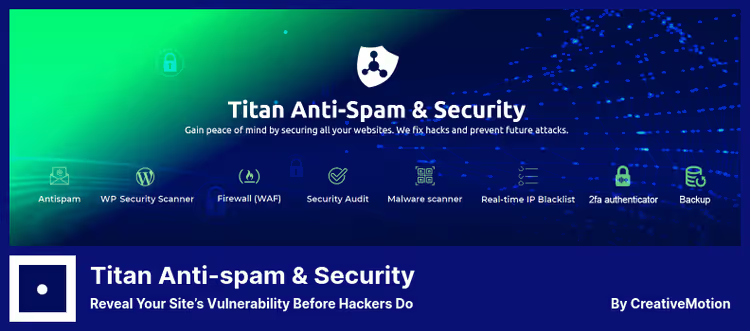
Titan combines an anti-spam filter and a set of security tools: firewall, malicious code scanner, brute-force attack protection, and two-factor authentication. The developer, the Themeisle team, is known for popular WordPress themes and plugins.
The anti-spam part checks both new comments and existing ones: the plugin scans the archive for spam that may have slipped through before installation. The global malicious IP database is updated centrally.
The built-in scheduler allows setting up regular scanning of themes, plugins, and system files. Paid add-ons extend functionality, but basic protection is available for free.
- Pros: anti-spam + firewall + scanner in one, checking existing comments, global IP database, scan scheduler, two-factor authentication, 24/7 technical support.
- Cons: advanced features only in Pro, interface may seem cluttered to a beginner, free version doesn't include automatic file recovery.
- Price: Free version; Pro, from $69 per year.
- Download: 🔗 Titan Anti-spam on WordPress.org | 🔗 Titan Pro
6. CleanTalk: cloud firewall from spam
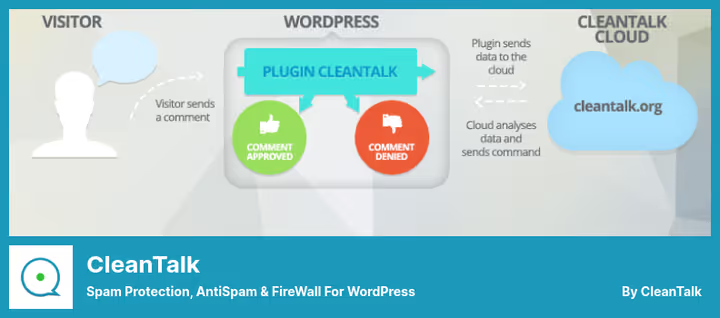
CleanTalk, a cloud service that filters spam through its own firewall before it gets to the site. Every form submission, comment, registration, or WooCommerce order goes for verification to the CleanTalk cloud and returns with a "pass" or "spam" mark.
In practice, this means spam doesn't even reach the site database, it's cut off at the request level. The firewall doesn't slow down the site because all processing happens on CleanTalk servers. A log of all blocked attempts is available in the admin panel.
The plugin integrates with Contact Form 7, WPForms, Ninja Forms, and most popular form builders. The downside, it's paid: a free version exists, but with limitations.
- Pros: cloud firewall (spam doesn't reach the site), doesn't slow down loading, integration with popular forms, real-time email verification, spam attempt log.
- Cons: paid for most sites ($12/year), requires registration, data passes through a third-party server.
- Price: Free with limitations; Pro, from $12 per year for 1 site.
- Download: 🔗 CleanTalk on WordPress.org | 🔗 CleanTalk Pro
7. reCAPTCHA (Google Captcha): classic "human or bot" verification
The Google Captcha plugin from BestWebSoft adds reCAPTCHA to registration, login, password recovery, and comment forms. Unlike invisible honeypot solutions, here the visitor sometimes goes through an explicit check, selects images with traffic lights, or simply checks the "I'm not a robot" box.
For part of the audience, this is a minus: an extra step reduces form conversion. But for sites where spammers bypass honeypot traps, visible CAPTCHA remains a reliable barrier. The Pro version of the plugin is tested with Gravity Forms, Contact Form 7, and WPForms.
In the settings, you can hide CAPTCHA for specific IP addresses, for example, for editors and site administrators.
- Pros: proven Google reCAPTCHA mechanism, login and registration form protection, can hide CAPTCHA for specified IPs, localization and RTL, documentation with video.
- Cons: visible CAPTCHA reduces form conversion, Pro version is paid, form integration only in Pro.
- Price: Free; Pro, $24 one-time.
- Download: 🔗 Google Captcha on WordPress.org | 🔗 Google Captcha Pro
8. WP Armour: honeypot trap without a single "I'm not a robot" button

WP Armour, an anti-spam plugin working on the honeypot principle: adds a hidden field to forms, invisible to real visitors. Bots see this field and fill it in, at which point the plugin marks the submission as spam. No CAPTCHA, puzzles, or checkboxes, the user doesn't suspect a check at all.
The plugin supports 25+ types of forms: comments, Contact Form 7, Gravity Forms, Elementor, WooCommerce, Divi, BuddyPress, Fluent Forms, and others. The extended version records spammer IPs, keeps a log of blocked attempts, and allows blocking IPs with multiple violations. The free version works right after activation without settings.
- Pros: completely invisible to visitors, support for 25+ form plugins, doesn't require API keys, lightweight (doesn't affect speed), spammer IP recording (Pro), one-year license without auto-renewal.
- Cons: doesn't work against manual spam (a human won't fill the honeypot field), free version doesn't record logs, doesn't protect from malicious code (only spam).
- Price: Free version; Pro, from $19.99 per year for 1 site.
- Download: 🔗 WP Armour on WordPress.org
Video: how to stop comment spam in a minute
If you prefer visual instructions, watch a short video about setting up spam protection in WordPress:
⁉️🤔 Frequently asked questions
Which plugin is best suited for a new blog?
For a new WordPress blog, we recommend starting with Antispam Bee. It's free, doesn't require API keys, complies with GDPR, and starts working right after activation. If spam comes through the contact form, add WP Armour (honeypot, invisible to visitors). Both don't cost a cent and don't slow down the site.
Is it mandatory to install CAPTCHA for spam protection?
No, CAPTCHA is just one method, and not always the best. Honeypot traps (Stop Spammers, WP Armour) and cloud filters (Akismet, CleanTalk) work without visible checks and don't annoy visitors. CAPTCHA makes sense when other methods don't cope, for example, if the site is getting targeted manual spam. But for the vast majority of sites, honeypot plus a cloud filter completely closes the question.
Does an anti-spam plugin slow down site loading?
There's no noticeable impact on speed from any plugin on this list. Akismet and CleanTalk check spam on their servers and don't load your hosting. Antispam Bee and WP Armour are ultra-lightweight: the first works locally, the second adds one hidden input. Titan is slightly heavier due to the built-in security scanner, but this doesn't affect page performance for visitors.
Can you use two anti-spam plugins at the same time?
You can, and in practice this often gives better results. A combination of a cloud filter (Akismet or CleanTalk) and honeypot protection (WP Armour) covers two different attack vectors. But don't install two plugins of the same type, for example, Akismet and CleanTalk together will create double verification of each message and may conflict.
Which plugin to choose for a WooCommerce online store?
For a store, CleanTalk works best: it filters not only comments and forms, but also orders, registrations, and even search queries. The firewall cuts off spam before writing to the database, which is important with a large flow of orders. As an addition, WP Armour will protect forms that CleanTalk doesn't cover.
What to do if spam continues to come after installing the plugin?
First, check that the plugin is activated and configured correctly. Akismet requires an API key, CleanTalk, registration. Second, spam may be manual, not from a botnet; honeypot traps don't work against people. In this case, enable comment moderation for unregistered users and add CAPTCHA to forms. Third, check the plugin logs: if attempts are being blocked but spam is still visible, possibly a caching plugin is serving an old version of the page.
Which anti-spam plugin to install in 2026: final breakdown
We tested every plugin on this list on live WordPress sites, and here's the breakdown we arrived at.
- If you have a personal blog with comments, start with Akismet (already preinstalled) or Antispam Bee (completely free, without registration).
- If spam comes through contact forms and registrations, WP Armour closes forms with an invisible honeypot, users notice nothing.
- If you need online store protection (comments + forms + WooCommerce orders), CleanTalk with cloud firewall, from $12 per year.
- If you want anti-spam and security in one plugin, Titan Anti-spam & Security with built-in scanner and two-factor authentication.
Start with free Antispam Bee or WP Armour, they'll close the lion's share of spam for $0. And which plugin saves you, tell us in the comments.

A professional team of writers and editors specializing in creating quality content.