














🧹 5 plugins to protect WordPress from spam and unwanted content in 2026
Three hundred spam comments overnight. Half of them with explicit profanity, the rest phishing links and garbage in a dozen languages. WordPress site owners see this regularly.
Worse still: search engines index hundreds of identical links from your domain and push your site down in rankings. And old profanity filter plugins have disappeared from the WordPress.org directory one by one. Of the dozen popular solutions recommended just a couple of years ago, only one is still alive today. We combed through the directory, filtered out dead and abandoned projects, and compiled a list of five anti-spam tools that actually work.
Every plugin on this list was updated in 2025-2026, has active installations and real reviews. No "used to be great," only what you can install, launch, and use to block spam today.
💡 Quick overview:
- Install Akismet: the WordPress standard with high filtering accuracy, free for personal blogs
- Add CleanTalk if you need protection not just for comments but also for contact forms, registrations, and WooCommerce orders
- Choose Antispam Bee if privacy matters: no external APIs, free and no registration required
- Install WP Armour for lightweight honeypot protection without captcha: visitors won't even notice the verification
- Enable Zero Spam if you want "set it and forget it": minimal settings, maximum blocking
Comparison table
Plugin | Best for | Price | Key feature |
|---|---|---|---|
Akismet | Bloggers, site owners | Free / from $5/mo | Self-learning from millions of sites |
CleanTalk | Online stores, forms | from $12/year | Protection for contact forms, WooCommerce, registrations |
Antispam Bee | GDPR, privacy | Free | No external APIs, no data collection |
WP Armour | Minimalists, lightweight sites | Free | Honeypot without captcha, zero server load |
Zero Spam | "Set it and forget it" | Free / Pro $24/year | IP and country blocking, minimal settings |
1. Akismet
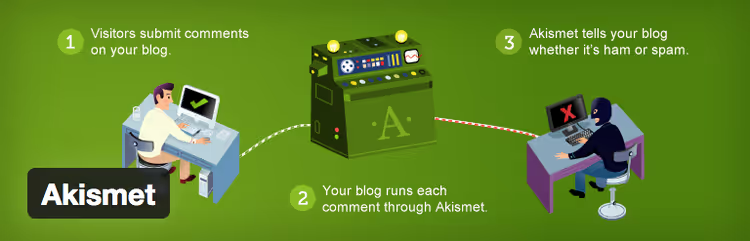
Akismet is the standard. The plugin was created by Automattic, the company behind WordPress.com and WooCommerce, and comes preinstalled on every new WordPress site. Over 20 years it has accumulated a database of billions of spam samples and learns from every new comment.
In practice, the algorithm rarely makes mistakes. Akismet checks comments, pingbacks, and trackbacks through a cloud API, comparing each request against a global spam database. Suspicious comments go to the "Spam" folder, where you can review them manually. No message is deleted automatically.
- Pros: accuracy above 99% at high volumes, free for personal blogs, preinstalled in WordPress, self-learning from your data
- Cons: paid for commercial sites (from $5/mo), requires connection to an external API, sometimes sends legitimate comments to spam
- Price: free for personal blogs; commercial plans from $5 per month
2. CleanTalk

CleanTalk addresses the main gap in most anti-spam plugins: they only check comments. CleanTalk filters everything (comments, contact forms, registrations, WooCommerce orders, bookings, even emails via wp_mail()). According to the service's own data, it blocks billions of spam attempts monthly.
The plugin works through a cloud service. Every user action (form submission, registration, comment) is sent for verification and returns with a verdict in milliseconds. No captcha: legitimate visitors don't know they're being checked. Spam bots are blocked by IP, email, text, and behavioral patterns.
- Pros: complete coverage of all site forms, invisible to users, statistics dashboard by day and source, supports 20+ form plugins out of the box
- Cons: paid with no free tier, depends on an external server, interface is overwhelming for beginners
- Price: from $12 per year for 1 site
3. Antispam Bee

Antispam Bee is the choice for those who don't want to share visitor data with third-party services. Unlike Akismet and CleanTalk, the plugin works entirely locally: no external APIs, no registration, no sending IPs to someone else's server. Just install it, and it filters.
Under the hood is a set of checks: comment language detection (spam in Chinese or Arabic on a Russian-language site equals block), link analysis in the body, empty field checks, timeouts for bots, and regular expressions. Geo-blocking is available: you can prohibit comments from specific countries. Everything is configured in a single tab under Settings → Discussion.
- Pros: completely free, purely local operation without external servers (GDPR-friendly), geo-blocking by country, regular expressions for fine-tuned filtering
- Cons: comments only (doesn't protect forms), no cloud-based learning, more complex for beginners than Akismet
- Price: free
🔗 Antispam Bee on WordPress.org
4. WP Armour, Honeypot Anti Spam

WP Armour uses the honeypot technique: a hidden field in the form that only bots see. Humans don't fill it out (the field is hidden with CSS and JavaScript), but bots enter data there and expose themselves. No captcha, puzzles, or "I'm not a robot" checkboxes: visitors have no idea they're being verified.
The plugin works with comments, Contact Form 7, WPForms, Gravity Forms, Elementor, registrations, and WooCommerce checkout. Each site gets a unique honeypot field name, so there's no universal bypass for bots. Zero server load, no API requests, no database usage.
- Pros: completely free, zero load, invisible to users, supports popular form builders, unique field names
- Cons: doesn't filter message content (only blocks bots), advanced bots can bypass JS protection, no blocked spam statistics in the free version
- Price: free
5. Zero Spam for WordPress

Zero Spam is "set it and forget it." After activation, the plugin immediately starts blocking spam without additional configuration. It uses a combination of JavaScript verification, honeypot, and known spam IP databases (Zero Spam, Stop Forum Spam, Project Honeypot). No API keys, no registration forms.
The free version includes IP and country blocking, plus comment and registration protection. The Pro version (Pro for $24 per year) adds protection for Contact Form 7, WPForms, Elementor, WooCommerce, and Gravity Forms, along with logging of blocked attempts. The plugin shows clean statistics: how much spam was blocked, from which countries, over what period. On the downside, some recent reviews complain about aggressive marketing of the Pro version in the admin panel.
- Pros: instant start without configuration, country and IP blocking, clear statistics, free version covers basic needs
- Cons: form protection only in Pro, IP database updates less frequently than cloud competitors, advanced bots bypass JS verification
- Price: free; Pro, from $24 per year
Watch: how WordPress anti-spam plugins work
This 12-minute video shows the installation and configuration of Akismet, Antispam Bee, and WP Armour on a real site, from first comments to fine-tuned filtering.
⁉️🤔 Frequently asked questions
Why have profanity filter plugins disappeared from WordPress.org?
By the end of 2025, WordPress.org removed plugins from the directory that hadn't been updated in more than 2 years and hadn't passed a security audit. WebPurify Profanity Filter, Word Replacer, Word Filter Plus, Defensio Anti-Spam, and others were caught in the cleanup: their pages now return 404. Modern anti-spam solutions (Akismet, CleanTalk, OOPSpam) analyze the entire comment text and filter out profanity along with spam, making a separate profanity filter unnecessary.
Can I use multiple anti-spam plugins at the same time?
Yes, if they don't conflict. A safe combination: one cloud-based (Akismet or CleanTalk) plus one local honeypot (WP Armour). The cloud service filters content while the honeypot blocks bots before submission. Two cloud plugins at once means double the cost and a risk of false positives. Two honeypots is pointless.
Which plugin should I choose for a WooCommerce online store?
CleanTalk. Of all the plugins listed, it's the only one that natively protects WooCommerce checkout, the "My Account" page, and the store registration form. Akismet only checks comments; Antispam Bee and WP Armour cover comments and basic forms. If budget is limited, the combination of Antispam Bee (free) plus WP Armour (free) will address most threats.
Do these plugins protect contact forms?
Partially. CleanTalk protects Contact Form 7, WPForms, Gravity Forms, Elementor, and others out of the box. WP Armour supports major form builders through JavaScript injection. Zero Spam protects forms only in the Pro version. Antispam Bee and Akismet work exclusively with comments.
Do I need an anti-spam plugin if comments are disabled?
Yes, if your site has any contact form, registration, or subscription functionality. Spam bots scan sites for input fields and send junk through any available form, not just comments. If your site has no input forms at all, you don't need a plugin.
What to install in 2026
These five plugins cover all real WordPress spam scenarios, from a personal blog to a store with thousands of products. The choice comes down to three questions: budget, form coverage, and privacy.
If you need a free and reliable option, install Akismet. It's preinstalled, trained on billions of entries, and free for personal sites.
If your site has forms, WooCommerce, or registrations, add CleanTalk. It's the only plugin that checks everything, and just from $12 per year for that level of protection is a reasonable price.
If privacy matters (GDPR, European audience, a site without external dependencies), Antispam Bee is your choice. It works locally, doesn't send data externally, and costs nothing.
If you want lightweight protection without captcha, add WP Armour as a second layer to any of the above. It's invisible, doesn't load the server, and blocks most bots before they reach the main filter.
Want "set it and forget it"? Zero Spam will launch without configuration and immediately show blocking statistics. For maximum protection, get Pro.
Start with Akismet: it's already in your admin panel. Which anti-spam plugin has saved you on real projects? Share in the comments.

A professional team of writers and editors specializing in creating quality content.