













 AIIllustrative image: AI-generated
🛡️ Akismet - still the best anti-spam plugin for WordPress? 2026 review
Spammers love WordPress no less than bloggers. Every day, hundreds of bots try to leave links to casinos, "miracle pills," and phishing pages in comments. If you don't block this garbage, the consequences go far beyond aesthetics: Google can lower your site in search results or exclude it from search results altogether.
Akismet is the oldest anti-spam plugin, created back in 2005 by the same team behind WordPress. Over 20 years, it has evolved from a simple comment filter into a full-fledged cloud system that checks every submission against a global spam database. But does it remain the best choice when there are dozens of alternatives on the market?
We put it to the test: install Akismet, review the reports, compare it with three strong competitors, and give an honest verdict on whether the plugin deserves your attention.
💡 Quick overview:
- Install and configure Akismet on WordPress: from finding the plugin to activating the API key in 5 minutes
- Choose a plan for your needs: Personal for personal blogs, Pro for commercial sites, Business for multisites
- Compare with competitors: Stop Spammers, CleanTalk, and Shield Security, strengths and weaknesses of each
- Set up spam statistics monitoring: find problematic IPs and prevent attacks before your site suffers
What Akismet is and how it works
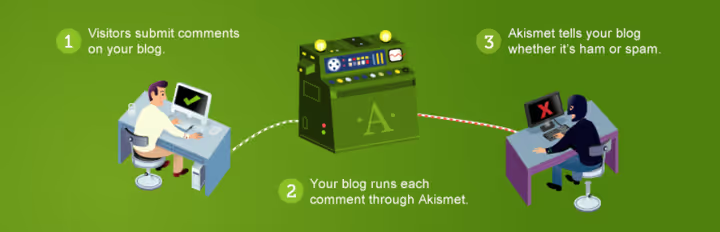
Akismet is a cloud-based anti-spam service from Automattic, the same company that develops WordPress.com, Jetpack, and WooCommerce. The plugin doesn't analyze comments locally on your server. Instead, it sends every suspicious submission, whether it's a comment, contact form entry, or user registration, to a central database where an algorithm compares it against millions of known spam patterns collected from all sites in the network.
This approach offers two advantages. First, the plugin almost doesn't load your server: all computational work happens in the cloud. Second, the database updates in real time: as soon as a new spam template is detected on one site, all others receive protection. The system is trained on such a volume of data that it rarely makes mistakes, according to Automattic itself, accuracy exceeds 99.9%.
Limitations: Akismet is designed specifically for WordPress and works with contact forms only through supported plugins (Contact Form 7, WPForms, Gravity Forms, Elementor Forms). For custom solutions in pure PHP, you'll need manual API integration.
Installing and configuring Akismet: step-by-step guide
Installing the plugin takes less than five minutes. No dancing with a tambourine required.

Go to the WordPress admin panel, open "Plugins" → "Add New." Akismet usually sits at the top of recommended plugins. Click "Install," then "Activate."

Immediately after activation, a notification appears at the top of the screen offering to set up an account. Click the large blue button, which will redirect you to the Akismet site.
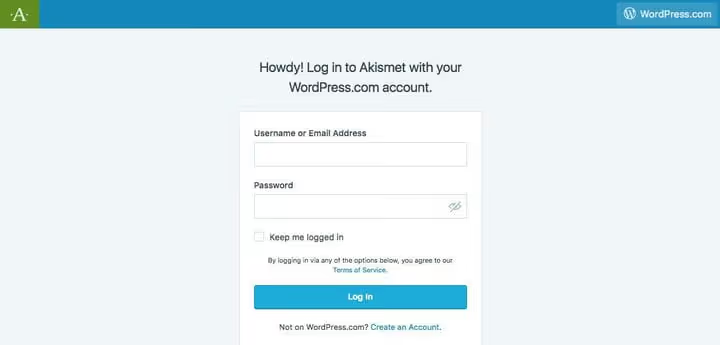
On the Akismet website, the system will ask you to log in through a WordPress.com account or create a new one. After authorization, the plan selection page opens (check current prices at akismet.com/pricing):
- Personal, "pay what you can," comment protection for personal blogs. Essentially a free tier with optional donation.
- Pro, €9.95 per month (annual payment). One commercial site, 500 spam checks per month, email support. Current prices on Akismet site
- Business, €47.95 per month. Unlimited sites, 5000 checks, priority support.
- Enterprise, custom terms. Dedicated support, custom check limits, suitable for large networks and multisites.
For most blog readers, Personal is sufficient. If your site is commercial, get Pro: 500 checks are enough for an active blog with a contact form.
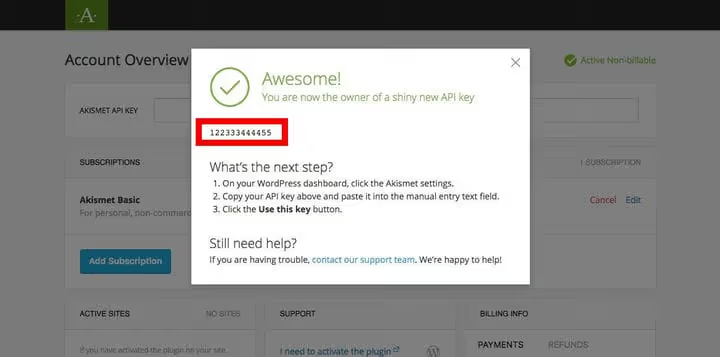
After selecting a plan and payment (or skipping payment for Personal), you land on a confirmation screen showing a 12-digit API key.

Copy the key, return to the WordPress admin panel, and paste it into the Akismet settings field.

The final step is choosing the strictness level of filtering. By default, Akismet places suspicious comments in the "Spam" folder, where you can manually review them. You can switch to automatic deletion, but we advise leaving manual mode: false positives are rare but not zero, and it's better to be safe.
Monitoring spam: what Akismet reports show
Right after setup, the plugin begins filtering incoming comments and form submissions. On the Personal tier, basic statistics are available, enough to understand whether the plugin is alive and how much spam it caught per day.
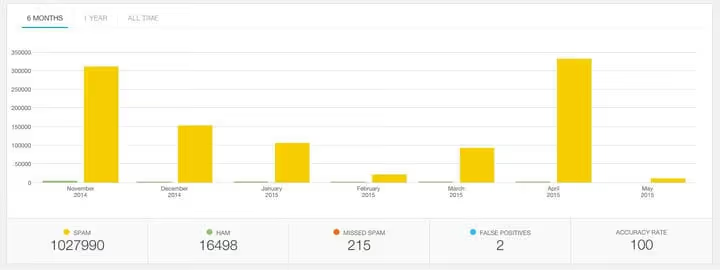
Pro and Business tiers unlock detailed analytics: monthly breakdowns, graphs, and the ability to track anomalous spikes. This comes in handy when you need to understand whether a coordinated spam attack on the site has begun.
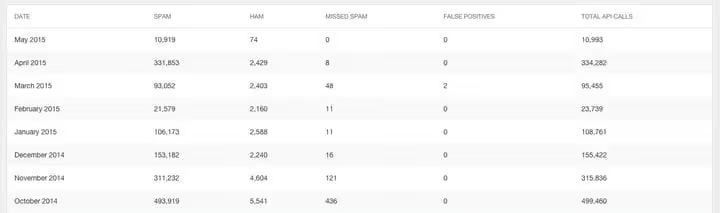
The practical benefit of statistics isn't just pretty graphs. In the Akismet admin panel ("Active Sites" section), you can click on a specific site and see the IP addresses sending the most spam. These addresses can then be added to the WordPress blacklist: "Settings" → "Discussion" → "Comment Blacklist." A simple but effective measure: you cut off the problematic source at the core level, leaving the plugin with less work.
Akismet versus competitors: three alternatives
Akismet is not the only player in the field. We selected three plugins that solve the same task using fundamentally different approaches: CAPTCHA, cloud filtering without Automattic dependency, and a firewall approach.
Stop Spammers, protection through CAPTCHA

Stop Spammers uses three CAPTCHA configurations to distinguish people from bots during login attempts, registration, and comment submission. It works well with Gravity Forms and covers five attack vectors at once: trackback spam, contact form spam, comment spam, registration spam, and login attempts.
Advantage: completely free, no premium tiers or subscriptions. Disadvantages: occasionally blocks legitimate users, doesn't work on proxy servers and hosting with limited PHP functions. Also worth noting a recent CSRF vulnerability (CVE-2025-14795) patched in version 2026.1, if you're installing, make sure the version is current.
Suitable for: owners of small sites who need basic protection without a monthly fee and who are willing to tolerate CAPTCHA.
🔗 Stop Spammers on WordPress.org
CleanTalk, cloud anti-spam without CAPTCHA
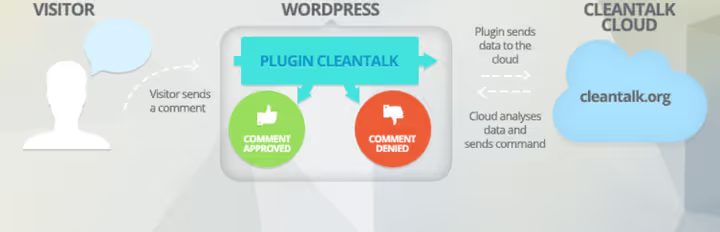
CleanTalk is a cloud service ideologically close to Akismet: it checks submissions through its own server rather than through CAPTCHA. The difference is in breadth of coverage: besides comments and registrations, it protects bookings, WooCommerce orders, widgets, email subscriptions, and mailing plugins. It also encodes email addresses on pages so bots can't parse them.
The plugin is free, but a paid subscription to the CleanTalk cloud service is required for operation (there's a 7-day trial). Price depends on the number of sites. It blocks email addresses, domains, and IPs on blacklists, and an additional firewall sends spam bots to an empty page instead of letting them onto the server.
Suitable for: WooCommerce online stores and sites with many user forms where standard comment protection is insufficient.
Shield Security, firewall for comprehensive protection

Shield Security is not so much an anti-spam plugin in pure form as a full-fledged firewall with spam comment blocking functionality. It hides the login page, blocks brute-force attacks, enables two-factor authentication, and automatically bans IP addresses caught sending spam.
Main advantage: all functionality is free. No premium tiers, no subscriptions, no ads. The plugin is completely autonomous and doesn't depend on an external cloud service, all logic runs on your server.
Disadvantages: it's a heavy combine. If you only need comment spam blocking, dragging along an entire firewall with two dozen modules is excessive. Also, local processing loads the server more heavily than cloud solutions like Akismet and CleanTalk.
Suitable for: those looking for "all in one": site security plus spam protection, without monthly payments.
🔗 Shield Security on WordPress.org
Video: installing and configuring Akismet in practice
If you prefer watching over reading, here's an excellent English-language guide to installing Akismet from scratch to working protection:
⁉️🤔 Frequently asked questions
Is Akismet needed if the site already has a firewall?
Even a good firewall (like Shield Security) filters traffic at the IP level and login attempts, but doesn't analyze comment content. Akismet looks specifically at the text of the submission and compares it against a global database of spam patterns. The two tools solve different tasks and work together peacefully.
How much spam does Akismet actually block on an average blog?
According to Automattic, a typical WordPress blog receives from 50 to 200 spam comments per day, Akismet blocks more than 99.9% of them. False positives occur in approximately 0.01% of checks, which is why we advise against enabling auto-deletion and recommend leaving manual quarantine.
Does Akismet work with custom forms?
With contact forms based on Contact Form 7, WPForms, Gravity Forms, and Elementor Forms, yes, out of the box. For custom solutions, a developer needs to manually integrate the Akismet API: call the check method before saving the submission to the database. Documentation at akismet.com/development/.
What to do if a competitor is inflating spam comments on my site?
This happens rarely, but there have been precedents. Akismet in this situation is your best friend: the database updates in real time and quickly recognizes a new spam template, even if the attack comes from hundreds of different IPs. Additionally, add keywords from the spam to the WordPress blacklist, this will cut off the remainder at the core level.
Can you use the free tier on a commercial site?
Technically, there are no restrictions. But the 500 checks per month limit on the Pro tier means an active online store will exceed the quota in a couple of days. For commercial sites, we recommend at minimum Pro, and preferably Business: the price difference pays for itself in the absence of headaches with spam.
How is Akismet better than built-in spam protection in Jetpack?
Jetpack uses the same Akismet engine for filtering, but with reduced capabilities: no detailed statistics, no filter strictness control, no plan selection for load. The separate Akismet plugin gives full control over all parameters and doesn't require installing the rest of Jetpack modules.
Conclusion: which anti-spam plugin to install in 2026
To summarize briefly, Akismet remains the best choice for the overwhelming majority of WordPress sites. It's free for personal blogs, installs in 5 minutes, and requires almost no maintenance: install it, link the key, forget about it.
CleanTalk is a worthy alternative for WooCommerce stores where, besides comments, you need to protect orders and bookings. Get Shield Security if you also need a firewall and you're willing to tolerate increased server load. Stop Spammers is a budget option for those who fundamentally don't want to pay, but CAPTCHA on login annoys visitors and reduces comment conversion.
Our choice is Akismet on the Personal tier for blogs and Pro for commercial projects. It works quietly, doesn't interfere with users, doesn't ask for CAPTCHA, and doesn't let garbage through. And what else do you need from an anti-spam plugin?

A professional team of writers and editors specializing in creating quality content.