














🤝 AffiliateWP review: affiliate marketing plugin for WordPress in 2026
Launching an affiliate program on WordPress without drowning in manual tracking, payouts, and reporting is a challenge that breaks the business model for dozens of online stores. Scattered CSV files, lost clicks, and unhappy affiliates eat profits faster than traffic grows.
But there's a tool that closes the entire affiliate marketing cycle inside the WordPress admin. No third-party SaaS platforms, no monthly commission on each referral, and no dependency on someone else's ecosystem.
We're talking about AffiliateWP, a plugin that since 2014 has helped owners of WooCommerce stores, membership sites, and LMS platforms build their own affiliate networks. We tested its capabilities in a real environment and are ready to show what it can do in 2026.
💡 Quick overview:
- Install AffiliateWP from the WordPress admin and activate your license key
- Configure integration with your eCommerce or membership plugin
- Create an affiliate area for affiliate registration and earnings tracking
- Launch a referral program with automatic click and conversion tracking
What is AffiliateWP
AffiliateWP is a self-hosted affiliate marketing plugin for WordPress, created by Pippin Williamson (author of Easy Digital Downloads) and Andrew Munro (Sumobi). Unlike cloud affiliate networks like ShareASale or CJ Affiliate, the plugin is installed directly on your site. You have full control over data, rates, and terms, with no third-party intermediary.
The plugin has been running since November 2014 and by 2026 has accumulated more than 30,000 active installations. During this time it has grown an ecosystem of 20+ official addons, 30+ integrations with popular WordPress plugins, and detailed documentation for developers.
The key advantage of the self-hosted approach: you don't pay a percentage of each affiliate sale. Standard affiliate networks take 20-30% of commissions as a platform fee. AffiliateWP charges only an annual license, fixed, with no connection to turnover.
Integrations: which plugins work with AffiliateWP
The plugin was originally designed as a bridge between your sales system and affiliate program. It doesn't create a separate cart or checkout, it connects to what you already have running.
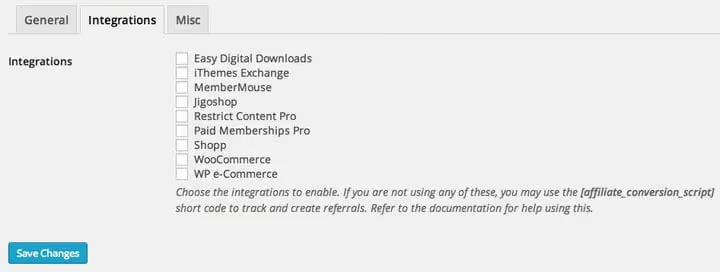
As of 2026, the plugin supports the following integrations:
Category | Plugins |
|---|---|
eCommerce | WooCommerce, Easy Digital Downloads, WP EasyCart, Jigoshop, Shopp, MarketPress |
Membership plugins | MemberPress, Restrict Content Pro, Paid Memberships Pro, MemberMouse, WishList Member, iThemes Exchange |
Forms | Gravity Forms, Ninja Forms, WPForms, Formidable Forms, Contact Form 7 |
LMS | LearnDash, LifterLMS, Tutor LMS |
Payment gateways | Stripe (via WooCommerce/EDD), PayPal |
Integration is enabled with one click on the "Integrations" tab. The plugin automatically picks up the target plugin's hooks and starts tracking referral traffic. No code required.
In practice, the connection with WooCommerce works seamlessly: an order paid through a referral link immediately appears in the AffiliateWP report linked to a specific affiliate. Commission is credited automatically when the order is completed.
Admin panel: what the site owner sees
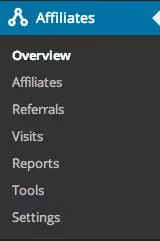
The AffiliateWP admin panel is divided into seven tabs. Let's cover each one.
Overview
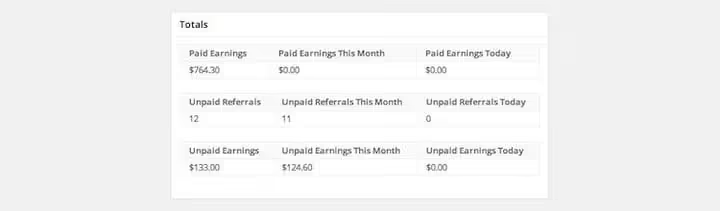
The main dashboard shows three key blocks: paid and unpaid referrals, total revenue, and recent affiliate registrations. This is enough for daily monitoring without diving into detailed reports.
Affiliates
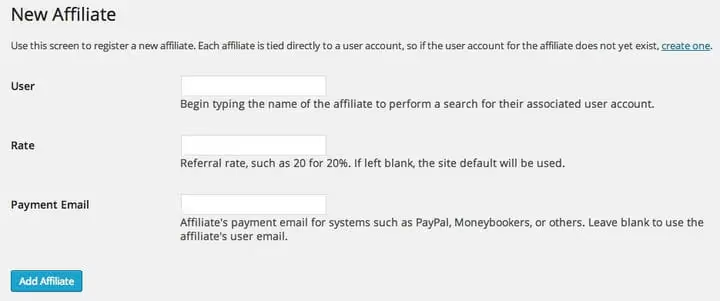
Adding an affiliate manually takes a minute: select a user from the WordPress database, specify the commission rate and payout email. The user must already be registered on the site. If there's no registration, create one through the standard WordPress "Users" section.
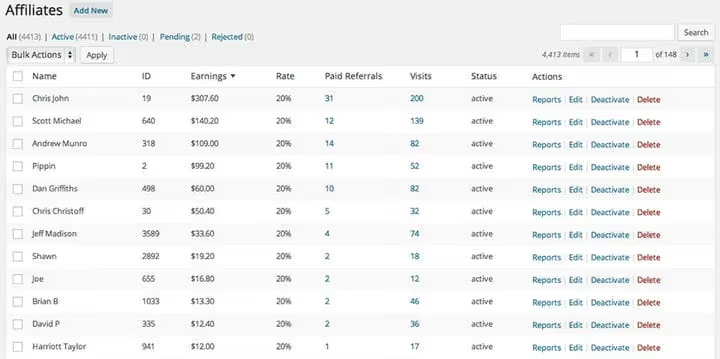
The affiliates table sorts by any column: earnings, commission rate, number of referrals, visits. One click and you see top performers and those who are idle.
Referrals
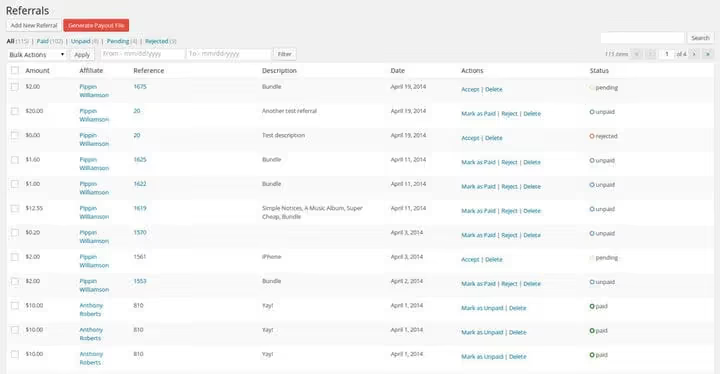
The "Referrals" tab is the heart of the plugin. Each click, conversion, and sale is recorded as a separate entry. Filters by status (paid, unpaid, pending, rejected) and date range allow you to quickly find the needed segment. Referrals can be moderated manually: reject a suspicious one, mark as paid, accept payment.
Visits
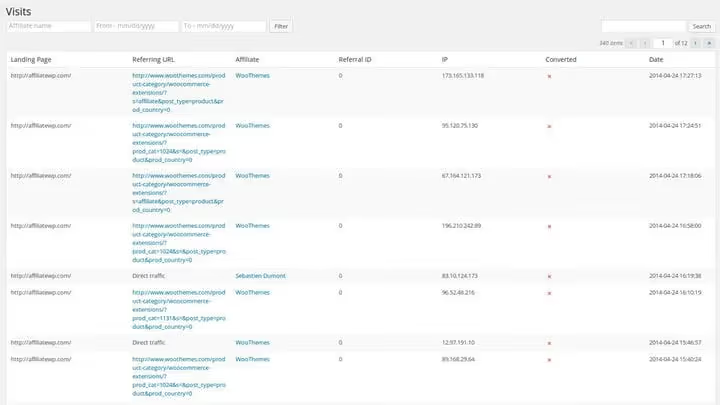
The "Visits" tab shows where traffic came from: landing page, referrer, specific affiliate, time, IP, and what's especially valuable, whether conversion occurred. This gives a transparent picture of each partner's traffic quality.
Reports
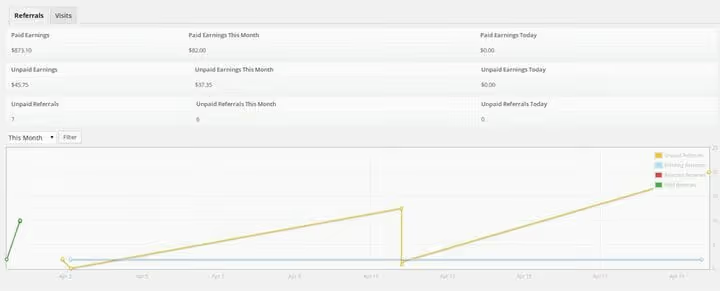
The built-in reports module builds graphs of conversions and visits by timelines: today, yesterday, this month, last month, this year. Custom range is available. Key metrics are displayed above the graph, no scrolling needed.
Tools
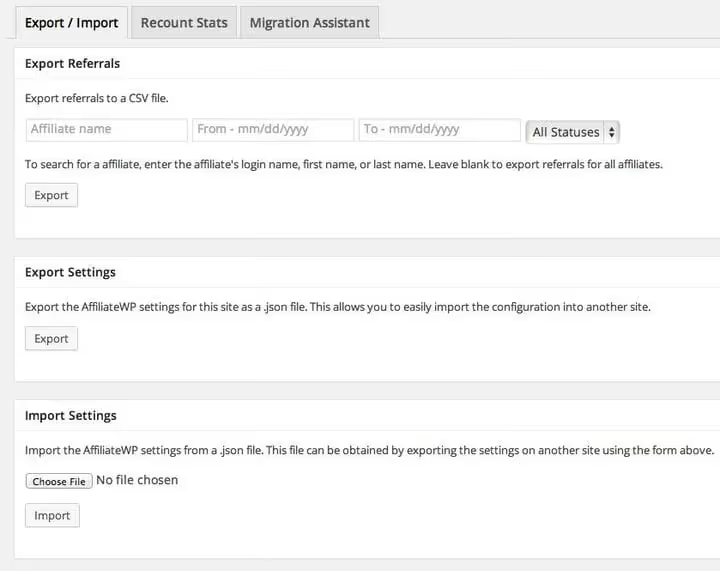
Three useful utilities:
- CSV export: referrals with filtering by affiliate, date, and status. Convenient for accounting.
- Settings import/export: transfer configuration between sites.
- Recalculate statistics: if data for a specific affiliate is corrupted (rare, but happens during migrations).
- Migration from Affiliates Pro: for those switching from the old solution.
Settings
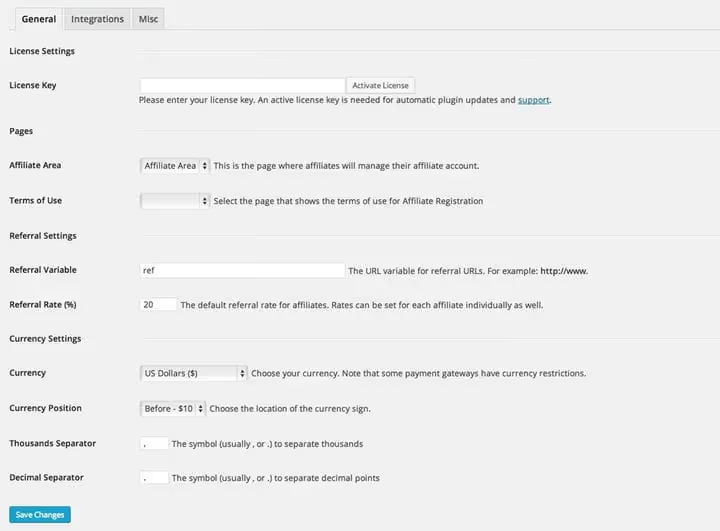
On the "Settings" tab you configure:
- License key (needed for auto-updates and support)
- Affiliate area and terms of use pages
- Referral URL parameter (default is
ref) - Default commission rate
- Currency and number format
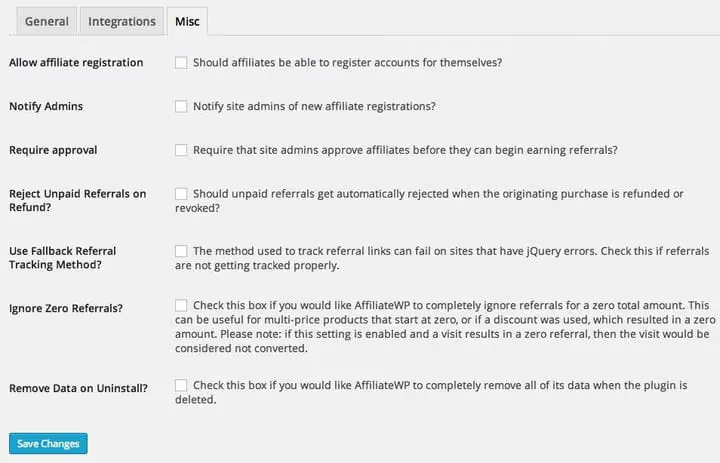
Additional settings include automatic admin notification of new applications, manual registration moderation, and fine-tuning of referral tracking.
Affiliate area: what your affiliates see
When activated, the plugin automatically creates an "Affiliate Area" page with the [affiliate_area] shortcode. This is the affiliate's personal dashboard, fully in your site's design.
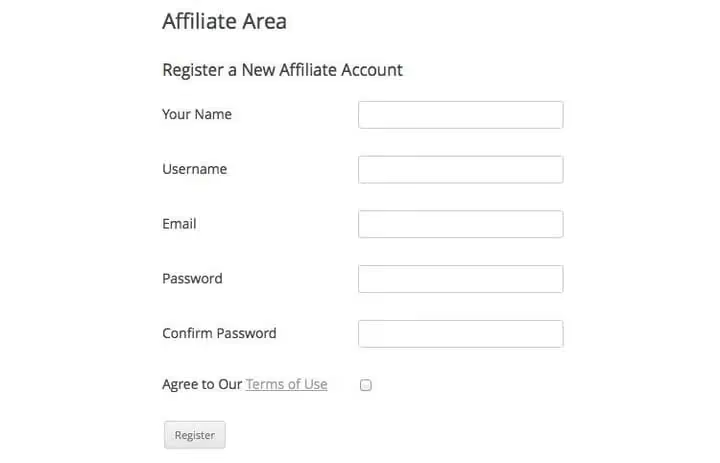
If registration is open, a new affiliate fills out the standard form (name, email, password) and gets to work. You can enable manual approval of applications, then the affiliate will get access only after your approval.
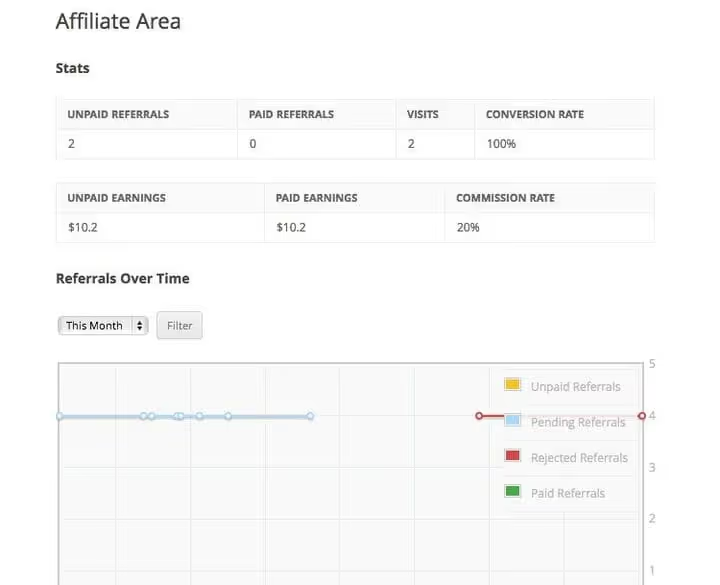
In the personal dashboard, the affiliate sees: paid and unpaid referrals, revenue, visits, conversion rate. Data transparency motivates, the affiliate sees the result of their efforts in real time.
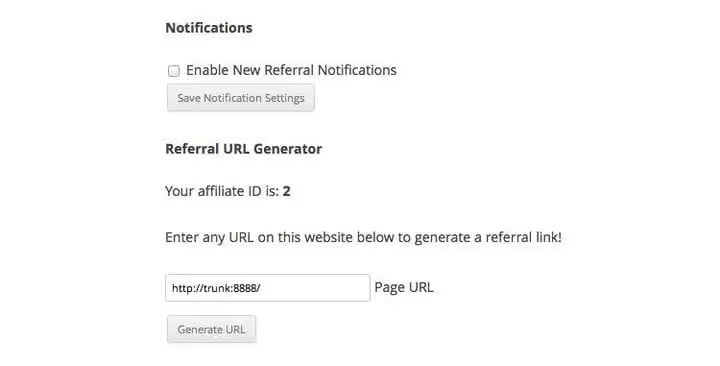
The referral URL generator is one of the most useful features for affiliates. The affiliate enters any page of your site and gets a unique referral link. This encourages linking not only to the homepage, but also to specific products, articles, and landing pages.
Addons: what's beyond the base
On the Pro plan, all official AffiliateWP extensions are available. The most significant ones:
Tiered Affiliate Rates. Multi-level commission rates: the affiliate gets an increased percentage when reaching a sales threshold. For example, 20% up to 50 sales, 25% up to 100, 30% after 100, configured in the addon interface. The system automatically switches the rate when crossing the threshold.
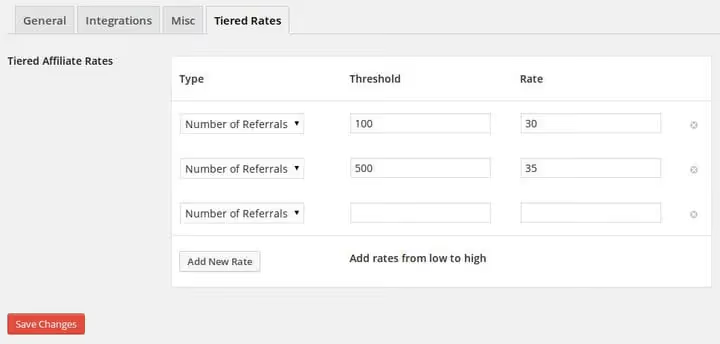
Direct Link Tracking. Tracking clicks without a referral link, by traffic source. Useful for affiliates with email newsletters and blogs.
Lifetime Commissions. Lifetime commission: the affiliate receives a percentage of all future purchases of the referred customer, not just the first one.
Affiliate Portal. A full-featured portal where affiliates see payout history, earnings graph, available creatives, and can edit their profile.
Based on our observations and testing experience, Tiered Affiliate Rates and Lifetime Commissions provide the greatest increase in affiliate motivation. People see a growing check and stay for the long term.
Pricing and rates in 2026
The pricing structure has changed compared to early versions of the plugin. Current prices as of June 2026:
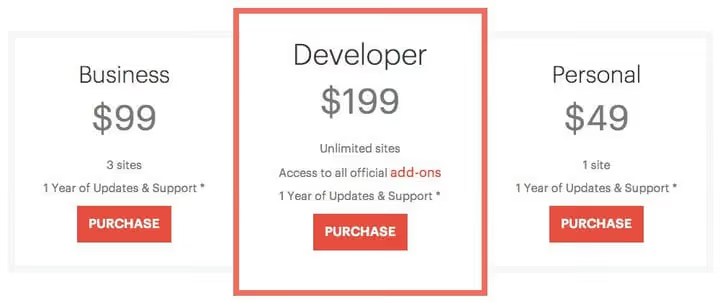
Plan | Sites | Price per year | Key features |
|---|---|---|---|
Personal | 1 | $149.50 | Basic integrations, unlimited affiliates |
Plus | 3 | $199.50 | All integrations, priority support |
Pro | 5 | $299.50 | All addons, tiered rates, lifetime commissions, fraud protection |
Growth Bundle | 5+5 | $349.50 | Pro + RewardsWP (points-based loyalty program) |
All plans include a year of updates and support. Renewal with a 40% discount off full price. Refund within 30 days, no questions asked, if the plugin doesn't fit.
For a small WooCommerce online store, the Plus plan at $199.50 per year pays for itself with the first dozen referral sales, that's less than $17 per month for a fully automated affiliate program.
In short: pros and cons of AffiliateWP
What we liked:
- Self-hosted architecture: your data, zero platform commission.
- Seamless integration with WooCommerce, EDD, MemberPress, and 25+ other plugins.
- Affiliate area out of the box: registration, dashboard, link generator.
- Smart addons: tiered rates, lifetime commissions, direct tracking.
- Clear reports with filtering and CSV export.
- Active community: 30,000+ users, documentation with code examples.
What to consider:
- Without addons (Pro) there's no fraud protection and lifetime commissions.
- For multi-currency programs you need an additional plugin.
- No built-in payout engine: payouts via PayPal Payouts (addon) or manually.
If you prefer video format, this overview clearly shows plugin setup from installation to the first referral sale.
⁉️🤔 Frequently asked questions
Do I need separate hosting for AffiliateWP?
No. The plugin is installed like a regular WordPress extension, via "Plugins → Add New." No additional servers, domains, or external services needed. All data is stored in your MySQL database.
How many affiliates can the plugin handle?
There's no technical limit. In practice, performance depends on hosting: with 500+ active affiliates and thousands of referral clicks per day, we recommend a VPS with 2+ GB RAM. On shared hosting, the plugin comfortably handles 50-100 affiliates.
Can I pay affiliates directly from the admin?
Yes, via the PayPal Payouts addon. It allows sending mass payouts with one click. Without the addon, export CSV and make manual payments via PayPal or bank. There's no built-in Stripe Payouts yet.
How does AffiliateWP differ from the WooCommerce affiliate program out of the box?
WooCommerce out of the box has no affiliate program at all. Basic coupon tracking, yes, but without affiliate registration, without affiliate dashboard, without automatic commission calculation. AffiliateWP builds a full-featured affiliate network on top of WooCommerce with personal dashboards and tracking of every click.
Does the plugin work with caching plugins?
Yes. AffiliateWP has been designed with caching in mind since the first versions. Referral tracking works through a JavaScript layer and server hooks, bypassing the cache layer. Compatible with WP Rocket, W3 Total Cache, LiteSpeed Cache.
Does the plugin support multisite?
Partially. On the Pro plan you can activate the plugin on 5 sites, but there's no built-in multisite console (unified dashboard for the entire network). For a network of several stores with a shared affiliate program, this is a limitation.
Is AffiliateWP worth installing in 2026?

For a WooCommerce store owner or membership site owner who wants to launch their own affiliate program without cloud SaaS commissions, AffiliateWP remains one of the most mature and thoughtful solutions on the market. 12 years of development, 30+ integrations, and a community the size of a small town give confidence that the plugin won't disappear in six months.
If you're just testing the affiliate model, start with the Personal plan at $149.50 per year. Enough for one site with unlimited affiliates. When the program grows, upgrade to Pro for tiered rates and fraud protection.
Try it free: the demo version on AffiliateWP.com lets you explore the admin before buying. And if your affiliate program has already outgrown manual spreadsheets, install the plugin today and get your first referral tomorrow.

A professional team of writers and editors specializing in creating quality content.