













 AIIllustrative image: AI-generated
🚫 How to protect WordPress from spam: 6 plugins and built-in settings 2026
You open the comments section and find 300 messages overnight. Casinos, pills, SEO "blasts." Not a single real reader.
Without protection, this is normal. According to Akismet, spam accounts for over 99% of all comments on an average WordPress site. The consequences are threefold: search rankings drop due to junk outbound links, readers face risks (links lead to malicious resources), and the database bloats with hundreds of unnecessary entries. Thousands of rows in wp_comments slow down the site and increase backup sizes.
The good news: WordPress provides built-in moderation tools, plus there are six plugins with fundamentally different mechanisms. We'll cover both.
💡 Quick overview:
- Breaking down three spam channels: bots, manual spam, and trackbacks, showing how to identify each
- Configuring built-in WordPress protection: moderation, blocklists, disabling pingbacks
- Comparing six anti-spam plugins with different mechanisms and choosing the right combination for your scenario
How comment spam destroys your site
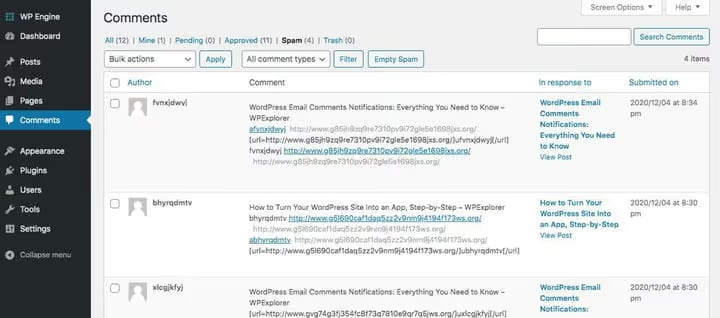
Comment spam is any irrelevant message with a backlink. The spammer doesn't care about your content. They want a URL to their site in the comment body, the "Website" field, or through trackbacks.
Spam arrives through three channels. Bots crawl thousands of sites and flood them with templated messages: "Great post! Check out my site." They rely on volume: hundreds per day. Manual spam is written by real people for pay. The quality is higher: links are hidden in spaces or punctuation, and auto-filters miss them. Trackbacks were designed as honest notifications about citations. In practice, automated systems generate thousands of fake mentions to get a return link in the comments section.
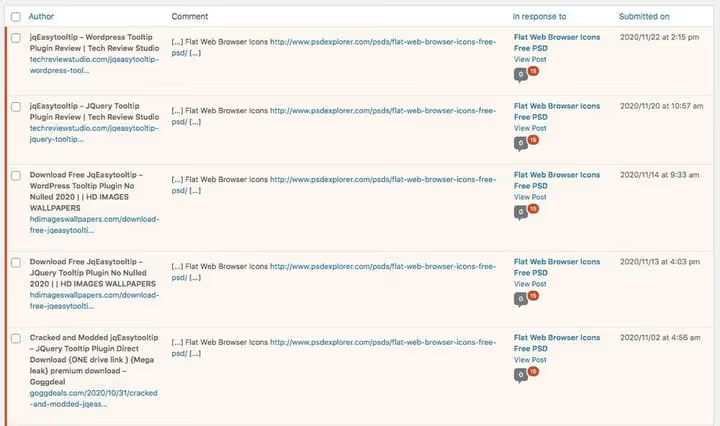
Ignoring spam is costly. Google considers outbound links when ranking, including those in comments. Dozens of links to junk sites signal to the algorithm: no one is managing content here. That's a direct path down in search results. Beyond SEO, spam links lead to phishing pages and malware-hosting resources: a reader clicks and catches a trojan, and the reputation problem becomes yours. Every comment, including spam, writes to the wp_comments and wp_commentmeta tables. Thousands of extra entries overload the database and slow down every page.
Built-in WordPress protection: what to configure without plugins
WordPress includes built-in comment moderation tools. All settings are in Settings → Discussion. In practice, most site owners ignore them and immediately install a plugin, even though these parameters close basic attack vectors.
 AIIllustrative image: AI-generated
What to configure first:
Moderate all comments. Every new comment awaits approval. For a young blog with low traffic, this is the most reliable option: no spam goes public.
Link count filter. The "Comment Moderation" parameter sends messages with N or more links to the queue. The default is 2. Set it to 1 to hold any comment with at least one URL.
Blocklist. The "Comment Blocklist" and "Disallowed Comment Keys" fields block by IP, email, link domain, or keyword. Catch a spammer, add the pattern: repeat comments won't get through.
Disable trackbacks. Uncheck "Allow link notifications from other blogs (pingbacks and trackbacks)." Ninety percent of this type of spam disappears immediately.
Require registration. The "Users must be registered and logged in to comment" option cuts off most bots. Downside: it creates a barrier for real readers and doesn't suit every blog.
Got the basics configured? Now add plugins. Below are six with different mechanisms: combine two or three with different working principles for maximum effectiveness.
1. Akismet
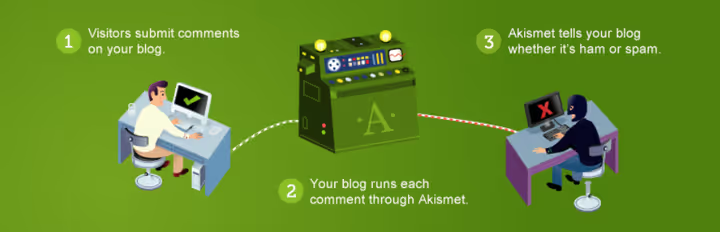
Akismet from Automattic (the WordPress.com developers) comes pre-installed on most new WordPress sites for a reason. The plugin checks every comment against a global cloud database of known spam patterns. No CAPTCHA, no friction for real readers.
The principle is twofold: first the comment is compared against millions of signatures in the Akismet database, then user behavior on the page is analyzed. Bots and humans behave differently, and this is detected without visible verification. False positives are rare, but it's worth checking the "Spam" folder once a week: takes a minute and saves you from losing a valuable review.
A detailed Akismet review with fine-tuning and alternative comparisons is in our in-depth plugin breakdown.
- Pros: global cloud database with billions of signatures; no CAPTCHA; comment status history; "Discard worst spam" mode deletes junk without saving to database
- Cons: commercial use requires a paid plan; false positives on clever manual spam
- Price: free for personal blogs (pay what you want, including $0); Pro €9.95/month with annual billing (one commercial site); Business €47.95/month (unlimited sites)
- Download: 🔗 Akismet on WordPress.org | 🔗 Official website
2. Antispam Bee

Antispam Bee from pluginkollektiv: over 700,000 active installations on WordPress.org and free forever for personal and commercial sites. The main difference from Akismet: no external requests. All processing happens on your server, which automatically means full GDPR compatibility.
The mechanism is based on a honeypot. An invisible field is added to the page: a bot that automatically fills all form fields falls into the trap and gets blocked before saving to the database. Zero footprint in wp_comments: spam simply doesn't get written there. Additionally: filtering by comment language and sender country. Important caveat: Antispam Bee only works with the standard WordPress comments system and doesn't filter contact forms on its own.
- Pros: honeypot without CAPTCHA; blocks before writing to database; GDPR-compliant without additional configuration; free forever
- Cons: doesn't protect contact forms or third-party comment plugins (Disqus, wpDiscuz, Jetpack)
- Price: completely free
- Download: 🔗 Antispam Bee on WordPress.org
3. Titan Anti-spam & Security

Titan Anti-spam & Security from Themeisle targets those who want anti-spam and basic security in one plugin. Over 60,000 active installations, last updated in May 2026. The anti-spam component checks comments against a locally updated pattern database without contacting external servers: better for privacy, but the database is objectively smaller than Akismet's.
Additionally in the free version: brute-force attack protection, failed login limits, WordPress version hiding. Pro adds machine learning for spam detection, two-factor authentication, and backup. One plugin instead of two or three. A good choice if you don't want to juggle multiple tools.
- Pros: anti-spam plus security without CAPTCHA; local database without transmitting data to third parties; actively maintained
- Cons: filtering accuracy lower than Akismet (smaller signature database); advanced features only in Pro
- Price: free version is fully functional; Pro plans at titansitescanner.com
- Download: 🔗 Titan Anti-spam on WordPress.org | 🔗 Documentation
4. Zero Spam

Zero Spam (over 20,000 active installations) combines three filtering techniques: JavaScript verification using the David Walsh method (a bot without a JS engine won't pass), IP filtering with Stop Forum Spam and Project Honeypot databases, plus geo-blocking down to country and region. Everything works in the background without CAPTCHA.
Geo-blocking: a separate strong point. If spam comes from a few specific countries and you have no real visitors from there, two clicks in settings close the channel. Broad form support: Contact Form 7, WPForms, Gravity Forms, Fluent Forms, wpDiscuz. The basic version is free; extended API integration with zerospam.org (real-time IP reputation) requires a subscription.
- Pros: three filtering levels without CAPTCHA; geo-blocking with whitelist exceptions; broad form support
- Cons: extended protection requires zerospam.org subscription; some users note intrusive monetization in the interface
- Price: free version; extended features via zerospam.org subscription
- Download: 🔗 Zero Spam on WordPress.org
5. Hide Trackbacks

Hide Trackbacks solves one task: it hides trackbacks and pingbacks from the public view of your site while keeping them accessible in the admin panel. Readers see only real comments. In the admin panel, you retain the full picture of legitimate site mentions.
This is a compromise between completely disabling trackbacks (losing information about honest citations) and an open section filled with spam. The plugin doesn't technically block spam trackbacks: they still arrive and write to the database. It only removes them from the frontend. Suitable for those who want to monitor real mentions but not show trackback junk to readers.
- Pros: hides trackbacks from frontend without losing data in admin; zero configuration; doesn't affect real comments
- Cons: doesn't technically block spam trackbacks, only hides them; database still gets cluttered; small audience (400+ installations)
- Price: completely free
- Download: 🔗 Hide Trackbacks on WordPress.org
6. Forget Spam Comment
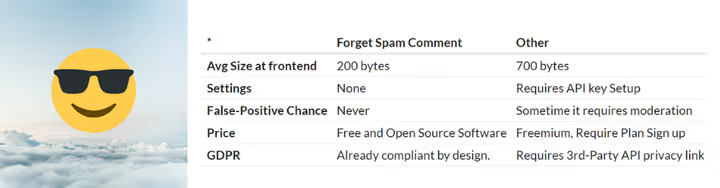
Forget Spam Comment: about 200 bytes of JavaScript and no settings. The plugin blocks direct requests to wp-comments-post.php for bots: the route to the comment form opens only when a real visitor scrolls down to the comments section. Bots sending requests directly without interacting with the page get rejected. Humans do everything as usual.
GDPR-compliant: no external requests, no user data sent anywhere. Works with cache plugins (cache clearing required after activation). No reporting on blocked items: you won't know what exactly was caught. Therefore, Forget Spam Comment is best installed as an additional layer on top of Akismet or Antispam Bee.
- Pros: about 200 bytes of JS, no CAPTCHA; zero configuration; GDPR-compliant; works with caching plugins
- Cons: no reporting on blocked spam; doesn't protect contact forms; last updated in 2025
- Price: completely free
- Download: 🔗 Forget Spam Comment on WordPress.org
If you prefer a visual format, below is a video overview of setting up WordPress anti-spam protection: from built-in parameters to connecting plugins.
Comparison table: all six plugins
Plugin | Mechanism | CAPTCHA | Form protection | Free | Pro price |
|---|---|---|---|---|---|
Akismet | Cloud pattern database | No | Yes (with WPForms) | Yes (personal) | €9.95/month |
Antispam Bee | Honeypot + geo + language | No | No | Yes | - |
Titan Anti-spam | Local database + security | No | No | Yes | Paid |
Zero Spam | JS + IP/geo + content | No | Yes | Yes (basic) | Subscription |
Hide Trackbacks | Trackback hiding | No | No | Yes | - |
Forget Spam Comment | JS routing | No | No | Yes | - |
⁉️🤔 Frequently asked questions
Which plugin should I choose if my budget is zero?
The Antispam Bee plus Zero Spam combination covers most spam for free. Antispam Bee catches bots through honeypot without database load, Zero Spam finishes off the rest through JS detection and geo-blocking. Add Hide Trackbacks for frontend cleanliness: you get multi-layer protection at no cost.
Is Akismet free for commercial sites?
No. For personal blogs, Akismet works on a "pay what you want" basis: you can enter $0. For commercial sites, you need a paid plan. According to the pricing page at akismet.com: Pro €9.95/month with annual billing (one site), Business €47.95/month (unlimited sites).
Can I just disable comments and forget about spam?
Technically yes. Disable in Settings → Discussion and close existing posts. But you'll lose reader feedback, UGC content, and social signals: Google considers all of this when ranking. For most blogs, this is an excessive measure with significant losses.
Does CAPTCHA help against comment spam?
It helps, but at the cost of conversion. reCAPTCHA v3 is invisible but collects data (GDPR issue). hCaptcha is more private. That said, modern bots bypass CAPTCHA through manual solving services. CAPTCHA works as an additional barrier, not the only line of defense.
Do I need to install multiple plugins, or is one enough?
One quality plugin (Akismet or Antispam Bee) is sufficient for the vast majority of sites. Two with different mechanisms: optimal for high comment volume. Three or more: conflict risk outweighs benefit for most scenarios. Always test new plugins on staging.
Which plugin to choose for your task
The tool set depends on site type, privacy requirements, and comment volume. There's no universal "best" option.
Personal blog with low traffic: Akismet on the personal plan (you can pay $0) plus built-in WordPress moderation. Three clicks, and almost everything is covered.
Commercial site with active commenting: Akismet Pro (€9.95/month) as the base filter plus Zero Spam as a second barrier. This combination handles tens of thousands of comments per month with minimal false positives.
Privacy-first or GDPR-mandatory project: Antispam Bee (all processing on server, no external requests) plus Hide Trackbacks for frontend cleanliness. User data never leaves your server.
No time for moderation at all: Forget Spam Comment on top of Akismet. The minimalist plugin with no settings cuts off residual bots automatically.
More anti-spam tools, including specialized solutions for forms and WooCommerce, are collected in our roundup of 12 plugins.
Fifteen minutes of configuration now saves hours of manual cleanup later. Try Antispam Bee or Akismet as a first step: both install in one click. Share in the comments which plugin or combination you use.

A professional team of writers and editors specializing in creating quality content.