














🔌 How to choose an internet provider in Odesa: 6 steps to a stable connection
The internet lags, support doesn't answer, and the bill is twice what was promised? Everyone in Odesa faces the choice of an ISP, and a mistake here costs more than it seems. Especially when there are dozens of tariffs, the technologies sound like magic, and a neighbor's "it flies for me" guarantees absolutely nothing at your address.
In reality, choosing a reliable provider is not a lottery. It's enough to check five or six parameters and not fall for advertising promises of "up to 1 Gbps for 99 UAH." Below is a concrete algorithm: from checking coverage to comparing tariffs and technologies. No fluff, just numbers and the realities of the Odesa market.
💡 Quick overview:
- Check coverage at your address: a call to support gives an exact answer, the map on the website does not
- Find out the technology: GPON (fiber optic) is more stable than Ethernet (twisted pair), especially during peak hours
- Look at real speed from reviews, not the advertised "up to 1 Gbps"
- Calculate the full cost: connection, equipment, price increase after the promo period
- Call support before signing up: how they answer is how they will work
- Clarify additional terms: static IP, contract suspension, operation during power outages
Step 1: Check coverage at your address, not on the website map
The first thing to understand: the coverage map on a provider's website and real availability at a specific address are different things. The map shows where the provider is "present." But presence does not equal the technical ability to connect your specific building.
Before comparing tariffs, call support and give your exact address. Ask about the connection technology (fiber optic or twisted pair), not just "yes, we operate here." The difference in technology directly affects stability and real speed.
The Odesa market in 2026 is divided among several major players: Briz with its XG-PON fiber optic network, Lanet, Vega, Tenet, and regional operators. Briz, in particular, covers Kyivskyi (including Tairovo and Velykyi Fontan), Prymorskyi, Malynovskyi (Moldavanka, Cheremushky), and Peresyp districts, as well as suburbs: Fontanka, Kryzhanivka, Lymanka, Chornomorske, and other settlements in the region. But even within these districts, availability is determined by the specific address.
Note: if the building is connected via GPON, the fiber optic cable comes directly into the apartment. This means the speed is not "shared" across the building entrance during peak hours, as in old Ethernet networks. For remote work and video calls, this is critical.
Step 2: Understand the technology, GPON, Ethernet, or xDSL
The connection technology determines the speed ceiling and stability. In Odesa, there are currently three main options:
GPON / XG-PON (fiber optic). A thin optical cable is brought into the apartment or house. It provides symmetrical speed (same for download and upload), does not depend on neighbors' load during peak hours, and works even during power outages if the provider has backup power at the nodes. This is the standard for modern networks. Briz, for example, builds its network specifically on XG-PON with generators and batteries at base stations.
Ethernet (twisted pair). A copper cable from a switch in the building entrance or attic. Cheaper to connect, but the speed is shared among subscribers and heavily depends on the condition of the building's internal wiring. In Odesa's old housing stock, this can be a problem; the wires were pulled 10-15 years ago.
xDSL (telephone line). Morally obsolete. Speed up to 50 Mbps in ideal conditions, in practice, half that. If there are no alternatives, it works, but for modern tasks (4K video, video calls, cloud backups), this is no longer sufficient.
If GPON is available at your address, take it. The price difference with Ethernet is typically 30-50 UAH per month, but the stability and speed headroom pay for that difference from the very first working day.
Step 3: Evaluate real speed, not the one in the ads
"Up to 1 Gbps" on a billboard says nothing about what will happen on a Sunday evening when the whole building is watching YouTube. Real speed under load is what matters.
Three questions worth asking the provider or checking in reviews:
Guaranteed speed vs "up to." GPON providers keep the speed significantly closer to the stated one even during peak hours, because the fiber optic line is not shared among neighbors. Briz, for example, specifies a guaranteed bandwidth in the contract. Clarify this metric; it must be in the contract.
Channel symmetry. For video calls and remote work, upload speed is no less important than download. On GPON, they are equal. On Ethernet, upload is usually 5-10 times lower than download, and this is a bottleneck for those who work a lot from home.
Ping to key servers. For gamers and traders, latency is critical. On GPON, it is 2-5 ms to Odesa servers and 20-40 ms to European ones. On Ethernet, ping is higher and fluctuates more.
Check it yourself: connect your laptop via cable to the router (not via Wi-Fi, it cuts speed) and run Speedtest on several servers at different times of the day. The picture will become clear within a day.
Step 4: Calculate the full cost, not just the monthly fee
The monthly fee is only part of the real cost. The full calculation for the first year includes:
Connection. Can cost from 0 UAH (promotion) to 500-1000 UAH. Briz charges from 100 UAH for connecting an apartment via PON and from 300 UAH for a private house. Clarify in advance.
Equipment. The router is often included in the price or provided for rent. If the provider offers a "free router," clarify the model. A cheap router with Wi-Fi 5 on a gigabit tariff will become a bottleneck and will not deliver speeds above 200-300 Mbps over Wi-Fi.
Promo price and its duration. "199 UAH for the first 3 months, then 399 UAH" is a standard tactic. Look at the price for the second year, not the first month.
Additional services. Static IP, TV set-top box, additional TV packages all add to the bill.
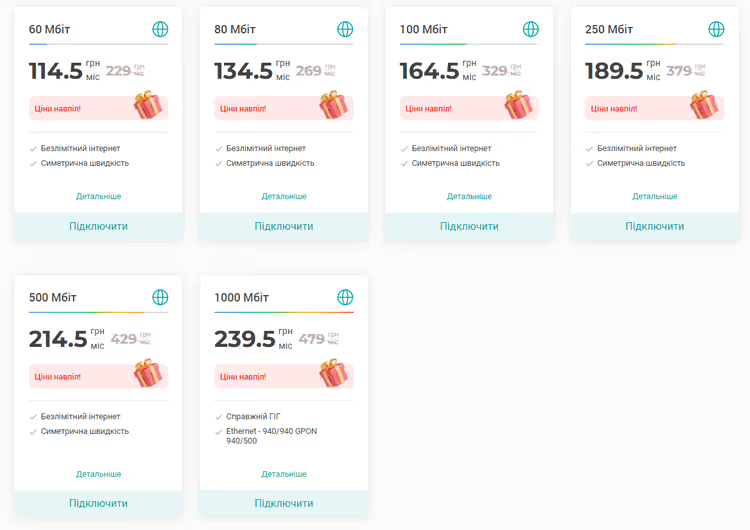
Briz's current tariffs for mid-2026 look like this:
Tariff | Speed | Price | What's included |
|---|---|---|---|
Lite 100 | 100 Mbps | 299 UAH/mo | Internet |
Lite 100 + TV | 100 Mbps | 359 UAH/mo | Internet + BRIZ.TV |
Comfort 1 Gbit | 1 Gbps | 399 UAH/mo | Internet |
Comfort 1 Gbit + TV | 1 Gbps | 459 UAH/mo | Internet + BRIZ.TV |
TURBO 2.5 | 2.5 Gbps | 499 UAH/mo | Internet + BRIZ.TV |
TURBO 2.5 + TV | 2.5 Gbps | 559 UAH/mo | Internet + BRIZ.TV |
When paying in advance for 3 to 12 months, cashback is credited to a bonus account; this is worth considering if you plan a long-term relationship.
Step 5: Check support, call before signing up
The quality of tech support cannot be assessed from the description on the website. But there is a simple test: call the hotline before you become a subscriber. Ask a specific question, for example, whether GPON is available at your address and which router is included in the package.
Evaluate:
- Did you get through in 2 minutes or listen to music for 15?
- Did a person answer or was it "your call is very important to us"?
- Was the answer specific or "leave a request, we'll call back"?
Briz claims 24/7 support. In practice, this means operators are available around the clock, and this is important because the internet tends to go down precisely late in the evening when you urgently need to finish work. The provider also has a web account and a mobile app for Android and iOS, through which you can manage services, check your balance, and write to support without calling.
Step 6: Consider additional terms, the small things that become important
There are several conditions rarely discussed when choosing, but which directly affect the user experience:
Operation during power outages. In Odesa, this is no longer an "added bonus" but a basic requirement. Clarify whether the provider's nodes are equipped with generators and batteries. Briz, for example, has powered all base stations via backup sources; the internet remains even during power cuts.
Static IP. Needed for video surveillance, a home server, or remote access to a work PC. Briz includes a static IP in business tariffs. For home tariffs, inquire separately.
Contract suspension. If you leave for a month or two, can you put the contract on pause and not pay? Many providers allow this but don't advertise it.
Loyalty program. Briz accrues cashback on prepayment; this money can be spent on paying for subsequent months. Other providers may offer discounts for tenure or referral programs.
In short: Connect home internet with the provider that answers all these questions directly and without evasion. Transparency of terms is the best marker of reliability.
⁉️🤔 Frequent questions
Why is internet speed lower in the evening than during the day?
During peak load hours (19:00-23:00), all subscribers in the building or district use the network simultaneously. If the provider operates via Ethernet, the speed is shared among neighbors, and the drop can be significant. On GPON, this problem practically does not exist: the fiber optic line is dedicated, and neighbors' load does not affect your speed.
Which is better: a Wi-Fi router from the provider or your own?
A router from the provider is a compromise. It is set up "out of the box," but it is often a budget model with limited performance. If you have a gigabit tariff, a house of 80+ square meters, or many devices, your own router with Wi-Fi 6 will give a better result. Check with the provider if you can use your own equipment: most allow it, but you do the setup yourself.
Can I switch to another provider and keep my phone number?
If the phone is connected via SIP (digital telephony), yes, the number can be ported. If an old copper line is used, it depends on the technical capability of the new provider. Clarify when signing up.
Does the internet work without a router, directly via cable?
Yes, provided the provider has a DHCP (dynamic IP) connection configured. Most Odesa providers, including Briz, use DHCP; just plug the cable into your laptop, and the internet works. For PPPoE connections, you will need to enter a login and password.
How many devices can be connected simultaneously without losing speed?
On a gigabit tariff over GPON, 15-20 devices simultaneously without a noticeable drop in speed. But the final result depends on the router: a budget model on Wi-Fi 5 will start to "choke" already at 5-7 active devices. For large families and smart homes, it's better to get a router with Wi-Fi 6.
Is it worth overpaying for gigabit: the final breakdown for Odesa providers
For one or two users who watch YouTube and work with email, a 100 Mbps tariff is more than enough. But as soon as video calls, cloud backups, a 4K TV, and a couple of smartphones downloading updates in the background appear in the house, 100 Mbps turns into a bottleneck.
The main selection criterion in Odesa today is technology. If GPON is available at your address (Briz, Lanet), it is a clear priority. Stability and a symmetrical channel outweigh the 50-100 UAH difference with Ethernet tariffs. If GPON is unavailable, look at Ethernet with a good support reputation, not the lowest price.
Before signing up, do three things: check coverage at your address by calling support, compare contracts (guaranteed speed, promo price duration, termination terms), and test the line in the very first days. A contract with a trial period and refund is a sign of the provider's confidence in its product.

A professional team of writers and editors specializing in creating quality content.