














🛡 WordPress protection through pentests: a hardening guide
A site on WordPress runs for a month, six months, a year, and then an email arrives from the hoster: "Spam is being sent from your account." Or a client calls in a panic because the homepage now redirects to a phishing domain.
Standard security checklists help cover the basics: updates, strong passwords, backups. But they don't show what will break first in your specific build of three dozen plugins, a custom theme, and tweaks in functions.php.
A WordPress site pentest is not just "another check." It is a deliberate attack on your site followed by a documented list of vulnerabilities, ranked by real-world danger. And most importantly, with concrete steps that close the holes so they don't reopen after the next update.

💡 Quick overview:
- Go beyond the security checklist: a pentest looks at the site through an attacker's eyes
- Find typical WordPress vulnerabilities: from debug logs in production to XSS via forms
- Walk through a full hardening cycle: scope, fix, quick wins, retest, WAF proxy
- Prepare the site for a pentest correctly: staging, test roles, logging
Why a pentest is more effective than a security checklist
A checklist is about "do it and forget it." Disabled XML-RPC, set a login attempt limit, changed the table prefix. Boxes ticked, sense of accomplishment present.
A pentest flips the picture. It looks at the site through an attacker's eyes, and often finds things that aren't in checklists. For example, a custom REST endpoint that the theme developer left without permission checks. Or two form plugins installed "just in case," where one hasn't been updated in two years and drags in a vulnerable library.
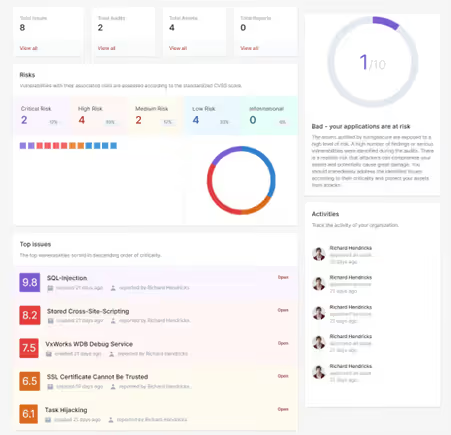
A professional pentest is a planned procedure with a fixed scope, documented results, and prioritized recommendations. What sets it apart from an automated scanner is depth: an auto-scanner finds signatures of known vulnerabilities, but goes blind on custom role logic, a specific theme, or hand-written REST routes.
The outcome of a pentest is not just a list of "this is bad." It is proof: here is the request we sent, here is the response we got, here is why this is dangerous, and here is how to fix it. For a business owner, that's an argument in a budget conversation; for a developer, a ready-made action map.
Three typical WordPress vulnerabilities: how a pentest finds them
WordPress problems are rarely exotic. Over years of administering sites, we see repeating patterns: plugin and theme names change, but vulnerability classes stay the same. Below are three examples that a pentest uncovers systematically.
Example 1: insecure hosting and WordPress configuration
Security misconfiguration is one of the most widespread problems. Extra features are enabled, default accounts haven't been renamed, and error messages leak environment details straight to the browser. Some issues sit on the hoster's side, but WordPress lets you close them.
What a pentester sees:
- Directory listing enabled: anyone can browse the contents of
/wp-content/uploads/ - Debug information in the frontend:
WP_DEBUGset totruein production - Admin panel without additional protection: direct access to
/wp-login.phpwith no restrictions
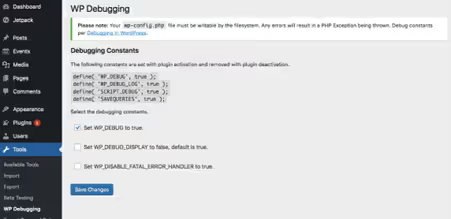
Debug output in the browser reveals file paths, component versions, and database structure. A pentester uses this data to map attack vectors.
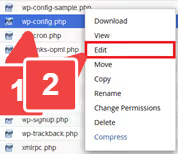
Disabling WP_DEBUG in wp-config.php is the first and fastest fix: one constant removes all debug information from public access.
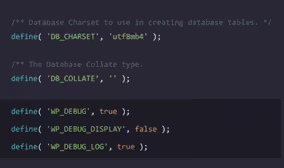
The solution, disabling debug in production:
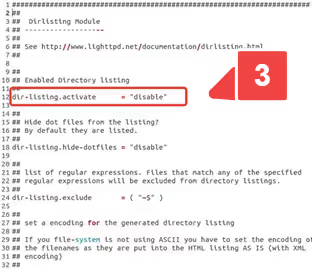
Closing directory listing at the server level or via .htaccess.
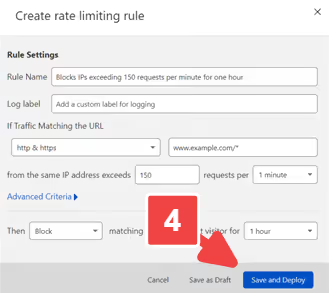
Rate limiting on /wp-login.php stops brute force before it ever touches WordPress.
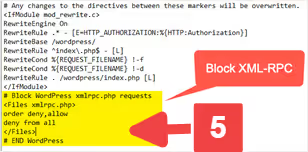
Server-side protection rules (WAF rules at the host or CDN level). The Solid Security plugin (formerly iThemes Security) covers many of these vectors centrally; the free version is enough for baseline coverage.
Example 2: plugin zoo and bloated permissions
Regular core, theme, and plugin updates are the basics that every security guide never stops reminding you about. In practice, though, what matters more than whether a specific plugin is updated is the overall configuration of the installation.
The hardening approach here is systematic:
- Build a complete inventory of plugins and themes
- Remove everything that is not in use
- Assign clear ownership for updates
Roles and permissions follow the principle of least privilege, strictly. An editor does not need access to plugin settings, and an SEO specialist does not need access to theme installation.
Real case: a site uses two form plugins "for historical reasons."
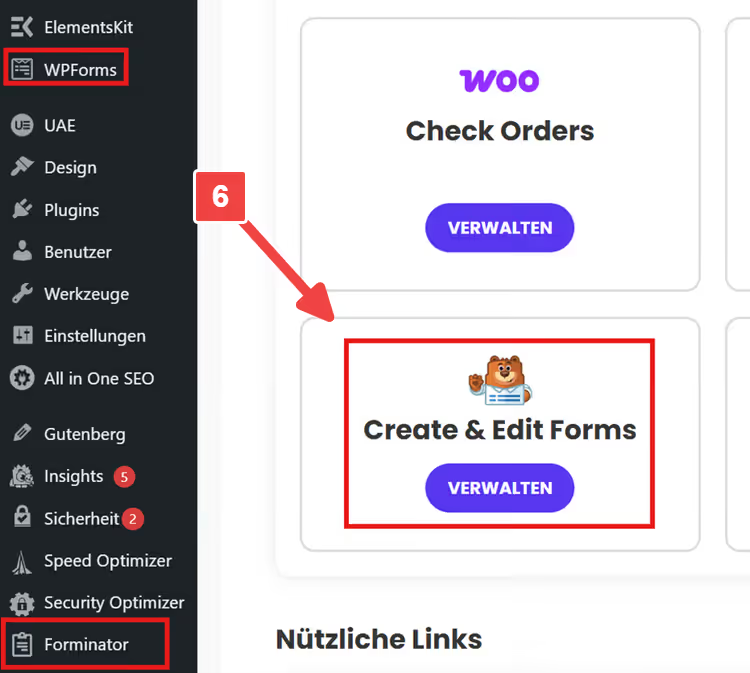
A pentest shows that only one is actually in use. The second just sits there as dead weight, but its endpoints are exposed and pull in a vulnerable version of a library. Hardening here is not adding yet another layer of protection on top; it is simply removing the unused plugin. Regular plugin audits and a critical look at every installed component are an integral part of the security cycle, not a one-off action.
Example 3: injections and XSS via the front end
OWASP puts injections at the top of its threat ranking. In WordPress, they occur wherever a developer treats user input as "safe by default":
- Contact forms and newsletter subscription forms
- Search and filters in stores and catalogs
- Comments and custom fields
Baseline protection: four rules that close most of the vectors:
- Validate input on the server (never trust the client)
- Escape output according to context (HTML, JS, SQL, URL)
- Keep plugins up to date
- Periodically review custom theme code
A pentest gives you the main thing: reproducible proof. A specific request, a specific system response: that is an argument that does not require you to explain the technical details of the attack to a manager or client.
WordPress hardening process: from report to protection
The most common mistake after a pentest is rushing to fix everything at once. Instead, you need a process that balances technical priority, effort, and how well fixes survive updates.
Step 1: define scope and priorities
Not every finding in a report is critical. A good pentest report includes severity, affected URLs, and a description of potential damage. This lets you establish an order:
- Remotely exploitable vulnerabilities without authentication (critical priority)
- Vulnerabilities in the authentication zone with a simple attack vector
- Configuration errors and defense-in-depth (low priority, but numerous)
Step 2: implement fixes so they survive updates
A classic pain point: you apply a fix, a week later an auto-update for the theme rolls in, and everything breaks. Where you place the fix determines its durability:
- Server level or hosting: headers, TLS, rate limits, file permissions. The most reliable, lives independently of WordPress.
- Child theme or clean hooks: template and functionality edits. No direct changes to the parent theme.
- Replacing a plugin instead of a "band-aid plugin": if a component is problematic by architecture, it is easier to replace it with a modern alternative than to patch it endlessly.
The WordPress hardening documentation describes typical points and emphasizes the importance of operational practices: updates, access control, auditing. Sometimes replacing a couple of outdated components radically changes a site's security score.
Step 3: start with quick wins
Quick wins that deliver a disproportionately large effect:
- Reduce the number of admin accounts, enable two-factor authentication, set a minimum password length
- Check XML-RPC: if not needed (no app or Jetpack connection), disable it. If needed, protect it via Solid Security
- Set file and directory permissions: the web server should write only to folders where it is genuinely needed. Discuss this separately with hosters, not all file masks are equally safe when switching
- Test not only backup creation but also restoration from it. A backup without a verified restore is false peace of mind
Step 4: retest is mandatory
A fix is considered closed only when it is verified. A repeat pentest checks: whether the vulnerability is truly eliminated and whether any side effects appeared. This is critical for measures like Content Security Policy or strict HTTP headers, they break the frontend at the slightest configuration error.
Step 5: consider a WAF proxy
The firewall proxy concept is effective and time-tested: every request to the site first passes through a proxy layer, where it is analyzed and filtered, and only then reaches the web server. This blocks a huge layer of attacks before they even contact WordPress. Sucuri, one option for such protection. Alternatives: Cloudflare WAF, Wordfence Premium with endpoint protection.
How to make a pentest faster and more effective
A pentest delivers maximum value when conditions are prepared in advance. The Penetration Testing Execution Standard highlights the Pre-Engagement phase, the moment where parties agree on goals, rules, and testing boundaries.
What this means for you as a WordPress site owner:
- Staging environment instead of production: reduces risk for live users and allows more aggressive testing. If staging is unavailable, at least a clone on a subdomain with IP-restricted access.
- Test accounts with different roles: at minimum editor and administrator. Without this, authorization testing is pointless.
- Enabled logging: login events, file changes, plugin installations. These records are invaluable during incident analysis.
- Coordination with third-party services: if the site integrates with a payment gateway, CRM, or tracking systems, define in advance what can and cannot be touched during the test.
Next steps after a pentest
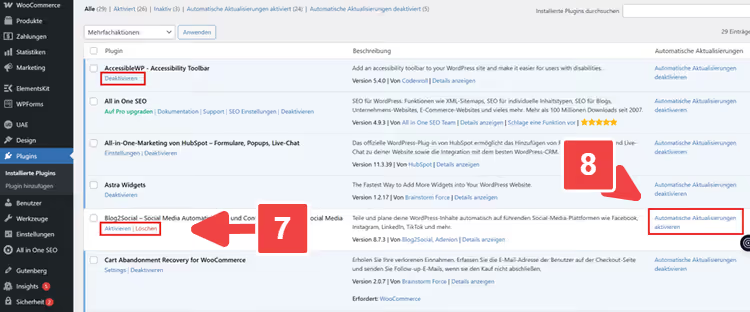
1. Build an inventory of plugins and themes, remove unused ones, set an update rhythm
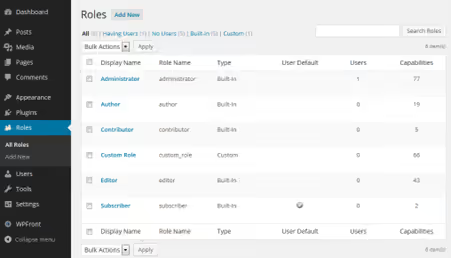
2. Review roles and admin accounts, permissions strictly on the least-privilege principle
3. Set up a staging environment and a fix deployment process that survives updates
4. Prepare screenshots for documentation: report overview, example request with response, comparison of headers or configuration before/after.
5. Schedule a retest with a specific date, hardening must not stop at the assumption "we fixed everything."
This approach turns a pentest from a one-off "hole check" into a continuous cycle: test, fix, verify, repeat. Over time, the site becomes not just "covered" but genuinely resilient to attacks, and you know this not because a checklist says so, but because verification confirmed it.
⁉️🤔 Frequent questions
Do I need a pentest if I use Solid Security and make backups?
Security plugins cover known attack vectors but do not see custom vulnerabilities: a self-written REST endpoint without permission checks, redirect logic in a theme, or a hole in an abandoned plugin that is listed as "active." A pentest finds precisely these non-standard entry points. Backups do not prevent a breach, they help you recover afterward. These are different layers of protection, and they complement each other.
How is a pentest different from an automated scanner like WPScan?
WPScan checks a site against a signature database: it looks at the core, plugin, and theme versions and matches them against known CVEs. This is useful for a baseline check, but a scanner does not understand context. It does not see that a subscription form leaks data without validation, or that a custom "store manager" role accidentally got theme editor rights. A pentester (or manual pentest) analyzes application logic, not just version numbers.
How often should a pentest be conducted?
After any significant change: a major core update, a theme switch, adding a new critical plugin (payments, membership, custom fields). For sites with a high cost of downtime (e-commerce, membership portal), a scheduled pentest every 6-12 months is justified. Ideally, a pentest becomes part of the development cycle: roll out changes → test on staging → fix → to production.
Can I conduct a pentest myself, without hiring specialists?
Basic steps are accessible: run WPScan, check security headers via Security Headers, manually walk through the OWASP Top 10 for web applications. But a full pentest requires experience: understanding how to combine attack vectors, how to read server responses, and how to distinguish a false positive from a real hole. For a commercial site, it is wiser to order a pentest from a professional team and use your own checks as a hygiene minimum between audits.
What if a pentest found dozens of vulnerabilities, but the remediation budget is limited?
Prioritize ruthlessly. First tier: vulnerabilities exploitable without authentication (remote data access, RCE). Second: issues in the authentication zone that allow privilege escalation. Third: defense-in-depth (logging, headers, unnecessary open ports). The quick wins from step 3 above close many items with minimal effort. The rest goes into a plan with a deadline, not a backlog without one.
Securing WordPress after a pentest: where to start today
A pentest does not make a site secure. It makes visible the holes that already exist in the site. The site becomes secure only after you close those holes and verify they have not reopened.
If the budget for a professional pentest is not yet approved, start with what is available right now:
- Run the free WPScan against your site (at least in passive mode
--no-banner --enumerate vp) - Go through the quick wins from step 3; that takes an hour and closes the most common attack vectors
- Build an inventory of everything installed in the admin panel and remove anything you have not used in over a month
When it is time for a full pentest, you will already be ready: staging is up, plugins are under control, roles are cleaned up. The pentester will not spend your budget enumerating what you already know, but will focus on real vulnerabilities. And that is exactly what you hired them for.

A professional team of writers and editors specializing in creating quality content.