














🔒 Best wordpress security plugins 2026: overview and comparison
330 million malicious attempts per day. That is not hypothetical, it is the real number from Wordfence's 2026 report, and that flood is held back by a single plugin.
The problem with WordPress is not the core. Dozens of developers audit it, and critical patches ship same-day. Vulnerabilities come through three points: an outdated plugin with an open bug, common administration mistakes like the password "admin", and an exposed xmlrpc.php. Each of these holes can be closed in 15 minutes if you know which tools actually work in practice, not just in the description on WordPress.org.
Below, nine security plugins, selected based on tests on real sites. With free and paid options, strengths and honest drawbacks. Choose for the task, not for the loud marketing.
💡 Quick overview:
- Find out what is already on the site: two security plugins conflict and crash the admin panel
- Pick a primary plugin from the list below: Solid Security, Wordfence, or MalCare
- Configure the firewall and brute-force protection: installing is not enough
- Add 2FA, change the database prefix, and disable the file editor: three minutes of work
Product | For whom | Price | Key feature |
|---|---|---|---|
Solid Security | All-rounder: from beginner to pro | Free / Pro $99/yr | Flexible configuration + zero-day patches |
Wordfence Security | Budget protection with a powerful scanner | Free / Premium $149/yr | Endpoint firewall + 5M installs |
MalCare | "Set and forget" automation | From $99/yr | One-click malware removal |
All-In-One WP Security | Beginner, first security plugin | Free | Visual security score |
Sucuri Security | Professionals, high-traffic sites | Free / From $199/yr | DNS-level firewall + managed cleanup |
1. Solid Security
Formerly iThemes Security, one of the oldest plugins in the niche. After the rebrand to SolidWP, the product got a completely redesigned interface, a notification center, and regular updates without losing backward compatibility. According to WordPress.org data, 900,000+ active installs.
In practice, Solid Security closes holes the site owner often does not even know exist. The built-in setup wizard walks through a checklist: changing the database prefix, disabling the file editor, hiding the login URL, limiting login attempts. The free version already provides a solid basic perimeter.
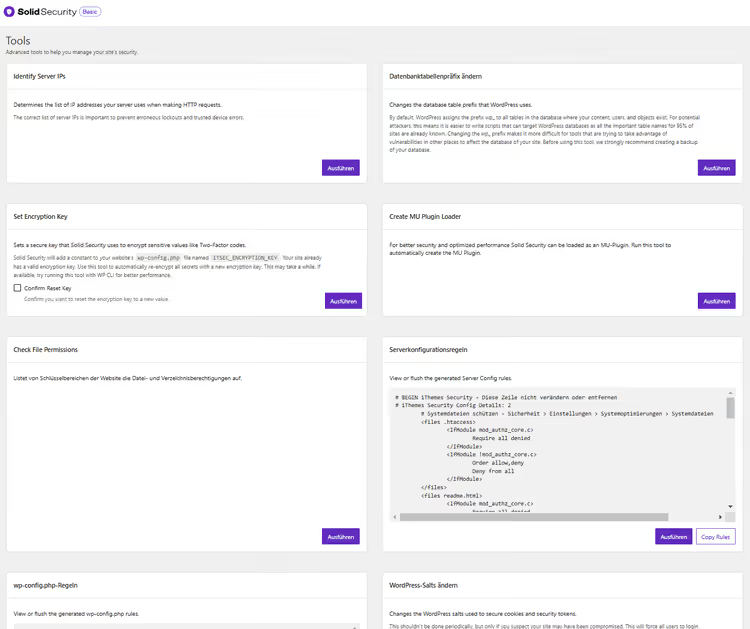
Protection in the free version:
- Brute-force attack and SQL injection blocking
- File change detection
- Basic malware scanning
- Login URL hiding and database prefix change
- WAF (web application firewall)
- Known malicious IP blocking
Practical tip: during active brute-force attacks, the plugin sends a notification for every block. In the notification center, limit them to one email per day. Otherwise your inbox turns into a spam feed.
Solid Security Pro: what you get for the money
The Pro version at $99/yr (1 site) adds layers critical for commercial projects (current pricing at SolidWP.com):
- Two-factor authentication (2FA) and passwordless login (passkeys)
- Trusted Devices: admin rights only from verified devices
- Magic Links: login even when the username is locked
- Automatic vulnerability patching (zero-day): the plugin applies a patch before the vendor releases an update
- Real-time security dashboard and user action logging
- Device geolocation, settings import/export, forced password changes
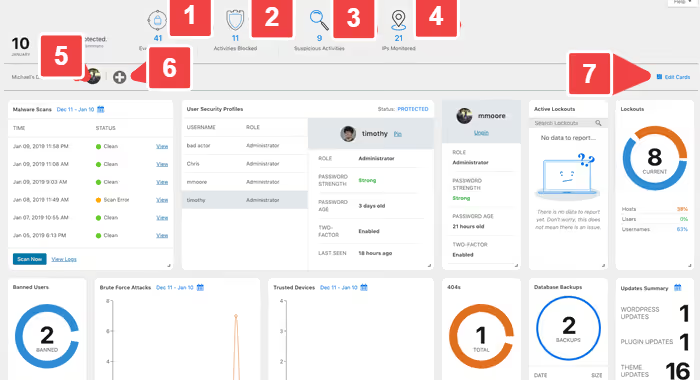
The Pro plan for 10 sites, $299/yr (SolidWP pricing). In terms of price-to-capability ratio, Solid Security Pro remains one of the strongest options on the market.
Pros:
- The free version covers most common threats
- Flexible manual configuration: the admin decides what to enable
- Automatic zero-day patches (Pro)
- Updated regularly, the rebrand did not break backward compatibility
Cons:
- Floods you with notifications during active attacks (fixable via settings)
- The Pro version does not include managed cleanup (unlike Sucuri and MalCare)
- A beginner can easily get lost in the advanced settings
Price: Free / Pro from $99/yr for 1 site (SolidWP).
🔗 Solid Security on WordPress.org | 🔗 SolidWP website
2. Wordfence Security
The most popular WordPress security plugin: 5+ million active installs, over 100 million all-time downloads. According to Wordfence data, the plugin blocks 330+ million malicious attempts daily, brute force, exploits, injections. Since launch: over 2.1 billion blocked exploits and 2.4 billion repelled brute-force attacks.
Wordfence's main advantage, the Endpoint Firewall. Unlike cloud firewalls, it runs at the server level and inspects every request before it reaches WordPress. The free version gets signature updates once every 30 days, Premium gets them in real time. The difference is critical: a new vulnerability in a plugin with 200,000 installs gets exploited within the first hours after disclosure.
Free version features:
- Endpoint Firewall with basic rules
- Malware scanner, bad URLs, backdoors, spam, and code injections
- Brute force and stolen password protection
- 2FA (two-factor authentication)
- Live Traffic: see who is visiting the site right now
- Restore modified files to WordPress originals
Premium:
- Real-time malware signature and firewall rule updates (vs. the 30-day delay in Free)
- Country blocking: block entire countries
- Personal support via ticket system
- Real-time IP blacklist
Note: Wordfence's scanner uses a signature-based approach. It is excellent at finding known malware in files, but can miss malicious code in the database or scripts in premium themes. Also, a full scan puts load on the server, on weak hosting schedule it for overnight hours.
Pros:
- Endpoint Firewall: a defense layer before WordPress
- Powerful free tier with 2FA and scanner
- Huge signature database (5 million installs = crowdsourced threat intelligence)
- Restore original core files
Cons:
- Signature-based scanner misses database malware
- Full scan loads the server
- Free version gets firewall rules with a 30-day delay
- No managed cleanup: malware removal at your own risk
Price: Free / Premium $149/year for 1 site (Wordfence).
🔗 Wordfence on WordPress.org | 🔗 Wordfence website
3. MalCare

MalCare follows a "set it and forget it" approach. No manual firewall settings, rule tuning, or half-hour checklists. Installation takes 60 seconds, then the plugin runs on its own. For a busy site owner who doesn't want to learn about signatures and WAF rules, that's the strongest argument.
The key differentiator from competitors: one-click malware removal. MalCare finds the infection, you clean the site with a button press. The scanner doesn't load the server because it runs on MalCare's cloud side, not locally. This solves the Wordfence and Solid problem: on weak hosting, scanning doesn't tank performance.
What's included:
- Cloud malware scanner (daily and on-demand)
- Automatic 1-click malware removal
- Built-in firewall
- Brute force protection and login CAPTCHA
- Backups and staging site
- Geo-blocking, uptime monitoring, performance check
- Dashboard for managing multiple sites
- White label and client reports (in the higher tier)
- Team management and Slack integration
In the MalCare dashboard, all sections, from scanner to backups, are gathered in a single window. No need to switch between tabs or remember where each report lives.
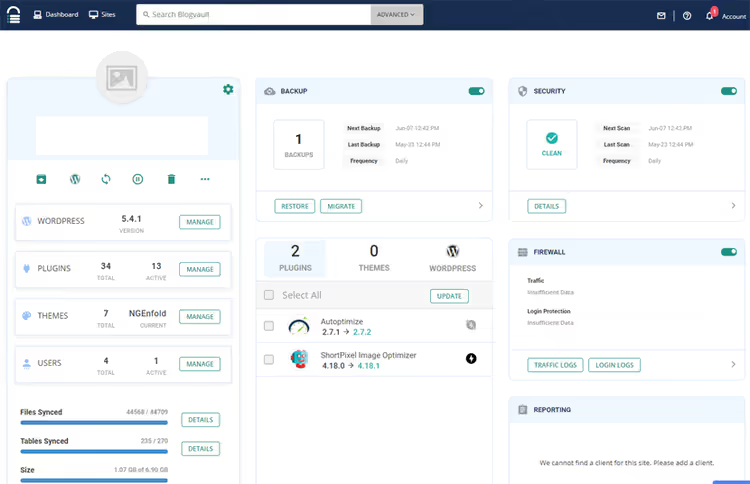
The drawback is obvious: MalCare is a purely paid product. The minimum plan is $99/year for 1 site, $499/year for 5 sites. That's more expensive than Solid Pro ($99) and comparable to Wordfence Premium ($149). But the price includes something competitors lack: managed cleanup with a guarantee. MalCare promises a triple refund if it can't remove the malware (MalCare pricing).
Pros:
- Cloud scanner doesn't load the site
- 1-click malware removal with a guarantee
- Simplest setup: 60 seconds from install to protection
- Backups and staging included
Cons:
- No free version
- Not suitable for those who want manual control over every rule
- More expensive than competitors for a small number of sites
Price: From $99/year for 1 site, $499/year for 5 sites (MalCare website).
4. All-In-One WP Security & Firewall

A completely free plugin from the Tips and Tricks HQ team. The name speaks for itself: one tool bundles a firewall, scanner, brute force protection, registration monitoring, and file security. According to WordPress.org data, 1+ million active installs.
The plugin's signature feature is a visual "security meter". After setup, the plugin shows a score: green is good, red means work is needed. A beginner with no technical background immediately sees what's already protected and what's still open to attack. The menu is intuitive, without deeply nested options.
Key features (all free):
- Firewall with basic rules
- Brute force protection by IP and cookie
- Database prefix change
- Upload protection and file permission security
- File and folder permission scanner
- XML-RPC blocking, file editor disabling
All-In-One WP Security is a good starter plugin. It doesn't provide the layered protection of Wordfence Premium or MalCare, but for a small blog or landing page, the free functionality is sufficient.
Pros:
- Completely free
- Visual meter: protection status visible at a glance
- Intuitive menu without overloaded options
- A solid set for initial hardening
Cons:
- No cloud scanner or managed cleanup
- Basic firewall, not at Wordfence's level
- No premium tier: for advanced protection, look to other plugins
Price: Free.
🔗 All-In-One WP Security on WordPress.org
5. Sucuri Security

Sucuri is a company with a "fire brigade" reputation in the WordPress world. Their free online scanner sitecheck.sucuri.net is known to everyone who has ever diagnosed a hack. The Sucuri Security plugin goes further: DNS-level firewall + managed cleanup + 24/7 monitoring.
Sucuri's architectural advantage is that the firewall sits in front of the server (DNS-level), not inside WordPress. Malicious traffic is blocked before it reaches the hosting. This radically reduces load and protects the site even if WordPress itself is already compromised.
The free version of the plugin gives you a basic set: scanner, event audit, hardening (disabling the file editor, PHP protection). But a full-fledged firewall, managed cleanup, and monitoring are only in the paid plans (from $199/year, see Sucuri website).
Pros:
- DNS-level Firewall (in front of the server, not inside WP)
- Managed cleanup: Sucuri specialists clean the site for you
- 24/7 monitoring and alerts
- Free external scanner sitecheck.sucuri.net
Cons:
- Free version is heavily stripped down: no firewall
- Paid plans are expensive (from $199/year, Sucuri.net)
- Plugin interface is overloaded with options
- Overkill for a small blog
Price: Free / Paid plans from $199/year (Sucuri pricing).
🔗 Sucuri on WordPress.org | 🔗 Sucuri website
6. BBQ block bad queries

BBQ is a narrowly specialized but exceptionally effective tool. It does not scan for malware and does not set up 2FA. It does exactly one thing: blocks malicious requests to URLs, the database, and files based on the 8G Firewall from Perishable Press (formerly 7G, updated in 2025).
It is a minimalist companion to a primary plugin like Solid Security or Wordfence. In practice, BBQ cuts off code injections, RFI (Remote File Injection), XSS, and Base64 attacks at the doorstep, quietly, with no overhead and no unnecessary alerts. The Pro version ($29) adds the Pattern Tool: you can check whether the plugin blocks a specific type of attack instead of guessing from logs (BBQ Pro).
Pros:
- Extremely lightweight: creates no overhead
- 8G Firewall: a proven and regularly updated rule base
- Works alongside any primary security plugin
- Pro: Pattern Tool for manual protection verification
Cons:
- Request filtering only: no scanner, no 2FA, no hardening
- Requires a second plugin for full protection
- Pro version is paid ($29, BBQ Pro), though inexpensive
Price: Free / Pro $29 (BBQ Pro pricing).
🔗 BBQ on WordPress.org | 🔗 BBQ Pro site
7. WP Security Ninja

Fast scanning is Ninja's strong suit. The plugin runs 50+ security tests in under a minute and delivers a report with specific vulnerabilities and links explaining each issue. No need to understand the terminology: the plugin essentially says "here's the hole, here's how to close it."
Ninja's arsenal includes: the core scanner, a malware scanner, Event Logger, Scheduled Scanner, and brute-force protection. According to WordPress.org data, the plugin is updated regularly, with the latest release in June 2026.
Pros:
- Fast scanning: 50+ tests in under a minute
- Explanation of each vulnerability with remediation instructions
- Event Logger and Scheduled Scanner included
- Beginner-friendly: "push a button, get a report"
Cons:
- Free version is stripped down compared to competitors
- No managed cleanup
- Premium is a bit pricey for a "scanner + logs" bundle
Price: Free / Premium from $49/year (WP Security Ninja).
🔗 WP Security Ninja on WordPress.org
8. BulletProof Security
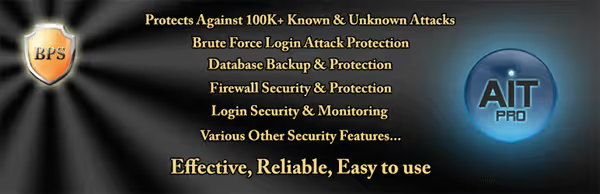
A veteran among WordPress security plugins with a straightforward approach: three protection areas, Firewall, Login Security, Database Security. For each, a setup wizard in a few clicks. A "red/green" system signals what is protected and what is not: red, unsafe, green, all good.
BulletProof blocks RFI, XSS, Base64 and other injections via.htaccess rules. This is an old but reliable method: protection at the server level, not inside PHP. The plugin was updated in May 2026 (version 7.2), but the interface looks archaic next to Solid Security and MalCare.
Pros:
- Simple setup: "red/green" in 5 minutes
- Protection at the.htaccess level (before WordPress)
- The free version delivers full firewall functionality
- Blocks RFI, XSS, Base64, SQL injections
Cons:
- Interface looks outdated
- No managed cleanup or cloud scanner
- Updated less frequently than market leaders
Price: Free / Pro $69.95, one-time purchase (BulletProof Security).
🔗 BulletProof Security on WordPress.org
9. Hide My WP Ghost (formerly Hide My WP)
Hide My WP Ghost (formerly Hide My WP) takes the "Security by Obscurity" path: instead of reinforcing doors, it masks the very fact that the site runs on WordPress. It hides paths to wp-admin, wp-content, standard permalinks, WP version meta tags, and theme/plugin signatures. Since 2016 the product has grown into a full security solution: WP Ghost 9.0 includes the 8G Firewall by Perishable Press, brute force protection, 2FA, logging, and 150+ features.
This approach does not replace a full firewall, but it adds a layer of protection: automated vulnerability scanners target WordPress signatures. Not seeing familiar URLs and meta tags, the bot moves on to another victim. The plugin also blocks direct access to PHP files and hides the fact that WP is in use.
Hide My WP Ghost is a supplement, not a replacement for a primary security solution. Use it alongside Solid Security or Wordfence, not instead of them.
Pros:
- Hides WordPress signatures from automated scanners
- Masks admin URL, wp-content, permalinks
- 8G Firewall and brute force protection included
- 250,000+ sites protected (WP Ghost)
Cons:
- "Security by Obscurity" does not protect against a targeted attack
- Does not replace a firewall and malware scanner
- Paid (from $49/year, WP Ghost pricing)
- Not always compatible with some themes and caching plugins
Price: From $49/year, free version with basic features (WP Ghost).
Other security plugins: in brief
The WordPress ecosystem has dozens more solutions. Here are the ones worth mentioning:
Defender Security. A WPMU DEV product: 2FA, login protection, security headers, geolocation lockout, file editor disabling. Works well paired with other WPMU DEV products, but standalone use offers no advantages over Solid Security.
Security & Malware scan by CleanTalk. A free basic perimeter: firewall with IP/country filtering, malware scanner with antivirus, brute force protection, custom login URL, 2FA.
Limit Login Attempts Reloaded. Login protection only (backend + WooCommerce + frontend logins). Attacker IP blocking, email notifications. Runs alongside Wordfence/Sucuri without conflicts. Supports multisite.
WP Activity Log. A log of everything happening on the site in real time. It does not block attacks, but it shows: who logged in, what they changed, where the knocks came from. Indispensable for post-mortem analysis and compliance.
HTTP Headers. Advanced control of HTTP headers: X-Frame-Options, Content-Security-Policy, HSTS and dozens of others. For those who know what they are doing, a powerful tool for defense in depth at the protocol level.
Video review in English: a comparison of Wordfence and Solid Security in real tests with a setup demo for each plugin.
⁉️🤔 Frequently asked questions
Which WordPress security plugins are the best in 2026?
Three leaders: Solid Security (free, flexible configuration), Wordfence Security (5 million installs, Endpoint Firewall), and MalCare (automatic malware removal, cloud scanner). The choice depends on the task: Solid for manual control, Wordfence for budget protection with a powerful scanner, MalCare for a "set it and forget it" approach.
Can you secure WordPress without plugins?
Yes, pros get by with.htaccess directives, server-level WAF (ModSecurity), proper HTTP headers, and manual hardening. But that takes experience and time. For the vast majority of site owners, one quality security plugin is a sensible trade-off between security and effort.
Should you install multiple security plugins?
In most cases, no. One well-configured plugin (Solid, Wordfence, or MalCare) covers the core perimeter. Two full-featured plugins often conflict: both try to modify.htaccess, hook into the same actions, and break the admin panel. The exception is narrow-purpose add-ons: BBQ alongside Solid/Wordfence, or WP Ghost as an obfuscation layer.
Is WordPress a secure platform?
The WordPress core, yes, it is audited by dozens of developers and updates ship regularly. The problem is the ecosystem: 60,000+ plugins and themes from third-party developers of varying skill levels. Every outdated plugin is a potential hole. With regular updates and a configured security plugin, WordPress is on par with other CMS platforms in terms of security.
Can you make a WordPress site completely invulnerable?
No, and that is the honest answer for any system running software. Absolute protection does not exist. The real goal is to reduce risks to a minimum: so automated attacks are blocked at the firewall level, and targeted ones are detected by the scanner before they cause damage.
How often should you update WordPress and plugins?
At least once a month. Critical security updates, same day. Enable auto-updates for minor core releases and themes. Before every update, take a full backup. Note: premium themes and plugins require activation to receive updates. An unactivated license = an unpatched vulnerability.
Which WordPress security plugin to choose: the final breakdown
The use case dictates the choice. Here is a short matrix:
- First plugin for a beginner → All-In-One WP Security. Free, visual score, no need to understand technical terms.
- Free protection with maximum features → Solid Security Free. Flexible configuration, hardening, patches, at zero cost.
- Powerful scanner and budget premium → Wordfence. The free version already covers a lot, Premium gives real-time protection (see section 2 for pricing).
- "Set it and forget it" automation → MalCare. Cloud scanner with no load, 1-click malware removal, backups included.
- High-traffic commercial site → Sucuri. DNS-level Firewall + managed cleanup + 24/7 monitoring, when the cost of a breach exceeds the subscription price.
If your budget is zero, take Solid Security Free and add BBQ Block Bad Queries for request filtering. That will block the vast majority of common attacks. If the site generates revenue, the cost of a plugin is negligible compared to the price of recovery after a breach (see sections 1-5 above for specific pricing).
Check that your site is updated right now. A security plugin is not a silver bullet, it is the last line of defense after an up-to-date core, themes, plugins, and reliable hosting. Which plugin has saved you? Let us know in the comments.

A professional team of writers and editors specializing in creating quality content.