














📎 File upload plugins for WooCommerce: 6 solutions for 2026
The buyer clicks "Place order", and the system asks: "Attach your artwork". At that moment the store either gets the file in a second or loses the order while the customer figures out where to attach the PDF and writes to support.
File uploads in WooCommerce are not a whim. For dozens of niches this is a mandatory checkout step: from mug printing to car rental. No file, no order.
We rounded up 6 plugins that cover this task: from lightweight free solutions to full-featured tools with conditional logic and cloud file delivery. Each is built for its own scenario, and below we will break down which one fits whom.
💡 Quick overview:
- If you need free uploads at checkout, install Checkout Manager: a working free version with no artificial limits.
- If files need to go to Dropbox or S3, look at File Uploader for WooCommerce or Drag and Drop Multiple File Upload.
- If moderation of every file matters, go with YITH WooCommerce Uploads or Customer Upload Files.
- If the upload is part of product customization with price recalculation, your pick is Barn2 Product Options.
Why a buyer needs to upload files directly in the order
A file from the customer is needed more often than it seems. And almost always its absence stalls the order.
Personalization. Mugs, phone cases, business cards, photo cakes. Without the artwork the order cannot be assembled. The plugin attaches the file to the order automatically, so the manager does not dig through email.
Documents and verification. Car rental, yacht booking, airline ticket sales. You need an ID, driver's license, diver certification. In a number of countries hotels are required to transmit guest data in advance, and a file at checkout closes the issue before check-in.
B2B and services. The client uploads a technical specification or drawing as a PDF, and the manager sees it right in the order details. No "send it by email" and lost messages.
Returns and exchanges. The item arrived damaged, the client attaches a photo of the defect. Everything goes through the order form, not through email correspondence.
The point is the same. A file at checkout removes friction: the customer does not jump between the site and email, and the store gets an order with a complete data set.
Comparison table: 6 file upload plugins
Plugin | Free version | Upload points | Cloud (Dropbox / S3) | Price |
|---|---|---|---|---|
Checkout Manager | ✅ Yes | Checkout | ❌ No | Free / premium from $49/year |
File Uploader (Snowray) | ✅ Yes, with limits | Product, cart | ✅ Drive, Dropbox, OneDrive | Free / Pro from $89.99/year |
YITH WooCommerce Uploads | ❌ No | Cart, checkout, Thank You | ❌ No | Annual license |
Customer Upload Files | ❌ No | Product, cart, checkout | ❌ No | from $49/year |
Barn2 Product Options | ❌ No | Product | ❌ No | from $149/year |
Drag and Drop Multiple Upload | ✅ Yes | Product, cart, checkout | ✅ S3, Dropbox, Drive | Free / Pro from $20.99/year |
1. Checkout Manager for WooCommerce, a free checkout builder
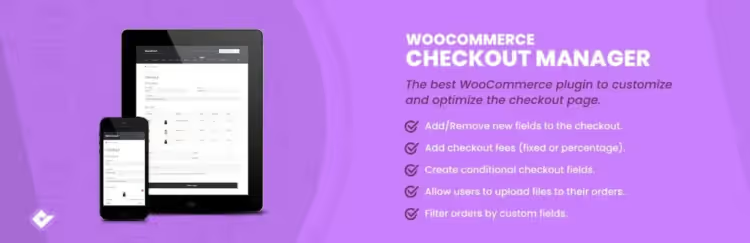
Checkout Manager by QuadLayers is the only plugin in this roundup with a full-featured free version. It has 80,000+ active installs and a 4.5 rating on WordPress.org, so this is not a stripped-down demo but a working tool.
The key point is that file upload here is part of a checkout builder. You add, remove and rearrange fields on the checkout page: text fields, checkboxes, dropdowns and an upload button. All through a visual editor, no code.
For files you configure the button text, label and association with products or categories. If you need the upload field to appear only for the "Mug Printing" category, you set a condition. In practice this covers most stores at the start.
One nuance. The plugin works with the classic shortcode checkout, and it does not yet support the new WooCommerce checkout blocks.
- Pros: working free version; flexible field builder; conditional logic for field display.
- Cons: no cloud integration; does not work with the new Checkout Blocks.
- Price: Free on WordPress.org. Premium from $49/year for one site adds premium fields and advanced logic.
- Download: 🔗 Checkout Manager on WordPress.org
2. File Uploader for WooCommerce, upload directly from the client's cloud

This niche used to be served by an older plugin on CodeCanyon with Dropbox and S3 integration, but it was pulled from sale. As a replacement we picked a live alternative with the same cloud focus, File Uploader for WooCommerce by Snowray.
Its distinction is that the client uploads a file not only from their disk. The plugin pulls uploads from multiple sources, including Google Drive, Dropbox, OneDrive and Box. The person picks a ready file in their cloud, and it gets attached to the order right away.
All uploads are stored not in the media library but on a cloud CDN. The WordPress media library does not bloat, and a direct link to the file arrives in the order and in the seller's email. Inside there is a simple image editor: crop, rotate, sharpen.
The plugin is young. The install base is still small, around a hundred active installs on WordPress.org, and the free tier is limited: one file per product and a monthly upload cap.
- Pros: import files directly from Google Drive, Dropbox, and OneDrive; CDN storage; built-in image editor.
- Cons: young product with a small install base; one file per product in the free version.
- Price: a free tier is available. Pro from $89.99/year on the Snowray site, with monthly billing and a 7-day trial.
- Download: 🔗 File Uploader on WordPress.org | 🔗 Snowray site
3. YITH WooCommerce Uploads, moderation and file validation

YITH WooCommerce Uploads is built around moderation. The admin doesn't just get a notification about an upload, they approve or reject the file. The customer sees the status and, if rejected, uploads a corrected version.
Uploads work in the cart, at checkout, and on the thank-you page. The maximum file size and number of files are configured separately for each location. After review, the customer gets an email: file accepted or not.
A standout feature is split items. Three identical t-shirts with different prints are not three orders, but one order with three attached files. For multilingual stores, WPML compatibility is built in. The plugin is fresh: the latest update shipped in July 2026.
- Pros: manual moderation with approval and rejection; separate limits per location; split items and WPML.
- Cons: no free version; no cloud storage.
- Price: annual license, check the YITH site for current pricing. 30-day refund.
- Download: 🔗 YITH WooCommerce Uploads
4. Customer Upload Files for WooCommerce, paid uploads
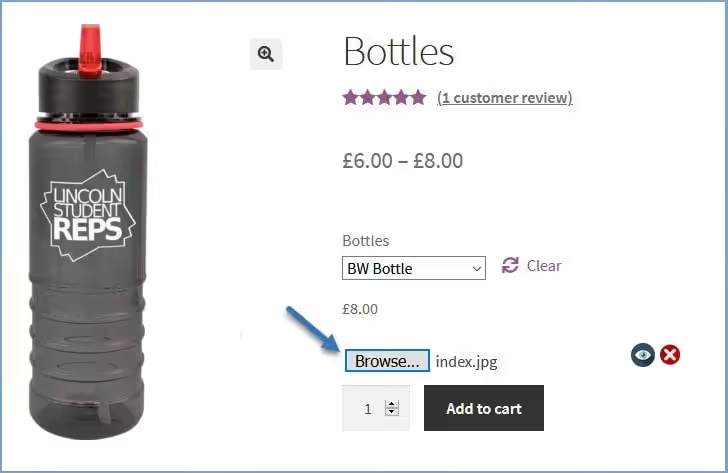
Customer Upload Files by FMEAddons is sold on the official WooCommerce marketplace and does something none of the others on this list do: charge for the upload itself.
The setup is simple. You enable "Charge for upload", set a price, and when a file is uploaded the amount is automatically added to the order. This is handy when personalization is a paid service: the customer sees the artwork cost right away, with no surprises at checkout.
The customer uploads multiple files, previews them before submitting, deletes and re-uploads. Everything can be adjusted until the order is placed. The admin, for their part, approves or rejects files with an email to the customer. There are size, quantity, and file type restrictions, plus compatibility with cart blocks and HPOS.
- Pros: upload fee charged directly on the order; file acceptance and rejection; role- and category-based restrictions.
- Cons: no free version; no cloud storage out of the box.
- Price: from $49/year, with a 30-day money-back guarantee.
- Download: 🔗 Customer Upload Files on WooCommerce.com
5. WooCommerce Product Options by Barn2, file field inside product options

Barn2 Product Options is a product options builder, not a narrow file plugin. File upload here is one field type among others, alongside checkboxes, radio buttons, and date pickers.
Why this matters. A file is often needed not on its own, but as part of customization. A cake order: size, filling, and uploading a decoration picture. The price recalculates on the fly, base plus a surcharge for each layer. Conditional logic hides what is irrelevant: choose chocolate, and the "Fruit add-in" field is hidden.
The plugin is built for upselling. The customer assembles the product like a configurator and raises the average order value themselves. All without code, through a visual options builder.
- Pros: many field types, including file upload; formula-based price recalculation; strong conditional logic.
- Cons: pricier than narrow plugins; no free version; upload only on the product page.
- Price: from $149/year for one site, plans for 5 and 50 sites available. 30-day refund.
- Download: 🔗 WooCommerce Product Options on Barn2
6. Drag and Drop Multiple File Upload, drag it and done

In place of the old Drop Uploader, which is no longer for sale, there is now a live and far more popular plugin by CodeDropz. It has 5,000+ active installs and a 4.9 rating on WordPress.org.
The idea is the same: make uploading ridiculously simple. The customer drags a file with the mouse into a designated zone, and that is it. The "Browse" button is also there, for those used to the old way. The field can be shown on the product page, in the cart, or at checkout, your choice.
Upload is asynchronous, with support for large files in chunks and downloading a batch as a ZIP. The extended plan connects the cloud: files go to Amazon S3, Dropbox, Google Drive, or FTP. There is also a pay-per-upload option, whether per file or per PDF page.
- Pros: convenient drag-and-drop; S3, Dropbox, and Drive cloud in Pro; large file upload in chunks.
- Minuses: cloud only in the extended plan; some settings are locked behind Pro.
- Price: free core on WordPress.org. Pro from $20.99/year, extended plan with cloud from $27.99/year.
- Download: 🔗 Drag and Drop Multiple File Upload on WordPress.org | 🔗 Pro version on CodeDropz
If you want to see file uploads in WooCommerce live, a short video on the topic is below.
⁉️🤔 Frequent questions
Can I build file uploads through functions.php and not pay for a plugin?
Technically yes. But then type validation, security, storage, order attachment, and the admin interface are all on you. A ready-made plugin delivers that out of the box for the price of one developer hour. For a store with live orders, a custom-coded upload is an unnecessary risk.
Which plugin to choose if the store is just starting and the budget is minimal?
Checkout Manager for WooCommerce. Its free version covers the "file at checkout" task with no investment. When you need conditional logic and premium fields, buy a license from $49/year. For simple drag-and-drop, the free CodeDropz core also works.
Do upload plugins slow down the site?
Quality ones do not. The file uploads asynchronously, via AJAX, without blocking the page. The main load falls on storage, and that is down to hosting. If files are many and heavy, pick a plugin with cloud support, File Uploader or Drag and Drop Multiple File Upload, to avoid bloating the media library.
Can I allow uploads of only certain file types?
Yes, all plugins in this roundup filter by MIME types and extensions. You set "PDF and JPG only, up to 5 MB," and the customer physically cannot attach a ZIP or EXE. That is standard protection against junk and unsafe files at checkout.
The customer uploaded the wrong file, can it be changed?
Usually yes. YITH WooCommerce Uploads and Customer Upload Files let the customer replace the file before placing the order. Checkout Manager lets the admin delete the file and request a new one. File Uploader by Snowray stores versions in the cloud, so re-uploading is also not a problem.
Which file upload plugin to choose in 2026
Six plugins, six scenarios. There is no universal one, only the one that fits your task.
- If the store is just starting and you need a free option, go with Checkout Manager.
- If files need to fly to the customer's cloud, look at File Uploader for WooCommerce.
- If moderation of every file matters, your choice is YITH WooCommerce Uploads or Customer Upload Files.
- If the upload is part of product customization with price recalculation, install Barn2 Product Options.
- If customers need simple drag-and-drop with cloud, take Drag and Drop Multiple File Upload.
Before installing, check the main thing: the plugin must work with your theme and not conflict with other checkout extensions. Place a test order with a file upload. Five minutes now will save hours of support later. And if you have already run any of these plugins in production, share your experience in the comments.

A professional team of writers and editors specializing in creating quality content.