













🎨 Laptops for graphic designers 2026
A graphic designer picks a laptop not by gigahertz. A display with accurate color, smooth work with multi-layered Photoshop files, and all-day battery life: three characteristics without which a machine can't keep up the pace. A mistake at the start costs weeks of lag and hours of color rework.
2026 delivered several hardware generations that meet these requirements without compromise. Snapdragon X Elite, Intel Core Ultra (Lunar Lake), and Apple M5 processors handle Illustrator with dozens of artboards and batch RAW processing without stuttering. Displays have broadly moved to OLED and mini-LED with factory DCI-P3 calibration. And 16 GB of RAM has become the standard even in entry-level configurations.
We picked three models for different workflows and budgets. Each passes the main criterion: a display you can trust without additional calibration. If you are looking to buy a laptop in Kharkiv, this selection will help you navigate current specs and avoid overpaying for unnecessary features.
💡 Quick overview:
- Identify your primary tool: Photoshop runs everywhere, Sketch is Mac-only.
- Don't chase the processor: factory display calibration matters more than gigahertz.
- Get 16 GB RAM minimum, 32 GB for multi-layered projects and rendering.
- Memory is soldered on all three models, no expansion slot.
Model | Display | Processor | RAM (base) | Battery life | Best for |
|---|---|---|---|---|---|
Surface Pro 11 | 13" OLED, 120 Hz, 2880×1920 | Snapdragon X Elite | 16 GB | up to 14 h | Mobility + stylus |
ZenBook S 14 OLED | 14" OLED, 120 Hz, 2880×1800, matte | Intel Core Ultra 7 | 16 GB | up to 15 h | Windows ultrabook with Pantone |
MacBook Pro 14" M5 | 14.2" mini-LED XDR, 120 Hz, 3024×1964 | Apple M5 | 16 GB | up to 17 h | Apple ecosystem, color reference |
1. Microsoft Surface Pro 11

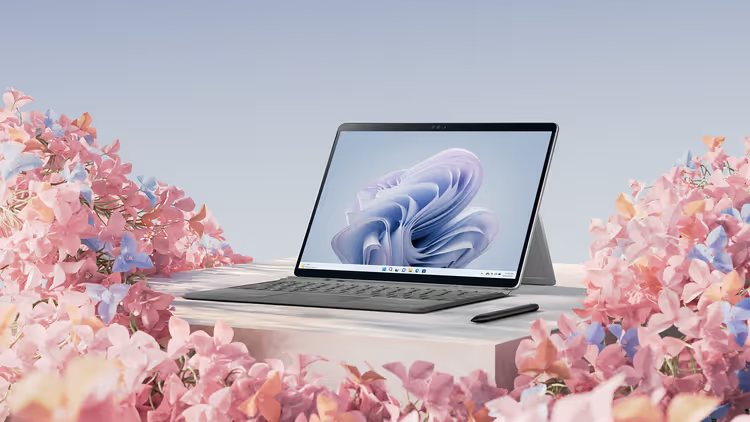
An eleventh-generation 2-in-1 tablet on the ARM-based Snapdragon X Elite processor, the most flexible tool in this selection. Two formats: with the Flex Keyboard detached you get a tablet for sketching in Adobe Fresco or retouching with the Slim Pen stylus. With it attached, a full-fledged laptop running Windows 11 with complete Adobe Creative Cloud compatibility.
The 13-inch OLED display with 2880×1920 resolution delivers full DCI-P3 coverage, a 120 Hz refresh rate, and 1,000,000:1 contrast ratio, Microsoft data. In practice, this means smooth artboard scrolling without jitter and accurate color without a calibrator.
The built-in 45 TOPS NPU deserves a special mention. It accelerates Photoshop AI tools: generative fill, object selection, neural filters, without loading the CPU. The difference from the Surface Pro 9 (2022) is radical: battery life doubled, and heat under load disappeared.
The base configuration (Snapdragon X Plus, 16 GB, 256 GB SSD) handles 2D design with room to spare. For 3D modeling and 4K video editing, it makes sense to get the X Elite version with 32 GB.
- Pros: studio-quality OLED display, stylus with haptic feedback, passive cooling (complete silence), up to 14 hours on a single charge.
- Cons: Windows on ARM is not compatible with all software, check your plugins before buying; keyboard and stylus are sold separately, adding $300-400 to the price.
- Price: from $1,000 for the tablet (without keyboard and stylus).
- Link: 🔗 Surface Pro 11 on Microsoft Store
2. ASUS ZenBook S 14 OLED

If the Surface Pro 11 bets on mobility and stylus, the ZenBook S 14 OLED is a classic ultrabook for those who need maximum Windows performance without weight compromises. It weighs 1.2 kg with a magnesium-alloy body, lighter than the MacBook Pro 14".
The 14-inch 16:10 OLED display (2880×1800) is Pantone Validated and VESA DisplayHDR True Black 600 certified, ASUS specifications. Factory calibration delivers Delta E below 1, a deviation the eye cannot discern. DCI-P3 coverage holds at 100%, sRGB at 133%. A critically important detail for designers: the display is matte. Unlike the glossy panels of the MacBook, there are no reflections from a window or a lamp behind you.
The Intel Core Ultra 7 (Lunar Lake) processor with Arc graphics handles Illustrator, Photoshop, and Figma simultaneously without stuttering. In PugetBench for Photoshop tests, the system shows a result noticeably ahead of the previous-generation ZenBook S 13.
Cooling with two fans and a vapor chamber keeps temperatures in check: even during rendering, the chassis does not overheat, and throttling is not observed in typical design workflows.
- Pros: calibrated OLED out of the box, matte anti-glare coating, record-light body (1.2 kg), up to 15 hours of battery life, fast charging (60% in 30 minutes).
- Minuses: no discrete GPU, for 3D design look at the ProArt line instead; memory is soldered with no upgrade option.
- Price: from $1,200.
- Link: 🔗 ASUS ZenBook on the official website
3. Apple MacBook Pro 14" (M5)

The professional standard for designers deeply embedded in the Apple ecosystem. The M5 chip model (release: fall 2025) brought a significant graphics performance boost over the M4, Apple data. Meanwhile, battery life reached 17 hours, two full workdays away from an outlet.
The Liquid Retina XDR display (14.2", 3024×1964, 120 Hz) is a reference for color grading. Mini-LED backlighting with thousands of local dimming zones delivers a 1,000,000:1 contrast ratio and 1,600 nits peak brightness in HDR, Apple specifications. Factory calibration includes Reference Mode with presets for DCI-P3, sRGB, BT.709, and BT.2020, switching between color spaces in one click.
The MacBook Pro's main advantage for a designer is not the hardware, but the ecosystem. Sidecar turns an iPad into a wireless graphics tablet. Continuity Markup lets you sign a layout from your phone and instantly see the edit on the desktop. And if you work in Sketch (which is not available on Windows), there are no alternatives.
- Pros: best display on the laptop market (mini-LED, Reference Mode), silent cooling in 2D tasks, record battery life (up to 17 h), Apple ecosystem magic.
- Minuses: high starting price (from $1,599), memory and SSD are soldered, capacity is chosen at purchase; glossy display (matte option only on higher configurations).
- Price: from $1,599.
- Link: 🔗 MacBook Pro on Apple.com
⁉️🤔 Frequent questions
Which processor is better for graphic design: Intel, Snapdragon, or Apple M5?
For Adobe CC, the difference between Intel Core Ultra 7 and Snapdragon X Elite is minimal in practice; both handle multi-layered Photoshop files without lag. Apple M5 wins in highly parallel tasks (rendering, batch processing 100+ RAW files) and delivers the best battery life. If you are not tied to Sketch or Final Cut, choose the best display, not the best processor: the difference in color accuracy is more noticeable than the difference in benchmarks.
Do I need a discrete graphics card for Photoshop and Illustrator?
For 2D design, no. Integrated Intel Arc graphics and Apple M5 chips handle Photoshop, Illustrator, and Figma with room to spare. A discrete GPU only makes sense for regular 3D work (Blender, Cinema 4D) or 4K and higher video editing. Paying for an RTX 4060 for web design is a waste of money and battery.
OLED or mini-LED: which is better for a designer?
Both panel types deliver excellent color reproduction with full DCI-P3 coverage. OLED wins on contrast ratio and response time; mini-LED wins on peak brightness (over 1,500 nits on the MacBook Pro versus 600-800 nits on typical OLED laptops). The critical difference for a designer is not the backlight technology, but factory calibration and the presence of a matte coating.
16 or 32 GB of RAM in 2026?
16 GB is the working minimum for a Photoshop + Illustrator + Figma + browser with 20 tabs combo. 32 GB provides headroom for 50+ layers in 16-bit color, parallel rendering, and After Effects in the background. All three models in this selection have soldered memory with no expansion slot; if your budget allows, get 32 GB upfront.
Is the Surface Pro 11 worth it for professional design?
For illustrators and retouchers who work with a stylus, yes, it is the best Windows tool. For UI/UX designers in Figma, it is also excellent: 120 Hz, 13", and 900 g weight provide mobility without sacrificing display quality. There is one limitation: the ARM processor. Check your Photoshop plugins' compatibility with Windows on ARM before buying; not all developers have ported their extensions to the new architecture.
Which laptop should a graphic designer choose in 2026
Three machines cover three different workflows. The choice comes down not to specifications, but to your daily scenario.
If you move between the studio, clients, and home, the Surface Pro 11 offers versatility that classic laptops lack. A stylus for sketches, tablet mode for presentations, and one kilogram of weight change the way you work with design.
If you are on Windows and want the best display without being tied to one ecosystem, the ZenBook S 14 OLED delivers maximum value for the money. A matte Pantone display and 15 hours of battery life cover the vast majority of design tasks without worrying about an outlet.
If you are already in the Apple ecosystem or work in Sketch and Final Cut, the MacBook Pro M5 is unrivaled. A reference display with Reference Mode and 17 hours without recharging are worth their price.
One rule remains unchanged: the display matters more than the processor. Choose a laptop where the colors don't lie from day one. The rest will follow.

A professional team of writers and editors specializing in creating quality content.