













 AIIllustrative image: AI-generated
🔒 Static vs dynamic IP: which one you need for home internet
You connect to the internet, and your router gets an address. Not a website URL, but a numeric identifier for the connection itself. It's called an IP address, and it comes in two types: static (permanent) and dynamic (changing).
Which one you have affects security, remote access to your home network, and even whether a game server lets you back in after a router reboot.
Below, no fluff: how both types work, a comparison table, use-case guidance, and what to ask your ISP.
💡 Quick overview:
- A static IP is a permanent address that doesn't change on reboot: handy for video surveillance, remote desktop, and hosting.
- A dynamic IP is an address the ISP reassigns each time you connect: standard for residential plans, better for privacy.
- You can check your type in 10 seconds via
whatismyip.comor thecurl ifconfig.mecommand in a terminal. - A static IP is usually added as a paid option through your ISP; a dynamic IP is included in the base plan.
What an IP address is and how it works in a home network
An IP address (Internet Protocol address) is a numeric identifier your router receives from the ISP when it connects to the internet. It's how websites and services "see" your device on the network and send data back: pages, videos, API responses.
An IP address consists of several numbers separated by dots. Inside the home network, the router hands out local addresses to devices, while the outside world sees a single public address for the entire household, the one issued by the ISP.
That public address is the one that can be static or dynamic. The type determines whether you can reach your network from outside, how trackable you are by websites, and how services that need a fixed IP behave.
Static IP: an address that doesn't change
A static IP is permanently assigned to your connection by the ISP. Reboot the router, lose power, wait a week, the address stays the same. It's like a phone number that hasn't changed in years.
How it works technically: the ISP adds your MAC address or PPPoE login to a static binding table on the DHCP server. Every time you connect, the server sees your account and issues the same IP.
What you get in practice:
- Remote access without middlemen. Set up a NAS server or surveillance camera at home, and you connect to them directly by IP from anywhere. No need for cloud workarounds like the camera manufacturer's P2P servers.
- Stability for hosting. You spin up a game server for friends or a test web server; the address doesn't drift, and the DNS record stays valid.
- Allowlists. You administer a corporate VPN or a server with IP-based access: add the address to the allowlist once and forget about it.
- Fewer captchas and blocks. Dynamic addresses can have a "dirty" reputation: the previous user may have sent spam, and now the whole pool is blacklisted. A static IP avoids that.
Downsides:
- Extra cost. Most ISPs charge a separate monthly fee for a static IP, ranging from 100 to 300 ₽ depending on the region.
- You become a persistent target. An attacker who spots your IP knows the address won't change tomorrow. A DDoS attack or password brute-forcing against an open port becomes easier.
- Tracking. Websites and ad networks accumulate browsing history tied to a permanent address. A profile gets built more accurately and faster.
Dynamic IP: the standard for residential plans
A dynamic IP is reassigned each time you connect to the network or when the lease time expires, typically anywhere from 24 hours to a week. It's like a rental apartment: you live there today, tomorrow another subscriber gets the address.
ISPs use dynamic addresses by default because it's easier to manage the address pool. An ISP might have, say, 10,000 public IPs for 50,000 subscribers: not everyone is online at the same time.
Upsides for a home user:
We also recommend: go proxy.
- Free. A dynamic address is included in every plan; no extra charge.
- Privacy out of the box. The address changes, so the browsing history collected by trackers quickly becomes stale. Pinning down a specific user behind a dynamic pool is much harder.
- Protection from targeted attacks. Even if someone grabs your IP during an online game or stream, it's useless a day later.
- Covers most needs. Browsing, YouTube, online games, video calls: everything works without a static IP.
Downsides:
- Not suitable for remote access. If you want to connect to your home PC from the office, you won't be able to guess the address. You'd need to set up DynDNS or use proxy services.
- Reputation-based bans. Your new IP may have been used by the previous subscriber to send spam, and now it's on a spam blocklist. Rare, but it happens.
- Session drops when the address changes. On some plans the lease time is short: the address changes once a day on a strict timer, cutting off active VPN connections and downloads.
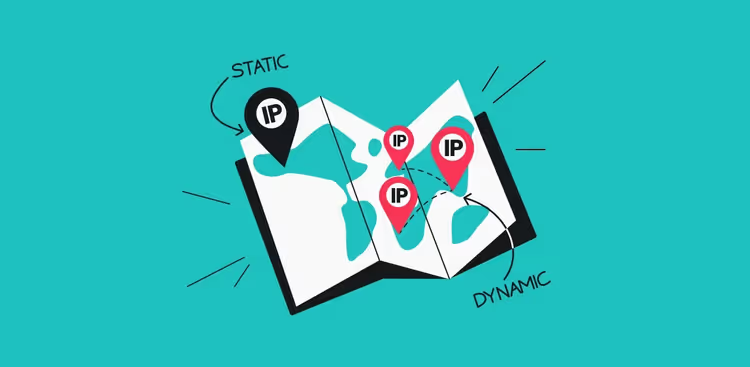
Comparison table: static vs dynamic
Criterion | Static IP | Dynamic IP |
|---|---|---|
Address persistence | Doesn't change | Changes on reconnect |
Cost | 100-300 ₽/mo extra | Free (included in plan) |
Remote access | Direct, no middlemen | Requires DynDNS or proxy |
Security | Higher risk of targeted attack | Higher anonymity |
Hosting / server | Works out of the box | Needs third-party hosting |
Captchas and blocks | Less frequent | May inherit someone else's bans |
Video surveillance | Direct camera access | Requires manufacturer's cloud |
Availability | As a paid option | Default on all plans |
How to check which IP you have right now
Method one, quick and visual. Open whatismyip.com or 2ip.ru: your current public address will be front and center. Reboot the router and check again: if the address changed, it's dynamic; if it stayed the same, it's either static or a long lease time.
Method two, for those who prefer the terminal. Run the command:
1 curl ifconfig.me
Note the result. Repeat after 24 hours or after rebooting the router. Compare, and you'll know right away.
Method three, look in your ISP's account dashboard. Most providers explicitly state it on the plan details page: "Dynamic IP" or "Static IP (active)." If you can't find it, ask support; they'll answer in a minute.
How to get a static IP from your ISP
The process is simple but varies by provider. The general steps:
- Log into your ISP's account dashboard and find the "Services" or "Add-ons" section.
- Look for "Static IP address" or "Fixed IP." It usually costs 100-300 ₽ per month.
- Activate the option; the address becomes active within an hour, sometimes immediately after a router reboot.
- The ISP will send your new static address via SMS or email. Save it.
Some ISPs (especially smaller regional ones) require a call to support or an office visit. Check in advance: sometimes the option isn't available on all plans.
The video above gives a visual explanation of the difference between static and dynamic IPs from a networking expert. The video is in English, but the diagrams and animations are clear without translation.
Which IP to choose for your needs
The answer depends not on your internet speed, but on your usage scenario. Here's a decision matrix:
- You mostly browse, watch YouTube, and play games: dynamic is enough. You won't notice a difference.
- You have a NAS server or surveillance cameras at home: get a static IP. Direct access to devices from outside without cloud crutches is worth it.
- You work remotely via VPN/RDP to the office: a static IP simplifies life, but it's not mandatory; a configured WireGuard with DynDNS also works.
- You administer servers with IP allowlisting: static only. A dynamic address will cut off your access every time it changes.
- Privacy matters and you don't want to expose your address: dynamic. And if you also need external access, add a private proxy to your dynamic setup (services like Go Proxy offer mobile IPs from EU carriers, handy for SMM and multi-accounting).
If you're unsure, start with dynamic. You can always add a static IP later with a couple of clicks in your account dashboard. Removing it is just as easy.
⁉️🤔 Frequent questions
Does the IP type affect internet speed?
No, the address type (static or dynamic) doesn't affect speed. Speed is determined by your ISP plan and channel load. A difference could only appear if a dynamic IP gets throttled by a specific service due to poor pool reputation, but that's rare.
Can I get a static IP for free?
Almost never. ISPs treat a static IP as an add-on service and charge for it. The exception is some business plans where a static IP is included by default. The free workaround is DynDNS services that tie a domain name to a changing dynamic address.
Is a dynamic IP dangerous for online gaming?
No. Modern games and gaming platforms (Steam, Epic Games) tie your account to your login, not your IP address. An IP change during a game might drop your session on some private servers, but on public matchmaking it's unnoticeable.
Can I hide my IP completely?
Neither static nor dynamic makes you completely anonymous. Your IP is always visible to the websites you visit. Maximum masking is achieved through a VPN (encryption + IP substitution by the VPN provider's server) or a proxy chain. But that's a topic for a separate article.
How much does a static IP cost with popular ISPs?
Prices as of July 2026: Rostelecom, from 150 ₽/mo; MTS, from 120 ₽/mo; Beeline, from 100 ₽/mo; small regional operators, from 50 to 200 ₽/mo. Check your ISP's account dashboard for the exact figure: plans change.
Which IP type to ultimately choose for home
In short: for typical home use, dynamic is more than enough. It's free, safer, and requires no setup.
A static address only pays off when a specific need arises: video surveillance, a home server, remote desktop access, or server administration via allowlist. In that case, 150-200 ₽ a month is a reasonable price for stability and direct access.
Check your current IP right now via whatismyip.com, reboot your router this evening, and check again. Once you know what you have, the decision becomes obvious.
What IP do you have, static or dynamic? Write in the comments: what tasks you chose it for and whether you switched plans to get a fixed address.

A professional team of writers and editors specializing in creating quality content.