














📌 What you need to know about laptop graphics cards: 2026 guide
Got a new game and it stutters on your laptop? The graphics card in a laptop is a topic often overlooked at purchase. People check the processor, RAM, SSD capacity. The GPU gets whatever is left. And that is a mistake: it is the GPU that determines whether the laptop can handle Premiere Pro, a modern AAA title, or at least 60 FPS in esports without hitching.
More: buy a gaming laptop.
The mobile graphics market in 2026 is running hotter than a cheap cooler: Intel Arc in Core Ultra processors is catching up to budget discrete cards, NVIDIA rolled out Blackwell in RTX 50, AMD brought RDNA 4 to the mobile segment. There is real choice, but without understanding the basics it is a guessing game.
💡 Quick overview:
- Define your task before choosing the graphics card type
- Compare models by TGP, not by GPU name
- Check for a MUX Switch in the laptop specs
- Match VRAM capacity to your specific use cases
What is a laptop graphics card and why think about it before buying
A graphics card (GPU, graphics processing unit) is the processor that handles graphics: UI rendering, video rendering, shaders in games. In a desktop PC it is a separate board in a PCIe slot, massive, with two or three fans. In a laptop it is different: the GPU is either integrated into the same die as the processor or soldered onto the motherboard as a separate chip.
The main limitation of a laptop is heat dissipation. A mobile GPU physically cannot consume 300-450 W like a desktop flagship. The typical range for a discrete mobile card is 45 to 175 W (TGP, Total Graphics Power). It is TGP, not the model name, that determines real performance.
And the key point: you can almost never swap the graphics card in a laptop after purchase. The decision is made once. A mistake is costly.
Integrated graphics: the baseline every laptop starts with
An integrated GPU (iGPU) lives on the same die as the processor. It has no dedicated video memory; it borrows from system RAM via shared memory technology. This has three consequences: low power consumption (a plus for battery life), modest heat output, and limited performance.
In 2026 an iGPU is no longer a dead end. Intel Arc graphics in Core Ultra processors (Arrow Lake) delivers stable FPS in esports titles at medium settings. AMD Radeon 780M and 880M on RDNA 3/4 architecture inside Ryzen AI 300 are noticeably faster. On such an iGPU you can realistically play Baldur's Gate 3, edit 4K in DaVinci Resolve, and work in Photoshop without lag.
Who will be fine with integrated graphics:
- Office, browser, YouTube, Zoom.
- Light video editing and photo retouching.
- Esports (CS2, Dota 2, Valorant) at medium to high settings.
- Study and frequent travel: an iGPU saves significant battery.
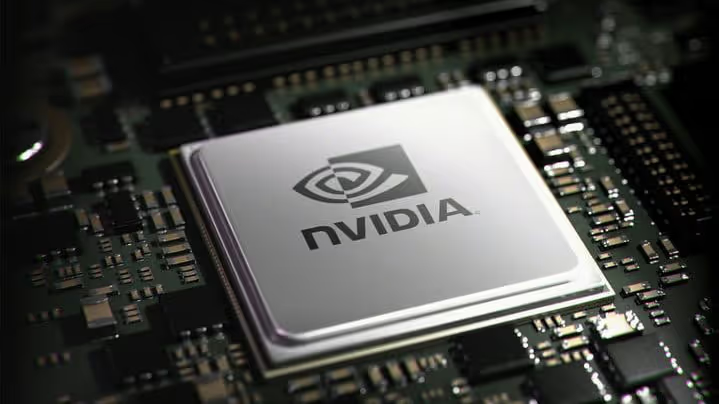
An iGPU will not handle AAA games at high settings, 3D rendering in Blender, running neural networks locally, or professional 8K editing. That is where discrete graphics comes in.
Discrete graphics card: when you cannot do without it
A discrete GPU (dGPU) is a separate chip with its own VRAM (in 2026, 6-16 GB GDDR7), its own power circuitry, and a dedicated cooler. It is what determines whether the laptop can run Cyberpunk 2077 with ray tracing on ultra or render a scene in Octane in minutes rather than hours.
Current mobile dGPU lineups as of mid-2026:
Lineup | Architecture | VRAM | Who it suits |
|---|---|---|---|
NVIDIA RTX 5090/5080 Laptop | Blackwell | 16 GB GDDR7 | AAA gaming 4K, 3D rendering, LLM work |
NVIDIA RTX 5070/5060 Laptop | Blackwell | 8-12 GB GDDR7 | 1440p gaming, video editing, entry-level neural networks |
NVIDIA RTX 4050 Laptop | Ada Lovelace | 6 GB GDDR6 | Budget gaming, student tasks |
AMD Radeon RX 7900M/7800M | RDNA 3 | 12-16 GB GDDR6 | Gaming without DLSS, OpenCL tasks |
Intel Arc A770M/A730M | Alchemist | 12-16 GB GDDR6 | Niche option: drivers have become more stable, price is lower than equivalents |
The "M" (Mobile) letter in the name is the key marker. A desktop RTX 5070 and a mobile RTX 5070 Laptop are two different chips with different core counts, frequencies, and thermal envelopes. The performance difference can be a multiple.
A separate note on VRAM for neural networks. Running Stable Diffusion XL, Flux, or an LLM like Llama 3 locally requires at least 8-12 GB of VRAM. 6 GB (RTX 4050) is only enough for inference of small quantized models. If you plan to work with AI tools, look at memory capacity, not core count.
Hybrid mode and MUX Switch: how a laptop switches graphics
A modern laptop with a discrete card almost always also has an integrated GPU in the processor. The system decides which one to use: iGPU for desktop and browser (battery saving), dGPU for gaming or rendering (maximum performance). The technology is called NVIDIA Optimus (or Advanced Optimus with direct connection) and AMD SmartShift.
The problem with classic Optimus: the discrete card renders the frame but sends it to the display via the iGPU. This "passthrough" cuts some FPS and disables G-Sync on the built-in screen. A MUX Switch solves this physically: it switches the display to a direct line from the dGPU, bypassing the iGPU. The result is full performance and adaptive sync support. In 2026 a MUX Switch is present in almost all current gaming models.
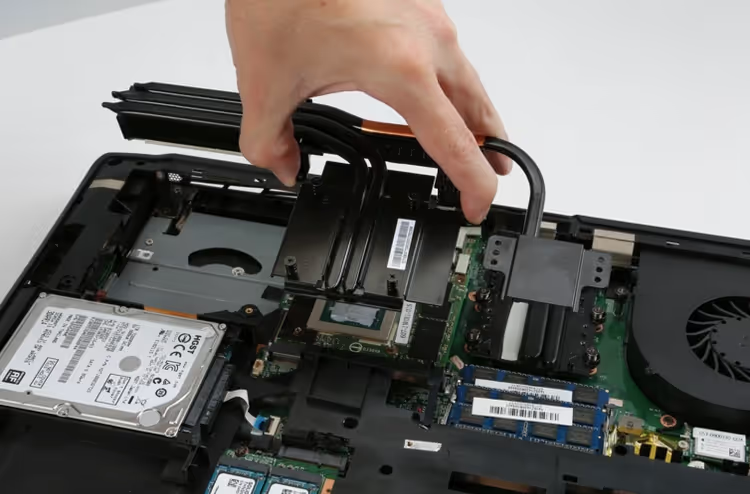
The MXM (Mobile PCI Express Module) slot is a separate story. It is a standard for a replaceable laptop graphics card, allowing a GPU swap without re-soldering. In practice it is rare: found in expensive Dell Precision, Lenovo ThinkPad P workstations, and some Clevo/Tongfang builds. The mass market lives with a soldered GPU.
Mobile vs desktop GPU: four differences stores stay silent about
Formally the chip is the same: Blackwell in an RTX 5080 whether in a PC or a laptop. In practice the difference is enormous.
1. Power consumption. A desktop RTX 5080 consumes up to 360 W. Its mobile namesake, 80-175 W depending on the TGP setting by the laptop manufacturer. Fewer watts, lower frequencies, fewer FPS.
2. Cooling and throttling. In a thin chassis the GPU heats up faster and drops frequencies after just 10-15 minutes of gaming. A flagship mobile chip in an ultrabook can perform at the level of a desktop mid-range card. A thick gaming laptop with large fans holds frequencies longer but weighs 3 kg and is loud.
3. Upgradeability. You swap a desktop card in five minutes and move on. In a laptop, only if it has the rare MXM slot, and even then finding a compatible module at retail is a real challenge.
4. Performance per unit of name. A mobile RTX 5080 is not a desktop RTX 5080 in a small chassis. It roughly matches a desktop RTX 5070 Ti. A gap of a whole generation downward, not deception but physics: 175 W vs 360 W under the same name.
Current mobile GPUs 2026: what to get for your tasks
GPU | TGP (typ.) | VRAM | Scenario |
|---|---|---|---|
RTX 5090 Laptop | 150-175 W | 16 GB GDDR7 | 4K gaming, LLM, 3D rendering without compromise |
RTX 5080 Laptop | 120-175 W | 16 GB GDDR7 | 1440p gaming, neural network work, CUDA workloads |
RTX 5070 Laptop | 100-140 W | 12 GB GDDR7 | Mainstream 1440p gaming, video editing |
RTX 5060 Laptop | 75-115 W | 8 GB GDDR7 | Budget gaming, students, first gaming laptop |
RTX 4050 Laptop | 45-85 W | 6 GB GDDR6 | Esports, undemanding games, office plus |
AMD RX 7900M | 140-180 W | 16 GB GDDR6 | Alternative to RTX 5080 without NVIDIA features (DLSS, CUDA) |
Intel Arc A770M | 100-130 W | 16 GB GDDR6 | Budget AI and content, good price per gigabyte of VRAM |
If you want to see the difference firsthand, here is a breakdown of mobile GPUs with real gaming benchmarks:
⁉️🤔 Frequent questions
Can I replace the graphics card in a laptop after purchase?
In mass-market models, no, the GPU is soldered to the motherboard. The exception is laptops with an MXM slot (expensive workstations and certain Clevo brick builds). But even there finding a replacement module for sale is difficult, and the price is comparable to a third of the cost of a new laptop.
Is integrated graphics enough for gaming in 2026?
Yes, if we are talking about esports. Modern iGPUs like Intel Arc and AMD Radeon 780M/880M deliver 50-80 FPS in CS2, Dota 2, Valorant at medium to high settings. For AAA titles (Cyberpunk 2077, Alan Wake 2, Black Myth: Wukong) you need a discrete card, at least an RTX 5060 Laptop. Casual games, indies, and emulators run perfectly on any modern iGPU.
What matters more: VRAM capacity or GPU frequency?
Until 2025, 8 GB was enough for any game at 1440p. In 2026 the situation has changed: new AAA titles demand 10-12 GB of VRAM for high textures without stutters. For Stable Diffusion, local LLMs, and 3D rendering, 12 GB is the comfortable minimum. GPU frequency determines FPS in light scenes; VRAM determines whether the game can handle high texture settings.
How does the graphics card affect battery life?
Directly and significantly. A discrete card in a game consumes 80-175 W; a typical 70-90 Wh battery will drain in 40-60 minutes. During office work Optimus/MUX Switch turns off the dGPU and shifts the load to the iGPU, extending runtime to 5-8 hours, like a regular ultrabook.
Which GPU to choose for neural network and AI work?
Minimum, NVIDIA with 12 GB VRAM (RTX 5070 Laptop). The CUDA and TensorRT ecosystem is still unmatched for Stable Diffusion, suites like ComfyUI, and local LLM inference. AMD is catching up with ROCm, but a smaller set of frameworks works under Windows. Apple Silicon (M4/M5) with unified memory up to 128 GB is a strong option for LLMs, but gaming is not its element.
Which graphics card to get: the final breakdown without marketing
The choice boils down to three questions: what you do on the laptop, how much you are willing to spend, and how important portability is.
Office, study, YouTube, esports? A modern iGPU (Intel Core Ultra or AMD Ryzen AI 300) is all you need. The laptop will be lighter, quieter, cooler, and cheaper. A discrete card will only add weight and cost with no practical benefit.
AAA games, video editing, 3D? Minimum RTX 5070 Laptop or AMD RX 7800M. Look at the TGP in the specific laptop model's specs, no lower than 100 W. Check for a MUX Switch. A 16 mm thick gaming laptop with "RTX 5090" is marketing: the card will throttle and perform like a model two tiers lower.
Neural networks, AI workloads? NVIDIA plus maximum VRAM within the budget. RTX 5080 Laptop with 16 GB is the sweet spot for Stable Diffusion, LLMs, and AI-accelerated video editing. If the budget is tight, RTX 5070 Laptop with 12 GB will handle most consumer models.
Before buying, find benchmarks for the specific laptop model, not the abstract GPU, but the exact configuration you are putting in the cart. The manufacturer writes "RTX 5080" in large print, while the real TGP of 80 W is in fine print. An hour spent studying reviews and benchmarks will save years of frustration from unplayable FPS.

A professional team of writers and editors specializing in creating quality content.