













 AIIllustrative image: AI-generated
💡 Cross-site scripting (XSS): what it is and how to protect your site in 2026
In 2019, nearly 75% of large companies experienced cross-site scripting. Seven years later, XSS is still here. Microsoft reported 970 XSS cases closed since January 2024 alone, and a 2025 vulnerability in the LiteSpeed Cache plugin put 7 million WordPress sites at risk.
The problem is not the technology. JavaScript, the language of the interactive web, powers every theme, every comment form, every shopping cart. The problem is that an attacker can force your site to execute their code, and the browser cannot tell a malicious script from a legitimate one.
Let's break down XSS mechanics, three types of attacks, and specific layers of protection that shield your site from cross-site scripting. With tools, code examples, and real WordPress cases.
💡 Quick overview:
- What XSS is and how an attacker injects malicious code into a trusted site
- Three types of cross-site scripting (stored, reflected, and DOM-based) and how they differ
- Step-by-step setup of three protection layers: WAF, output escaping, and Content Security Policy
- Where to look for XSS vulnerabilities on your site and what to do if an attack has already happened
What is cross-site scripting
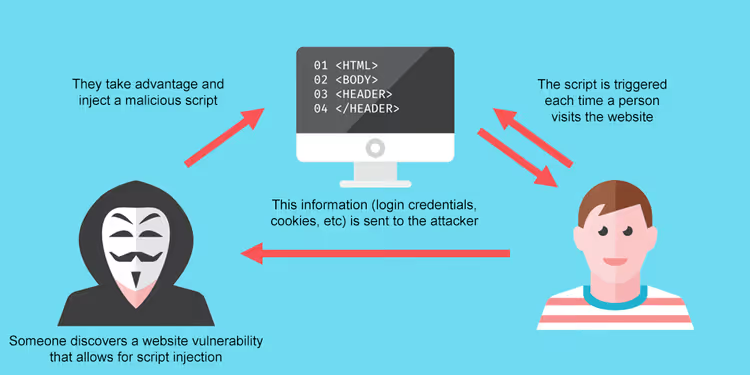
Cross-Site Scripting is an injection attack where an attacker embeds a malicious script into a page of a trusted site. The victim's browser executes this code because it treats it as part of the legitimate page. Hence the name: the script comes "crossing the site boundary."
Technically, the attack vector is not limited to JavaScript. Vulnerabilities are possible in HTML, Flash, ActiveX, and CSS. But in practice, the vast majority of exploits target JS. The reason: access to the DOM tree, cookies, localStorage, and the ability to make requests on behalf of the user.
In WordPress, vulnerabilities almost always arise through plugins and themes that improperly handle user input. Comment forms, search bars, contact forms, login pages: any field that accepts data and outputs it back without filtering becomes an entry point. According to Claranet, 2570 cases of reflected and stored XSS were found in tested web applications in 2024.
How XSS works
An attacker needs two conditions: an entry point for malicious code and no filtering on output. In practice, this is achieved in two ways: through manipulation of user input and through bypassing the same-origin policy.
Injection through user input
The most common scenario. A user field (search bar, comment form, file upload field) accepts not just text but executable code. If the plugin or theme does not escape output, an entered <script>alert('XSS')</script> will execute in the browser of everyone who opens the page.
The problem runs deeper than it appears. Even experienced developers miss XSS vectors through seemingly harmless fields: uploading an SVG file with an embedded script, entering data in the "username" field during registration, URL parameters in redirects. One field without esc_url() or esc_attr(), and the site is exposed.
In an ideal world, a search field accepts plain text and nothing more. In the real WordPress ecosystem of 60,000+ plugins, this guarantee is unattainable: one plugin with echo $_GET['q'] without esc_html() is enough.
Bypassing the same-origin policy
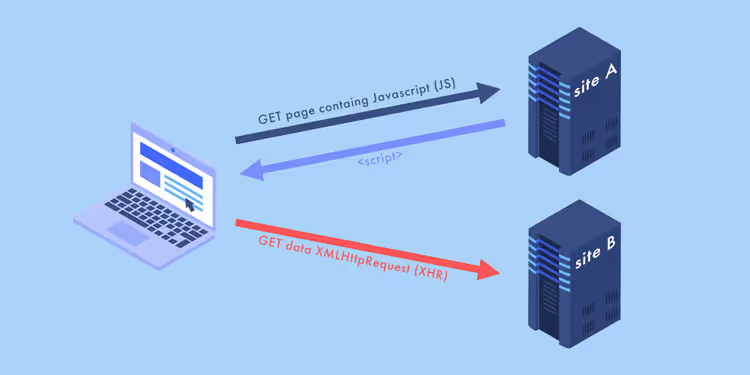
Same-origin policy is a fundamental browser security rule: scripts from one origin cannot read data from another. A Facebook page and a bank page open in the same browser do not exchange information. But this rule has an Achilles' heel: session cookies.
When you log into a site, the browser creates a session cookie that confirms your identity with every request. Without it, you would have to enter your password when navigating to each new page. The problem is that the browser attaches this cookie to any request to the domain, including requests initiated by a malicious script.
Attack scheme: an attacker finds an XSS vulnerability on example.com → injects a script that reads document.cookie → sends the session cookie to their server. Result: full access to the victim's account without knowing the password. Session cookies store credentials, cart contents, shipping information: the entire user context.
Three types of XSS attacks
XSS classification is based on where and how malicious code reaches the victim. There are three types, and protecting your site requires understanding the mechanics of each.
Stored XSS (type I)
The most dangerous type. The malicious script is saved on the server (in the database, in logs, in a comment field) and executes every time the infected page is opened. On WordPress, this is a classic scenario: an attacker leaves a comment with a <script> tag, the comment plugin does not filter HTML, and the script fires for every visitor to the post.
The peculiarity of stored XSS is that the attack does not need to be activated through a phishing link. The victim simply visits the page. In 2025, vulnerability CVE-2025-12709 in the Interactions plugin for WordPress was a classic stored XSS due to insufficient input sanitization in event selectors.
Reflected XSS (type II)
The attacker sends the victim a link containing malicious code in URL parameters. The server "reflects" this code back in the response, for example, in a search error message or in a line "You searched for: X." The browser executes the script because it arrived in the response body from a trusted server.
Reflected XSS requires active action from the victim: clicking a link. Therefore, the attack is often disguised as a legitimate URL in a phishing email. On WordPress, a typical vector is search plugins that output the search query without esc_html().
DOM-based XSS (type 0)
Unlike the first two, here the vulnerability is not in server-side code but in client-side JavaScript. Malicious data never goes to the server; it is processed directly in the browser through unsafe DOM API methods such as innerHTML, document.write(), or eval().
The data source is the URL (via window.location), document.referrer, or any other controllable source on the client. Server logs are clean; the attack is visible only in the browser. This XSS is the hardest to detect because WAF and server-side scanners do not see it.
Why XSS is especially dangerous for WordPress
WordPress is the number one target for XSS for one reason: the ecosystem. Of the 60,000+ plugins in the repository, not all undergo strict review for output escaping. One plugin with a vulnerability compromises the entire site.
In September 2025, Microsoft published an analysis of why XSS remains a threat 25 years after it appeared. The key takeaway: the complexity of the modern web stack makes complete XSS elimination nearly impossible, too many layers where escaping can be missed.
What an attacker gains through XSS on WordPress:
- Access to the admin panel by stealing administrator session cookies
- Injection of hidden links (SEO spam)
- Downloading malware to visitor computers
- Substituting payment details in WooCommerce
- Mass defacement of site pages
Combined with social engineering, XSS becomes a vector for sophisticated attacks: from installing keyloggers to cross-site request forgery.
How to protect your site from XSS: three layers

XSS protection is not solved by a single setting. Only defense in depth works: security plugins block crude attacks, output escaping closes technical vectors, and Content Security Policy blocks script execution at the browser level.
Layer 1: security plugins and firewall
The first line of defense is a WordPress plugin with a Web Application Firewall. WAF filters incoming requests before they reach plugin code and blocks known XSS attack signatures.
When choosing a security plugin, use this checklist:
- Regular scanning for malware and known CVEs in installed plugins
- Firewall with rules to block XSS patterns in requests
- WordPress hardening: disabling XML-RPC, changing table prefix, preventing file editing from admin
- Centralized management of updates for all plugins and themes
- Backup, so you can restore the site if an attack does get through
You can find a selection of WordPress security plugins with detailed breakdowns of each tool's features in specialized reviews on our site.
Layer 2: validation and output escaping
This is the main technical line of defense. The rule is simple and non-negotiable: no user data is output to the browser without escaping. WordPress provides built-in functions for this, and each is tied to a specific output context.
Basic toolkit for WordPress developers:
1 // For output inside HTML tags — between <p> and </p> 2 echo esc_html($user_input); 3 4 // For HTML attributes — inside value="..." 5 echo esc_attr($user_input); 6 7 // For URLs in href, src, and other attributes 8 echo esc_url($user_url); 9 10 // For output inside <textarea> 11 echo esc_textarea($user_text); 12 13 // For JavaScript variables 14 echo esc_js($user_data); 15 16 // For allowed HTML tags with dangerous attributes removed 17 echo wp_kses_post($user_html);
The key point: function choice depends on context. esc_html() in an href attribute will not save you; the attacker will insert javascript:alert('XSS'). Conversely, esc_url() inside a paragraph will let a <script> tag through. Context determines the function.
wp_kses() deserves special mention: a powerful filter that allows only permitted HTML tags and attributes. For user content (comments, profile descriptions, custom fields), this is the minimum required level of filtering.
Layer 3: Content Security Policy (CSP)
CSP is an HTTP header that tells the browser: "Execute scripts only from these sources." This is the last line of defense. Even if an attacker injected a <script> into the page, the browser will not execute it because inline scripts are not on the whitelist.
Basic CSP policy for WordPress:
1 // In functions.php or via a plugin 2 function add_csp_header() { 3 header("Content-Security-Policy: default-src 'self'; script-src 'self' 'unsafe-inline' 'unsafe-eval'; style-src 'self' 'unsafe-inline'; img-src 'self' data: https:;"); 4 } 5 add_action('send_headers', 'add_csp_header');
A strict policy ('strict-dynamic' instead of 'unsafe-inline') is safer but requires configuring nonce or hashes for each legitimate script. This is substantial work on a site with a dozen active plugins. Start with report-only mode to collect violation logs without breaking the frontend:
1 Content-Security-Policy-Report-Only: default-src 'self'; report-uri /csp-report-endpoint
CSP does not replace escaping. It mitigates the consequences of errors when escaping was missed somewhere.
Video: XSS from basics to exploitation
To see XSS in action and understand how to find vulnerabilities on real sites, watch this 30-minute breakdown:
After watching, return to the protection layers above. Now they will make sense at the mechanical level, not just at the level of function names.
⁉️🤔 Frequently asked questions
Will updating WordPress and plugins help protect against XSS?
Yes, and this is the most underestimated protection step. Each new plugin version often closes specific CVEs, including XSS vulnerabilities. The LiteSpeed Cache vulnerability CVE-2025-12450 was patched within a week of discovery, but 7 million sites that did not update remained exposed. Enable auto-updates for all plugins; compatibility issues are rare, while a missed patch hits guaranteed.
Is one security plugin enough to protect against XSS?
No. A security plugin with WAF closes known attack signatures but does not see zero-day vulnerabilities and non-standard vectors. It should be the first layer, followed by output escaping in theme code and CSP headers. Three layers together provide protection that none of them can provide alone.
How do I check if my site has XSS vulnerabilities?
Start with a free scanner: WPScan, Sucuri SiteCheck, Qualys SSL Labs. For deeper testing, run OWASP ZAP (Zed Attack Proxy), an open-source tool that automatically fuzzes input fields and catches reflected XSS. Important: automated scanners do not see DOM-based XSS; that requires manual auditing of the site's JavaScript code.
Can XSS be completely eliminated on a large site?
Complete XSS elimination on a site with dozens of plugins and a custom theme is a task close to ideal but difficult to fully achieve. Every new plugin, every theme update, every custom snippet in
functions.phpis a potential entry point. A realistic goal: three layers of protection, auto-updates, quarterly audits, and CSP in report-only mode. This way you will catch the vast majority of attacks at an early stage.
What should I do if my site has already been attacked through XSS?
Immediately change all passwords and reset session keys in
wp-config.phpusing the WordPress generator. Then restore the site from a clean backup. After restoration, install a security plugin, update all plugins and themes to the latest versions, and add a CSP header infunctions.php. Passwords must be changed because XSS often steals administrator session cookies.
Are XSS and SQL injection the same thing?
No, although both are injection attacks. SQL injection targets the database through an SQL query; the attacker can read, modify, or delete tables. XSS targets the user's browser through JavaScript; the goal is to steal sessions, display phishing forms, or alter page content. They have different vectors, different protection functions (
$wpdb->prepare()for SQL,esc_html()for XSS), and different consequences. But in practice, they often come together: XSS is used to deliver SQL injection through the admin panel.
Should you fear XSS in 2026
XSS has not disappeared, but defending against it has become engineering routine, not magic. Three layers (a plugin with WAF, output escaping at all points of contact with the user, and a CSP header) close the vast majority of vectors. Plus auto-updates for plugins and themes, so patches arrive before exploits.
If you are not currently using any of these layers, start by installing a security plugin and enabling auto-updates in the WordPress admin. This takes 10 minutes and closes the crudest entry points. Then come back to this article when you are ready to implement escaping and CSP.

A professional team of writers and editors specializing in creating quality content.