













 AIIllustrative image: AI-generated
🔍 Does your WordPress site use cookies
You open your browser console on your WordPress site and see a dozen cookies with unclear names. Then an email arrives: "Your site does not comply with GDPR, please fix within 14 days." Sound familiar?
The cookie topic is technically simple but legally sensitive. GDPR non-compliance fines reach €20 million or 4% of annual revenue, whichever is greater. And this applies not only to online stores: any site with Google Analytics, a comment form, or an embedded YouTube video technically collects user data. According to the GDPR Enforcement Tracker, total fines since 2018 have exceeded €6 billion, and in 2025 alone regulators issued €1.2 billion in sanctions.
Let's break it down step by step: which cookies exactly does WordPress set, what explicit consent under GDPR means, and how to bring your site into full regulatory compliance using a free plugin, without a programmer and in half an hour.
💡 Quick overview:
- Check the actual cookie list on your site: open the browser console (F12), Application tab → Cookies, and take a screenshot
- Install the free GDPR CCPA Compliance & Cookie Consent Banner plugin from the WordPress catalog, it covers all technical requirements of the regulation without code
- Configure IP anonymization in Google Analytics through MonsterInsights and update your privacy policy to reflect the current cookie list
What are cookies and how WordPress uses them
A cookie is a small text file that the server sends to the browser, and the browser returns with each subsequent request. It's a "memory" mechanism for the HTTP protocol, which itself doesn't store state. Without cookies, the internet would look like amnesia: every click feels like a first visit, no authorization, no shopping cart.

WordPress uses cookies in three key scenarios.
Authentication. When you enter the admin panel, WordPress sets session cookies that confirm you're who you are with each transition between console pages. Lifetime is 48 hours; with the "Remember me" checkbox, up to 14 days.
Comments. WordPress remembers the comment author's name, email, and URL using three cookies: comment_author_{HASH}, comment_author_email_{HASH}, and comment_author_url_{HASH}. Storage period is about a year. Convenient for the user, but from a GDPR perspective each of these three cookies requires declaration in the privacy policy.
Plugins and themes. The most common scenario. Any third-party code can set its own cookies: behavior tracking, pop-ups, A/B tests, WooCommerce cart, advertising pixels. Legally, the site owner is responsible for notifying about each such cookie, not the plugin developer.
Cookies from external services: Google Analytics, social media and chats
A separate category is cookies that come not from WordPress but from connected external services. The most common example is Google Analytics.
When you connect Google Analytics tracking code, directly or through a plugin like MonsterInsights, three main cookies get into the visitor's browser:
_ga, user identifier, lives 2 years;_gat, request rate limiter, lives 1 minute;_gid, session identifier, lives 24 hours.
Google Analytics itself doesn't violate GDPR under one condition: IP anonymization. In MonsterInsights there's a built-in toggle for this: enabled with one click, and IP addresses are masked before being sent to Google servers.
The same applies to any other external code: Facebook Pixel, embedded YouTube players, advertising scripts, chats like Intercom, heatmap trackers (Hotjar, Microsoft Clarity). Each adds its own cookies, and each must be declared in the privacy policy and covered by a consent mechanism.
Explicit and implied consent: what the law requires
From a GDPR perspective, there are two approaches to obtaining cookie permission.
Explicit consent. The site doesn't set any non-essential cookies until the visitor clicks "Accept." Until that moment, only strictly necessary cookies work: authorization session, cart contents, security tokens. This is the only approach that fully complies with GDPR, and it's what European regulators have required since 2018.
Implied consent. Cookies are set immediately, and the user sees a notice "By continuing to use the site, you agree...". This approach is no longer considered sufficient under GDPR norms: active action is needed. The legal trend is clearly moving toward explicit consent, and plugins that simulate the "sufficiency" of implied consent create a false sense of protection.
What is GDPR and who does it apply to
GDPR (General Data Protection Regulation) is a European data protection regulation that came into force on May 25, 2018. Its jurisdiction extends to any company processing data of EU citizens, regardless of the company's country of registration.
Simply put: if your WordPress site can be visited by a resident of Germany, France, or Poland, GDPR is relevant to you.
The regulation gives users six rights: access to their data, correction, deletion ("right to be forgotten"), restriction of processing, data portability, and objection to processing. For a WordPress site owner, this means that users must have the technical ability to request, correct, or delete all their data, and the site must fulfill the request within a reasonable time.
Non-compliance fines are up to €20 million or 4% of annual turnover, whichever is greater. According to Enforcement Tracker, total fines over the entire regulation period have exceeded €6 billion, and the pace is only increasing: in 2025, regulators issued €1.2 billion, more than any previous year.
GDPR CCPA Compliance & Cookie Consent Banner plugin: covering requirements with one tool
GDPR CCPA Compliance & Cookie Consent Banner (formerly Ninja GDPR Compliance) is a free plugin from the official WordPress catalog. It covers virtually all technical requirements of the regulation without a single line of code. As of June 2026, the plugin is actively maintained: version 2.7.5 from December 2025 migrated the interface from Vue.js to React and fixed several vulnerabilities.

Cookie notice
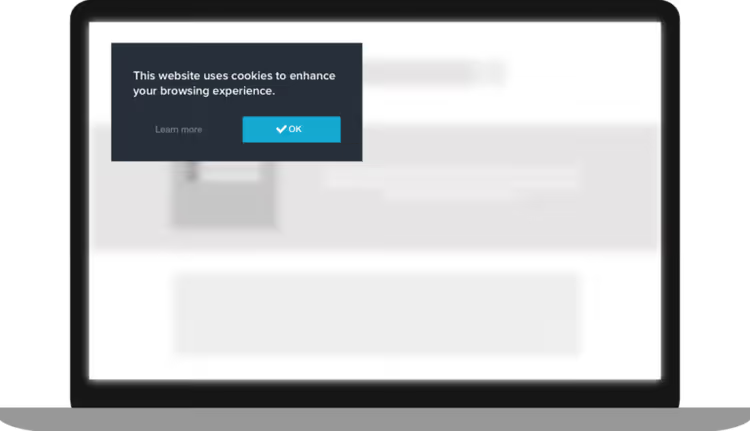
The first and most visible feature is the consent pop-up. Configured through a visual builder: text, colors, screen position. The "Reject" button can be enabled separately, so visitors can explicitly refuse non-essential cookies. Until the "Accept" button is clicked, tracking scripts don't activate.

Privacy policy consent
When this option is enabled, users are automatically directed to the privacy policy page, and logged-in visitors must explicitly accept its terms. The plugin logs each acceptance, creating a documentary trail useful during legal review.

Forget Me form
The Forget Me function creates a form on the site through which users request deletion of all their data. After submission, the administrator receives an email notification and just needs to confirm deletion. This covers the GDPR requirement for "right to be forgotten."

EU traffic control
Allows showing cookie notices only to visitors from EU countries or completely blocking access from European IPs. The country list is editable, you can exclude a specific country if you don't work with its residents.

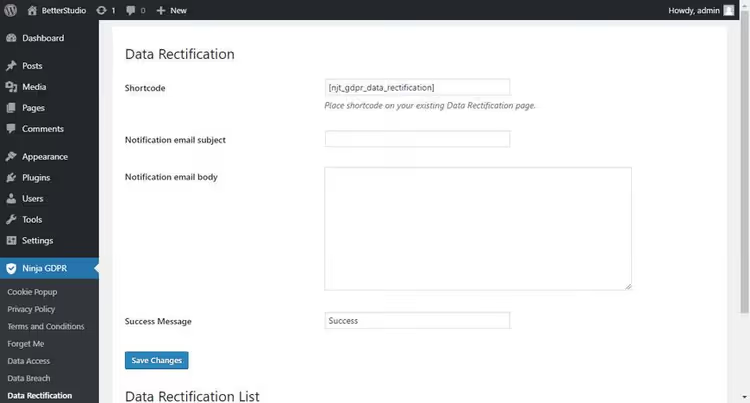
Data rectification
Implements the user's right to correct stored information, another GDPR requirement. Users fill out a form describing what needs to be corrected, and the administrator receives a notification.
Data breach notification
The Data Breach Notification function is one you hope never to use, but which is mandatory under the regulation. If the site is hacked and user data may have leaked, the plugin mass-notifies all affected visitors with one click.

The plugin is completely free and works out of the box. Installation: "Plugins → Add New", search for "GDPR CCPA Compliance", activate, go to GDPR → Settings menu and configure the cookie notice to match your site design. The entire process takes less than five minutes.
🔗 GDPR CCPA Compliance on WordPress.org
Alternative plugins: when one banner isn't enough
GDPR CCPA Compliance is good as a lightweight "all in one" solution, but the market is broader. If you need automatic policy generation, cookie scanning, or Google Consent Mode v2 integration, here are three active alternatives:
- Complianz, automatically scans the site for cookies, generates a privacy policy based on the actual list, and documents consent. The free version is sufficient for most small sites.
- CookieYes, focuses on notification design customization: flexible configuration of banner colors, position, and text. Supports Google Consent Mode v2 for advertisers.
- WPConsent, tailored for Google Consent Mode v2: manages how Google Ads and Analytics respond to user consent status. For sites with active advertising monetization this is critical, since without Consent Mode v2, Google advertising scripts simply don't run in the EU.
For a typical blog or landing page, the free GDPR CCPA Compliance is more than sufficient. But if you use Google Ads or manage a WooCommerce store with European customers, take a look at Complianz or WPConsent.
Configuring Google Analytics for GDPR through MonsterInsights
MonsterInsights is one of the most popular Google Analytics plugins for WordPress, with over 3 million active installations. In addition to the analytics panel right in the admin panel, the plugin has a built-in GDPR compliance mode.
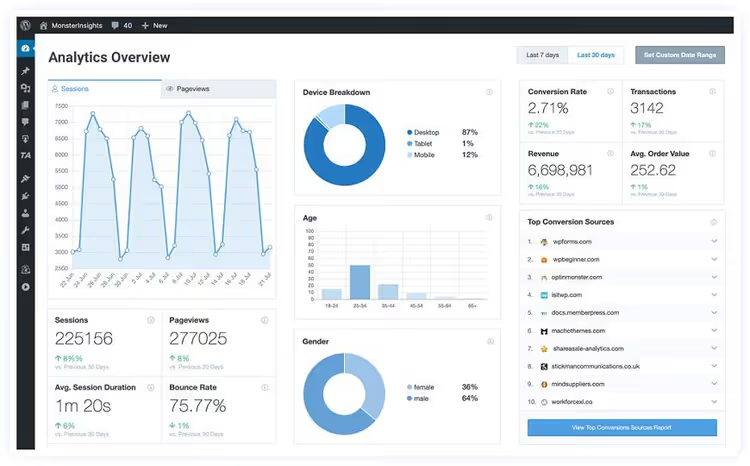
What MonsterInsights does for GDPR compliance:
- IP anonymization. Enabled with one toggle in settings, the plugin adds the
anonymizeIpparameter to the tracking code, and Google receives a truncated IP address. - Disable tracking for logged-in users. Site administrators and editors shouldn't appear in statistics, this distorts data about real visitors.
- Integration with cookie consent plugins. MonsterInsights can listen to events from Complianz, CookieBot, and other GDPR plugins and activates tracking only after receiving user consent.
🔗 MonsterInsights on WordPress.org
Contact forms and GDPR
Any contact form on a WordPress site collects personal data. Under GDPR you must fulfill three conditions:
- Specify the purpose of collection right above the submit button, in one sentence. For example: "Your name and email will be used only to respond to this inquiry."
- Obtain explicit consent if you plan to use contacts for mailings. A separate checkbox, not pre-filled.
- Disable saving of IP addresses and user-agent in form logs. For Contact Form 7 this is done through the Flamingo add-on, for WPForms it's a built-in GDPR setting.
Worth mentioning separately is the "Delete Me" function, an additional mechanism covering the GDPR requirement for the right to delete an account.
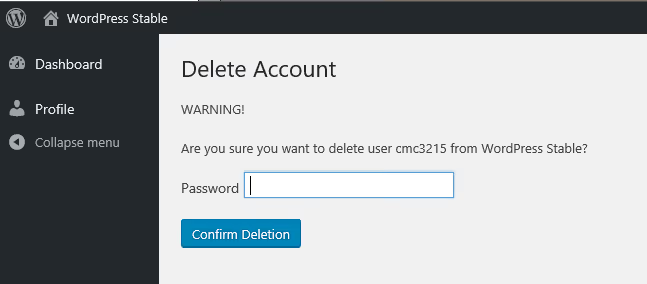
When activated, users can delete their profile themselves, without contacting the administrator. WordPress then deletes all user posts, links, and comments. Access to the function can be restricted to a specific role, for example, allowing only subscribers.
How to check cookies in the browser in a minute
Sometimes you need not GDPR compliance but simple diagnostics: see what cookies a specific site sets. Here's how it's done in two major browsers.
Google Chrome. Open the site, press F12 (developer tools), go to the Application tab, in the left menu select Cookies → site domain. Before you is the complete cookie list with their values, lifetimes, and HttpOnly/Secure flags. For global settings management: Settings → Privacy and security → Site settings → Third-party cookies.
Mozilla Firefox. F12 → Storage tab → Cookies → domain. Global settings: Settings → Privacy & Security → Enhanced Tracking Protection. Firefox offers three levels: standard, strict, and custom, the last allows fine-tuning which cookies exactly to block.
Video: quick cookie consent setup in WordPress
Watch a three-minute demonstration of cookie notice setup from the Elementor team, it's faster than reading text instructions.
⁉️🤔 Frequently asked questions
Does WordPress use cookies if I have a simple blog without registration?
Yes. Even if comments are disabled and no one logs in, WordPress sets
wp-settings-time-{ID}andwp-settings-{ID}for the administrator. Any analytics plugin, advertising pixel, or embedded YouTube video will add its own cookies regardless of your wishes. Basic minimum: go to the browser console (F12 → Application → Cookies), compare the actual list with the privacy policy, and update it if there are discrepancies. Fifteen minutes of work radically changes the legal position during an audit.
How does GDPR differ from the ePrivacy Directive ("cookie law")?
The ePrivacy Directive was adopted in 2002 and updated in 2009, it requires obtaining consent to store and access information on a user's device. GDPR, which came into force in 2018, is broader: it regulates any processing of personal data, not only through cookies. Practical difference: GDPR raised the bar for consent quality. You can't pre-check "I agree" by default, hide rejection deep in settings, or make site use dependent on consent to advertising cookies. All this is now penalized, and amounts are growing every year.
Which plugin to choose: GDPR CCPA Compliance or Complianz?
GDPR CCPA Compliance wins with simplicity: minimal settings, everything works out of the box, free. Suitable for blogs, landing pages, and small sites. Complianz gives more: automatic cookie scanning, privacy policy generation based on the actual list, detailed consent documentation. For a WooCommerce store or site with active advertising take Complianz, its free version is sufficient. If key revenue comes through Google Ads, look toward WPConsent with Google Consent Mode v2.
Do I need GDPR compliance if I'm not in Europe?
Almost certainly yes. GDPR protects EU citizens, not companies, and applies to any organization processing their data, regardless of jurisdiction. If your site is publicly accessible and doesn't block European traffic, the regulation applies to you. In practice, small sites outside the EU rarely become targets of regulators, but legal risk exists. Recommendation: if there are Europeans among visitors (Google Analytics shows this in the geography report), install at least a free cookie notice plugin. It's zero money and five minutes of time, but creates a documentary trail of good faith efforts to comply with the regulation.
How do I check which cookies exactly my site uses?
The simplest way: open the site in incognito mode, press F12 → Application → Cookies and take a screenshot of the list. For a more thorough audit, the CookieServe service works, it scans the site for free and produces a report with cookie classification by categories (necessary, analytical, advertising). If you use Complianz, the built-in scanner does the same automatically. The main value of such an audit: you find out if an old Facebook Pixel plugin you forgot about three years ago is setting cookies. This happens more often than it seems.
What to do about GDPR right now
Cookie compliance is not a topic where you can set it up once and forget for a year. Plugins update, new scripts get added, regulator requirements change. But everyone has the same starting point: check the actual cookie list, install a consent plugin, and make sure Google Analytics anonymizes IPs.
The fastest path to results: install GDPR CCPA Compliance & Cookie Consent Banner, enable IP anonymization in the MonsterInsights plugin, and replace the standard WordPress privacy policy with a current one listing actually used cookies. Thirty minutes, and the question "what about my GDPR?" stops being a question.

A professional team of writers and editors specializing in creating quality content.