













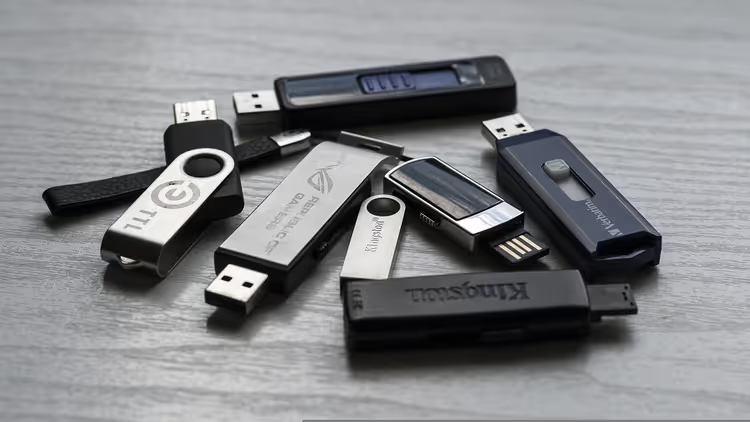
💾 Fake 2 TB flash drives: how the scam works and how to protect your data
A 2TB flash drive for a couple dozen dollars. A seller with a 4.8 rating and a hundred reviews. Free shipping. Looks like a bargain.
But inside, a 32GB chip and a controller that methodically lies to the operating system. Files you copy to it vanish without a trace. Not after a year. After a week. Or the first time you unplug it from USB.
This isn't a defect or an accident. It's a mass technological scam with a refined business model: cheap chip, re-flashed controller, hundreds of fake reviews, and thousands of victims. In 2026, the scheme hasn't gone anywhere, marketplaces are still flooded with "2TB flash drives" at the price of lunch. We break down the mechanics of the fraud at the hardware level and provide working methods to check.
💡 Quick overview:
- Check the price before buying, a real 1TB flash drive costs from $100
- Look inside a suspicious device, cheap snap-together case and unmarked chip
- Run the drive through ValiDrive or H2testw, the only way to know the truth
- Buy only from known brands and never buy used flash drives
How much large-capacity flash drives actually cost
Real 1TB flash drives are a niche and expensive product. Kingston DataTraveler Max with 1TB capacity costs $160-180 on Amazon and in the official Kingston store. SanDisk Ultra Dual Drive Luxe USB-C with 1TB will run about $120-160 on Amazon. This is the minimum threshold for an honest terabyte in flash form factor.
Major brands don't have 2TB flash drives at all. Not because they can't make them, technically it's possible to assemble. But the cost of a reliable NAND chip of that density in a flash drive case is too high, and demand is negligible. For capacities from 2TB, the market has long moved to external SSDs: they're faster, more reliable, and cheaper per gigabyte.
The bottom line is simple. If you see a "2TB" flash drive cheaper than $100, you're looking at a fake. For comparison: a real 1TB flash drive starts at $115. No exceptions.
What's inside a 2TB flash drive for $25
The fake is easy to disassemble: a cheap plastic case with no screws is held together by clips. Inside, the same picture from specimen to specimen.
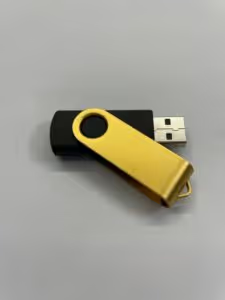
The case is assembled with clips, not a single screw. Removing the cover, you immediately see crude assembly.
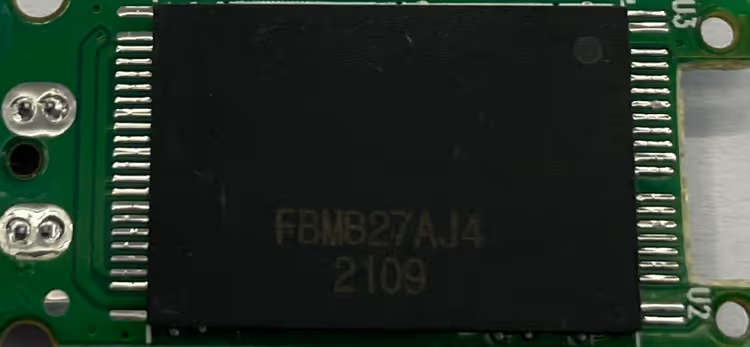
NAND flash memory chip, unmarked, with no capacity markings. Most often it's 8, 16, or 32GB, mass-market commodity bought for pennies. The controller, Chipsbank CBM2199E or similar, with re-flashed firmware. The controller is what's responsible for what capacity the operating system "sees" when connected.
The counterfeit manufacturer takes a utility for mass-programming controllers (they're publicly available), changes one parameter (the number of logical blocks), and a 32GB chip presents itself to the system as a 2TB drive. No magic. Just the USB Mass Storage specification, designed in an era when manufacturers were trusted.
How the controller lies to the operating system
When connected, a USB drive responds to the OS query: "How many logical blocks do you have?" The controller sends the number written in the firmware, and the system accepts it as truth. There's no provision in the protocol to verify "do these blocks physically exist?" This was done in the late 1990s for simplicity and compatibility, and the mechanism hasn't changed in decades.
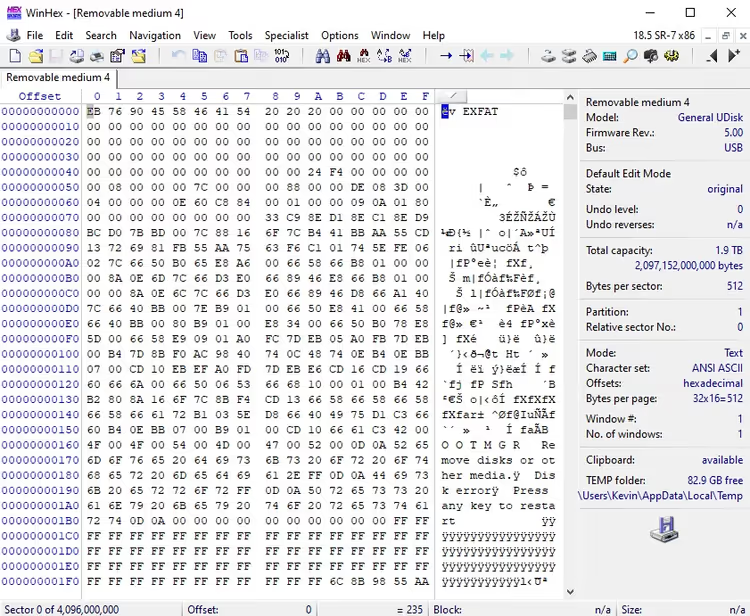
In laboratory tests, the picture emerges quickly. The hex editor WinHex shows a volume of nearly 2TB, exactly what the firmware claims.
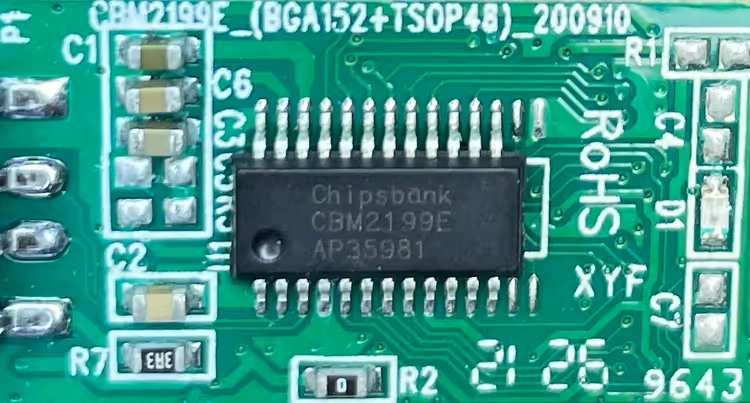
But with detailed firmware analysis, the real chip capacity is those same 32GB. The remaining "terabytes" are emptiness.
Why doesn't the OS check the capacity itself? Technically it could. But full verification of a 2TB drive would take hours with every connection. Nobody needs that UX. The vulnerability is baked into the standard at the architecture level, and that won't change in the coming years.
What happens to your files on a fake
The scenario is predictable. You copy 10GB of photos to the flash drive, everything's fine. Copy another 20GB, fine. Exceed the real chip capacity (say, 32GB), and chaos begins.
Some controllers loop the write: new data is written over old, silently destroying files. Others cache operations and "accept" files, but when disconnected from USB, the data disappears. Still others simulate writing without touching the memory at all. The OS shows no errors, the controller continues reporting "all good."
Result: after a week you open the flash drive and it's empty or full of corrupted files. Data is gone permanently.
How to check a flash drive for real capacity
Quick tests don't work. Windows Explorer, formatting, benchmarks like CrystalDiskMark only check a small portion of the drive and are easily fooled by the controller. You need to write to all sectors and read back.
Two proven free tools:
- ValiDrive, a utility from Steve Gibson, creator of SpinRite. Writes random data to all sectors and instantly shows where the real capacity ends. Runs without installation, verification takes minutes, not hours. Result is a drive map: green is real memory, red is fake.
- H2testw, a tool proven over years. Writes and verifies files across the entire volume. Slower than ValiDrive, but gives a detailed report.
If the test shows real capacity less than claimed, return the drive. Don't format it, don't try to "fix" it. This is a hardware fake, not repairable.
Modern external SSDs with 1-2TB from Samsung, Crucial, or SanDisk cost noticeably less per gigabyte and work many times faster than the most expensive flash drives. If capacity is critical, get an SSD, not a flash drive.
Where to buy flash drives without risk
Safety rules come down to three points.
Buy from known brands. Kingston, SanDisk, Samsung, Corsair, and PNY are companies with reputations they won't burn for one batch of fakes. Look for official stores on Amazon marked "Visit the Store" or direct sales from the manufacturer's website.
Ignore reviews on marketplaces. Scammers pump up hundreds of fake reviews with photos of other products. We saw a "2TB" flash drive with a 4.5-star rating and 160+ reviews discussing microfiber towels. Reviews on AliExpress, eBay, and Amazon are not an indicator.
Avoid "deals of the century." A 2TB flash drive for a couple dozen dollars isn't a bargain, it's mathematically guaranteed fraud. The cost of a real chip of that capacity is many times higher. Miracles don't happen in retail.
Separately: never buy used flash drives and SSDs. NAND memory has a limited number of write cycles, and you don't know how many are left. Saving a few dollars can cost you all your data.
⁉️🤔 Frequently asked questions
Why does my 2TB flash drive show the correct capacity in Explorer?
The controller is programmed to report 2TB capacity to the OS. Windows Explorer doesn't verify the physical presence of sectors, it trusts the controller's response. It's like a speedometer that always shows 100 km/h regardless of actual speed. Correct capacity in Explorer is exactly what the scammer needs: the buyer sees "honest" 2TB, feels reassured, and doesn't check the drive until files start disappearing. The only way to know the truth is to run ValiDrive or H2testw.
Can you re-flash the controller back and get an honest flash drive?
Technically yes. With utilities like ChipGenius, you can determine the controller model and rewrite the firmware with correct capacity. But there's zero practical sense in doing this. After re-flashing, you get a 32GB flash drive with a controller and memory of unknown origin and zero reliability. It's cheaper and safer to buy a normal 32GB drive from Kingston for a few dollars. At minimum, it won't fall apart in a month and won't drag data into oblivion the first time you unplug it.
Are there any 2TB flash drives from known brands at all?
As of mid-2026, no. Neither Kingston, nor SanDisk, nor Samsung, nor Corsair manufacture USB flash drives with 2TB capacity. The maximum in this form factor is 1TB. For 2TB and above, manufacturers offer external SSDs:
Samsung T7,SanDisk Extreme Portable. These are real products with real warranty and speeds up to 1000 MB/s. The difference from a flash drive is like between a bicycle and a motorcycle.
Why don't marketplaces block these products?
They do block them, but slowly. The scheme is simple: the seller registers a store, uploads a hundred "2TB flash drive" listings, collects money, and disappears before enough complaints accumulate. A week later, a new store appears with the same photos and a new name. Amazon and eBay delete such listings by the thousands, but scammers multiply faster. Marketplace algorithms are tuned for maximizing sales, not for technical expertise of every product. The protection here is only your awareness.
How to identify a fake from a photo in the listing?
Characteristic signs are often visible. Non-existent brands like "HP 2TB Pendrive" (HP doesn't produce flash drives of that capacity). "2TB" inscriptions are engraved crookedly or stuck on top of the case. Price below fifty dollars for claimed 2TB. Seller registered a week ago and only sells flash drives. But the most reliable indicator is price. A real 1TB flash drive costs from $115. Everything that's "2TB for twenty bucks" is fake by definition. No exceptions.
What to do if the flash drive is already purchased
Don't connect it to your main computer. If you already connected it and copied files, don't delete the originals. Data on the fake is considered lost from the moment the real chip capacity is exceeded.
Order of actions: run ValiDrive, get the real memory map, take a screenshot. Open a dispute on the marketplace, attach the test screenshot as proof. Money is returned almost always: platforms know about this scam and don't want reputational losses.
And the flash drive itself goes in the trash. Don't gift it, don't sell it, don't try to use it "for small things." Even with 32GB of real capacity, a controller with re-flashed firmware is unpredictable. Files can disappear at any moment.
Data is worth more than any "super-bargain" flash drive. Don't let yourself be deceived.

A professional team of writers and editors specializing in creating quality content.