













⚡ Home charging stations: how to protect yourself from power outages
The power went out in the middle of the workday. The laptop holds for an hour, the router died immediately, and the fridge is silently defrosting. If this picture looks familiar, you already understand: you can't put a gas generator on a high-rise balcony, and a phone power bank only saves you for the first couple of hours.
A solution that works in an apartment and in a private house is a portable power station. This is not a "big power bank," but a standalone power source with 220 V outlets, capable of running critical equipment for hours. The market for these devices grew exponentially in 2026: models became more powerful, and prices for lithium iron phosphate (LiFePO4) batteries went down.
By the end of this article, you will know exactly which station to get for your set of devices, without overpaying for watts you don't need.
💡 Quick overview:
- Calculate the total wattage of the devices you will power during an outage (fridge, router, laptop, lights).
- Choose the station capacity in Wh: 500-800 for a laptop and router for half a day, from 2000 for a fridge and several gadgets for a full day.
- Pay attention to the battery type (LiFePO4 gives 3000+ cycles), the number of 220 V outlets, AC charging speed, and solar panel support.
- If the budget allows, get a model with UPS mode: the station automatically switches on within 20 milliseconds when the grid fails.
Power station or generator: what to choose for home
Each option has its niche. A gas or diesel generator outputs 3-7 kW and runs as long as there is fuel. But it needs to be outdoors (exhaust), produces 70-90 dB of noise, and requires regular maintenance. In an apartment, this is not an option.
A power station runs silently, requires no fuel, and plugs into a wall outlet. The downside is limited capacity: even the flagship EcoFlow DELTA Pro Ultra with 6,144 Wh won't run an entire house for days without recharging, unlike a stationary system like the Tesla Powerwall 3 (13,500 Wh, from $12,000 with installation).
The rule is simple: if outages last up to 6-12 hours and you need to power a fridge, lights, laptop, and router, get a power station. If outages last a full day and you need complete autonomy for a private house, look toward a stationary battery with solar panels or a hybrid generator.
How to calculate wattage for your devices
The main mistake when choosing is getting "the most powerful one that fits the budget." As a result, you pay for watt-hours you never use. The calculation process is as follows:
List the devices critical during an outage: fridge (150-200 W), router + ONU (10-15 W), laptop (45-65 W), LED lighting (10-30 W), possibly a gas boiler with a circulation pump (80-150 W).
Add up the wattage. A typical set of "fridge + router + laptop + 2 lamps" is about 300 W. Add a boiler, 400-450 W.
Multiply by the desired runtime. 300 W × 8 hours = 2,400 Wh. This is the capacity you need from the station. Note: the actual usable capacity is roughly a tenth lower than stated due to inverter losses and self-discharge.
Check the starting currents. The fridge, when the compressor starts, can briefly draw 600-900 W. The station must handle this surge, look at the peak (surge) power in the specifications.
5 Key parameters when choosing a power station
With the basic wattage calculation, you already understand what capacity to look for. Now let's break down the parameters that distinguish a good station from a compromised one.
Battery type
In 2026, LiFePO4 (lithium iron phosphate) became the standard. They are safer than old NMC: they don't catch fire when punctured, and hold 3,000-4,000 cycles before capacity drops below 80% (manufacturer data). For comparison, an NMC battery degrades in 500-800 cycles. All current EcoFlow, Bluetti, and Jackery models have switched to LiFePO4; if you see a model without this chemistry, it is either a budget disposable unit or outdated.
Number and type of outputs
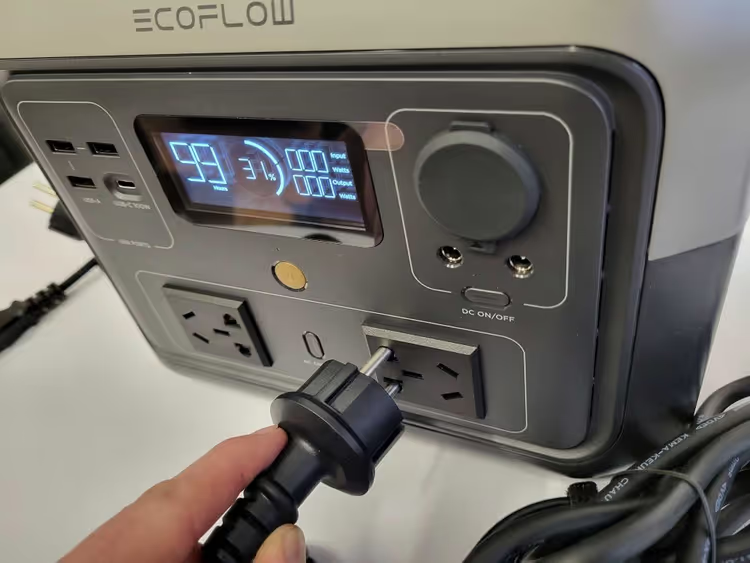
The minimum set for home: 2-3 220 V outlets (Schuko), 2-3 USB-A, and at least one USB-C with Power Delivery (PD) at 60-100 W for a laptop. A 12 V car outlet is useful; you can power the same router from it via an adapter.
Note: not all stations output a pure sine wave on the 220 V outputs. A modified sine wave is safe for heating devices, but sensitive electronics (fridge compressor, boiler power supply) require a pure one. All mid-range and high-end models from EcoFlow, Bluetti, and Jackery output a pure sine wave.
AC charging speed
When the power comes back for a couple of hours, the speed of replenishing capacity is critical. EcoFlow DELTA 2 Max (2,048 Wh) charges in 84 minutes, the best indicator in its class. Bluetti AC200MAX with the same capacity, 180 minutes. Jackery Explorer 2000 Plus, 120 minutes. A difference of 1.5-3 times is significant if outages are frequent.
Solar input
If you have a private house or a south-facing balcony, a pair of 200-400 W folding panels will multiply the station's autonomy. Bluetti leads in solar input: AC200MAX accepts up to 900 W, AC300 up to 2,400 W. EcoFlow DELTA 2 Max, up to 1,000 W. Jackery Explorer 2000 Plus, up to 1,400 W.

UPS mode
Not all stations can work as an uninterruptible power supply. Models with UPS/EPS automatically switch to battery within 20-30 milliseconds after a grid failure. This is important if you power a router or computer through the station: without UPS, they will reboot at every outage. EcoFlow DELTA 2 Max, Bluetti AC200MAX, and higher models support UPS; lower-end Jackery models do not. Look for the "UPS/EPS" or "Uninterruptible Power Supply" line in the specifications.
Before buying, it's worth studying current models in catalogs: https://stylus.ua/zaryadnye-stancii/. The assortment updates every couple of months, and fresh versions often get increased capacity at the same price.
Comparison of popular 2026 models
To avoid swimming in dozens of specifications, I've put three real mid-range models into a table (manufacturer data as of July 2026). All are LiFePO4, all with pure sine wave.
Model | Capacity | Output (cont.) | Peak | AC Charging | Solar Input | Weight | Price (~) |
|---|---|---|---|---|---|---|---|
EcoFlow DELTA 2 Max | 2,048 Wh | 2,400 W | 4,800 W | 84 min | 1,000 W | 23 kg | $1,500 |
Bluetti AC200MAX | 2,048 Wh | 2,200 W | 4,800 W | 180 min | 900 W | 28 kg | $1,600 |
Jackery Explorer 2000 Plus | 2,042 Wh | 3,000 W | 6,000 W | 120 min | 1,400 W | 28 kg | $1,800 |
EcoFlow DELTA 2 Max, the best balance for an apartment: the fastest charging, moderate weight, X-Boost allows briefly pulling devices up to 3,400 W. If the power comes back in short windows, you will charge in the time that others would only get halfway.
Bluetti AC200MAX, the choice for a home with solar panels. The deepest modular expandability: you can buy additional B300 batteries and scale the system up to 8,192 Wh. The 900 W solar input and the lead-acid port (yes, it supports external AGM/Gel batteries) make it the favorite for a "slow" autonomous scenario.
Jackery Explorer 2000 Plus, the most powerful output in the trio (3,000 W continuous), which allows starting even a powerful power tool or two fridges simultaneously. The price for this is the cost and the lack of UPS.
For those who need a station for a basic set (laptop, router, a couple of lamps), lower-end models are enough: EcoFlow RIVER 2 Pro (768 Wh, ~$500), Bluetti AC70 (768 Wh, ~$500), or Jackery Explorer 600 Plus (632 Wh, ~$450). All figures are current prices as of July 2026. The price difference with the two-kilowatt-hour units is threefold.
Solar panels: autonomy without an outlet
Capacity alone is not enough for prolonged outages; you need to replenish the reserve. A solar panel turns the station from a "half-day battery" into a system capable of working for weeks off-grid.
Practical figures: a 200 W folding panel on a sunny day yields roughly 0.9-1.2 kWh. This covers the daily consumption of a fridge and router with a margin. A pair of such 400 W panels covers 2-2.5 kWh per day, enough for the station to be full by evening.
When choosing panels, make sure the connector is compatible with the station. Most use MC4 or Anderson. Adapters cost pennies, but it's better to take panels of the same brand: EcoFlow and Bluetti ones are voltage-optimized for the MPPT controllers of their stations.
⁉️🤔 Frequent questions
How long will a power station last?
5-10 years with regular use. A LiFePO4 battery holds 3,000-4,000 cycles before capacity drops to 80% of the original (confirmed by manufacturers). At one cycle per week (an outage once every 7 days), that's 50-75 years. In practice, the electronics or connectors will become obsolete sooner. Manufacturers give a 5-year warranty on all models mentioned above.
A typical scenario for an apartment: 3-5 outages per month, 4-6 hours each. In this mode, a mid-segment station (2,000 Wh) works for 8-12 years without noticeable battery degradation. The fridge holds for 12-16 hours, the laptop charges 8-10 times.
Can you power a gas boiler from a power station?
You can, but with a caveat. The boiler's circulation pump consumes 80-150 W and requires a pure sine wave. Make sure the station has a UPS mode; when the grid fails, the boiler must not lose power even for a second, otherwise the automation will throw an error. EcoFlow DELTA 2 Max and Bluetti AC200MAX with UPS mode (20 ms) handle this task.
A boiler with a 100 W pump will run from a 2,000 Wh station for about 18-20 hours, accounting for the pump's cycling. Add a solar panel, and you'll get through the heating season without a single cold day.
Power station or UPS?
Different tasks. A computer UPS at 1,000-1,500 VA holds a home PC for 10-20 minutes to save data and shut down. A power station holds for hours. A UPS for a hundred and fifty dollars won't save the fridge; a station for fifteen hundred will. Combine them: a UPS for instant computer switching, a station for long-term power to the rest of the critical equipment.
For a server room or NAS, where milliseconds of switching matter, a classic line-interactive UPS remains the best choice. The station solves the "long autonomy" task, not the "instant reaction" one.
How long will the station last at full load?
It's calculated simply: capacity (Wh) / total load wattage (W) = hours of operation. Example: a 2,048 Wh station, 400 W load, roughly 5 hours. In reality, slightly less due to inverter efficiency and the inability to drain the battery to zero (BMS will cut off at a minimum reserve).
For an accurate calculation for your set of devices, apply a coefficient of 0.85 to the stated capacity. A 2,048 Wh station → ~1,740 Wh usable → 400 W load → 4.3 hours of continuous operation.
Does the power station make noise when operating?
At loads up to 150-200 W, most models run passively, the fan does not turn on. At 400-600 W and above, active cooling kicks in. The noise level is 35-45 dB, comparable to a quiet laptop cooler. This is acceptable for a bedroom; the station is no louder than a fridge, and a gas generator next to it sounds like a jackhammer.
At night in the bedroom, powering only a router and an LED lamp (~25 W), the station is silent. The fan will only turn on if you simultaneously charge a laptop and run a fridge.
Which station to get in 2026: the final breakdown
There is no universal answer, there is an answer for your situation. Here are three scenarios with specific models:
Apartment, basic set (laptop, router, lights, phone charging). Get the EcoFlow RIVER 2 Pro or Bluetti AC70. 768 Wh is enough for 6-8 hours of operation. The price is around five hundred dollars, charging takes an hour to an hour and a half. Compact, they fit on a shelf.
Apartment or house, need a fridge and 12+ hours of autonomy. EcoFlow DELTA 2 Max, the best choice. 2,048 Wh, charging in 84 minutes, UPS, X-Boost for starting currents. The price is around fifteen hundred dollars. If you plan on solar panels, look at the Bluetti AC200MAX.
Private house, day-long outages, need full autonomy. Look beyond power stations, toward the Tesla Powerwall 3 or a stationary system with a solar array. The budget here starts from $12,000. A portable station during day-long outages will require either recharging from a generator or an array of 1,000+ W panels.
Before buying, check actual prices in several stores: promotions on power stations happen often, and the difference between retailers can be significant. And most importantly: don't put it off until the next blackout. When the lights go out, the power station at your neighbor's place, who bought it yesterday, costs exactly the same as yours, which will only be delivered the day after tomorrow.

A professional team of writers and editors specializing in creating quality content.