














🎮 How to choose the perfect gaming chair: 5 key parameters
Your back stiffened an hour after buying the new chair. The upholstery cracked within six months. The armrests don't adjust at all, and the picture looked completely different.
Choosing a gaming chair isn't about the color of the RGB lighting or the shape of the "ears." A pretty render often hides cheap foam, plastic bases, and a gas lift that will start wobbling before you finish your first game. We've put together five parameters that determine whether a gaming chair will be comfortable after one, two, and five years, not just on the day you unbox it.
💡 Quick overview:
- Seat padding: why molded foam beats generic foam and how to check firmness before buying
- Backrest and lumbar support: what an ergonomic curve is and why you need an adjustable cushion
- Upholstery materials: mesh, PU leather, or genuine leather, pros and cons of each option
- Adjustments: which settings really matter and which ones you can skip
- Design and interior compatibility: how to avoid regretting a flashy chair after a month
Seat: padding, firmness, and height adjustment
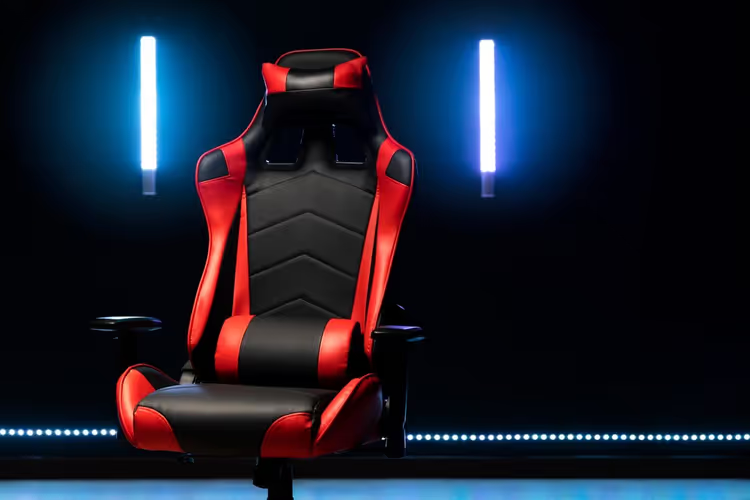
The main thing in a seat is the padding. Most budget models use generic foam: it quickly loses its shape, sags, and stops distributing weight. After three to four months of active use, you start feeling the plywood base, and that's a direct path to discomfort and tailbone pain.
Memory foam holds its shape for years. It's denser than generic foam but adapts to the anatomy of the individual. Quality models have foam density from 50 to 65 kg/m³; these chairs don't sag even with a user weight over 100 kg. In practice, the difference is noticeable right away: after four hours at the computer, you stand up without numbness in your legs.
Seat height and depth are two parameters you can't ignore. The gas lift should raise the chair so your feet are fully flat on the floor and your knee angle is roughly 90 degrees. Check the depth simply: sit down, press your back against the backrest, and make sure there's room for two to three fingers between the edge of the seat and the back of your knee. If the edge digs into your legs, circulation is compromised within half an hour.
Also pay attention to the base shape. A flat seat without lateral support doesn't hold your thighs; you slide forward and hunch over. Quality models have slightly raised side bolsters that keep the pelvis in the correct position without excess pressure.
Backrest: ergonomics, not just a tall panel

A high backrest is the hallmark of gaming chairs. But height alone doesn't solve anything. Three things matter: the shape of the curve, lumbar support, and the ability to lock the recline angle.
An ergonomic backrest follows the natural S-shaped curve of the spine. If the backrest is completely straight or, conversely, curved too far forward, you'll either slouch or overstrain your back muscles trying to maintain posture. In mid-range and high-end models, the backrest curve is designed with input from orthopedists and accounts for differences between male and female anatomy.
Lumbar support comes in built-in and removable forms. A built-in bolster is part of the backrest frame; its position adjusts for height and depth. A removable cushion on straps is a simpler option, but it also works: it provides targeted support exactly where needed. Check that the cushion doesn't slip when you change position; this is a common problem with cheap models that have smooth upholstery.
Backrest recline angle: for desk work, locking within a range of 90 to 120 degrees is enough. Full recliner mode (up to 160-180 degrees) is useful for those who like to lean back with a controller or watch movies at their desk. But remember: the closer to horizontal you get, the higher the demands on base stability. The chair must not tip over when you shift your weight onto the backrest.
A separate word about the headrest. If you're taller than 180 cm, look for a model with a height-adjustable neck pillow. A fixed headrest for a tall person will press into the shoulders instead of supporting the head; it's completely useless.
Upholstery: what breathes and what cracks
The three main upholstery materials for gaming chairs are fabric, PU leather, and genuine leather. A fourth option, often grouped with fabric, is mesh. Each has its own pros and compromises, and the choice depends not on prestige but on the room climate and how many hours straight you spend in the chair.
Fabric and mesh. The most breathable option. A mesh backrest doesn't contact the body over a large area at all; air circulates freely. This is critical in summer and in rooms without air conditioning. Fabric upholstery (polyester, nylon with treatment) is practical, isn't afraid of pet claws, and is easy to clean. The downside: it can pill over time in friction areas.
PU leather. The most common material in the mid-range segment. It looks presentable, feels pleasant to the touch, and is available in dozens of colors. But PU leather has an inherent problem: it doesn't breathe. In the heat, your back and thighs sweat, and in a cold room, the material becomes unpleasantly icy. The solution is models with perforation: micro-holes improve ventilation, though they don't make PU leather as cool as mesh. The service life of PU leather is from 2 to 5 years depending on quality: cheap PU film cracks and peels, while expensive high-density polyurethane coating lasts longer.
Genuine leather. Premium segment, top-tier prices. It breathes better than PU leather, lasts for decades with proper care, and develops a patina with age. But it requires regular conditioning and is afraid of direct sunlight. For most users, the price difference doesn't justify the comfort difference, unless you need a status interior piece.
Removable covers. On some models, the backrest and seat covers can be removed and washed. For those who eat at the computer or have a cat in the room, this is a significant argument.
Adjustments: what you really need and what's not worth the extra cost
A modern gaming chair can have up to a dozen independent adjustments. Let's break down which ones affect comfort and which are just marketing.
Armrests. The most underrated element. 2D armrests adjust only for height. 3D adds horizontal forward-backward movement. 4D adds side-to-side swivel. For working with a keyboard and mouse, all four dimensions matter: your elbows should rest exactly at the height where your desktop ends, and your wrists should lie freely on your peripherals without bending at the wrist. Rigidly fixed armrests or those that only move up and down force you to raise your shoulders or hunch over; within an hour or two, pain appears in the trapezius muscles.
Gas lift and height. A standard Class 3 gas lift supports up to 100 kg; Class 4, up to 150 kg. If your weight is near the upper limit, get one with a margin: operating at the limit cuts the mechanism's service life in half. The lift height on most models is from 40 to 55 cm from floor to seat. For people shorter than 160 cm, look for chairs with a minimum height of 35 cm, otherwise your feet will dangle.
Rocking mechanism and tilt lock. The Top-Tilt mechanism (synchronized seat and backrest tilt) is the gold standard. Multiblock allows locking the backrest in several positions. A simple rocking mechanism without lock is only for those who love rocking mode.
Footrest. A pull-out footrest is a nice addition but not a must-have. In practice, it's used less often than expected at purchase. If your use case is an hour or two in the evening with a gamepad, get it. For an eight-hour workday, a footrest isn't needed.
RGB lighting, cup holders, USB hubs. These are gimmicks that have nothing to do with ergonomics. An RGB strip in the backrest may look flashy on stream, but you pay for USB power and an extra cable on the floor with a cluttered workspace. Don't let accessories distract you from the main thing: seat and backrest quality.
Design: bold accent or calm integration
Gaming chairs fall into two visual camps. The first is aggressive esports style: bright colors, contrast stitching, carbon-fiber inserts, logos across the entire backrest. The second is a restrained hybrid with office aesthetics: monochrome upholstery, minimal branding, clean lines.
Before buying, honestly answer this question: what kind of room will the chair be in? If the room is decorated in Scandinavian minimalism or it's a shared bedroom, an acid-green "throne" with red inserts will clash with the interior. Within a month, your eye will start catching the dissonance, and the chair will turn into a visual irritant.
The frame material also affects appearance. A steel base with powder coating lasts longer than plastic and doesn't creak. An aluminum base is lighter than steel and doesn't rust, but costs more. Plastic parts on budget models are the first thing to break: casters crack, armrest joints develop play.
Among brands that consistently get positive reviews from gamers and bloggers, we'll note Cougar, Anda Seat, GT Racer, Barsky, and Aklas. Each has its own signature: Cougar emphasizes aggressive design and reliable Class 4 gas lifts, Anda Seat is known for wide seats for larger users, GT Racer offers balanced models in the mid-range segment. All of them produce chairs with high-density foam and steel frames; this is the minimum bar you shouldn't drop below.
In this video, the BTODtv channel visually compares gaming and office chairs by key parameters: ergonomics, materials, durability. If you're hesitating between a gaming model and an ergonomic office chair, watch it to the end.
⁉️🤔 Frequent questions
How much should you spend on a decent gaming chair?
A reasonable minimum is from 15,000 to 20,000 hryvnias for a model with a steel frame, foam density from 50 kg/m³, and a Class 4 gas lift. Anything cheaper uses generic foam instead of molded foam, plastic bases, and Class 3 gas lifts; these chairs start creaking and sagging within the first year. The upper limit of the mass segment is around 35,000 hryvnias: here you get 4D armrests, a synchronized rocking mechanism, and upholstery made of quality PU leather with perforation.
How is a gaming chair different from an office chair?
Gaming chairs have a high backrest with lateral support, are designed for recliner mode (reclining up to 160-180°), and often come with lumbar and neck pillows. Ergonomic office chairs are oriented toward upright desk work: they rarely have a headrest, and the backrest ends at shoulder-blade level. For an 8-hour workday, an office chair often turns out to be more comfortable; for evening gaming with a gamepad, a gaming chair is.
Mesh or PU leather: which will last longer?
Mesh lasts longer: quality mesh doesn't stretch for 5-7 years, and if damaged, it's replaced separately from the seat. PU leather in the budget segment starts cracking after 1.5-2 years, in the mid-range, after 3-4. Genuine leather with care lives 10-15 years. In terms of durability: genuine leather > mesh > expensive PU leather > cheap PU leather.
Do you need a footrest on a gaming chair?
For desk work, no. For evening relaxation with a gamepad or watching movies, it's a nice addition but not essential. In practice, after the first month of use, the footrest is pulled out less often than expected. If your budget is limited, it's better to put the difference into 4D armrests rather than a pull-out footrest.
How do you check a chair before buying if you're ordering online?
Study video reviews on YouTube, not the manufacturer's promotional videos, but independent tests from channels like BTODtv. Pay attention to three things: the base material (aluminum or steel, not plastic), the presence of a steel backrest frame, and the foam density in the specifications. If the manufacturer doesn't state the padding density, it's most likely generic foam.
Which chair to get for your scenario?
If you work at the computer for 6-8 hours and then game for another couple of hours in the evening, get a model with foam density from 50 kg/m³, a mesh backrest, and 4D armrests. This is a maximum-load scenario, and skimping on materials will come back to haunt you with back pain faster than you think.
If the chair is for an office or occasional use, you can look at simpler models: PU leather with perforation, 2D or 3D armrests, a Class 3 gas lift. The main thing is don't buy a chair with a plastic base, no matter how attractive the price.
If you have a large build (height over 190 cm or weight over 100 kg), your choice narrows to models with a reinforced steel frame, a Class 4 gas lift, and an extended seat. Pay attention to the Anda Seat and Cougar lineups: they have specialized series for big-and-tall users.
And finally: test the chair before buying if you have the opportunity. 15 minutes in a showroom will tell you more than 50 reviews. Sit, swivel, recline the backrest, check whether the armrests bump into the desktop. The body doesn't lie; if you're already fidgeting after 10 minutes, it's not your chair.

A professional team of writers and editors specializing in creating quality content.