














⚡ How to run Flash content in Google Chrome: working methods in 2026
If you were around for the mid-2000s internet, you probably remember: half of all websites ran on Flash. Browser games, animations, entire portals like Newgrounds and Miniclip lived on this technology. And then it all vanished.
Today, when you try to open an old Flash site, Chrome silently shows a gray puzzle piece instead of content. There's no "enable Flash" button in settings anymore. And this isn't a bug.
Adobe officially discontinued Flash Player on December 31, 2020. Chrome, starting with version 88 (January 2021), completely removed plugin support. There's no way to restore it through standard means. But there are working workarounds, and that's what we'll discuss.
💡 Quick overview:
- Why Flash disappeared from Chrome: timeline of the shutdown and the reasons behind it
- Ruffle: an emulator that runs Flash content through WebAssembly directly in the browser
- Flashpoint Archive: an offline archive of 212,000+ games and animations preserving the legacy
- Alternative browsers with residual Flash support (and why it's unsafe)
- Direct answer: is it worth trying to enable Flash today and what to choose instead
How it used to work: a path that no longer exists
Before 2021, Chrome had a built-in version of Flash Player. It didn't require installation since the plugin shipped with the browser. But Google blocked Flash content by default, and users had to explicitly grant permission.
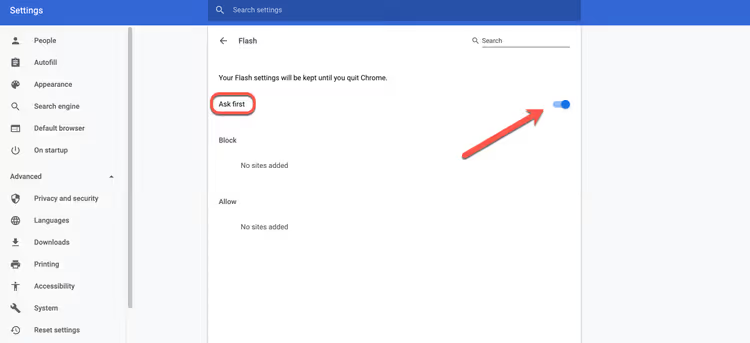
The process looked like this. You would open chrome://settings/content, scroll down to the Flash section and enable the "Ask first" toggle:
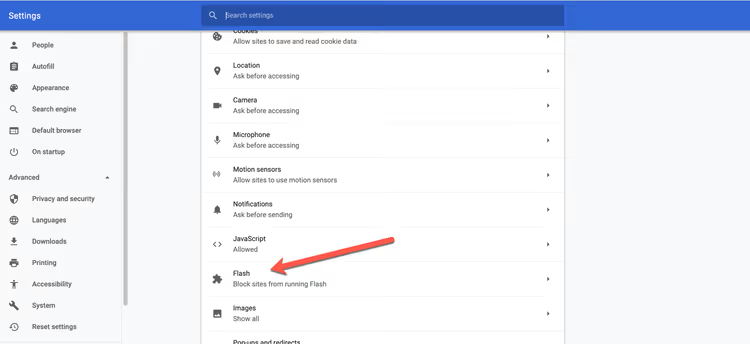
The toggle was located right under the JavaScript item in the general content settings:
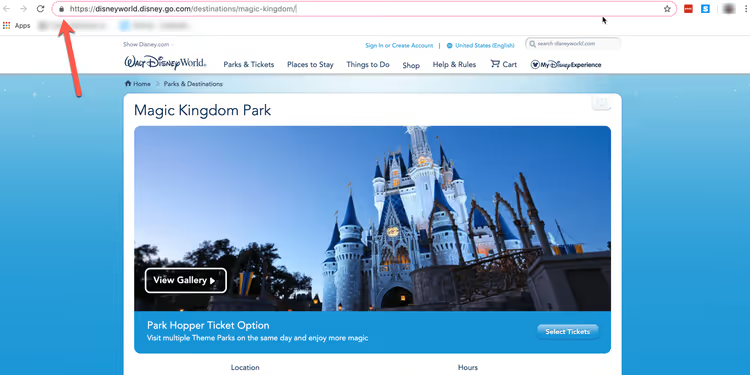
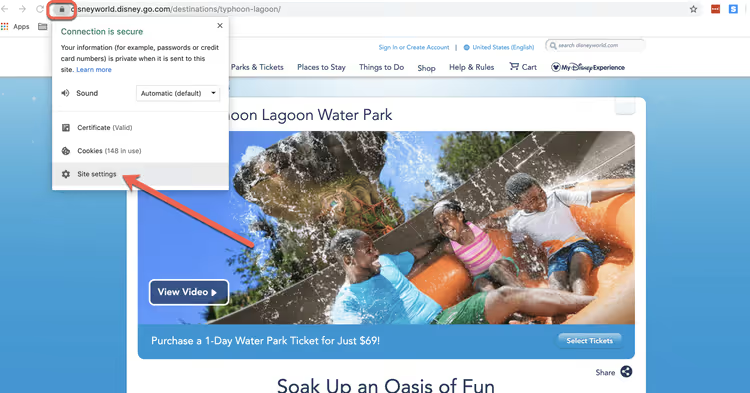
After that, when visiting a site with Flash content, a lock icon would appear in the address bar. Clicking it would take you to the site settings:
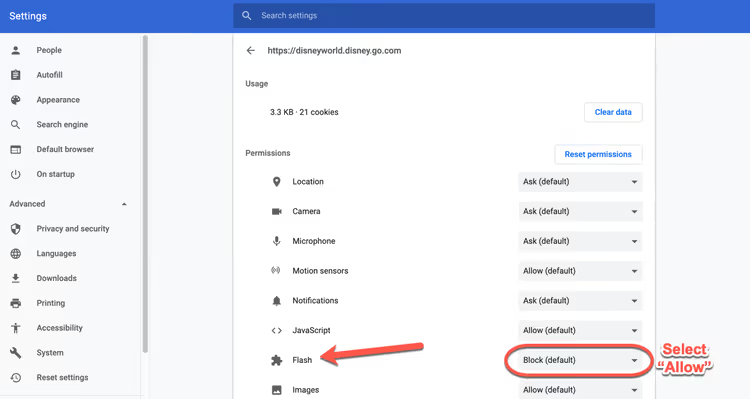
The site settings menu opened a list of permissions: geolocation, notifications, camera, and among them, Flash:
In the dropdown next to Flash, you needed to select "Allow":
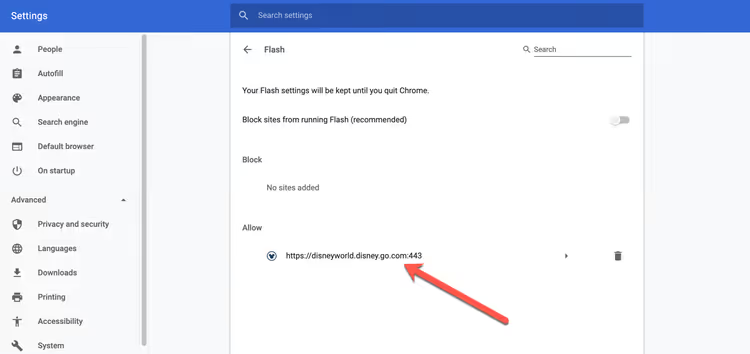
The site would appear in the allowed list, the page would reload, and the content would work:
Today this menu doesn't exist in Chrome. Not in chrome://settings/content, not in chrome://flags, not through enterprise policies. The code responsible for Flash has been cut from Chromium at the source level. That's why the very question "how to enable Flash Player in Chrome" is incorrect in 2026: there's nothing to enable.
Why Flash was disabled and won't return
The timeline of events is short but telling. In July 2017, Adobe announced it would discontinue Flash Player support by the end of 2020. Google, Mozilla, Microsoft, and Apple synchronously published their own deprecation roadmaps. The Chromium plan called for complete removal of Flash code from the engine in version 88, and it was executed right on schedule in January 2021.
There were three reasons. First, security: Flash had been the primary target for exploits for decades. Year after year Adobe patched critical vulnerabilities while attackers found new ones. Second, performance: the plugin consumed CPU resources disproportionate to what it delivered. Third, the emergence of open standards: HTML5, WebGL, and WebAssembly covered all the scenarios Flash existed for (video, vector graphics, interactivity).
The result: modern Chrome contains not a single line of Flash Player code. You can't enable it because there's nothing to enable.
Ruffle: a Flash emulator in the browser

Ruffle is not a plugin or a wrapper around Adobe's old code. It's a completely independent Flash Player emulator written in Rust and compiled to WebAssembly. It works in any modern version of Chrome, Firefox, Edge, and Safari without installing anything outside the browser.
How it works: Ruffle intercepts <embed> and <object> tags on pages (which sites used to embed Flash content) and replaces them with its own player. All rendering goes through HTML5 Canvas and WebGL. The browser sandbox isolates the emulator, so the vulnerabilities that plagued native Flash don't apply here.
Installation comes down to adding the extension from the Chrome Web Store. After that, Ruffle automatically detects Flash content on any site and plays it. No additional configuration required: everything works out of the box.
The extension is at version 0.3.0 (June 2026), with active development ongoing. ActionScript 2.0 is supported almost completely, while ActionScript 3.0 is in progress. For most old games and animations, this is sufficient. The project is open source under the MIT license, with the repository on GitHub.
Limitations: not all Flash capabilities are implemented, and complex AS3 projects may work with errors or not launch at all. But for the vast majority of content from the Flash era, Ruffle is a working solution.
Flashpoint Archive: an archive of 212,000 projects

If you want to do more than just open a random Flash site and instead specifically find a particular game or animation from the past, Flashpoint Archive solves the problem differently.
This isn't a browser emulator but an offline archive. A community of enthusiasts has preserved over 212,000 web games and animations (data as of December 2025) and packaged them in a catalog with its own launcher. Each project runs in an isolated environment with the engine it was originally built for (Flash, Shockwave, Silverlight, Unity Web Player, Java applets).
Flashpoint comes in two variants: Ultimate (the complete archive, ~1.5 TB) and Infinity (a launcher that downloads files on demand). Infinity weighs about 5 GB and lets you play without downloading the entire data set.
The project is non-commercial, existing on donations and volunteer work. It's the most comprehensive archive of the Flash era in existence.
Alternative browsers: Pale Moon, Basilisk, and the cost of security
Certain Firefox forks (Pale Moon and Basilisk) retain support for NPAPI plugins, including old versions of Flash Player. Technically, you can install such a browser, download the Flash Player 32.0.0.465 distribution (Adobe's last release, December 2020, confirmed by Adobe) from an archive mirror, and run any Flash site.
We don't recommend this path. The reason is simple: version 32.0.0.465, Adobe's final release, hasn't received security updates since December 2020. All vulnerabilities discovered after that date remain open. Running the native Flash plugin in 2026 is voluntarily letting attackers into your system.
If Flash content is critical (for example, an internal corporate portal built on Flash), isolate it: run the old browser in a virtual machine without access to the host file system and without entering sensitive data.
A visual demonstration of installing and running Ruffle on a real site, from installing the extension to working Flash content.
⁉️🤔 Frequently asked questions
Can I download and install an old version of Chrome with Flash support?
Technically, yes: finding a Chrome 87 distribution on archive sites isn't difficult. But the browser will try to auto-update to the current version on first launch, and disabling updates in Chrome is a non-trivial task. Plus an old browser version carries its own vulnerabilities unrelated to Flash. The risk isn't justified. If you really need to, use a portable build with auto-update disabled, running in an isolated VM. For a one-time launch of a specific Flash file this is acceptable; for everyday use, it's not.
Is Ruffle safer than the original Flash Player?
Yes, fundamentally. Ruffle runs inside the WebAssembly sandbox, the same one that isolates JavaScript on any modern web page. It has no direct access to the file system and cannot execute arbitrary code outside the browser. Plus Rust as the development language provides memory safety guarantees at the compilation level: the class of bugs that were used to hack Flash simply doesn't exist here in principle. Ruffle's developers deliberately made the emulator secure by default: it doesn't load external resources, doesn't make network requests on behalf of Flash content, and doesn't interact with operating system APIs.
Does Ruffle work on mobile devices?
Yes, the extension for Firefox on Android is available. Mobile Chrome doesn't support extensions, but sites that have embedded Ruffle into their own code (Newgrounds, for example) work in mobile Chrome without extensions since the emulator loads as a JavaScript library.
Why does Flashpoint weigh one and a half terabytes?
The archive includes not just SWF files but also accompanying resources: images, sounds, video, XML configurations. Plus the engines themselves for different technologies (Flash, Shockwave, Silverlight, Unity Web Player, Java). And most importantly, 212,000 projects. If you ran each one for just a minute, that would be almost 150 days of continuous time. The Infinity version solves the size problem by downloading files on demand.
Is there a future for Flash content?
As a cultural artifact, yes. Archive projects like Flashpoint will continue to grow as long as enthusiasts exist. Ruffle is evolving and closing gaps in emulation. As a living technology, no. New Flash projects aren't being created, and development tools (Flash Professional, Adobe Animate in Flash mode) have discontinued SWF export support. The era has ended; the legacy is being preserved.
Should you run Flash in 2026: the final verdict
The short answer to the request "how to enable Adobe Flash Player in Google Chrome" in 2026 is: you can't. The enable button doesn't exist. The plugin code has been removed from the browser. Adobe discontinued support.
But if you need access to specific Flash content, here's a working strategy:
- Install the Ruffle extension: it will catch the vast majority of content on sites without any extra effort.
- Check Flashpoint Archive: if the game or animation you need is there, you'll get it in the most authentic form possible.
- Pale Moon with Flash Player: only as a last resort, in an isolated virtual machine, for a one-time launch.
Flash is gone, but its content hasn't disappeared. You just need different tools to access it now.

A professional team of writers and editors specializing in creating quality content.