














🖥️ VPS or dedicated server: what to choose for your project in 2026
When shared hosting stops keeping up and the budget isn't unlimited, every site owner faces the same question: VPS or dedicated. The cost of a mistake is high: you either overpay fivefold for hardware you don't need, or you hit the ceiling three months after launch.
Providers on both sides paint impressive numbers in their price lists. But the real difference isn't in gigahertz and gigabytes. It's in how the system behaves under sustained load, how much you'll pay per month once hidden fees are factored in, and who will administer it all.
Below, a straight breakdown with no marketing. When a VPS handles nine out of ten cases, and when dedicated hardware is truly unavoidable.
💡 Quick overview:
- Understand how a VPS works: hypervisor, KVM, guaranteed resources, and where the limits lie.
- Compare dedicated and VPS across six key parameters: CPU, memory, disk, scaling, security, cost.
- Walk through three real-world scenarios and determine which solution fits your project.
What a VPS is and how it works
A virtual private server is a slice of a physical machine carved out by a hypervisor. In 2026 the de facto standard is KVM, with VMware and Xen seen less often. You get root access, your own IP address, a guaranteed amount of RAM and disk space, and a share of the host's CPU time.
Modern providers like DigitalOcean, Hetzner, and Vultr spin up instances in under a minute and bill hourly. This is fundamental: you don't pay for idle time, and you can spin a server up or down for a task rather than forever. For a developer this means instant staging; for a startup, paying only for the hours actually used.

What a VPS gives you in practice:
- Full control over the system. Install any OS, any software, edit kernel configs: you are root.
- Control panels of your choice: HestiaCP, FastPanel, aaPanel, cPanel. Setup in a couple of clicks, no sysadmin required.
- Instant scaling. Switch plans and get more cores and RAM in a minute, with no data migration and no downtime.
- Free basic DDoS protection. Many providers, including GMHOST, include it in the plan by default.
There are limitations too. You share the physical hardware with other tenants. During peak hours the "noisy neighbor" effect is possible: another instance eats up CPU time. On quality KVM nodes this is rare, but it can't be ruled out entirely. For most web applications this isn't a problem. For sustained maximum load, it's a reason to look at alternatives.
What a dedicated server is
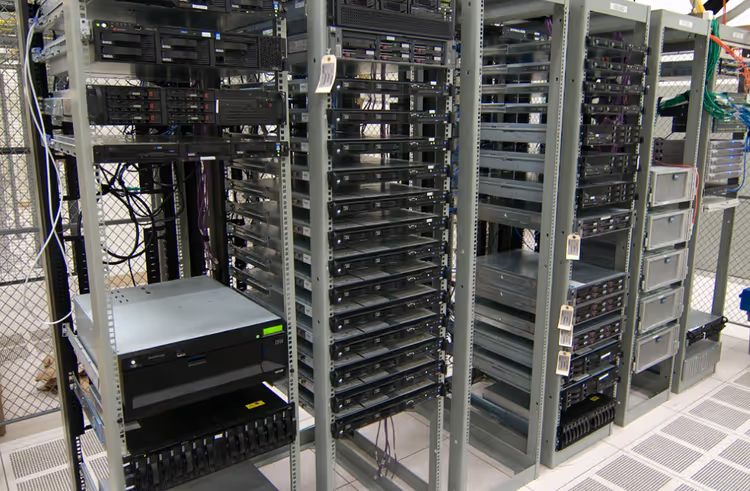
A dedicated server is an entire physical machine given to a single client. Every CPU cycle, every byte of RAM, every I/O operation is yours. No hypervisor layer, no hardware neighbors.
Key characteristics of dedicated:
- Deterministic performance. What you measured in a benchmark is what you get 24/7, with no dips caused by neighbors and no steal time.
- Full hardware isolation. No attack vector through the hypervisor: vulnerabilities of the Spectre, L1TF, and MDS classes are eliminated entirely.
- Hardware customization. Need more disks? You physically add SSDs or HDDs into a free slot. Need a specific RAID array? You build it for the task.
- Pricing reality. Starter configurations begin at $60-80 per month (OVHcloud, Hetzner AX). Sensible builds for serious workloads easily exceed $150-200.
But there's a nuance: there is no control panel "out of the box." Administration falls on you or your sysadmin. A managed option adds another 50-100% to the price according to VPSRated. If you don't have someone on staff who knows how to update the kernel and configure a firewall, dedicated suddenly stops being "cheap."
VPS vs dedicated server: comparison by key parameters
To cut to the chase, here's a summary table across six criteria. Data is current as of 2026.
Criterion | VPS | Dedicated server |
|---|---|---|
Processor (CPU) | 85-95% of bare-metal, possible dips at peak | 100%, deterministic, no jitter |
Memory and disk | Guaranteed volume, but the storage channel is shared | Full throughput, local NVMe with no layer in between |
Scaling | In a minute by switching plans, no downtime | Hours or days: physical replacement or migration |
Security | Isolation at the hypervisor level; provider patches vulnerabilities | Full hardware isolation, no hypervisor as an attack vector |
Administration | Panels, snapshots, cloning in a couple of clicks | A sysadmin or managed option needed (adds 50-100% to the price) |
Cost | $5-80/month for typical configurations | $60-200+/month, price scales linearly with resources |
Performance: myths and real benchmarks
The difference between a modern KVM VPS and dedicated hardware is not "multiples," as forums often claim. On a well-utilized node, a VPS delivers 85-95% of the host's raw power. A single-core test on Xeon Gold shows virtually identical numbers for VPS and bare-metal according to VPSRated data for 2026. Dips are noticeable only under sustained 100% load during peak hours.
The real threshold is roughly 16 GB RAM and 8 vCPU. Below this mark, VPS is always more cost-effective. Above 32 GB, dedicated starts to win. Above 64 GB, dedicated wins outright: you stop paying for hypervisor overhead.
Disk I/O on a local NVMe-backed VPS reaches 500k+ IOPS, which is enough for any web workload and medium-sized databases. The serious advantage of dedicated in the disk subsystem only shows up with databases holding 100 GB or more of hot data, where predictable latency is everything. In practice, very few projects ever reach that mark.
Security and compliance
VPS relies on hypervisor isolation. Hypervisors have historically had exploitable vulnerabilities: Spectre, Meltdown, L1TF, the MDS class of attacks. Cloud providers patch quickly, but dedicated removes this attack surface entirely. If your threat model includes lateral movement between instances, dedicated is legitimate protection.
From a compliance standpoint: most VPS providers hold SOC 2 and ISO 27001. HIPAA requires a Business Associate Agreement, which isn't available from everyone. Upper-level PCI-DSS almost always requires dedicated for the cardholder data environment. If you process payments directly rather than through Stripe or an equivalent, factor this in from the start.
Hidden costs nobody talks about
Headline prices in price lists are just the tip of the iceberg. Before entering your card details, calculate the full cost:
- Traffic. Dedicated usually includes 20-50 TB per month; VPS, from 1 to 20 TB according to VPSRated. Overages on a VPS can blow up your monthly bill. If your project streams video or serves files, read the fine print in the plans.
- Backups. Off-site copies add roughly 20% to the server price. Don't skip this line: data loss costs exactly as much as what you lost.
- Managed services. A managed VPS costs 2-3 times more than an unmanaged one. If you don't have a sysadmin on staff, budget for managed from the start; the alternative is a server with no kernel updates six months later.
- IPv4 addresses. Additional IPs run $1 to $3 per month on both server types.
- Setup fee. Dedicated sometimes carries a one-time fee in the tens of dollars. VPS almost never does.
How to choose: three typical scenarios
Theory is theory, but the choice always comes down to the specific project. Here are three scenarios that cover the vast majority of real-world situations.
Scenario 1: startup, blog, small online store
Go with a VPS. A configuration of 2-4 vCPU, 4-8 GB RAM, and an NVMe disk will handle 10-50 thousand visitors a month with room to spare. VPS rental will cost you several times less than dedicated, and the scaling headroom is just a simple plan switch in a minute. No magic: you pay only for what you actually use.
Scenario 2: SaaS, medium database, multiple projects
VPS is still your option. At this level it makes sense to split web and database onto different instances: one VPS runs Nginx and PHP, the second runs PostgreSQL or MySQL. This isolates the load without moving to dedicated. When the database exceeds 100 GB of hot data, you can put it on a VDS, a virtual server with dedicated cores where CPU steal time is zero. The price sits midway between VPS and dedicated: an ideal compromise.
Scenario 3: game server, ML training, compliance, traffic over 50 TB
Go with dedicated. Game servers don't forgive jitter; a 5 ms delay irritates players more than low-resolution textures. ML training eats CPU time for hours on end without a break, and on a VPS you risk becoming that very "noisy neighbor" for other tenants. PCI-DSS and HIPAA require physical isolation; here, VPS savings will backfire at the very first audit.
If traffic consistently stays above 50 TB per month, dedicated wins on cost thanks to all-inclusive bandwidth plans. On a VPS, overages beyond the included 10-20 TB quickly eat up the price difference.
VDS: the golden middle
Between VPS and dedicated there is an intermediate option: VDS (Virtual Dedicated Server). This is the same VPS, but with dedicated CPU cores rather than a share of a common pool. The instance remains virtual: snapshots, migration, and hourly billing are preserved. But CPU steal time is zero, and performance is as predictable as on dedicated.
VDS pricing sits exactly midway between VPS and dedicated. An ideal compromise for a workload that "almost fits" on a regular VPS but isn't yet ready for dedicated on a budget basis.
⁉️🤔 Frequent questions
Is VPS faster than shared hosting?
Yes, and the difference is usually 5-20x. Shared hosters resell CPU time to dozens of clients on a single machine, applying strict limits. A VPS gives guaranteed resources: at peak you get exactly what you paid for. Moving from shared to VPS is the upgrade with the most noticeable performance gain per dollar spent.
Can I run Windows Server on a VPS?
Yes, most providers offer Windows plans with full administrative access. The license is usually included in the price or adds $15-25 to the monthly bill. For specific Windows workloads like ASP.NET or MSSQL this is the standard path; spinning up dedicated for them is economically unjustified in most cases.
Can I migrate from VPS to dedicated with no downtime?
Yes, with careful database migration. Major providers like Hetzner, OVHcloud, and Liquid Web offer migration assistance. Plan for 2-4 hours of write-freezing for clean synchronization and DNS cutover. The process isn't painful, but it requires preparation: test the new server before switching traffic.
At what traffic volume does dedicated become more cost-effective?
At a steady 50+ TB per month, dedicated usually wins on cost thanks to bundled bandwidth plans. On a VPS, overages beyond the included 10-20 TB quickly eat up the price difference. The figure isn't exact and depends on the specific provider: calculate your typical monthly traffic and compare plans from three or four hosts; there is no universal answer here.
What is VDS and how does it differ from VPS?
VDS (Virtual Dedicated Server) is a VPS with dedicated CPU cores. The instance remains virtual, but CPU steal time is zero: the cores are pinned to you and not shared with neighbors. The price sits midway between VPS and dedicated. An ideal tool for a workload that has outgrown a regular VPS but hasn't yet reached the budget for a full dedicated server.
What to deploy for your project in 2026
If you're reading this and you have no explicit compliance requirement, no database with 100+ GB of hot data, and no game server with jitter demands, go with a VPS. Seriously. Nine out of ten projects never grow into needing dedicated, and overpaying "for future growth" is someone else's money thrown down the drain.
The approach is simple: start with a VPS on 2-4 cores. When it starts falling short, don't guess: look at the metrics: CPU steal time, disk latency, RAM utilization. Hit the ceiling on one parameter? Add cores by switching plans. Hit the ceiling on all of them? Move to a VDS with dedicated cores. And only when the VDS objectively can't keep up, sign a contract for dedicated.
The right hosting is the one that solves the problem today, not the one with the most impressive spec sheet. Start with a VPS, and buy more hardware later, when you actually need it.

A professional team of writers and editors specializing in creating quality content.