














🥇 3 best cron job plugins for WordPress 2026 (free and Pro)
Sending emails, publishing scheduled posts, checking for updates, running backups, everything hangs on cron tasks in WordPress. As long as they're running, you don't think about them. But once a single hook freezes, the site starts living its own life: scheduled articles don't publish, WooCommerce subscriptions don't renew, notifications go silent.
The unique thing about WP-Cron is that it doesn't fire on a server timer, but when a visitor arrives. On a low-traffic project, a task scheduled for 9:00 AM might execute at 11:47 AM when the first reader opens a page. And if there's no traffic for several hours, cron simply sleeps. Add lost hooks from deleted plugins, memory-hungry callback functions, and missing logs, and you get a black box instead of predictable automation.
We've gathered three plugins that cover the entire WP-Cron workflow: from viewing events to monitoring and debugging crashed hooks. All have been tested on real projects at techblog.sdstudio.top. At the end, in a separate section, we'll show how to replace the standard WP-Cron with a server scheduler for those who need guaranteed execution accuracy.
💡 Quick overview:
- Install WP Crontrol to see all cron events, edit them, run them manually, and clean out garbage hooks, this is the main admin tool
- Add Advanced Cron Manager PRO if you need execution logs, memory and time measurements for each hook, plus fatal error catching with file and line indication
- Enable WP-Cron Status Checker for daily monitoring: an email if cron stops working or a hook freezes for longer than 5 minutes
- Replace the standard WP-Cron with a server one if visitor accuracy isn't enough, move tasks to a real scheduler with guaranteed execution time
Comparison table
Feature | WP Crontrol | Advanced Cron Manager | WP-Cron Status Checker |
|---|---|---|---|
View all cron events | ✅ | ✅ | ❌ |
Manual event execution | ✅ | ✅ | ❌ |
Create new events | ✅ | ✅ | ❌ |
Execution logging | Pro | PRO | ✅ (basic) |
Fatal error catching | Pro | PRO | ❌ |
Memory and time measurements | Pro | PRO | ✅ (time) |
CSV export | ✅ | ❌ | ❌ |
Email notifications on failures | ❌ | ❌ | ✅ |
Free version | ✅ | ✅ | ✅ |
Pro price | From $59/year | $39/year | $10.99 |
1. WP Crontrol
WP Crontrol by John Blackbourn, the de facto standard for working with WP-Cron. The plugin is installed on 300,000+ sites and is part of the WordPress VIP tech stack and the Altis platform. We install it first on every project when we need to deal with scheduled tasks.
The plugin adds two screens to the admin: Tools → Cron Events for viewing and managing events, and Settings → Cron Schedules for creating custom intervals. On the events screen you see a table: hook, arguments, next run time, action. Any event can be run immediately, edited, paused, or deleted.
In practice, the most common use is finding lost hooks from long-deleted plugins. WP Crontrol highlights events with a missing action (the Action field shows "None"), which can safely be removed. Bulk deletion via Bulk Actions saves dozens of clicks when an audit turns up 15-20 garbage cron tasks.
The timezone handling is particularly nice: every date is shown with an explicit timezone indicator. No guessing "is this UTC or local?".
CSV export, a feature missing from Advanced Cron Manager. Hit the Export button, open the table in Google Sheets, and in 5 minutes you've audited all of a client's cron tasks before migration.
Pros:
- Full control over all cron events and schedules from the admin panel
- Bulk deletion, CSV export, custom interval management
- PHP and URL cron events, run code or hit an endpoint on schedule
- 300,000+ active installs, PHP 8.4 compatibility, regular updates
Cons:
- Logging, error catching, and performance measurements only in Pro for $59/year
- No built-in failure notifications for cron
💵 Free. WP Crontrol Pro, from $59/year (full logging, performance metrics, WP-CLI commands, error alerts).
🔗 WP Crontrol on WordPress.org
2. Advanced Cron Manager
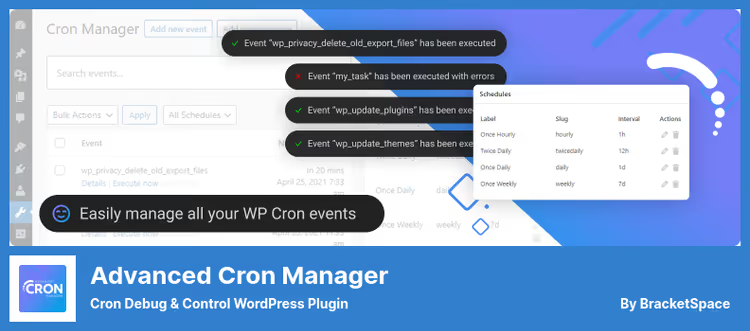
Advanced Cron Manager by BracketSpace (Kuba Mikita), this is WP Crontrol with a different philosophy. If WP Crontrol goes wide (management + custom schedules + PHP/URL events), Advanced Cron Manager goes deep: diagnostics, logging, performance profiling.
In the free version you get the same set as in WP Crontrol: view, add, delete, pause events. Plus there are bulk operations, search, and filtering, on a site with hundreds of cron tasks this saves time. A nice detail: for each event the plugin shows a ready-made PHP snippet (copy-paste callback function implementation), copy it to functions.php and add your logic.
The real power is unlocked in the PRO version for $39/year. Cron Logger turns on, full execution history with timestamps and status. For each hook you see execution time and peak memory consumption, it's immediately clear which plugin is eating resources on cron tasks. Error Catcher automatically intercepts fatal errors in callback functions and displays them in the log, instead of "silently crashed" you see the specific file and line.
On our test stand, one plugin for syncing with an external API regularly consumed 180MB of memory on a cron hook. Without Advanced Cron Manager PRO we wouldn't have known, externally everything worked, the site just periodically crashed with OOM.
Pros:
- Ready-made PHP snippet for each event, speeds up development
- PRO: full logging, performance measurements, and fatal error catching
- Server Scheduler, instructions for replacing WP-Cron with system cron
- Debug tool:
do_action('advanced-cron-manager/log')for logging your own data
Cons:
- No CSV export (unlike WP Crontrol)
- No PHP/URL events out of the box (creators consider it unsafe)
- PRO version doesn't add event management, only diagnostics
💵 Free version on WordPress.org. PRO, $39/year (logging, performance measurements, error catching, debug tool). 14-day money back.
🔗 Advanced Cron Manager on WordPress.org
3. WP-Cron Status Checker
WP-Cron Status Checker doesn't manage events, and that's its strength. It's a purely monitoring tool: it watches to make sure WP-Cron is alive, and sends an email if something goes wrong. Every 24 hours the plugin checks WordPress's ability to run cron tasks and logs all executed hooks.
A widget appears on the WordPress dashboard: green status if cron is working, red with an error description if not. Separately you can see the time of the last WP-Cron run, convenient for quick checks on low-traffic sites.
Logs show which hook executed, when, how long it took, and whether it completed successfully. If a hook hangs for longer than 5 minutes, the plugin marks it as failed and sends a notification.
Downsides: the free version stores only the last 3 logs. PRO for $10.99 removes this limit and lets you configure email notification frequency. PRO also lets you specify which hooks not to consider errors if they execute with incomplete status.
We keep WP-Cron Status Checker on projects where cron is critical (WooCommerce subscriptions, automated exports) as an independent watchdog. WP Crontrol and Advanced Cron Manager don't have built-in alerts, they show the state "right now", but won't warn you if cron went down at three in the morning.
Pros:
- Automatic WP-Cron check every 24 hours with email alerts
- Dashboard widget with color-coded status indication
- Hook logging: execution time, status, failure reason
- Doesn't depend on WP-Cron for checks, uses its own transients
Cons:
- Monitoring only, can't create, delete, or run a cron event
- Free version stores only 3 logs
- Requires registration through Freemius
💵 Free version on WordPress.org. PRO, $10.99 (log limit removal, alert frequency configuration).
🔗 WP-Cron Status Checker on WordPress.org
Replacing WP-Cron with server cron

Standard WP-Cron depends on site visits. If you need guaranteed execution accuracy (billing in WooCommerce, overnight CRM sync, report generation), replace it with server cron. The task will execute exactly at the specified time, regardless of whether anyone visited the site.
Here are three approaches for different levels of server access:
- cPanel / ISPmanager. Go to Cron Jobs, add a task with "Every 5 minutes" interval and command
wget -q -O - https://yoursite.com/wp-cron.php?doing_wp_cron > /dev/null 2>&1. First disable standard WP-Cron with the linedefine('DISABLE_WP_CRON', true);in wp-config.php. - Cloudways / hosting with SSH. Add an entry to crontab:
*/5 * * * * wget -q -O - https://yoursite.com/wp-cron.php?doing_wp_cron > /dev/null 2>&1. Same principle, but via terminal. - cron-job.org. Free external service with no WordPress tie-in. Register, create a task with your wp-cron.php URL, 5-minute interval. Doesn't require installing a plugin on the site or server access.
If you don't want to completely disable WP-Cron, use server cron only for critical hooks. Leave the standard mechanism for background tasks and set up a separate trigger via wget to the URL of a specific hook.
⁉️🤔 Frequently asked questions
Why do you need a separate plugin for cron if WordPress does everything itself?
Standard WP-Cron handles basic tasks: publishing scheduled posts, checking for updates. But it doesn't show what's actually scheduled, doesn't log execution, and doesn't warn about failures. When a site grows plugins (WooCommerce, backups, SEO scanners), the number of cron hooks exceeds 30-40, and without a management tool you lose control. A cron plugin is like DevTools for the frontend: you can live without it, but when something breaks, you don't even know where to look.
How does WP Crontrol differ from Advanced Cron Manager?
WP Crontrol gives full control over events: view, create, pause, bulk delete, CSV export, PHP and URL hooks. Advanced Cron Manager in the PRO version goes into diagnostics: execution logs, memory and time measurements, fatal error catching with file and line indication. Essentially they complement each other: WP Crontrol for management, Advanced Cron Manager for debugging. In practice we install both: WP Crontrol for everyday work with events, Advanced Cron Manager PRO for performance audits.
Can you get by without WP-Cron Status Checker if you have logs in Advanced Cron Manager?
Logs show what ALREADY happened. Status Checker warns WHEN it happened. This is the difference between "checking logs a week later and discovering cron has been down for 5 days" and "getting an email 24 hours after failure". For sites with WooCommerce subscriptions, 5 days of cron downtime means lost payments. On one project we found out about a frozen hook an hour after failure. Without Status Checker we would have only seen the problem when the client complained that subscriptions weren't renewing.
Does WP-Cron Status Checker itself depend on WP-Cron for checks?
No. The plugin uses the WordPress Transients API to store timestamps, not cron hooks. This means that even if WP-Cron is completely broken, Status Checker will detect the problem and send an alert. The check runs on every admin login and compares current time with the last recorded mark. Like a separate watchman who doesn't live in the house he's guarding.
Is it mandatory to disable standard WP-Cron when switching to server cron?
Advisable, but not mandatory. If you leave both, cron tasks will fire twice: by the standard mechanism (on visit) and by the server trigger. For most tasks this isn't critical, but it loads the server. Better to disable standard WP-Cron via
define('DISABLE_WP_CRON', true);and leave only the server trigger. Exception: if you're using server cron for specific critical tasks and let the rest work normally.
If you've never looked at the Cron Events section in the admin, start with this video. In 6 minutes David McCan shows how WP-Cron works, why events miss their schedule, and how WP Crontrol solves these problems. Practical guide without fluff, after which you'll be able to audit your site's cron tasks in 10 minutes.
Which cron task plugin to install in 2026
Three combinations for different scenarios, from light monitoring to full control:
- Minimal setup. WP Crontrol + WP-Cron Status Checker. Event management plus failure alerts. Covers most needs of small sites: all hooks visible, alerts present, zero cost. Free.
- Diagnostics and debugging. WP Crontrol + Advanced Cron Manager PRO + WP-Cron Status Checker PRO. Adds full logging, memory measurements, and fatal error catching. For sites with custom cron hooks and high cost of downtime.
- Precise execution timing. Any of the combinations above + server cron. Guaranteed execution on schedule, with no traffic dependency. For WooCommerce, billing, and syncs where an hour's delay is critical.
If you've never looked at what's in your Cron Events, start with WP Crontrol. Five minutes after installation, and you'll see how many garbage hooks are left from deleted plugins and which tasks are idle. Then add tools as needed: logs when something breaks, alerts when silence costs money, server cron when traffic isn't enough for stable execution.

A professional team of writers and editors specializing in creating quality content.