














🚀 5 Simple ways to boost sales on your wordpress site
A WordPress site is live, traffic is coming in, but sales are stuck. Sound familiar?
Most of the time the problem is not the product or the price. It is that the site never gets the visitor to the "Buy" button: a confusing menu, a sluggish mobile version, not a single hint that the transaction can be trusted. The person leaves within a couple of seconds, and you will never even know why.
Below are five concrete steps that remove these barriers and lift conversion. None of them require an ad budget. All you need is your hands and a couple of hours to implement.
💡 Quick overview:
- Clean up navigation: a clear menu and Mega Menu for large catalogs so the right section is found in a couple of clicks.
- Check the mobile version manually on a real phone: the cart, the order form, the payment page.
- Add trust signals: HTTPS, real reviews and a quality seal remove the fear of paying.
- Launch a blog for SEO: articles targeting customer queries bring warm traffic for years, for free.
- Speed up loading: image compression, caching and decent hosting win back visitors who would otherwise close the tab.
Convenient navigation: a menu that leads to a purchase
A visitor lands and does not understand where to click. Three seconds of confusion, and they are at a competitor. Navigation directly affects conversion: the faster a person finds the right product or service, the higher the chance they will reach the payment step.
The logic is simple. Build the menu so the most frequent scenario ("buy", "book", "see prices") opens in one click from the homepage. On desktop, keep the classic horizontal menu. Save the hamburger icon for mobile: on a large screen it hides sections behind an extra click and cuts their click-through rate.
Mega Menu for large catalogs
If the site has dozens of categories, a regular dropdown menu turns into a long, unwieldy list. This is where Mega Menu helps: a wide panel that shows the entire category structure at once, with icons and thumbnails.
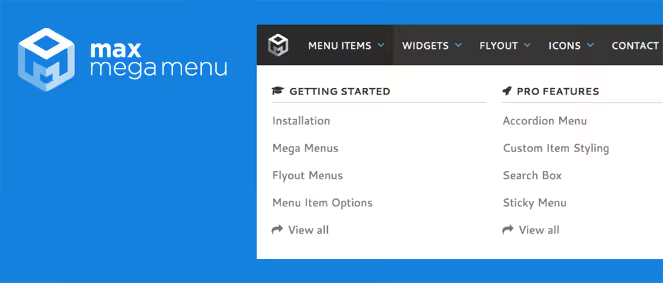
Among free solutions for WordPress, the most convenient is Max Mega Menu in the WordPress.org catalog: hundreds of thousands of active installs, block editor support and style customization right from the customizer. There is one rule for any Mega Menu: do not overload it. Five to seven top-level items, no more. Anything deeper, the visitor simply will not see.
Mobile version: half of your buyers come from a phone
According to Statista data for 2025 the share of mobile traffic worldwide exceeded 58%, and on B2C commercial sites it is usually even higher. Ignoring responsiveness today means losing more than half of your potential buyers.
Most modern themes are responsive out of the box. But automatic adaptation fails: buttons overlap text, forms get cut off, fonts become unreadable. That is why after installing a theme you should walk through the site on a real smartphone. Check the cart, the order form and the payment page. These are critical points. One broken "Buy" button on mobile wipes out all your traffic efforts.
For a quick diagnosis, the free PageSpeed Insights from Google works well: it shows specific problems with touch elements, scaling and content width. No registration needed, and it takes a minute.
Trust and security: three signals that convince people to pay
People do not leave money on a site that looks unreliable. Trust on the first visit is built by three things: the HTTPS padlock in the address bar, real customer reviews and a recognizable quality seal.
An SSL certificate is basic hygiene today. Most hosts issue Let's Encrypt for free and renew it automatically. Check that the site opens over https:// and does not complain about mixed content, where some images or scripts still load over the old HTTP. This often surfaces after a migration or a theme change and is fixed with the Really Simple SSL plugin in a couple of clicks.
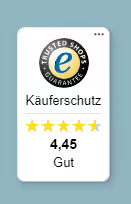
Reviews, the second pillar. Collecting them on your site, without third-party services, is helped by Site Reviews: star ratings and moderation right in the admin panel. For stores in Germany and Europe, Trusted Shops has become the de facto standard: the buyer sees a familiar logo and is more willing to complete the order. Separately, place the return policy and guarantee in a prominent spot. Transparency removes the last barrier before payment.
Content marketing: a blog that brings buyers
Paid advertising gets more expensive year after year, and for a small business this is painful. Against this backdrop, a blog becomes the best free channel: an article written once brings traffic for years.
The mechanics are simple. You publish articles that answer real audience questions. A dog supply store writes a piece "How to choose a harness for a husky: no chafing and no slipping off". A husky owner googles this question, lands on the blog, sees a selection of harnesses and buys one. This is inbound marketing: the customer comes on their own, already interested.
SEO for the blog: so you get found in search
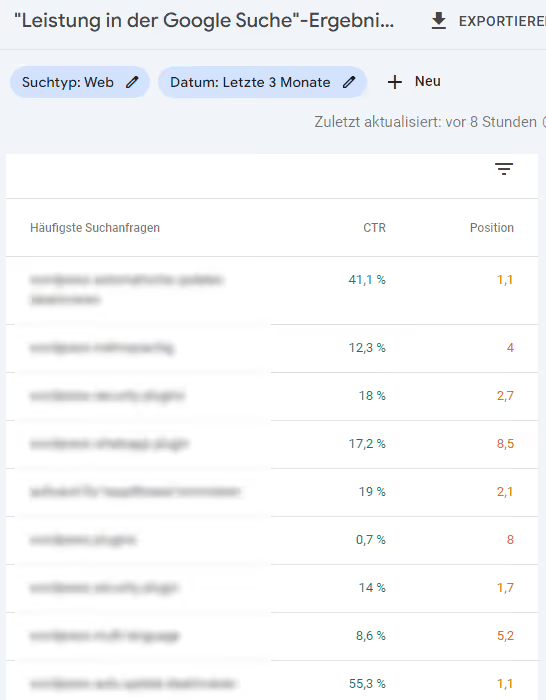
For an article to appear in search results, basic SEO optimization is needed. Three things work:
Long-tail keywords. Use phrases of three to five words: not "cat food", but "wet food for sterilized cats with urinary issues". Competition is lower, and the buyer's intent is more specific.
Title and description. Title up to 60 characters with the main keyword at the beginning. Meta description of 140-160 characters, sales-oriented, differentiating your result from the neighboring ones. Both fields affect click-through rate, and that, in turn, affects ranking.
Internal linking. Link articles to each other: from the harness review, link to the article about leashes, from there, to collars. The search engine sees this structure and considers the site authoritative on the topic.
For the technical part, the free version of Rank Math SEO is enough: XML sitemap, Schema markup, title and description management, readability analysis right in the editor.
Loading speed: a slow site kills conversion
According to a Google study when load time increases from 1 to 3 seconds, the probability of a bounce jumps by 32%. From 1 to 5 seconds, it is almost twice as high. For a commercial site, every extra second costs money.
Three levers give the fastest improvement.
Image compression. Images, the heaviest resource on an average site. The TinyPNG plugin automatically compresses JPEG and PNG and converts them to WebP right upon upload to the media library. The free limit is more than enough for a small site.
Caching. WP Super Cache saves a ready-made HTML version of the page and serves it to subsequent visitors instantly, bypassing PHP assembly and database queries. For repeat visits, the difference is tangible: seconds turn into fractions of a second.
Hosting. A cheap shared plan handles a business card site fine, but not a store during sale season. If after compression and caching pages still load longer than a couple of seconds, move to a VPS or specialized WordPress hosting. The price difference pays for itself through saved sales at peak times.
Measure your current speed via PageSpeed Insights: the service provides a specific list of issues, from unused JavaScript to font sizes.
What this looks like in practice
Want to see the logic of conversion optimization in action? The short breakdown below shows an approach with no ad budget, relying solely on site structure and user behavior.
⁉️🤔 Frequent questions
How long does it take to implement all five steps?
The basic set (SSL, mobile version check and image compression) takes an hour. Another couple of hours will go to Mega Menu and launching the blog. Content marketing takes the longest: the first articles require time, but this is a one-time investment. A noticeable conversion result is usually visible two to four weeks after the fixes.
Is it mandatory to install exactly Max Mega Menu?
No, it is just the most popular free option. There are alternatives like QuadMenu for Bootstrap-based themes or the premium UberMenu with a visual builder. And if your site has five to seven pages, you do not need a Mega Menu at all: the standard WordPress menu with logical item grouping is enough.
How do I know the site is losing sales specifically because of speed?
Open the speed reports in your analytics and look at the average load time. If it is above three seconds, and bounces on slow pages are noticeably higher than on fast ones, speed is the issue. PageSpeed Insights will show bottlenecks with a score on a hundred-point scale separately for mobile and desktop.
Do I need a blog if I sell services, not products?
For services, a blog works even better. Articles like "How much does an apartment renovation cost: an honest estimate" or "How to choose a lawyer: five red flags" answer the client exactly at the moment they are choosing a provider. You demonstrate expertise before the call. For lawyers, contractors and accountants, such content pays off especially quickly.
Is it worth paying for premium versions of optimization plugins?
Not for the start. The free versions of TinyPNG, WP Super Cache and Rank Math are enough for a small to medium site for years of growth. Premium is justified for a specific need: a CDN for an international audience or priority support for urgent incidents. Start with the free version and switch to paid only when you hit a real ceiling.
Where to start today?
The order of implementation is no less important than the steps themselves. Do not grab everything at once, break the work into three sessions:
Right now: check the mobile cart and order form, enable image compression and make sure the site opens over HTTPS without mixed content. An hour of work, the fastest effect.
This week: clean up the navigation. The visitor should reach the product in two to three clicks, no more.
This month: launch the blog. Three articles targeting real customer questions with basic SEO will bring the first warm visits from search.
No ad budget is needed for this. What you need is convenient navigation, fast loading and content that answers the customer's question before they even ask it. Start with the first step today, and you will see the first conversion lift this week.

A professional team of writers and editors specializing in creating quality content.