














🔋 6 Reasons why Chromebook covers all your tasks
Bought an expensive laptop but only use the browser? Sounds familiar. For most everyday tasks, powerful hardware is overkill: documents, email, YouTube, video calls don’t need a Core i7 processor and 16 GB of RAM.
Chromebook changes the game. Instead of a tricked-out Windows machine, you get a lightweight, fast, and affordable laptop built around ChromeOS. In 2026, the global Chromebook market is valued at $14.7 billion, with shipments reaching 22 million devices a year, and it’s long been more than just the budget segment.
Below are six reasons why a Chromebook covers the needs of most users with room to spare, without overpaying, antivirus software, or endless Windows updates.
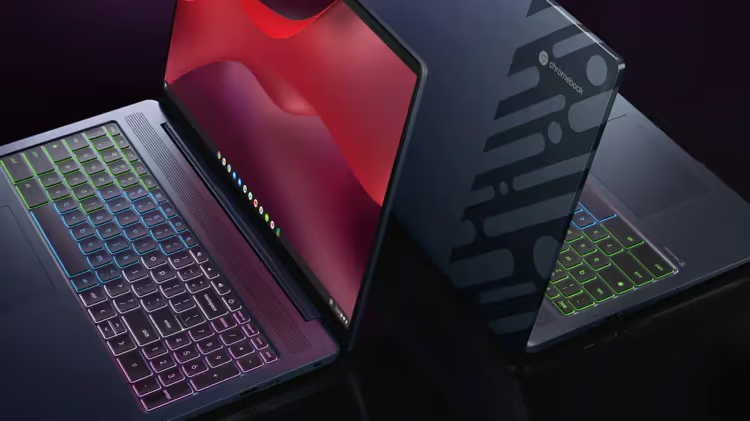
💡 Quick overview:
- Chromebooks are noticeably cheaper than Windows laptops with similar specs; pricing starts at two hundred dollars.
- The system boots in 6-8 seconds and doesn’t lag on modest hardware, even with a dozen open tabs.
- Battery life up to 17 hours on ARM models, a full workday without recharging.
- Google ecosystem out of the box: Gmail, Drive, Docs, and Calendar work online and offline.
- Automatic background updates and built-in virus protection without third-party antivirus.
- Chromebook Plus adds AI features (Help me write, Magic Editor, Gemini) at the price of a budget Windows laptop.
Why a Chromebook is a better value than traditional laptops
A Chromebook costs noticeably less than Windows and macOS laptops with comparable hardware. A budget model with an 11.6-inch screen, 4 GB RAM, and 64 GB eMMC runs a couple hundred dollars. A Windows equivalent with the same specs will set you back four to five hundred.
It’s not about cutting corners on materials. The manufacturer doesn’t pay for a Windows license ($50-100 per device), and ChromeOS requires less RAM and permanent storage. Instead of a terabyte SSD, 64-128 GB eMMC is enough: documents, photos, and videos live in Google Drive.
For example: an Acer Chromebook with a 15.6-inch screen, 8 GB RAM, and a touch display costs $350-400. A comparable Windows laptop with a touch screen starts at $600.
Chromebook Plus, launched by Google in 2024, raises the bar: models with 8+ GB RAM, Full HD IPS screens, and 128 GB storage start at $350. For that money, you get hardware that handles AI features and Android apps without lag.
Instant boot and responsiveness on modest hardware
The main advantage of ChromeOS is architectural minimalism. The system doesn’t drag along a registry, background services, and a pile of drivers. A cold start takes 6-8 seconds. Waking from sleep is instant, like a smartphone.
Browser, streaming, documents, and video calls run without stuttering even on MediaTek Kompanio or Celeron N-series with 4 GB RAM. The system aggressively unloads inactive tabs and manages memory more efficiently than Windows with the same specs.
Flagship Chromebook Plus models on MediaTek Kompanio Ultra (50 TOPS NPU) add headroom for Google AI features: live subtitle translation, text generation, background replacement on video. But even without Plus, a base model handles 15-20 open tabs, Slack, Google Docs, and Spotify in the background, verified in practice.
According to AboutChromebooks data for 2025, average Chromebook battery life ranges from 9 to 17 hours. Most models with ARM processors deliver 12-14 hours in mixed use: browser, documents, video. ChromeOS doesn’t waste charge on background processes that constantly run in Windows: indexing, auto-updates, telemetry. ARM chips (MediaTek, Snapdragon) consume 3-7 W versus 15-28 W for x86 laptops. The result is a full workday without a power outlet, even if you forgot your charger at home.
Seamless integration with Google services
If your email is on Gmail, files in Google Drive, and calendar in Google Calendar, a Chromebook works as a native extension of your smartphone. Signing in with a Google account deploys all services in a couple of minutes: no need to set up an email client, sync bookmarks, or install a cloud drive.
Offline mode has matured. Gmail, Google Docs, Sheets, and Slides work without internet: you edit a document, and changes sync when you reconnect. Google Drive caches selected folders locally. The Play Store gives access to Android apps, including Microsoft 365, Zoom, Slack, Spotify, and Netflix in native versions.
The Linux environment (Crostini) adds a terminal and full desktop tools: VS Code, GIMP, LibreOffice. For a developer or hobbyist designer, this is enough to close the "where’s my familiar software" gap.
Device fleet management: why schools and companies choose Chromebooks
IT administrators at schools and companies choose Chromebooks not for savings, but for manageability. The Google Admin console lets you centrally configure hundreds of devices: deploy apps, set access policies, block unwanted sites, and force-install extensions.
Every Chromebook receives automatic background updates every 4-6 weeks. Google guarantees 10 years of updates for models released from 2024 onward. No more "Windows update failed, undoing changes" in the middle of the workday.
For a user, onboarding looks like this: open the laptop, enter your Google account password, and within 30 seconds all apps, bookmarks, and settings are pulled from the cloud. Switch to another device, same environment, no manual profile transfers.
Variety of models and form factors
The Chromebook market in 2026 has come a long way from "cheap plastic laptop for school." Four categories are available:
- Budget ($150-250): 11.6" HD, MediaTek/Celeron, 4 GB RAM, plastic body. For browsing, email, and YouTube, covers 80% of use cases.
- Mid-range ($250-400): 14-15.6" Full HD IPS, 8 GB RAM, 128 GB eMMC, touch screen, aluminum accents. Comfortable work with documents and Android apps.
- Chromebook Plus ($350-600): 8+ GB RAM, Full HD/2K IPS, 128-256 GB SSD, Google AI features, up to 17 hours of battery life. Competes with Windows ultrabooks costing $700-900.
- Premium ($600+): 14-16" 2K-3K OLED/IPS, Intel Core / AMD Ryzen, 16 GB RAM, 256-512 GB SSD. Acer Chromebook Spin 714, HP Elite Dragonfly, devices for those who want flagship materials and performance.
Form factors: classic laptop, convertible (360° hinge), detachable keyboard (Lenovo Duet). Manufacturers: Acer, Lenovo, HP, ASUS, Samsung, Dell. The choice is wider than the MacBook lineup.
If you’re picking a specific model right now, watch the video above. It breaks down the key specs of Chromebook and Chromebook Plus to pay attention to before buying.
⁉️🤔 Frequent questions
Can you work on a Chromebook without internet?
Yes, most Google services support offline mode: Gmail (reading and composing emails), Docs, Sheets, Slides, Keep. Files from Google Drive are cached locally. Android apps from the Play Store often work without a connection. The only limitation is web services that require a constant connection (CRM, online banking) are unavailable offline.
Is a Chromebook suitable for programming?
Yes, via the Crostini Linux environment. You get a full terminal, apt package manager, and support for VS Code, Node.js, Python, Docker, Git. For web development and scripting, the capabilities are more than sufficient. Heavy IDEs (IntelliJ, Android Studio) work but require a Chromebook Plus with 8+ GB RAM. Native compilation of C++/Rust runs through Crostini without emulation.
How is a Chromebook different from a regular Windows laptop?
Three things. First, the OS: ChromeOS boots in seconds and doesn’t need antivirus; the system isolates apps from each other. Second, software: instead of installing.exe files, you use web apps, Android apps from the Play Store, and Linux packages via the terminal. Third, price and battery life: comparable hardware costs noticeably less, and the battery lasts from 9 to 17 hours.
Is it worth paying extra for Chromebook Plus?
Depends on your tasks. If you work with heavy spreadsheets, 15+ tabs, Linux apps, or need Google AI features, Plus is justified. The RAM increase (8 GB vs. 4) and Full HD IPS screen are noticeable daily. For browser, email, and YouTube, a base model for $200-250 is more than enough.
How long does a Chromebook get updates?
For models released from 2024 onward, Google guarantees 10 years of automatic ChromeOS updates. Devices released earlier get updates for 5-8 years from the platform’s release date. The Auto Update Expiration (AUE) date is listed for each model on Google’s website.
Should you get a Chromebook in 2026?
Over 6-8 years, the Chromebook has gone from "a browser in plastic" to a full-fledged platform. ChromeOS now includes Android apps, a Linux environment, and Google AI features, while keeping the speed, battery life, and price it started with.
If your tasks fit within the "browser + documents + video" triangle, a Chromebook for a couple hundred dollars will cover them completely. Add Chromebook Plus for three hundred fifty to four hundred if you need more RAM, Full HD, and AI tools. Developers and hybrid users gravitate toward models with 8+ GB RAM and Crostini; VS Code, Node.js, and Docker run natively.
But if you need specific Windows programs (AutoCAD, Adobe Premiere, 1C) or AAA games, a Chromebook won’t replace a full PC. In that case, it makes sense to look at a Windows laptop or keep a Chromebook as a second lightweight device for mobility.
Start simple: open the list of installed programs on your laptop. If practically all of them are a browser, messenger, office suite, and email, a Chromebook will handle it without compromise. What laptop do you have now, and have you considered a Chromebook as an alternative? Share in the comments.

A professional team of writers and editors specializing in creating quality content.