













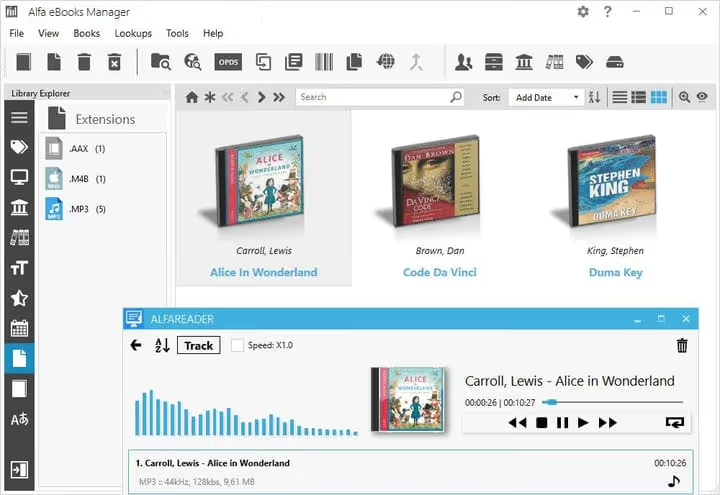
📚 Alfa Ebooks Manager review: software for managing your audiobook collection
An audiobook collection on your PC quickly turns into chaos. Dozens of folders, MP3 and M4B files scattered across the drive, some tracks unlabeled, and finding the right chapter is only possible from memory. Without dedicated software, getting things organized is nearly impossible.
Alfa Ebooks Manager solves this problem radically: it scans folders, automatically links scattered audio files into a single book, and extracts metadata directly from files. You get a unified library with covers, sorting, and a built-in player, without manual tag wrangling.
Let's break down what this manager can do, how it differs from Calibre, and who will actually find it useful.
💡 Quick overview:
- Audiobook import: automatic folder scanning, merging multiple files into one entry, metadata extraction from MP3, M4B, and AAX
- Library organization: sorting, search, filtering, "bookshelf" view, and managing audiobooks alongside ebooks
- Built-in player: playback without third-party software, position memory, speed control, file sorting within a book
- Comparison of three versions (Basic, Pro, Web): pricing, licensing, and key differences from Calibre and Audiobookshelf
Import and collection organization
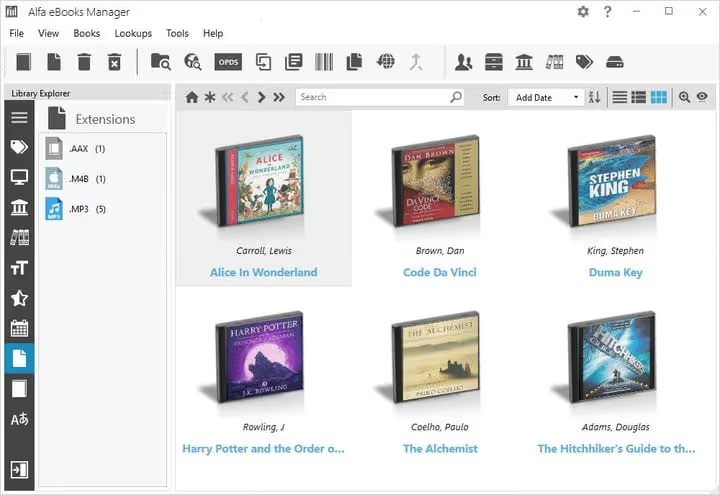
Alfa scans selected folders on your computer and gathers all audio files into a single database. The main advantage here is automatic linking of multiple files to one book entry. If an audiobook is split into chapters with each one as a separate MP3, the program will "glue" them together into a single catalog item. No manual renaming or grouping required.
During import, the manager extracts metadata and covers from MP3, M4B, and AAX formats. If tags are empty or broken, you can update them from web sources: Amazon, Audible.com, and others. After import, the library looks like a bookshelf with covers, not a flat file list.
Cataloging tools let you sort and filter your collection by multiple parameters: author, genre, date added, rating. You can maintain a unified library for audiobooks and ebooks; the program does not separate formats, everything is stored in one database.
Built-in audio player
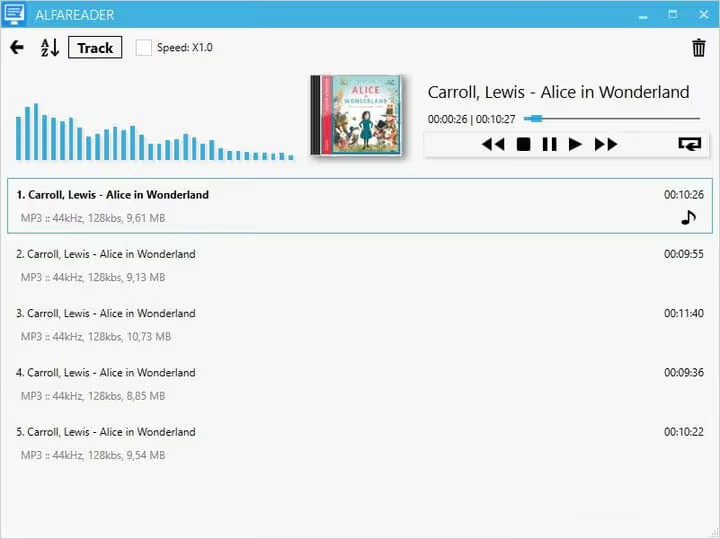
A separate plus: no need to launch a third-party player. The built-in player remembers the position where you stopped for each book individually. Standard controls and a playback speed option are included.
The player can sort tracks within a book by different parameters. This matters because not all audiobooks have track numbers set correctly in their metadata. If chapters are mixed up, you can arrange them manually, and the program will remember the order.
For those who don't want to launch the full database just to continue listening, there's a separate reader called Alfareader with the same player. It installs as a lightweight add-on for $5.47 and lets you open a book directly, bypassing the main manager window.
Backup tools
Alfa's file manager can create ISO images for burning audiobooks to CD and DVD discs. Record your collection to blank discs and free up hard drive space. The program remembers which specific disc contains each book, and later you can find and play it directly from the disc without copying files back.
For older collections that have grown to dozens of gigabytes, this is a significant space saver. External discs and DVDs remain readable for many years, unlike cloud services where the provider might shut down or change terms.
Versions, pricing, and licensing

Alfa Ebooks Manager uses a lifetime license model: pay once and use without subscription. Three tiers differ in functionality:
Version | Price (no discount) | Key features |
|---|---|---|
Basic | $29.95 | Unlimited books, batch operations, reader, audio player, manual web update, Kindle integration, ISBN scanner |
Pro | $49.95 | Everything in Basic plus metadata editor, knowledge management, batch web update, file parser, file manager, database management |
Web | $69.95 | Everything in Pro plus web server, web interface, web reader, OPDS server and OPDS client |
One license can be installed on 5 computers. Minor updates and bugfixes are free; major updates (roughly once a year) are paid, but existing users get a 75% discount. Occasional promotions run: at the time of writing, a promo code offers 45% off. All terms are listed on the Alfa purchase page.
A free demo version is available to evaluate basic functionality before purchase.
Comparison with alternatives
Alfa is not the only tool for managing audiobooks. Calibre and Audiobookshelf stand nearby, but they solve tasks differently.
Calibre is a free open-source powerhouse for ebooks. It can convert formats, edit metadata, and sync with devices. Calibre also sees audiobooks, but working with them is not its main function: the player is basic, and there's no automatic linking of multiple files into one book. Calibre is an ebook reader that "also" plays audio, not the other way around.
Audiobookshelf is an open-source server for audiobooks and podcasts with a web player and mobile apps. It suits those who want to stream their collection to a phone or tablet via browser. But Audiobookshelf requires server installation (Windows version via Docker), and that's a barrier for those who need a simple desktop manager.
Alfa occupies a niche between them: it's designed specifically for audiobooks, works as a regular Windows application, and requires no server setup. For those maintaining a mixed collection of audio and text, a shared database without format separation is a plus.
Video overview
To see the interface in action, watch the official overview from the developers:
⁉️🤔 Frequently asked questions
Does Alfa Ebooks Manager work on macOS and Linux?
The program is written for Windows and officially supports only this platform. On Mac and Linux, you can run it through Wine or a virtual machine, but the developer does not guarantee stability. macOS users should consider Audiobookshelf or run Alfa in a virtual environment.
Can you sync the library between computers?
There is no built-in cloud sync. However, Alfa's database is stored in a folder that can be placed on a network drive or in the cloud (Dropbox, OneDrive) and opened from different machines. The Web version of the program ($69.95) provides access to your library via browser from any device on the local network.
How does Alfa differ from free Calibre?
Calibre is a universal ebook manager with basic audio support. Alfa is designed specifically for audiobooks: it automatically links multiple files into one book, has a built-in player with position memory, and can change playback speed. Calibre does this worse because audio is not its priority. If you have more audiobooks than text books, Alfa will be more convenient.
Does the program extract metadata from AAX files?
Yes. The AAX format (Audible audiobooks) is supported alongside MP3 and M4B. Alfa reads the title, author, cover, and duration directly from the file during import. If metadata is missing, you can update it from online sources.
Is there a library size limit in the free version?
The demo version is fully functional but has a time or book count limit; the developer does not publish exact limits. A license purchase is required for permanent use. That said, even the Basic version has no book limit after purchase.
What to choose for managing audiobooks.
If audiobooks make up the core of your collection and you work on Windows, Alfa Ebooks Manager looks like the most straightforward solution. It doesn't try to be a universal powerhouse like Calibre and doesn't require server setup like Audiobookshelf. File linking, a player with position memory, and metadata handling are implemented here the way you'd expect from software where audio is the primary format.
The $29.95 price tag for the Basic version with a lifetime license doesn't look inflated compared to subscription services, and the demo version lets you try everything before paying. If your audiobooks have long needed a dedicated manager, Alfa handles this task without unnecessary complications.

A professional team of writers and editors specializing in creating quality content.