














🚀 How to create and publish books with PressBooks: complete 2026 guide
You have a WordPress site up and running. Your content plan is ready. But your books, both digital and print, are still sitting in your head and drafts, even though they could be your main asset: a lead magnet, a source of passive income, and your calling card as an author.
The problem is the tool. Word, Google Docs, and their conversion to EPUB produce broken results. Design packages like InDesign require budget and time. What you want is simple: write chapters in a browser, click "export," and get a ready file for Amazon Kindle, Apple Books, or print.
PressBooks solves exactly this problem. It's a platform for creating books built on the WordPress engine, familiar interface, instant export to EPUB, PDF, MOBI, and web version, professional layout out of the box. In this review, what PressBooks can do in 2026, how much it costs, and who it's right for.
💡 Quick overview:
- Create a free account on pressbooks.com and start a 7-day trial period.
- Write or import text, break it into parts and chapters, add book metadata.
- Choose a design theme from 20+ options: minimalist book design, responsive and accessible (WCAG 2.2).
- Export the finished book to EPUB, PDF, MOBI, or XML and upload to Amazon, Apple Books, Kobo, or print on demand.
What is PressBooks
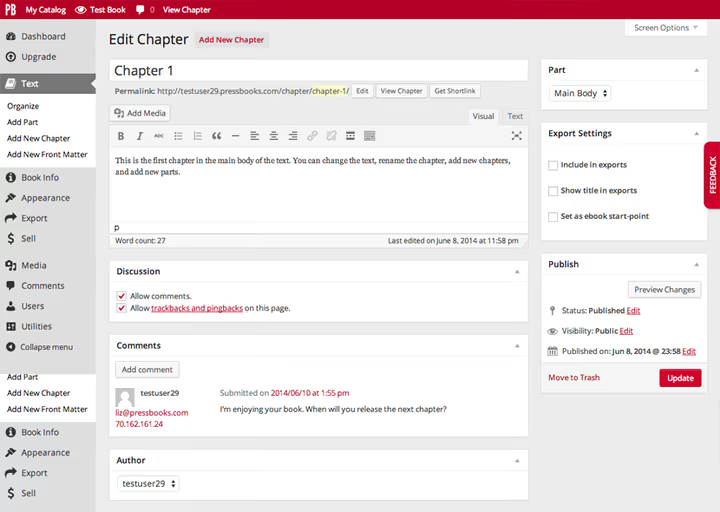
PressBooks is a cloud platform for self-publishing and creating books. Visually and logically, it's very close to WordPress: the same principles of content organization, the same admin panel. Each book is essentially a separate site within a PressBooks multisite network.
A chapter in PressBooks is structured like a standard WordPress post and includes metadata: title, subtitle, author, part number. All elements of a professional book are supported: preface, introduction, parts, chapters, afterword, appendices. The author assembles the book structure in the sidebar with simple drag and drop, and the system automatically generates the table of contents and page numbering.
You can write directly in the browser, or import ready text from Microsoft Word, EPUB, or open sources. PressBooks exports the finished book to all major formats: EPUB 3, PDF for digital and print, MOBI for Kindle, XML, XHTML, and Common Cartridge for educational platforms.
How PressBooks looks to readers
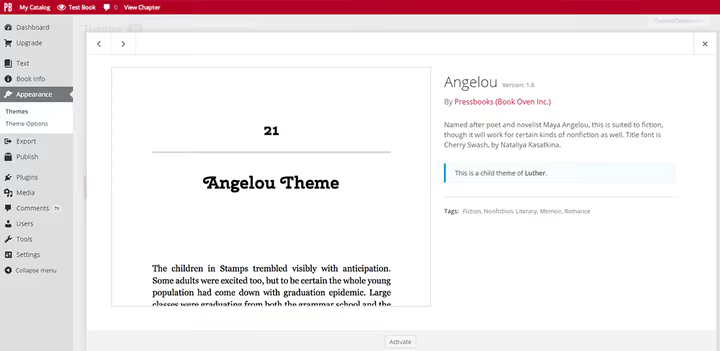
More than 20 themes are available for the web version of the book. All are minimalist and inspired by print publications: single-column layout, left and right arrow navigation, calm typography. The themes are responsive, the book reads equally well on desktop, tablet, and phone.
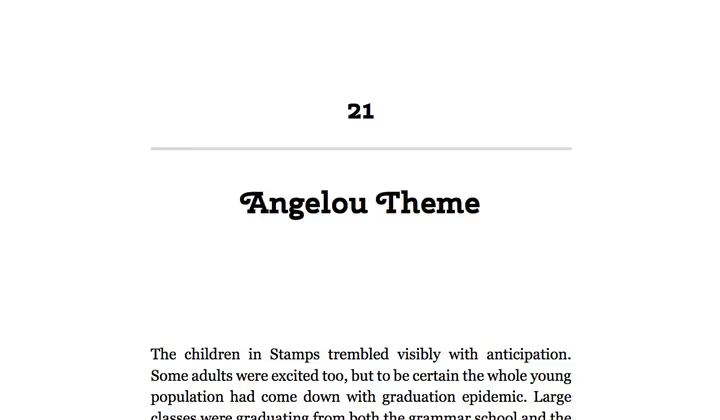
If you need a more vibrant or stylish design, you can add custom CSS (option available on the Collaboration plan). But for most authors, the basic themes are sufficient: PressBooks deliberately keeps the design restrained so readers focus on the text, not on animations.
An important touch: all PressBooks books comply with the WCAG 2.2 accessibility standard. This means your content can be read by people with visual impairments, through screen readers, with contrast and zoom settings. For educational and government publications, this is often a mandatory requirement.
Pros and cons of PressBooks
PressBooks does exactly what it promises: turns a manuscript into a finished book in minutes, without a typesetter or designer. But the platform has limitations that are important to know before starting.
What delights
Familiar interface. If you've administered a WordPress site, you'll master PressBooks in an hour. The same logic of "pages and posts," the same editor, the same menu on the left. The learning curve is minimal.
Instant export. Write a chapter, click Export, get EPUB and PDF. No manual conversion through Calibre and fixing broken layouts. Files pass validation for Amazon Kindle Direct Publishing and Apple Books.
Accessibility. WCAG 2.2 out of the box, a rarity for publishing tools. Your books are open to the widest possible audience.
Open license for content. PressBooks does not claim your copyright. You can sell ready EPUB and PDF files anywhere, the service takes no royalties or sales commission.
What disappoints
No built-in monetization. PressBooks cannot accept payments. To sell books, you need to connect an external store: WooCommerce on your site, Amazon KDP, Gumroad, or a similar service.
Limited media. You cannot upload video directly, only through embed from YouTube, Vimeo, or another hosting. On the free trial period, media storage is limited to 100 MB.
Not for complex layout. PressBooks handles text books, textbooks, and manuals excellently. But if you need a richly illustrated gift book with text wrapping, non-standard grids, and designer layout for each page, this is not the tool.
PressBooks plans in 2026
PressBooks offers three subscription levels. All prices are listed on the official pressbooks.com website as of June 2026.
Plan | Price | Who it's for |
|---|---|---|
Free Trial | Free, 7 days | Try the platform, create a draft book |
Single Author | $12/month or $120/year | Solo author: write and publish one or more books |
Collaboration | $40/month or $400/year | Team: co-authors, editors, interactive H5P content, custom CSS |
Single Author covers the needs of most independent authors: one account, unlimited books, public access to the web version, export without watermarks, built-in traffic analytics.
Collaboration is needed for teams: you can invite unlimited co-authors and editors, add tests and quizzes through H5P, edit CSS, and upload files for readers to download directly from the book's home page.
For organizations and universities, there's a separate product, PressBooks Enterprise Networks. This is a branded network with centralized management, suitable for departments, publishing programs, and corporate training. Prices are on request.
Video: how to get started with PressBooks
The official PressBooks channel on YouTube publishes short tutorials for each step: from registration to export. Below is an introductory video for self-published authors.
After watching, you'll know how to create a book from scratch, set up parts and chapters, choose a theme, and launch an export.
Alternatives to PressBooks for WordPress authors
PressBooks is not the only way to create books in the WordPress ecosystem. Depending on your task, other tools may be suitable.
Designrr is a service for quickly generating eBooks from existing blog posts, podcasts, or videos. Suitable for lead magnets: you take 5-7 articles, Designrr assembles them into PDF or EPUB in a few minutes. Prices from $27 per month.
Beacon is another content-to-book converter aimed at marketers. It can create lead magnets with capture forms and track how many times the book was downloaded. Plans from $49 per month.
WordPress eBook plugins. If you want to sell books directly on your site, check out eBook plugins in the official WordPress.org catalog. They add a book catalog to the site with 3D covers, automatic file delivery after payment, and copy protection. They work well paired with WooCommerce, Easy Digital Downloads, or Paid Memberships Pro.
Full author website. An alternative path is to build your own author site on WordPress, publish chapters as posts, and sell access to the book through membership or digital products. We have a separate guide to creating an author website and selling books where we cover this approach step by step.
Conclusion: PressBooks is the best choice if you need a professional book (EPUB + PDF + print) with publishing-quality layout. Designrr, Beacon, and WordPress eBook plugins solve a different task, quick generation of lead magnets and selling files on a site. The tools do not compete, they complement each other.
⁉️🤔 Frequently asked questions
Can you upload ready text from Word to PressBooks?
Yes, PressBooks supports import from Microsoft Word. Open the Import section in the book menu and upload a.docx file. The system will break the text into chapters by headings. Some formatting elements may require manual editing after import, especially tables, footnotes, and complex lists. It's recommended to clean the document of extra styles before importing.
How many books can you create in one account?
On the Single Author plan, the number of books is unlimited. You can run ten projects simultaneously. The only limitation is media storage: 250 MB on the Single Author plan. If your books have many illustrations, monitor the volume or upgrade to Collaboration (1 GB).
Is PressBooks suitable for printing through Amazon KDP?
Yes, PressBooks PDF export meets Amazon Kindle Direct Publishing requirements for print books. EPUB files also pass Kindle validation. Many authors successfully publish through PressBooks → export → upload to KDP without intermediate conversion.
Can you use PressBooks for free?
The free period is 7 days. During this time, you can create a book, set up the structure, write a few chapters, and test export. But to publish the book publicly and download files without watermarks, you need a paid plan. Special conditions sometimes apply for open educational projects, check on the PressBooks site.
What happened to the old WordPress PressBooks plugin?
The PressBooks plugin for self-installation on WordPress was closed back in 2016 and removed from the official WordPress.org catalog. The project fully switched to a cloud SaaS model. If you encounter old reviews of the "PressBooks plugin," keep in mind: now PressBooks is an independent platform on pressbooks.com, not a plugin for your site.
Is PressBooks right for you
In short: PressBooks is the best publishing tool for an author who wants to write and publish without messing with layout. Familiar WordPress interface, one-click export, WCAG 2.2 accessibility standard, and honest pricing (from $12 per month on the PressBooks site) make it the default choice for a solo author.
Get PressBooks if: you're writing a book, textbook, or manual of 50-400 pages; you plan to sell through Amazon, Apple Books, and Kobo; you value minimalist book design; you don't want to spend time on layout and conversion.
Look for an alternative if: you need a quick lead magnet from existing blog posts (then Designrr or Beacon); you want to sell books directly on your site with minimum effort (then WordPress eBook plugins + WooCommerce); you need designer layout for each page (then Adobe InDesign or Scribus).
You can create a free PressBooks account in a minute on pressbooks.com. Try it, the first 7 days are free, and in that time you can realistically write and export a test chapter to see if the platform fits your workflow.

A professional team of writers and editors specializing in creating quality content.