














🔗 How to create a proper URL from Cyrillic text: the complete guide
A Cyrillic URL in the address bar is %D1%81%D1%81%D1%8B%D0%BB%D0%BA%D0%B0 instead of a readable word, the result of percent-encoding per the RFC 3986 standard. Search engines can technically handle such addresses, but the user sees a jumble of characters, and when copying, the link turns into an unreadable string of percent signs and digits. For blogs, online stores, and Russian-language websites this is an everyday problem: a post title like "How to choose hosting for WordPress" should become kak-vybrat-hosting-dlya-wordpress, not %D0%BA%D0%B0%D0%BA-%D0%B2%D1%8B%D0%B1%D1%80%D0%B0%D1%82%D1%8C.
Converting Cyrillic to Latin characters for URLs is a routine operation that can be automated in seconds. The iTRANSLIT service has been solving this task since 2016: you paste a Russian heading and get a ready-made slug (a human-readable URL) with no spaces, punctuation, or uppercase letters. Below is a step-by-step walkthrough of the tool, transliteration principles, alternatives, and nuances for WordPress.
💡 Quick overview:
- Learn what a URL slug is and why Cyrillic in addresses causes problems
- Study the Russian-to-Latin transliteration table and cleanup rules
- Create your first slug via iTRANSLIT in under a minute with the step-by-step guide
- Compare alternative services and plugins for WordPress
- Find answers to common questions: Cyrillic in URLs, long titles, nested pages
What a URL slug is and why Cyrillic in the address is a problem
A URL slug (or human-readable URL) is the part of the page address after the domain that describes the page content in words. For example, in the address site.ru/kak-vybrat-hosting/ the slug is kak-vybrat-hosting. A good slug consists of 2 to 5 words separated by hyphens and is written in lowercase Latin characters.
When a slug contains Cyrillic characters, the browser encodes them using the Percent-Encoding (RFC 3986) standard. The word "ссылка" turns into %D1%81%D1%81%D1%8B%D0%BB%D0%BA%D0%B0. There are two visible problems:
- Readability. The user cannot tell where a link leads by looking at the address bar or a copied URL. For social networks, messengers, and email newsletters this is critical: a Cyrillic URL turns into a mess of percent signs when pasted.
- Duplication. Yandex and Google handle Cyrillic and transliterated URLs differently; with incorrect canonicalization the search engine may treat them as separate pages.
Technically, search engines do index Cyrillic URLs (Yandex even displays them decoded in search results), but for external links, copying, and user experience a transliterated slug is clearly better.
How Cyrillic-to-Latin transliteration works
Transliteration is a letter-by-letter replacement of characters from one alphabet with characters from another. Several transliteration systems exist for Russian: GOST 7.79-2000 (System B), Ministry of Foreign Affairs Order No. 4271 (for international passports), and ISO 9:1995. None of them is applied literally to URL slugs; instead, an informal ("user-friendly") transliteration optimized for readability is used.
A typical correspondence table for URLs:
Russian letter | Latin | Russian letter | Latin |
|---|---|---|---|
а | a | р | r |
б | b | с | s |
в | v | т | t |
г | g | у | u |
д | d | ф | f |
е | e (ye after a vowel) | х | h (kh) |
ё | yo (e after a consonant) | ц | ts (c) |
ж | zh | ч | ch |
з | z | ш | sh |
и | i | щ | shch |
й | y (j) | ы | y |
к | k | э | e |
л | l | ю | yu (ju) |
м | m | я | ya (ja) |
н | n | ь, ъ | (omitted) |
о | o | п | p |
After the letter replacement, three cleanup rules are applied: all punctuation is removed, spaces are replaced with hyphens, and uppercase letters are converted to lowercase. Consecutive hyphens are collapsed into one. The result is a clean ASCII slug ready for use in the address bar.
The exact transliteration scheme varies slightly between services. For example, some render the letter щ as shch, others as sch or shh. For SEO the difference between variants is negligible; what matters is that the same slug is generated consistently. Pick one tool and stick with it across your entire site.
Step-by-step guide: creating a slug with iTRANSLIT
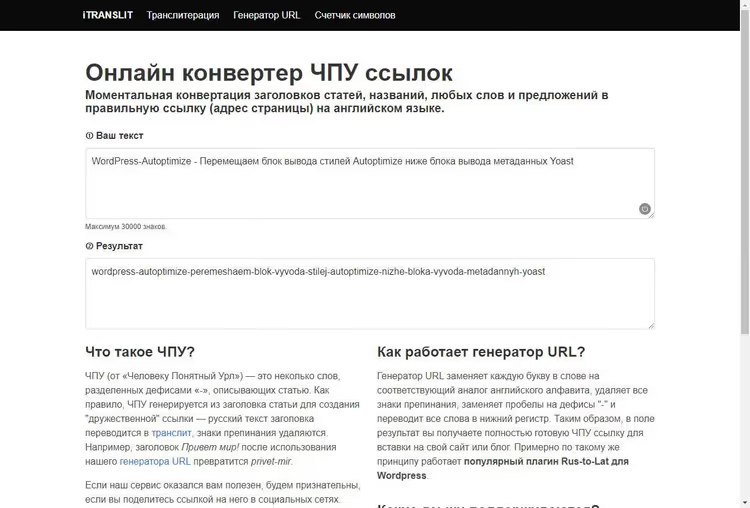
The iTRANSLIT service has been running since 2016 and supports transliteration from eight languages: Russian, Ukrainian, Polish, Latvian, Bulgarian, Czech, Greek, and Turkish. A dedicated module, the URL generator, is used to create URL slugs. The step-by-step process takes less than a minute:
- Open the page itranslit.com/slugify. You will see an input field and a language switcher above it.
- Select the source language (Russian by default). This determines which transliteration table is used.
- Paste or type a heading into the input field. Transliteration happens instantly, without a page reload; the result appears in the adjacent field.
- Copy the finished slug. The service automatically: converted Cyrillic to Latin, removed all punctuation, replaced spaces with hyphens, converted the text to lowercase, and removed duplicate hyphens.
Example output: the heading "Привет мир! Как дела?" becomes privet-mir-kak-dela. The heading "10 лучших плагинов кеширования для WordPress" becomes 10-luchshikh-plaginov-keshirovaniya-dlya-wordpress. Note that digits, Latin words, and hyphens are preserved unchanged; only Cyrillic characters are transliterated.
iTRANSLIT uses client-side JavaScript, meaning your text is not sent to a server. This is a plus for privacy: headings of unpublished articles stay on your device.
The tool is not designed for bulk processing; it converts one heading at a time. If you need to process a hundred headings at once, check the alternatives in the next section.
Alternative services and plugins for generating URL slugs
Over the ten years iTRANSLIT has existed, several dozen alternatives with additional capabilities have appeared. Here are tools that cover scenarios not handled by the basic iTRANSLIT:
- Pixlane Slugify uses Unicode NFKD decomposition to handle diacritics (café → cafe) and non-Latin scripts, including Chinese characters (transliteration to pinyin, e.g. bei-jing). Suitable for multilingual projects.
- URLToolskit Slug Generator offers built-in transliteration rules for Cyrillic and Greek plus a configurable maximum slug length and a choice of separator.
- FreeAIToolz Slug Generator supports batch processing of up to 1,000 headings at once. You can choose between kebab-case, snake_case, and camelCase output.
- The Cyr-To-Lat plugin for WordPress is installed from the official repository and automatically transliterates the slug when a post is saved. It works for posts, pages, categories, and tags. No manual copying is required; the slug is generated at the moment of publication.
If you run a WordPress blog, the Cyr-To-Lat plugin covers this need entirely. If you work with text outside a CMS or build a static site, web services like iTRANSLIT remain the fastest option.
⁉️🤔 Frequently asked questions
Is Cyrillic in URLs acceptable from an SEO standpoint in 2026?
Technically, yes. Yandex displays Cyrillic URLs in search results and indexes them correctly. Google also indexes Cyrillic addresses but shows them in percent-encoded form in search results. The issue is user experience: when copied from the address bar, a Cyrillic URL turns into a
%D0%-mess. That is why transliteration remains the de facto standard for public websites regardless of the year.
Which transliteration service should I choose for a commercial site?
For a commercial site on WordPress the Cyr-To-Lat plugin is sufficient; it works automatically and requires no manual effort. For sites on other CMSs or custom platforms, iTRANSLIT (for one-off tasks) or Pixlane Slugify (for multilingual projects with diacritics) will work. The key criterion is consistency: pick one tool and use it for every URL on the site to avoid discrepancies in transliteration.
What should I do when a heading is too long and the slug turns out huge?
Keep 3 to 5 keywords in the slug and remove stop words: prepositions, conjunctions, particles. The heading "Как правильно настроить кеширование в WordPress для ускорения загрузки сайта" can be shortened to
nastroika-keshirovaniya-wordpress. Most CMSs automatically trim slugs to a reasonable length. iTRANSLIT does not trim the result, so edit it manually before pasting it into your CMS.
Do I have to use transliteration for URLs, or can I use an English translation of the heading instead?
Translating the heading into English for the URL is an acceptable but non-standard practice. The downsides: the slug does not match the heading text (the user sees a Russian H1 and an English URL), each post requires a manual translation, and phrasing inconsistencies are likely. Transliteration is simpler, more predictable, and fully automatable. An English slug makes sense for an entirely English-language section of a site but not for individual pages.
Why does iTRANSLIT sometimes produce a different result than the Cyr-To-Lat plugin in WordPress?
Different tools use different transliteration tables. For example, iTRANSLIT renders the letter
щasshch, while Cyr-To-Lat renders it assch. For SEO the difference does not matter; search engines do not penalize any particular transliteration variant. What matters is consistency: once you pick a scheme, stick with it across all pages of your site.
Is URL transliteration still worth the effort in 2026
Yes, if you publish content in Russian and want links to remain readable when copied, shared on social media, or sent via messengers. The operation itself takes seconds, and WordPress plugins make it completely automatic.
Choosing a tool comes down to three scenarios:
- WordPress blog: install Cyr-To-Lat and forget about the problem. The plugin has been around since 2009, receives updates, and is compatible with Gutenberg.
- One-off tasks: iTRANSLIT or Pixlane Slugify in the browser. Works without registration and requires no installation.
- Bulk processing: FreeAIToolz lets you run up to 1,000 headings in one go with a choice of output slug format.
URL transliteration is not a matter of trends or a particular year. It is basic hygiene for a Russian-language website, just like human-readable headings. As long as Cyrillic addresses are percent-encoded when copied, a readable Latin slug remains the standard.

A professional team of writers and editors specializing in creating quality content.