













🔧 Apple Self Service Repair: how to fix iPhone, iPad and Mac yourself in 2026
A cracked iPhone screen costs $279-379 to replace at a service center. A battery replacement, $99. And that's with the part sitting just a couple of centimeters below the surface. For years, Apple blocked self-repair: it didn't supply parts, didn't provide schematics, and an unauthorized part swap turned Face ID into a brick.
The situation flipped in 2022 with the launch of Self Service Repair, an official program that gives owners access to genuine parts, professional tools, and step-by-step manuals. Four years later, the program covers 65 devices across 34 countries in 25 languages. Let's break down how it works today and who should actually pick up a screwdriver.
💡 Quick overview:
- What Self Service Repair is: Apple's official program for self-repair of iPhone, iPad, Mac, Studio Display, and Beats, with genuine parts, tool rental, and free manuals.
- Who it's for: only those with real electronics repair experience. The program is not for beginners, and Apple warns about this directly on the first page.
- How the process works: download the manual → run diagnostics → order the part and tools → complete the repair → calibrate via Repair Assistant → return the old part for recycling.
- What's important to know: the program isn't available in every country, part calibration requires Wi-Fi and the latest OS version, and a part with someone else's activation lock won't complete pairing.
The company announced the launch of a new program...
Learn more about "announced" at this link.
How it all started
Apple announced Self Service Repair in November 2021 and launched the program in April 2022 in the US. The first devices were the iPhone 12 and iPhone 13 lineups. The list of repairable modules at the time was limited to the display, battery, and camera. Later that year, Macs with M1 chips were added.
The idea was simple, but almost revolutionary for Apple: for the first time, the company allowed customers to buy genuine parts and rent the same tools used by technicians in Apple Stores. No "Chinese knockoffs from AliExpress." Only factory components with serial numbers.
By mid-2026, the program had grown to 65 products. All current iPhones from the 12 through the 17 series, iPads on M-series chips, MacBooks and desktop Macs with Apple silicon up to the M5, Studio Display, and select Beats models. Geography: 34 countries and 25 languages, covering nearly all of Europe.
Which devices you can repair yourself

As of July 2026, the list of supported devices looks like this:
Category | Models | Typical repairs |
|---|---|---|
iPhone | 12, 13, SE 3rd gen, 14, 15, 16, 16e, 17, 17 Pro, 17 Pro Max, iPhone Air, 17e | Display, battery, camera (front and rear), speakers, Taptic Engine, back glass (from iPhone 14), USB-C port, logic board |
MacBook | MacBook Air and Pro on M1-M5, MacBook Neo (A18 Pro, 2026) | Display, battery, top case with keyboard, trackpad, USB-C/MagSafe ports, logic board |
Mac desktop | iMac (M1/M3/M4), Mac mini (M1/M2/M4), Mac Studio (M1-M4), Mac Pro (M2 Ultra) | Display, stand, speakers, power supply, storage, fans |
iPad | iPad Air (M2+), iPad Pro (M4/M5), iPad mini (A17 Pro), iPad (A16) | Display, battery, camera, charging ports |
Other | Studio Display, select Beats models | Per the specific model's manual |
The list of repairs varies from model to model. For each device, Apple publishes a separate manual with a list of available parts and procedures.
How the process works: six steps from diagnostics to calibration
Apple built the process around the same cycle used by official service centers. Here's how it works.
Download the manual and get a Manual ID. Go to the Self Service Repair Store, select your model, and download the PDF manual for free. The manual includes a step-by-step teardown guide, a list of compatible parts, and a Manual ID. You'll need it when ordering.
Run Apple Diagnostics. Before buying parts, it's worth confirming the fault. Diagnostics for Self Service Repair is the same tool Apple technicians use. It checks the hardware and identifies exactly which part has failed. This avoids wasting money on an unnecessary part.
Order the part and tools. At selfservicerepair.com, you buy a genuine part, new or refurbished, and rent a professional toolkit. The tool kit costs $49 for a week's rental. The parts themselves are cheaper than a service repair: for example, an iPhone 15 battery is about $69 versus $99 for a replacement at an Apple Store.
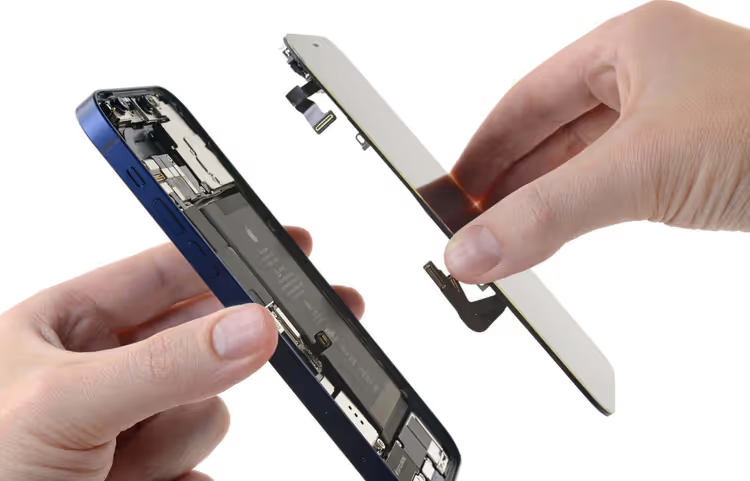
Perform the repair. A clean workspace, good lighting, no rushing. The procedures involve working with strong adhesives, glued-in batteries, and fragile flex cables. The manual describes every step, from heating the adhesive to safely disconnecting contacts.
Run Repair Assistant. On supported iPhones, iPads, and Macs, go to Settings → General → About → Parts & Service History → Restart & Finish Repair. The device will calibrate and pair the new part over the internet on its own. Important: Wi-Fi is mandatory, the battery must have sufficient charge, and the OS must be the latest version. Skipping calibration disables Face ID and Touch ID until it's completed.
Return the old part for recycling. Apple takes back replaced components and, in some cases, refunds part of the money, essentially a deposit for recycling.
What changed by 2026: the major improvements
The 2022 version of the program and today's are two different products. Here's what was added over four years.
On-device calibration. Previously, a remote session with an Apple technician was required. Now Repair Assistant handles everything locally. All you need is Wi-Fi and a current OS.
Support for used genuine parts. You can buy not only a new part but also a refurbished one. Calibration works the same for both. This lowers the cost and reduces e-waste.
Transparency through Parts and Service History. In the device settings, you can see which part is installed, whether it's genuine, and whether it's new or used.
Activation Lock at the part level. A part tied to someone else's Apple ID through activation lock won't pass calibration. This protects against stolen components. But it requires checking the donor device before buying a used part.
Critical limitations
The program isn't all-powerful, and Apple doesn't hide that.
Procedure complexity. Adhesive, heat, microscopic flex cables. One wrong move with a battery spatula, and a punctured battery starts smoking. This is not "remove two screws and you're done."
Geography. 34 countries: the US, Canada, the UK, and 31 European countries. Ukraine, Belarus, Kazakhstan, and most countries in Asia and Latin America are not on the list. If you're outside a supported region, the options are Apple authorized service centers or independent shops like AppleLab that work with genuine components.
Part pairing. Bought a used screen from an iCloud-locked iPhone? Calibration will fail, and the device may lose its warranty and trade-in eligibility.
No savings without experience. Tool rental at $49 per week plus the cost of the part plus the risk of breaking everything makes the benefit questionable for a one-off repair. The program pays off only if you repair several devices regularly.
⁉️🤔 Common questions
How much does a repair through Self Service Repair actually cost?
The price of the part plus the toolkit rental at $49 per week. An iPhone 15 battery is about $69, an iPhone 15 Pro display is around $279. There is a difference compared to the Apple Store, but it's not dramatic: you save on the technician's labor, not on the part. Check current prices using the calculator at selfservicerepair.com.
What happens if I make a mistake during the repair?
Most likely, the device won't turn on or will lose the functionality of the damaged module. A spare part bought by mistake is non-returnable. Apple states it plainly: if you're not confident in your skills, don't start. A mistake with the battery can lead to a fire.
Can I use non-genuine parts?
Technically yes, the device will turn on. But calibration through Repair Assistant only works for genuine Apple parts. Without it, Face ID, Touch ID, and other features may fail, and an "Unknown Part" label will appear in the Parts & Service History section.
Is the program available in my country?
Check at selfservicerepair.com; the store detects your region upon entry. If your country isn't on the list of 34, you can't officially order parts. The alternative: Apple authorized service centers in your region or independent repair shops.
Is it worth trying if I've never repaired phones before?
No. Start with something less expensive and less glued together. Self Service Repair is designed for people who already know how to work with microelectronics. That's not a figure of speech; it's a direct warning from Apple on the program's first page.
Is it worth the effort: the 2026 verdict
Self Service Repair is a mature, well-thought-out program that has come a long way in four years, from a "US experiment" to a full-fledged repair ecosystem across three continents. Genuine parts, professional manuals, tool rental, and automatic calibration all work.
But the barrier to entry remains high. If you repair devices regularly and are prepared to follow a 60-page manual carefully, the program gives you access to parts you can't legally buy anywhere else. If, however, you have a single iPhone with a cracked screen, take it to a service center. The price difference isn't worth it, and the risk of damaging the device outweighs the potential savings.

A professional team of writers and editors specializing in creating quality content.