













 AIIllustrative image: AI-generated
🚫 Cloudflare email-decode.min.js: why disable email obfuscation and how to remove the script in a minute
You visit PageSpeed Insights and see a render-blocking resource. You look closer: email-decode.min.js, Cloudflare. "This script is slowing down the site again," you think, and head to Google for a solution.
In April 2026, Cloudflare finally fixed the problem: they added the defer attribute, and the script stopped blocking rendering. Case closed, it seemed. But no. email-decode.min.js still leaves phantom soft 404s in Google Search Console, and the XOR cipher Cloudflare uses to "protect" addresses can be decrypted in seconds. No real security, no clean reports.
In practice, we've encountered this script many times during site audits: you disable it in a minute and get a clean Search Console as a bonus. Let's break down how the obfuscation works, why the script still causes problems, and how to remove it, with an alternative that actually hides email from bots.
💡 Quick overview:
- Understand how Email Address Obfuscation works in Cloudflare and why
email-decode.min.jsexists in the first place. - Explore three reasons to disable obfuscation after the April 2026 fix.
- Disable the script step by step: dashboard, API, Configuration Rules.
- Implement an alternative using
IntersectionObserverand base64, without external scripts or soft 404s.
How Cloudflare hides email
When a site runs through Cloudflare, the service enables Email Address Obfuscation by default. Cloudflare scans the HTML of pages, finds anything that looks like an email, and replaces each address with an XOR-encoded hex string. To decrypt it, email-decode.min.js is injected into the visitor's browser.
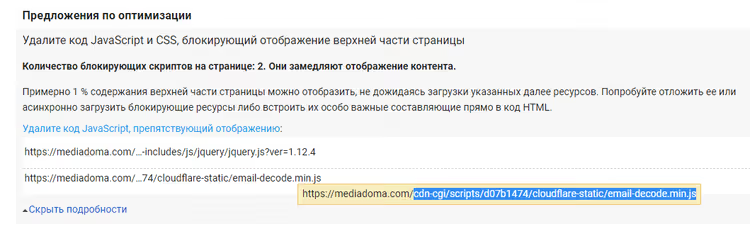
The idea makes sense: bots don't see addresses, people do. In practice, it's more complicated. Until April 2026, the script openly hurt performance, and the protection itself turned out weaker than Cloudflare promises.
Three reasons to disable email-decode.min.js
The April fix eliminated render-blocking. But three problems remain. And they're more serious than lost milliseconds.
Soft 404 in Search Console
Cloudflare replaces email addresses with links like /cdn-cgi/l/email-protection#[hex]. For Googlebot and other search crawlers, these URLs return 404. The result: "Soft 404" errors in Google Search Console. Ahrefs and Screaming Frog flag them as broken internal links.
This isn't cosmetic. Dozens of phantom Cloudflare errors mask real indexing issues. During a technical audit, you waste time filtering noise instead of finding actual broken pages.
XOR cipher doesn't protect
Cloudflare uses single-byte XOR, where the key is embedded directly in the encoded string. The decryption mechanism is identical for all sites under Cloudflare. A spammer needs one decoder, and they can extract addresses from any site in seconds.
Spencer Mortensen's research (2026) tested 25 obfuscation methods against 300+ spam harvesters using honeypot addresses. Even primitive CSS display:none showed 100% blocking. Cloudflare's obfuscation only protects against bots that can't decode XOR, and those wouldn't collect addresses anyway.
Main thread load on mobile
1.2 KB of JavaScript with defer isn't critical for desktop. But on a budget Android device with a loaded CPU, every small main-thread task eats into the INP budget. If you're fighting for the last 50 ms, this script is unnecessary.
Disabling obfuscation: step-by-step guide
Disabling takes a minute. Choose the path for your dashboard version.
New dashboard (Security Settings)
- Log in to the Cloudflare dashboard.
- Go to Security → Settings.
- Find the Email Address Obfuscation toggle.
- Switch it to Off.
Old dashboard (Scrape Shield)
If your account interface hasn't been updated yet:
- Log in to the Cloudflare dashboard.
- Open the Scrape Shield section.
- Find Email Address Obfuscation and toggle to Off.
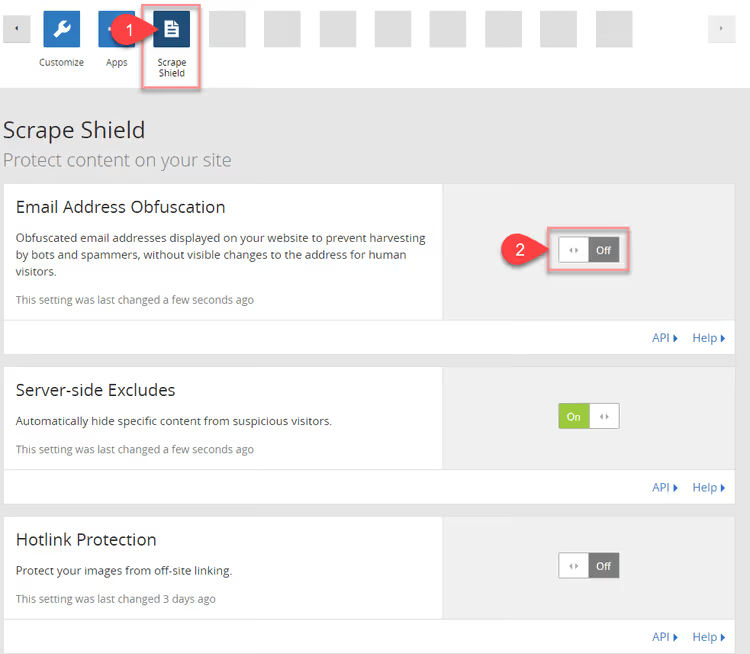
The script disappears instantly. email-decode.min.js stops being injected on all zone pages.
Via API
For automation or bulk management, send a PATCH request to the Cloudflare API:
1 curl -X PATCH "https://api.cloudflare.com/client/v4/zones/<ZONE_ID>/settings/email_obfuscation" \ 2 -H "Authorization: Bearer <API_TOKEN>" \ 3 -H "Content-Type: application/json" \ 4 --data '{"value":"off"}'
Substitute your Zone ID and API token with permission to edit zone settings.
Selective disabling via Configuration Rules
Need obfuscation on the contact page but not on landing pages? Use Configuration Rules:
- Go to Rules → Configuration Rules.
- Create a rule with criteria: hostname, URL path, or both.
- Add the Email Obfuscation setting and set it to Off.
- Apply.
You can also exclude individual addresses in HTML by wrapping them in comments:
1 <!--email_off-->info@example.com<!--/email_off-->
Alternative without Cloudflare: IntersectionObserver and base64
If you actually need to hide email from bots, there's a better way. No external script, no soft 404, and no impact on INP. The approach: base64-encode the address and decrypt it via IntersectionObserver, only when the visitor scrolls to the block containing the email.
Step 1. HTML markup:
1 <a class="email-hidden" href="#" data-email="aW5mb0BleGFtcGxlLmNvbQ=="> 2 [email hidden] 3 </a>
The data-email attribute contains the address in base64. Encode the string with an online tool or the command echo -n "info@example.com" | base64.
Step 2. Observer. Place the script in the page footer:
1 const emailTag = document.querySelector('.email-hidden'); 2 let observer = new IntersectionObserver((entries) => { 3 entries.map((entry) => { 4 if (entry.isIntersecting) { 5 let script = document.createElement('script'); 6 script.onload = function () { 7 emailDecode(entry.target); 8 }; 9 script.src = '/decode-email.js'; 10 document.head.appendChild(script); 11 } 12 }); 13 }); 14 observer.observe(emailTag);
Step 3. Decryption function, file decode-email.js:
1 const emailDecode = (e) => { 2 let email = atob(e.dataset.email); 3 e.href = 'mailto:' + email; 4 e.innerHTML = email; 5 };
Result: the email is decoded only when scrolling to it. Zero impact on INP, zero soft 404 errors. And base64 is no worse than Cloudflare's XOR for "protection," both methods are trivially reversible, but paired with IntersectionObserver, the address doesn't even enter the DOM on page load.
Video guide
If you prefer a visual guide, here's a demonstration of disabling obfuscation in the Cloudflare dashboard:
⁉️🤔 Frequently asked questions
Does Cloudflare obfuscation affect all site pages?
Yes, after adding a site to Cloudflare, Email Address Obfuscation is enabled for the entire zone. The
email-decode.min.jsscript is injected on every page where text resembling an email is detected. You can exclude individual pages through Configuration Rules, and specific addresses via HTML comments<!--email_off-->.
What happens if I just disable obfuscation?
email-decode.min.jswill stop being injected immediately. All email addresses on the site will become visible in the source code, exactly as you placed them. For most sites, this is normal operation: the contact email is already public, and hiding it from bots can be done with simpler methods.
Does Cloudflare obfuscation protect against all spam bots?
No. The XOR cipher is the same for all sites, anyone can decrypt the addresses. Spencer Mortensen's data shows: even CSS
display:noneblocks 100% of 300+ tested spam harvesters. Cloudflare's obfuscation only works against primitive bots that don't attempt to decode XOR.
Can I hide the script only from PageSpeed Insights?
No, PageSpeed Insights checks the page like a regular browser. If the script is injected, Lighthouse will see it. With the April 2026 fix, render-blocking is gone, but SEO effects (soft 404) and micro-impact on INP remain. The only way to remove the script completely is to disable Email Address Obfuscation in the dashboard.
How do I verify that obfuscation is actually disabled?
Open the page source code (Ctrl+U) and search for
email-decode.min.js. No script means obfuscation is disabled. Alternatively, check the browser console: before disabling, the DOM contains<script src="/cdn-cgi/scripts/.../email-decode.min.js">, after, it's gone. Changes apply instantly.
To disable or keep: the verdict
With the April fix, email-decode.min.js stopped blocking rendering. But SEO noise (soft 404 in Search Console) and the illusion of security (XOR is reversible in seconds) remain. Disabling through the dashboard takes a minute. Bonus: clean reports and a couple of saved INP milliseconds on mobile.
If obfuscation is genuinely needed, the alternative with IntersectionObserver and base64 provides real protection from spam harvesters. Without side effects. The choice is yours, but email-decode.min.js in 2026 is more habit than necessity.

A professional team of writers and editors specializing in creating quality content.