














⌨️ Comparing code editors: Sublime Text, VS Code and Vim/Neovim in 2026
Choosing a code editor is like choosing a car. One chases speed, another demands comfort and maximum features out of the box, a third insists on manual transmission. And each is convinced their route is the only correct one.
The editor market underwent a tectonic shift in late 2022. Atom, the very editor GitHub invented and on which Electron grew, officially retired. Source code archived, repositories closed, signing certificates revoked.
The other three heavyweights didn't go anywhere. Sublime Text, Visual Studio Code, Vim and its modern fork Neovim still divide the developer audience. Each has its own philosophy and its own set of trade-offs. This breakdown will help you understand which tool to pick for your tasks in 2026: without fanaticism, with numbers and real experience.
💡 Quick overview:
- We'll recall why GitHub shut down Atom in December 2022 and where former users should go
- We'll compare Sublime Text 4 (Build 4200), VS Code and Neovim 0.12 by speed, ecosystem, customization and entry barrier
- We'll give an honest comparison table and "pick X if Y matters to you" scenarios, without marketing slogans
What happened to Atom?

Atom launched in 2014 and was revolutionary at the time. An editor built on web technologies (HTML, CSS, JavaScript) on top of Chromium through the Electron framework, nobody had done that. Built-in package manager, deep customization through CSS/Less, convenient integration with Git right out of the box.
By 2018, Atom had gathered around 6,500 packages and themes, and the Electron framework itself gave life to dozens of applications: Slack, Discord, GitHub Desktop and, ironically, VS Code.
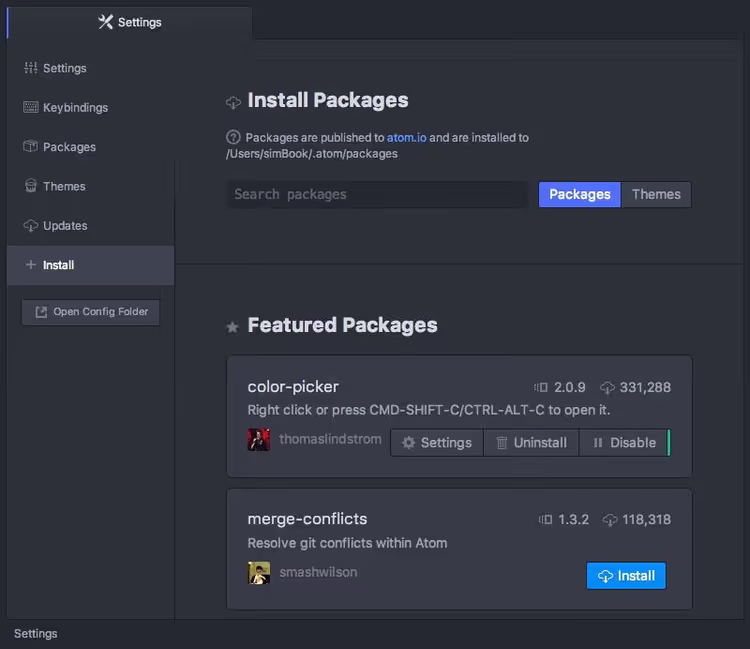
But Atom had a congenital problem: performance. Opening a large file, switching between tabs, launching the editor, all of it came with noticeable delays. Against the backdrop of lightning-fast Sublime Text and the rapidly gaining momentum VS Code, Atom was losing the speed battle.
GitHub officially announced Atom's shutdown on June 8, 2022. The final sunset happened December 15, 2022. The reason stated plainly: "We decided to discontinue Atom development to focus on VS Code and GitHub Codespaces." And yes, this was said by GitHub, the very company that created Atom.
If you're still sitting on Atom, it's time to move. The next three editors in this comparison are the three main directions worth looking at.
Sublime Text 4

Sublime Text, a market veteran. The first release came out back in 2007, and since then the editor has maintained the bar as the fastest GUI tool for working with code. The current version, Sublime Text 4 (Build 4200), received several fundamental updates.
Speed. Sublime is written in C++, and you can feel it. Opening a project with hundreds of files, searching through the entire tree, switching tabs, everything works instantly. GPU rendering, added in version four, made the interface smooth even on 8K monitors. For developers who don't tolerate delays, this is the main argument.
Packages and customization. The plugin ecosystem is built around Package Control, a manager that, unfortunately, still isn't preinstalled (the first package any Sublime user installs). After installation, access opens to thousands of packages: from linters like SublimeLinter to advanced file work through SideBarEnhancements. Configuration, simple JSON, settings can be overridden for each file type.
Price. Sublime Text 4 costs $99 for a personal license, a one-time payment with three years of updates. The free trial version isn't time-limited (a popup window every N saves). Business license, from $65 per seat per year. For comparison: in 2016 the license cost $70, moderate growth but fair for 10 years of updates.
Weak spots. No built-in debugging (unlike VS Code), no terminal inside the editor, and the extension ecosystem is noticeably more modest. Plugins exist, but don't expect the variety VS Code has. Project search, though fast, falls short of IntelliSense-like systems in capabilities.
Verdict: Sublime Text 4, the choice for those who value speed above all. If you work with dozens of files simultaneously and any interface delay irritates you, this is your tool. Web developers writing JS/TypeScript may find the ecosystem lacking.
🔗 Sublime Text 4 on the official site
Visual Studio Code

Visual Studio Code, the undisputed market leader. Five years running (2021-2025) VS Code takes first place in the Stack Overflow developer survey as the most used development environment. And there are reasons for this.
Technical foundation. VS Code is built on Electron, exactly the same framework that was created for Atom. But Microsoft wrote the editor UI on its own Monaco engine (from Visual Studio Online), and this gave a colossal performance gain compared to Atom. Yes, VS Code isn't as fast as Sublime, but for everyday work there are practically no delays.
Extension ecosystem. This is VS Code's main weapon. The marketplace has tens of thousands of extensions, from support for any programming language to design themes, snippets and integrations with cloud services. Extension management is built-in and works out of the box. Need a Chrome debugger, installed with one click. Node.js debugging with breakpoints, from the same interface.
AI capabilities. In 2026, VS Code became a platform for multi-agent development. GitHub Copilot Cloud Agent is built right into the editor: it doesn't just complete code, but executes tasks, refactors components, generates tests, searches repositories. The free Copilot version is available with limitations, full functionality by subscription.
Git and terminal. Git integration is built-in and works excellently: commits, viewing diffs, resolving conflicts. The built-in terminal, another ace: no need to switch between editor and a separate console window.
Price. Free. Completely. With all functionality. Only the Copilot subscription is paid.
Weak spots. Electron means memory consumption: VS Code can occupy 400-800 MB RAM with several projects. On weak machines this is noticeable. Another nuance: deep customization through settings.json requires time to learn, though most developers are fine with default settings.
Verdict: VS Code, the universal choice for the overwhelming majority of developers in 2026. If you don't know what to install, and you don't have specific requirements (like Vim or Sublime users), install VS Code. It's equally good for web development, Python, Go, C# and practically any other language.
🔗 Visual Studio Code on the official site
Vim and Neovim

Vim, the grandfather of all text editors. Created in 1991 as the successor to vi (1976), it's still installed on practically every Linux server and is actively developed. And its fork Neovim, launched in 2014, turned an archaic tool into a modern development platform.
Modal editing. Vim's philosophy is that hands never leave the keyboard. There's insert mode, there's command mode, there's visual mode. At the start this seems inconvenient, the first two weeks you'll constantly get confused and exit the editor through :q!. But after overcoming the entry barrier, modal editing gives text editing speed unattainable in regular editors.
Neovim, reimagining Vim. Neovim 0.12, released in March 2026, brought a number of fundamental improvements. Built-in plugin manager vim.pack eliminates the need to install a third-party package manager first thing. Native autocomplete insertion through the 'autocomplete' option works without plugins. Built-in LSP client for autocomplete and code navigation. Tree-sitter for precise syntax highlighting. Lua configuration instead of arcane Vimscript. Asynchronous plugins (no freezing during linting). Built-in terminal with full support.
Ecosystem. The modern Neovim ecosystem is built around Lua plugins and managers like lazy.nvim. Thousands of plugins cover everything: file trees (nvim-tree), autocomplete (nvim-cmp), search (telescope.nvim), status lines (lualine). Essentially, Neovim can be turned into an IDE not inferior to VS Code in functionality, but at the cost of serious setup time.
Price. Free, open source. Both projects.
Weak spots. Entry barrier, the main stopping factor. Setting up modern Neovim for web development takes from several hours to several days. Without plugins it's a "bare" editor that can't do anything. And also: for frontend development with visual preview (HTML/CSS), a terminal editor is objectively less convenient.
Verdict: Vim/Neovim, the choice for those ready to invest time in a tool to get maximum editing speed. System administrators, backend developers on Linux, keyboard navigation enthusiasts. If you spend most of your workday in the terminal, Neovim will become a natural extension of your hands.
🔗 Neovim on the official site | 🔗 Vim on the official site
Comparison table
Criterion | Sublime Text 4 | VS Code | Vim/Neovim |
|---|---|---|---|
Speed | ★★★★★ | ★★★★☆ | ★★★★★ |
Ecosystem | ★★★☆☆ | ★★★★★ | ★★★★☆ |
Entry barrier | ★★★★★ | ★★★★★ | ★★☆☆☆ |
Customization | ★★★★☆ | ★★★★★ | ★★★★★ |
Git integration | ★★★☆☆ | ★★★★★ | ★★★★☆ |
AI capabilities | No | Copilot Cloud Agent | Through plugins |
Debugging | No | Built-in | Through plugins |
RAM consumption | Minimal | 400-800 MB | Minimal |
Price | $99 (one-time) | Free | Free |
Platforms | Win/Mac/Linux | Win/Mac/Linux | Win/Mac/Linux |
Watch a visual comparison of editors in action: the channel author tests speed, convenience and features of each tool on real tasks.
⁉️🤔 Frequently asked questions
Is it worth switching from Atom to VS Code?
Yes, this is the most direct and logical route. VS Code is built on the same Electron technology as Atom, but works noticeably faster. GitHub itself recommended VS Code and Codespaces as Atom's replacement when announcing the shutdown. Most hotkeys and concepts (Command Palette, tree file view) are very similar, so the migration will take a couple days.
What to use for frontend (HTML/CSS/JS/React) in 2026?
VS Code, the de-facto standard for frontend development. Extensions for React, Vue, TypeScript, Tailwind CSS; IntelliSense with autocomplete; Live Server for instant preview; built-in Chrome debugger. All of this works out of the box or installs with one click. Sublime Text works for light markup, but without an extension ecosystem, serious frontend work on it is inconvenient.
Sublime Text 4, is it still relevant?
Absolutely. For developers on C++, Python, Go and those working with large projects (hundreds of files), Sublime Text 4 remains the best in speed/functionality ratio. GPU rendering, native Apple Silicon support and instant search make it indispensable for those irritated by any delay.
Vim or Neovim, what should a beginner install?
Neovim. The reason is simple: Lua configuration is more modern and simpler than Vimscript, the built-in LSP client gives autocomplete without dancing with a tambourine, and the community created ready-made distributions (LunarVim, LazyVim, NvChad) that set everything up for you in 5 minutes. Start with a distribution, and in a month or two you'll write your own configuration.
Is there a replacement for Atom with the same deep customization?
Closest is VS Code with its settings.json and extension API. But if you specifically need interface customization through CSS like in Atom, none of the three have that now. Pulsar (an Atom fork trying to continue development by community effort) exists, but activity is low and prospects are hazy.
Is it realistic to use Neovim for web development?
Realistic, but requires time investment. The combination nvim-cmp + LSP + Tailwind CSS LSP + VS Code snippets through plugins gives autocomplete at VS Code's level. However, visual markup preview in the terminal is absent, and for React DevTools you'll have to keep the browser open. For backend on Node.js/Python/Go, Neovim is good without reservations, for frontend it's a compromise.
Which editor to pick in 2026: final breakdown
The code editor landscape simplified to three clear paths. Sublime Text 4 for speed perfectionists. VS Code for everyone else. Neovim for terminal enthusiasts. Atom left gracefully, its legacy lives on in Electron, on which VS Code is also built.
The practical recommendation is simple. If you're a web developer, install VS Code, it's the choice without alternatives. If you write C++ or Python and editor speed is critical for you, Sublime Text 4 for $99 pays for itself in the first month of work. If you live in the terminal, spend a weekend setting up Neovim with LazyVim and get a tool you won't change for years.
And if you're still on Atom, close the tab with nostalgia and download VS Code. Migrating projects takes an evening, and the difference in speed and ecosystem pays for itself on the very first workday.

A professional team of writers and editors specializing in creating quality content.