













🔍 Gigabyte laptops 2026: lineup overview, technologies and current models
A laptop for gaming and work: to run Cyberpunk on ultra and render in DaVinci Resolve. No overheating, no throttling, no compromises. In 2026, Gigabyte turns this into hardware.
Not long ago the brand was associated mostly with motherboards and graphics cards. Today its laptops are among the most sensible on the market: four lineups, each for a specific task and budget. From the flagship AORUS with RTX 5090 to the student EAGLE at $900 (manufacturer data).
Below, a breakdown of all series and an honest answer: is a Gigabyte laptop worth buying in 2026.
💡 Quick overview:
- Meet the four Gigabyte lineups of the current model year
- Compare specs of AORUS, AERO, GAMING, and EAGLE by key parameters
- Learn the pros and cons of each series and pick a laptop for your task
Current model range: four lineups instead of three
A couple of years ago Gigabyte had three series: AORUS, Aero, and Sabre. Sabre is history, Aero was reimagined, and two new ones took their place: GAMING and EAGLE. The result is four lineups with clear positioning.
Here is what the brand's laptop portfolio looks like in 2026:
Lineup | For whom | Screen size | Processors | Graphics | Price (from) |
|---|---|---|---|---|---|
AORUS MASTER | Hardcore gamers, esports | 16" / 18" | Intel Core Ultra 9 / Ryzen 9 | RTX 5070 Ti - 5090 | $3,099 |
AERO X16 | Content creators, Copilot+ | 16" | AMD Ryzen AI 400 | Integrated + discrete | ~$1,800 |
GAMING A16/A18 | Mainstream gaming | 16" / 18" | Intel Core / Ryzen 5-7 | RTX 4050 - 5070 | ~$1,200 |
EAGLE | Budget gaming, students | 16" | AMD Ryzen 5 | RTX 3050 - 4060 | ~$900 |
The table gives the big picture (manufacturer data). Next, a detailed breakdown of each series.
1. AORUS MASTER, the no-compromise flagship
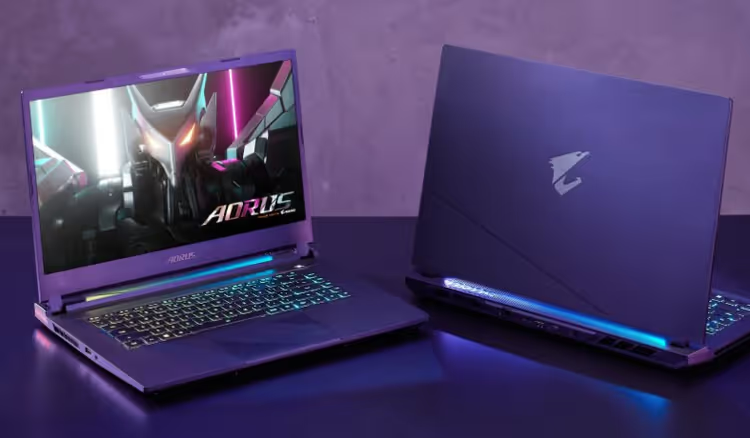
AORUS MASTER is the top tier. 16- and 18-inch models, Intel Core Ultra 9 275HX processors (24 cores: 8 performance and 16 efficiency, up to 5.4 GHz boost) and graphics cards up to NVIDIA GeForce RTX 5090 with a full 175 W TGP (manufacturer data).
The 16-inch version's display is 2560×1600 OLED with a 16:10 aspect ratio, 500 nits brightness, and a 240 Hz refresh rate. The 18-inch version uses a mini-LED panel instead of OLED: same 240 Hz refresh rate, but higher brightness headroom for HDR. Both are top-tier for gaming and color work (manufacturer data).
As for performance: the RTX 5080 in the MASTER 16 handles Cyberpunk 2077 on ultra with ray tracing. The RTX 5090 version adds headroom for years ahead. Memory is 32 GB LPDDR5 (upgradeable to 64 GB), storage is a 1-2 TB NVMe PCIe 5.0 drive.
- Pros: flagship performance, 240 Hz OLED, upgradeable RAM and SSD (two M.2 slots), Thunderbolt 5, Wi-Fi 7
- Cons: plastic chassis at a starting price of $3,099, zonal (not per-key) RGB keyboard backlight, weight 2.5 kg, loud fans under load
- Price: from $3,099 (RTX 5080) to $4,299 (RTX 5090) (manufacturer data)
- Where to buy: Gigabyte laptops, official retailer in Ukraine
The AORUS MASTER 18 costs more: $3,299 for RTX 5080, $4,399 for RTX 5090 (64 GB RAM). The premium for two extra inches and mini-LED is not trivial, but for a desktop replacement it is justified (manufacturer data).
2. AERO X16, a workstation with Copilot+ on board

AERO is the lineup for content creators. In the 2025-2026 models Gigabyte bet on AMD: the AERO X16 runs on Ryzen 7 / Ryzen 9 with an NPU block Ryzen AI 400. This gives Copilot+ PC certification, local AI right on the device, no cloud needed (manufacturer data).
Display, 16 inches, WQXGA (2560×1600), 165 Hz, factory calibrated for sRGB and DCI-P3. Unlike AORUS, this is IPS, not OLED. Viewing angles are excellent, brightness headroom is sufficient for outdoor work (manufacturer data).
The key difference from gaming series is the focus on battery life. Ryzen AI uses battery power more efficiently, and the integrated Radeon handles everyday tasks without a discrete GPU. Heavy configurations offer discrete NVIDIA graphics for Premiere Pro, Blender, and DaVinci Resolve.
- Pros: Copilot+ PC with local AI, calibrated display, good battery life, lightweight for a 16-inch laptop
- Cons: not for hardcore gaming, IPS instead of OLED, no Thunderbolt (AMD platform)
- Price: from ~$1,800 (manufacturer data)
- Where to buy: all Gigabyte lines in stock at the official retailer
3. GAMING A16/A18, mainstream gaming without breaking the bank

GAMING A16 and A18 cover the "I want to game without taking out a loan" need. Configurations range from Intel Core / Ryzen 5 to Ryzen 7, with RTX 4050-5070 graphics cards. This is enough for AAA titles at high settings in FHD and for esports like CS2 and Valorant at max settings (manufacturer data).
Display, WUXGA (1920×1200) or WQXGA (2560×1600) at 165 Hz. Plastic chassis, dual-fan cooling, ports include HDMI 2.1 and USB-C (no Thunderbolt). GAMING A18 PRO comes with Intel Core Series 2: 18 inches, 165 Hz, WQXGA (manufacturer data).
- Pros: honest gaming performance for reasonable money, choice between Intel and AMD, 165 Hz IPS, two screen sizes
- Cons: plastic chassis, no Thunderbolt, fan noise under load (typical for the segment)
- Price: from ~$1,200 (manufacturer data)
- Where to buy: GAMING models in stock at the retailer
For most gamers, the GAMING A16 with RTX 4060/5070 is the sweet spot.
4. EAGLE, honest budget entry

EAGLE, Gigabyte's most affordable series. Processor, AMD Ryzen 5, graphics, RTX 3050-4060, display, 16-inch IPS at 165 Hz. Pricing starts around $900 (manufacturer data).
For a student or a first gaming laptop, a sensible entry point. Esports (CS2, Dota 2, Valorant) run without issues. Undemanding AAA titles at medium to high settings. Don't expect miracles, but it justifies its price.
- Pros: affordable price, 165 Hz IPS (rare at this budget), decent build quality for the segment
- Cons: modest performance headroom, plastic chassis, base RTX 3050 is a bit weak for modern AAA games
- Price: from ~$900 (manufacturer data)
- Where to buy: EAGLE models in stock at the retailer
Common to GAMING and EAGLE: the GiMATE AI assistant in Control Center analyzes the system and gives tuning tips, Advanced Optimus automatically switches graphics, and in 0dB mode the fans turn off during office work.
Gigabyte technologies: what actually works
Cooling system. On AORUS MASTER, a vapor chamber covering over 50% of the motherboard, plus two fans with 158 fins each. Under gaming loads it is noticeably audible, this is not a silent ultrabook. But there is no throttling: the RTX 5080 holds a stable boost. On GAMING and EAGLE, a classic dual-fan setup without a vapor chamber.
GiMATE AI. GiMATE understands system context: which game is running, which performance profile is selected, whether the GPU is overheating. You ask in plain text "why did the frame rate drop," and it analyzes the profile. Useful for beginners who don't want to dig into MSI Afterburner.
Battery. AORUS MASTER 16 is equipped with a 99 Wh battery, the maximum allowed for air travel. In office mode, up to 7 hours 49 minutes in the Procyon test. While gaming, around 2 hours. For a gaming laptop, the result is average, not a failure (IGN data, 2025).
Should you buy a Gigabyte laptop in 2026?
AORUS MASTER, for those who need a desktop replacement with a 240 Hz OLED and RTX 5090. The main compromise: a plastic chassis at a price starting from $3,099. For that money, the Razer Blade gives you aluminum, but with lower TGP and no RAM upgrade option (manufacturer data). Here, everyone decides what matters more: maximum FPS or premium tactility.
AERO X16, the choice for an AMD-based video editor who values battery life and local AI (Copilot+). GAMING A16, the sweet spot. EAGLE, an honest budget option.
Note: Gigabyte does not offer 14-inch models. If compactness is critical, look at the ASUS ROG Zephyrus G14 or Razer Blade 14.
A detailed video review of the AORUS MASTER 16 with in-game tests and temperature measurements is below:
⁉️🤔 Frequent questions
How does AORUS differ from the Gigabyte GAMING series?
AORUS, the flagship: OLED/mini-LED, RTX 5070 Ti-5090, vapor chamber, Thunderbolt 5, chassis with an RGB projector and aluminum lid. GAMING, the mainstream series: IPS 165 Hz, RTX 4050-5070, dual-fan cooling, plastic chassis with no frills. The price difference is roughly 2-2.5x (manufacturer data).
AORUS justifies the difference if you play AAA titles on ultra or work with 3D rendering. For esports games like CS2 and Valorant, the GAMING A16 with RTX 4060 at $1,400 is enough (manufacturer data).
AERO X16, is it for gaming or work?
The AERO X16 is designed for content creators: calibrated display, Copilot+ with local AI, emphasis on battery life. A discrete GPU is available, but TGP is lower than on the AORUS, and the display refresh rate is 165 instead of 240 Hz. You can game on it, but that is not its primary purpose.
If you spend 80% of your time working in Premiere / Blender and 20% gaming, get the AERO. If it is the other way around, look at GAMING or AORUS (manufacturer data).
Does it make sense to get a Gigabyte with Intel or is AMD better?
It depends on the series. AORUS MASTER with Intel Core Ultra 9 275HX is pure performance: 24 cores, 5.4 GHz boost. AERO X16 with Ryzen AI 400 is efficiency and battery life. GAMING is available on both platforms, choose based on budget and preference.
The practical difference in games between comparable Intel and AMD of the same generation is 5-7%. The price difference is often larger. Focus on the final configuration, not the processor brand (NanoReview data, 2026).
Are Gigabyte laptops reliable in the long term?
Gigabyte as a brand has been known for components and boards since 1986, the engineering expertise is there. In AORUS laptops, the components are select: upgradeable memory and SSD, two M.2 slots, a non-soldered Wi-Fi module. The chassis is plastic, which raises questions at a $3,000+ price point. But this does not affect the longevity of the internals.
Warranty is 2 years (international). At Ukrainian retailers like Skay.ua, on-site service is available (manufacturer data).
Which Gigabyte laptop should I get for gaming in 2026?
If budget is not a constraint, the AORUS MASTER 16 with RTX 5080 at $3,099: 240 Hz OLED, top-tier performance, a 3-4 year headroom. A $1,200-1,600 budget, the GAMING A16 with RTX 4060/5070: all modern games at high-ultra in FHD. A budget up to $1,000, the EAGLE: esports and undemanding AAA titles (manufacturer data).
Whatever you choose, get it with a GPU and RAM headroom. You cannot buy and add more of those later separately (manufacturer data).
What to get for your task: the final breakdown
Gigabyte in 2026 offers a clear choice: AORUS, maximum power. AERO, editing and AI. GAMING, honest gaming for reasonable money. EAGLE, budget entry. Each line is for its own task, with no attempt to make a "universal laptop" for all the money.
If you need a specific model, go to Skay.ua, filter by budget and specs, read reviews for the specific configuration. And remember: get the GPU and RAM with headroom now, you will not be able to add more in a couple of years.

A professional team of writers and editors specializing in creating quality content.