













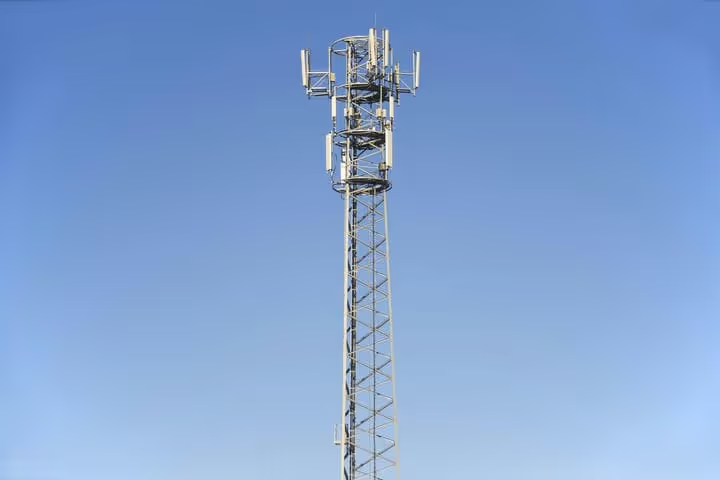
📡 GSM and CDMA: what they are, how they differ and how to boost cellular signal
A weak signal in a basement or outside the city is familiar to everyone. But when smartphone specs flash abbreviations like GSM and CDMA, and a salesperson asks "which carrier?", confusion sets in. Behind those letters is a technology that defined phone compatibility and coverage for two decades.
The good news: in 2026, the difference between GSM and CDMA has almost completely lost its relevance. LTE and 5G have replaced both standards, and 2G/3G networks are either shut down or living out their final months. But understanding how mobile bands work is still useful: it helps you choose the right signal booster, figure out compatibility for an old phone, and avoid confusion when buying a device for international travel.
💡 Quick overview:
- Learn how GSM and CDMA differ at the radio access level: time slots versus code division.
- Understand why Verizon's CDMA networks have been fully shut down since 2023 and how that affects old phones.
- See how a signal booster works: external antenna, repeater, and internal antenna.
- Compare analog and smart boosters, external and internal antennas, RG-6 and LMR 400 cables.
- Find the right booster for your needs: home, vehicle, office, or M2M applications.
What GSM and CDMA are: how mobile bands work
GSM and CDMA are two multiple access technologies for radio channels. Both solve the same problem: how to let several subscribers talk or transfer data simultaneously through the same base station without interfering with each other. But they do it in fundamentally different ways.
GSM (Global System for Mobile Communications) turns voice into a digital data stream, slices it into time slots, and gives each call its own interval in the shared radio channel. The receiver at the other end reassembles the pieces back into coherent speech. This approach is called TDMA, Time Division Multiple Access. GSM became the global standard: at its peak, it operated in more than 200 countries and covered roughly 80 percent of the world's mobile market. Today, 2G GSM networks are still alive in many regions as a fallback for voice and SMS, but carriers are systematically shutting them down as well.

CDMA (Code Division Multiple Access) works differently. Each call is encoded with a unique digital key, and all encoded conversations are transmitted simultaneously in the same frequency band. The receiver knows the key for "its" call and extracts it from the overall noise. CDMA dominated in the US: Verizon and Sprint built their networks on this technology. Outside North America, CDMA practically never took hold; by various estimates, its share of global wireless networks at its peak did not exceed 20 percent.
The main practical difference between GSM and CDMA that mattered to users: GSM allows simultaneous voice and data (for example, checking email during a call), while pure CDMA does not. But with the arrival of LTE, this difference disappeared, because LTE supports simultaneous voice and data regardless of which 2G/3G technology the carrier used before.
CDMA is a thing of the past: the 2G and 3G shutdown timeline
If you read old articles about GSM and CDMA, you will inevitably come across the dates "late 2019" and "late 2020". Verizon did originally plan to shut down 3G CDMA back in 2019, but postponed the deadline several times. The final shutdown happened on December 31, 2022. As of January 3, 2023, Verizon's CDMA network is fully deactivated.
Practical consequences: old phones that worked only on CDMA stopped being serviced. Models that used CDMA for voice and LTE only for data (so-called non-VoLTE devices) also lost the network. Verizon began transitioning CDMA devices off of the network long before the official shutdown: as early as 2018, the carrier stopped activating 3G devices on its network.
The picture is similar for other US carriers. AT&T shut down 3G in February 2022. T-Mobile completed its 3G CDMA shutdown (inherited from Sprint) by the end of 2022. According to GSA data from July 2025, 278 operators in 83 countries have either already shut down or planned the shutdown of 2G and 3G networks. Europe is heading toward a full 2G/3G sunset by 2027-2028, and some countries, such as Spain, began coordinating shutdowns as early as 2026.
For smartphone owners, all of this means one thing: you no longer need to buy a phone "for CDMA" or "for GSM". Any modern device with LTE and 5G support works in any country in the world, provided its radio module supports the required frequency bands. It is the bands, not the network type, that have become the real compatibility criterion.
How a signal booster works: three components and one principle
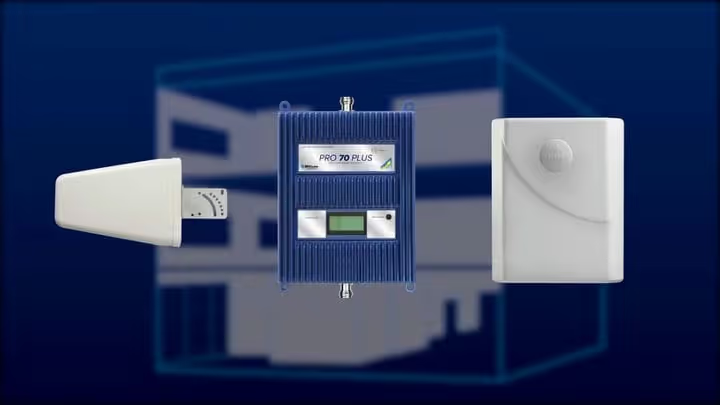
A cellular signal booster, or cell phone signal booster as it is called in English-language documentation, is a repeater that receives a weak signal from outside, amplifies it, and retransmits it inside a building or vehicle cabin. The system consists of three essential elements.
External antenna. Mounted on the roof of a house, on a window, or on a vehicle body. Its job is to capture the signal from the carrier's base station. The gain of an external antenna is rarely below 7 dB and can exceed 10 dB. The higher the antenna is installed and the fewer obstacles between it and the tower, the cleaner the signal it captures.
Amplifier (repeater). The heart of the system. It receives the signal from the external antenna via coaxial cable, adds power (gain), and sends it to the internal antenna. Analog amplifiers deliver 63-70 dB of gain; smart models, up to 100 dB and above. An important nuance: an amplifier does not create a signal out of nothing. If there is no stable reception outside (at least one bar), a booster will not help.
Internal antenna. Distributes the amplified signal within the coverage area: a room, a car cabin, an office. The type of internal antenna (panel, dome, or low-profile) depends on the building layout and the required coverage area.
The operating principle of the entire system can be described in four steps. First, the external antenna captures the weak signal from the nearest tower. Then the repeater amplifies it to a level sufficient to cover the designated area. The internal antenna distributes the signal to all devices within range. And when the phone sends data back, the uplink signal travels the same path in reverse: internal antenna, amplifier, external antenna, tower. A properly tuned booster extends the phone's battery life by up to 180 minutes in talk mode: the device does not need to spend energy constantly searching for a network.
Analog and smart boosters: which to choose
All boosters fall into two broad classes: analog (broadband) and digital (smart).
Analog boosters work on the principle of "amplify everything I see". They boost the signal across all frequency bands the carrier supports simultaneously. This is a simple, time-tested technology. Most boosters sold today are analog. They are also called Bi-Directional Amplifiers (BDA): the same device amplifies both the incoming and outgoing signal. An analog booster suits most residential scenarios: a country house, a cottage, a basement, a small office.
Smart boosters appeared later. Inside such a booster is a digital baseband processor that cleans the signal of noise before amplification. The result is a cleaner and more powerful output signal with a lower noise floor. Smart models deliver more than 100 dB of gain and often come in an "all-in-one" format: a built-in donor antenna inside the housing, with no external antenna required. This is a plug-and-play solution for an apartment or a small house.
Smart boosters have a downside as well: they are more expensive than analog ones. But for users whose outside signal is very weak and unstable, the difference in quality justifies the price. Manufacturers' product lines, such as those from SureCall or weBoost, typically offer both classes.
Why the signal gets weaker: three groups of causes
Distance to the tower. The main factor. Signal level is measured in dBm, and with every doubling of distance from the base station, power drops not linearly but according to the inverse-square law. If you are 500 meters from the tower, the signal can be excellent. If you are 5 kilometers away, with woods or dense buildings around, the phone risks losing the network.
External interference. Radio waves are physical radiation, and they obey the laws of propagation. Any obstacle on the line between the phone and the tower reduces signal quality: hills, tree lines, tall buildings, billboards. Weather conditions also have an effect: heavy rain, thunderstorms, and snowfall create additional attenuation. High-frequency 5G bands are especially sensitive to this.
Internal interference. Even if reception is perfect outdoors, the signal inside a building can be zero. Thick concrete, brickwork, metal structures, coated double-glazed windows, foil-faced thermal insulation: all of these act as shields for radio waves. Add electromagnetic noise from operating equipment: a Wi-Fi router, a microwave, wireless speakers. The result is predictable: four bars on the porch, and "No service" in the living room.
These are exactly the scenarios a booster is designed for. It takes a good signal from outside and delivers it indoors, bypassing construction barriers.
Outdoor antennas: omni-directional and Yagi
The outdoor antenna is a critically important component of the amplification system. The higher it is installed, the better the signal. There are three mounting options: on the roof (maximum height), on a wall, or on an upper-floor window. Structurally, outdoor antennas fall into two types.
An omni-directional antenna picks up signal from all 360 degrees. This is the universal choice when there are several towers from different carriers around and you need to boost the signal for all of them at once. An omni antenna requires no precise aiming: install it vertically, and it works. Suitable for suburbs and urban areas with moderate signal levels.
A Yagi antenna (directional) focuses on a narrow sector, about 45 degrees. This is the choice for those who live far from a single tower and know exactly which direction it is in. A Yagi reaches farther than an omni antenna and provides higher gain in the targeted direction. The downside: if there are multiple towers or the carrier changes the sector direction, the antenna will need to be re-aimed.
A separate class of outdoor antennas exists for vehicles. A magnetic antenna on the roof is an omni-directional element 10-30 cm tall with a magnetic base. Installation is elementary: place it on a metal roof, route the cable into the cabin. For trucks, campers, and travel trailers, reinforced antennas on a spring mount 60-90 cm tall are used; they withstand vibration and headwinds on the highway. Marine antennas for yachts and boats are protected from salt and moisture: stainless steel, fiberglass, sealed connections.
Indoor antennas: panel, dome, and in-vehicle
The indoor antenna distributes the amplified signal inside a room or cabin. Its type depends on the geometry of the space.
A panel antenna broadcasts the signal in one direction. It mounts on a wall or ceiling and serves rectangular rooms and multi-story buildings. If you need to cover several floors, the panel is placed on the ceiling with the radiating element facing down. Using splitters, multiple panels can be connected to one amplifier, for long corridors or large open-plan spaces.
A dome antenna mounts on the ceiling and distributes the signal in all directions. It is optimal for a single floor with an open layout: a retail floor, a restaurant, an office without partitions.
A low-profile antenna for a car attaches with Velcro and has a range of about 1.2 meters, sufficient for the driver and passengers. For larger vehicles (motorhomes, yachts, buses), panel indoor antennas with a wider coverage area are used.
Cables: why length matters
All booster components are connected by coaxial cable. It transmits the signal from the outdoor antenna to the amplifier and from the amplifier to the indoor antenna. The longer the cable, the greater the transmission loss. That is why the main installation rule is: place the amplifier as close as possible to the outdoor antenna and use the minimum necessary length.
RG-6, the most common cable in residential installations. The same F-connector is used in cable and satellite TV. Maximum length is about 15 meters. Suitable for small houses and apartments.
RG-174, a thin cable with an SMA connector for in-vehicle boosters. Length does not exceed 3 meters. Flexible, easily routed under interior trim.
LMR 400 (or SureCall 400), a professional cable with ultra-low loss. Used in large commercial installations with coverage areas up to 10,000 square feet. Length can reach 300 meters. The cable is thicker than RG-6 and requires N-connectors. If the outside signal is weak and the indoor area is large, LMR 400 justifies its price by preserving the signal over long runs.
Certification and registration: what the law requires
In the US and Canada, all signal boosters sold must undergo mandatory certification. In the US, the FCC (Federal Communications Commission) is responsible for this; in Canada, IC (Industry Canada). Certification guarantees that the booster operates in permitted frequency bands, does not create interference for carrier towers, and is safe for the user.
An important point: after purchase, the booster must be registered with your carrier. Most US carriers have consented to the use of FCC-certified boosters, but registration remains a requirement. This is a formal procedure that takes a few minutes on the carrier's website, but it protects you as the owner: in the event of claims from the carrier (interference, excessive power), you have proof of a legal installation.
The largest brands of certified boosters on the US market: weBoost (Wilson Electronics brand), SureCall, Cel-Fi, and HiBoost. In the home segment, the weBoost Home MultiRoom (up to 5,000 square feet) and SureCall Flare with a built-in indoor antenna are popular. For vehicles, the weBoost Drive Reach and SureCall Fusion2Go have become the standard. Commercial solutions, Wilson Pro 4000R and Cel-Fi Quatra, cover large facilities up to 100,000 square feet.
How to choose an amplifier for your task
The choice comes down to three parameters: where you'll use it, what the outside signal is, and how much coverage area you need.
For an apartment or small house (up to 200 m²). If you have at least 1-2 signal bars outside, an entry-level plug-and-play amplifier will do: SureCall EZ Call or weBoost Home Studio. The kit includes everything you need: an outside antenna, amplifier, cable, and inside antenna. Installation takes an hour to an hour and a half.
For a cottage or two-story house (200-500 m²). You need a mid-range amplifier with a panel inside antenna and an optional splitter for two inside antennas. weBoost Home MultiRoom and SureCall Flare are proven models in this class.
For an office, warehouse, or commercial property (500+ m²). This is where professional amplifiers come into play, with 70+ dB gain and LMR 400 cable. Wilson Pro 4000R, Cel-Fi Quatra, or SureCall Force 5. As a rule, installation of such systems is entrusted to certified installers.
For a vehicle. A magnetic antenna on the roof, a compact amplifier under the seat, a low-profile inside antenna on the dashboard. weBoost Drive Reach covers the cabin of a passenger car with room to spare. For an RV or camper, SureCall Fusion2Go RV with a reinforced outside antenna.
For M2M applications. Machine-to-machine communication (ATMs, vending machines, remote monitoring systems, security panels) requires a wired connection from the amplifier directly to the device's modem. M2M boosters such as SC-SoloAI-15 operate on Verizon and AT&T 4G LTE bands and are built into the equipment housing.
As carriers roll out 5G networks, amplifier requirements are changing: high-frequency millimeter-wave (mmWave) bands are still difficult to boost with home repeaters. But for low-band and mid-band 5G (600 MHz, 2.5 GHz, 3.5 GHz), modern amplifiers already work. Before buying, check the spec: the booster must support the specific bands your carrier uses in your region.
Equipment for improving cell phone signal should be selected after you've checked the actual signal level outside and inside. Free analyzer apps are available for this: they show not just the number of bars, but the exact dBm value for each band. A reading of minus 100 dBm and below (for example, minus 110) means the signal is weak and a booster is essential. Minus 85 dBm and above means the signal is good and the problem lies elsewhere (interference inside, poor phone placement).
⁉️🤔 Frequent questions
Do I need to consider CDMA/GSM when buying a phone in 2026?
No. All modern smartphones support LTE and 5G. The CDMA/GSM distinction mattered for 2G and 3G, but those networks have been shut down. When buying, check support for 4G bands (B2, B4, B5, B12, B13, B66 for the US) and 5G bands, not the network type.
No. In 2026, the only compatibility criterion is support for your carrier's LTE and 5G bands. Verizon fully shut down CDMA on December 31, 2022, AT&T in February 2022, T-Mobile by the end of 2022. All phones sold today work on LTE and 5G regardless of which 2G/3G technology the carrier's network was originally built on.
Can I use an old Verizon CDMA phone after the 3G shutdown?
No. As of January 3, 2023, Verizon's CDMA network is fully deactivated. Phones that don't support VoLTE (voice over LTE) stopped working. Activation of old 3G devices on the Verizon network was discontinued even earlier.
No. After December 31, 2022, Verizon's 3G CDMA network no longer exists. Devices that worked only on CDMA or used CDMA for voice with LTE for data lost service. The carrier stopped activating and replacing 3G devices long before the shutdown. The only solution is replacing it with a VoLTE-capable smartphone.
Does a signal booster work with all carriers?
Yes, FCC-certified amplifiers are compatible with all US carriers: Verizon, AT&T, T-Mobile, and their MVNOs. But the specific model must support the bands of the carrier you need. Before buying, check the bands in the booster's spec against your carrier's bands in your region.
Yes, all FCC-certified weBoost, SureCall, Cel-Fi, and HiBoost amplifiers work with Verizon, AT&T, and T-Mobile. But check which specific bands the model supports: the booster may amplify B12/B13/B5, while your carrier in your area uses B66. The spec is always available on the manufacturer's website.
Will a booster help if there's no signal at all?
No. A booster doesn't create a signal; it amplifies an existing one. If there are zero bars outside and the app shows worse than minus 120 dBm, a booster won't help. But in practice, a complete absence of signal is extremely rare: even in a deep basement or in the woods, there's usually at least a weak signal on the roof or in an open area.
No. A repeater only boosts the power of an existing signal. If the outside signal level is below minus 120 dBm (complete loss of reception), the amplifier cannot capture it. The practical threshold for most consumer boosters is minus 105 dBm outside: at that level, you'll get 1-2 stable bars indoors.
Do I need to register a signal booster?
Yes. Per FCC requirements and those of most US carriers, every signal booster owner must register the device with their carrier. The procedure is free and takes a few minutes. Registration protects you in case of interference claims from the carrier.
Yes. All major US carriers (Verizon, AT&T, T-Mobile) require signal booster registration. It's free and done online. An unregistered booster can be identified as a source of interference and forcibly shut down. Registration is your insurance against carrier claims.
Does a booster amplify Wi-Fi?
No. A cell signal booster works only with cellular bands. Wi-Fi is a different technology, a different frequency band, and different equipment. To boost Wi-Fi, you need a mesh router or a Wi-Fi repeater.
No, these are different devices and different frequencies. A cell booster amplifies LTE/5G bands (600 MHz, 700 MHz, 1.9 GHz, etc.), while Wi-Fi operates on 2.4 GHz and 5 GHz. No cell repeater will improve Wi-Fi, and vice versa. A home often needs both devices.
The bottom line: GSM and CDMA are dead, but the weak signal problem remains
GSM and CDMA technologies are history. Since 2023, not a single CDMA network operates in the US, and 2G GSM networks are being shut down worldwide on a schedule through 2028. When buying a phone in 2026, you can ignore the CDMA and GSM acronyms: look only at LTE and 5G bands.
But the fundamental problem hasn't gone anywhere. Walls, distance to the tower, and landscape still kill the signal. A cell signal booster remains the only legal and effective way to solve this problem for a home, office, or vehicle. The choice comes down to correctly assessing the outside signal level, selecting an antenna suited to the terrain type, and not skimping on cable where every tenth of a decibel matters.
If there's a signal indoors but it's weak, get a plug-and-play booster. If the signal is barely detectable on the roof, get a Yagi antenna and an amplifier with extra gain headroom. If you need internet on the road, there's a vehicle kit with a magnetic antenna for that. And if it's about an ATM or a terminal in a basement, an M2M booster with a direct modem connection. Pick a specific model based on the carrier's bands and the coverage area, not on a flashy marketing name. At the Itcentre store, you can browse current models; the key is that the technical specs match your situation, not the other way around.

A professional team of writers and editors specializing in creating quality content.