













🔋 Mi Power Bank 3 Pro review: 45W PD, 20,000 mAh and real load tests
Need a power bank that can charge both your phone and your laptop, but you don't want to carry two separate devices? The Xiaomi Mi Power Bank 3 Pro with 45 W Power Delivery tries to cover both tasks with a single box. 20,000 mAh, pass-through charging, PPS support: on paper it sounds like a Swiss Army knife for anything with a USB port.
The breakdown below is not a spec-sheet recap from mi.com. It's data from real load tests: output at 5, 9, 15, and 20 volts, recharge speed from different adapters, and behavior under high current. The numbers come from a measurement bench, with zero marketing extrapolation.
💡 Quick overview:
- Check the specs: 20,000 mAh (74 Wh), lithium-polymer cells.
- Compare with the predecessor: not 18650 cells like the first Mi Powerbank, but pouch cells.
- Verify compatibility: PD 3.0 with PPS, charges laptops and Nintendo Switch.
- Assess recharge speed: 3.5 hours from a 45 W PD adapter.
- Note the limitations: pass-through charging only at 5 V / 3 A, does not work as a UPS.
Technical specifications
Parameter | Value |
|---|---|
Model | PLM07ZM |
Rated capacity | 20,000 mAh (3.7 V, 74 Wh) |
Claimed output | 12,600 mAh at 5 V (85% efficiency at 25 W) |
Cell type | Lithium-polymer (Li-Po pouch) |
Input (USB-C) | 5 V / 3 A, 9 V / 3 A, 12 V / 3 A, 15 V / 3 A, 20 V / 2.25 A |
USB-C output | 5 V / 3 A, 9 V / 3 A, 12 V / 3 A, 15 V / 3 A, 20 V / 2 A |
USB-A output (single port) | 5 V / 2.4 A, 9 V / 2 A, 12 V / 1.5 A |
USB-A output (both ports) | 5 V / 3 A |
All 3 ports simultaneously | 5 V / 5.4 A (27 W max.) |
Protocols | PD 3.0 with PPS, Quick Charge, pass-through charging |
Weight and dimensions | ~440 g, noticeably larger than the predecessor |
What's in the box and design
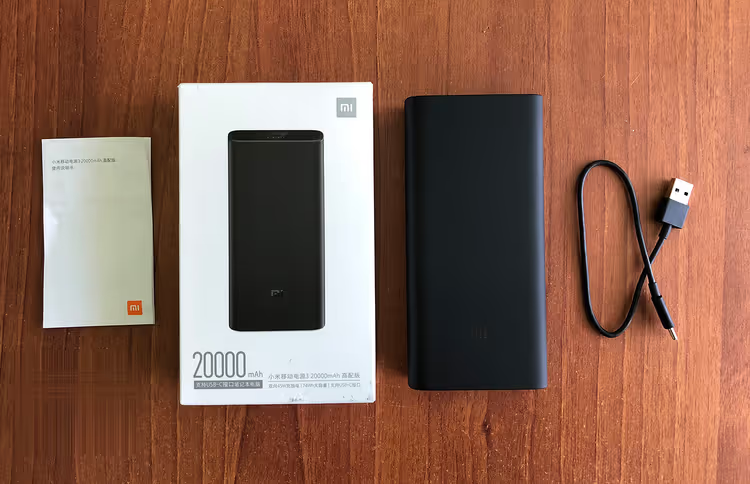
Xiaomi sticks to the formula: a pencil-case-style box made of recycled cardboard, inside the power bank, a short USB-A to USB-C cable (USB 2.0), and a manual in Chinese. No power adapter is included; you'll need to buy a 45 W PD adapter separately.
The body is matte plastic with glossy end caps. It looks understated and more expensive than its price, but both finishes are short-lived: the matte surface picks up fingerprints, and the gloss scratches almost immediately. On the top edge, two USB-A ports and one USB-C port with output ratings printed on them. The side button turns the device on, resets the state, and activates low-current mode (for charging earbuds and fitness bands). Four LEDs show the remaining capacity.
An important nuance that isn't obvious from photos: the model is noticeably larger and heavier than its predecessors. You feel those 440 grams in a backpack; that's the trade-off for 74 Wh in a body without 18650 cells.
Output characteristics and load testing
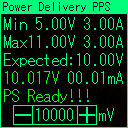
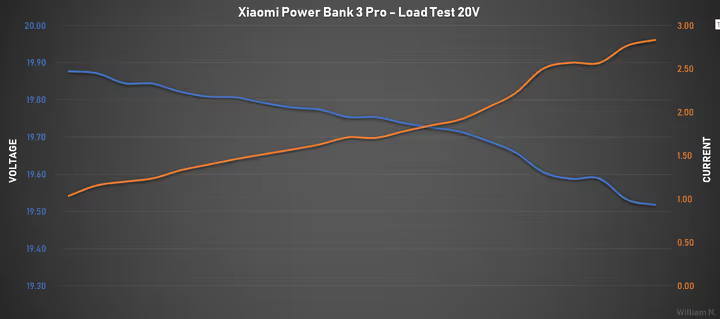
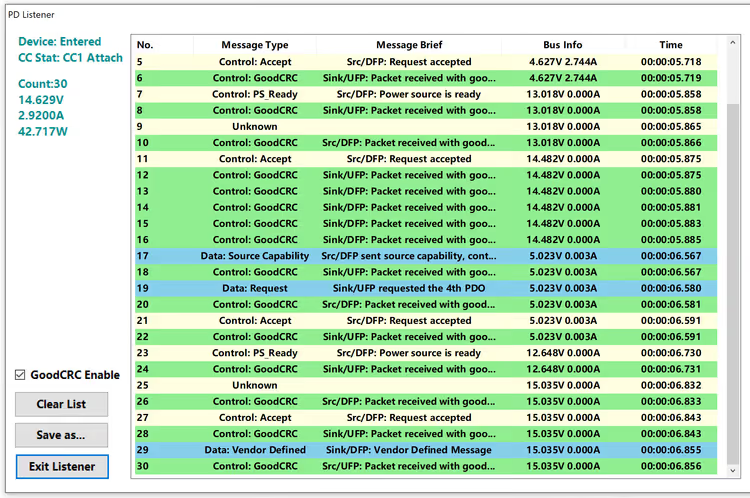
The claimed protocols work honestly. PD 3.0 delivers all voltages up to 20 V, and PPS lets you set a non-standard value, for example exactly 10 V for a device with an atypical input. Note: at 20 V the port is limited to 2 A, not 2.25 A, so the full 45 W is drawn through a combination of current and voltage at lower steps.
Pass-through charging is supported, but with a caveat: the output is limited to 5 V / 3 A, and when the adapter is connected or disconnected on the USB-C port, the port resets with a pause of about one and a half seconds. It cannot be used as an uninterruptible power supply.
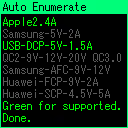
Comparison of supported protocols, normal charging and pass-through mode:
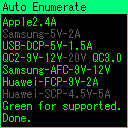
The difference is clearly visible: in pass-through mode some protocols are unavailable, and the voltage is fixed at 5 V.
PPS test requesting exactly 10 V; the power bank delivers without sag:
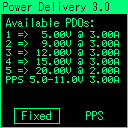
The result confirms: the programmable power supply works correctly at a non-standard voltage.
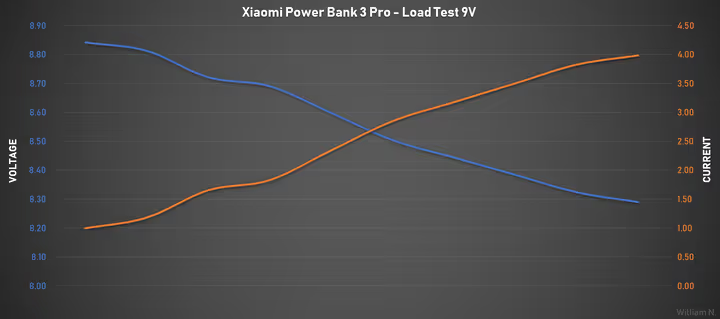
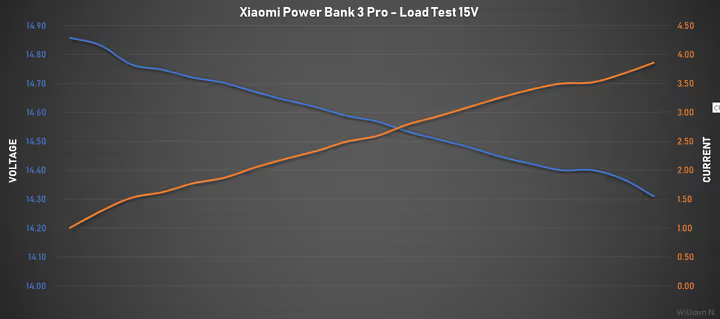
Load tests show a consistent picture. Unlike the previous version, there is no automatic voltage boost to compensate for cable losses, but even without it the voltage drop on all ports is acceptable. USB-A holds 5, 9, and 12 V with a cutoff at 3 A. USB-C delivers up to 4 A, beyond the stated protocols, and the overcurrent protection trips correctly.
9 V PD, load test:
15 V PD, load test:
20 V PD, load test:
Recharge speed of the power bank itself
Replenishing the capacity depends dramatically on the adapter:
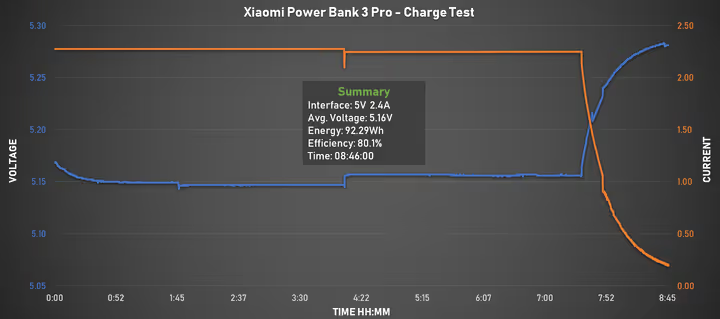
- 5 V / 2.4 A (standard charging): predictably slow, the curve is flat, the full cycle takes 8+ hours.
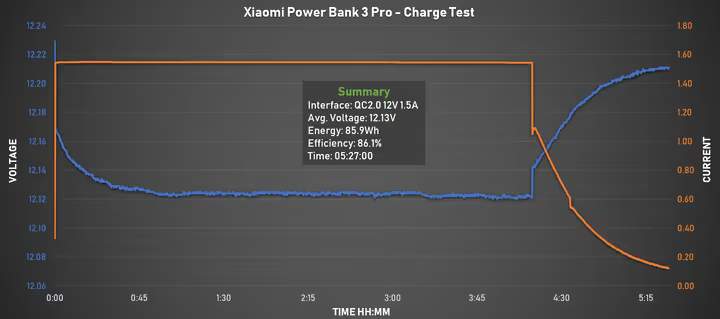
- Quick Charge 2.0: faster, but still not fast, around 5.5 hours.
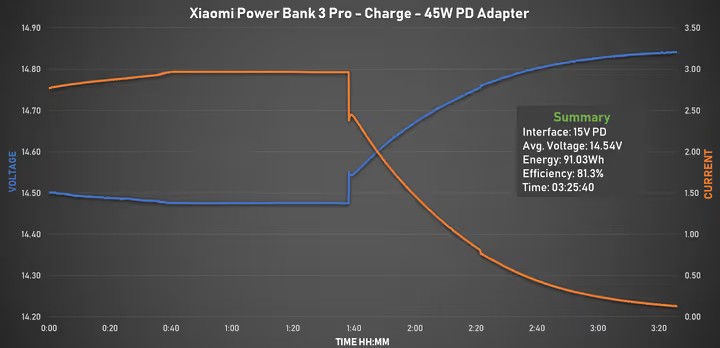
- 45 W PD: under 3.5 hours to full. This is one of the fastest results for a 20,000 mAh power bank among the models tested.
Below, recharge curves from each adapter type. Note the shape of the curve with 45 W PD: the power bank enters the constant-voltage (CV) phase for nearly half the charge time, a sign that the cells are not designed for high charging current.
Charging from a 5 V / 2.4 A adapter:
Charging from QC 2.0:
Charging from 45 W PD (full cycle):
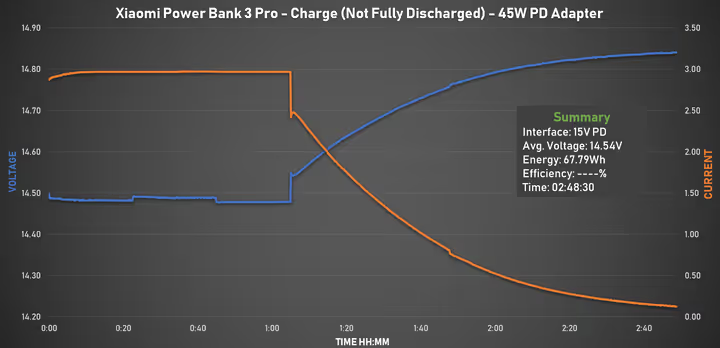
The same 45 W PD adapter, but after a high-current discharge: the deep-discharge protection (LVP) tripped before full depletion, so less energy went into the input because some charge remained in the cells. You can see the CV phase dominates most of the time:
Real-world load performance
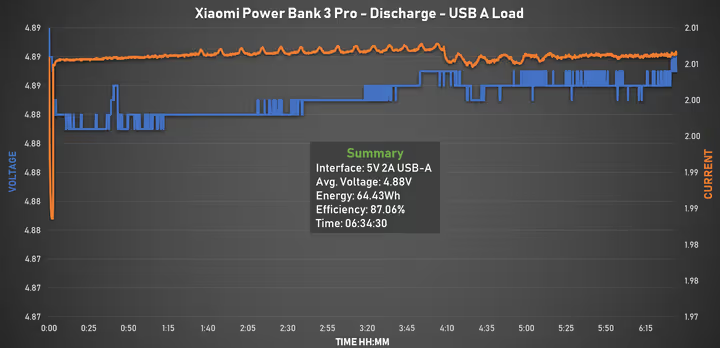
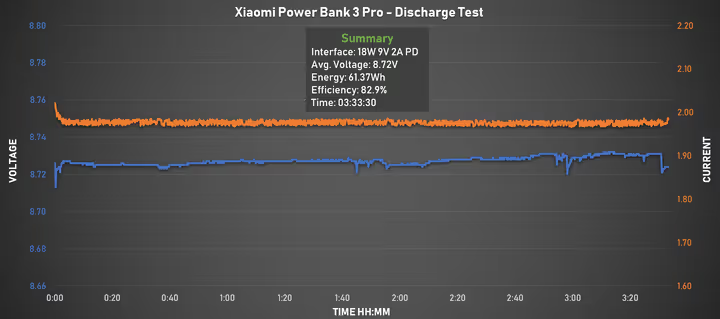
Discharge tests show a stable plateau throughout the entire cycle, with no sharp dips; the curve stays flat even when zoomed in vertically.
5 V / 2 A discharge from USB-A:
18 W PD discharge from USB-C:
Maximum 45 W PD load:
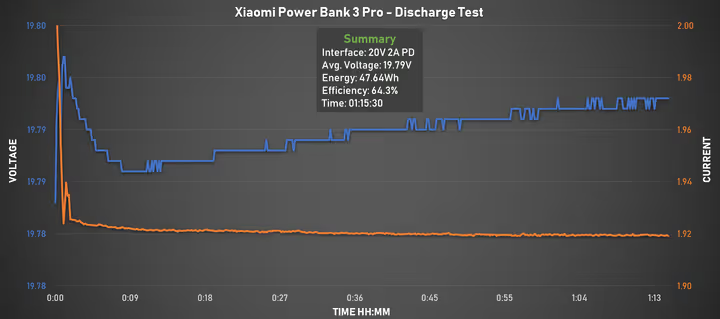
The main takeaway for discharging: efficiency is good for smartphones and small devices, and it is best to use USB-A rather than USB-C. For high-power loads the picture is worse. According to the load test data, at 45 W the delivered capacity was about 47 Wh, which charges a Surface Pro 6 almost fully, but for a full-size laptop with a 99 Wh battery it is barely enough for half a cycle.
Real devices: what charges and how
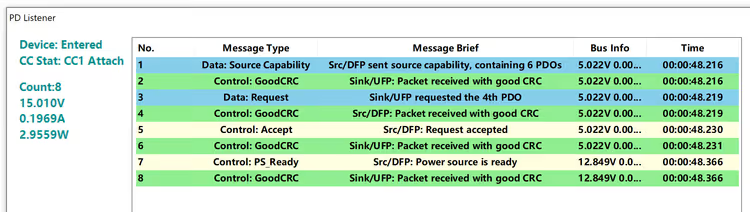
Nintendo Switch, no issues, standard 15 V PD profile:
MacBook Pro 2018, full charging profile, the power bank is recognized as a 45 W source:
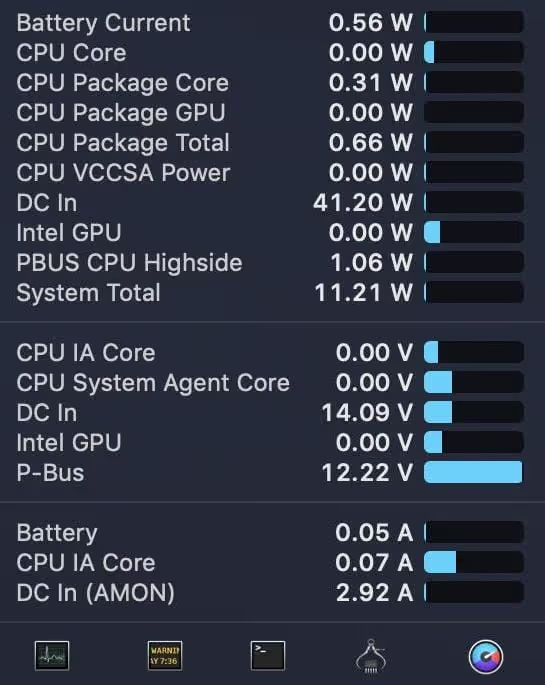
The negotiation parameters are visible on the graph: the laptop requests 20 V, and the power bank delivers the maximum per its specification.
Surface Pro 6 with a PD → 15 V DC adapter: with PPS support, adapters like this turn the power bank into a universal power supply for devices with non-standard inputs, from 5 to 20 V, up to 3 A. The potential is huge, but at the time of testing the technology was just gaining traction.
Lithium-polymer instead of 18650: what about the battery
The switch from cylindrical 18650 cells (LG F1L in the first model) to lithium-polymer pouches is a debatable decision. The upside is more compact energy packaging. The downside is that a Mi Powerbank 2 with the same kind of cells cells started swelling after a year and a half, swelling to the point where the case would no longer lie flat. It had around a hundred cycles and a moderate load.
You cannot claim the problem is systemic: one sample is not a statistic. But the combination of "low-current cells + 45 W fast charging" raises questions. During an 18 W discharge (only 0.3C) the LVP protection trips early, and after it shuts off you can restart the power bank for another ~30 seconds, and repeat that many times. That is a classic sign of voltage sag under load. During a 45 W charge (less than 1C) the CV phase takes up nearly half the time, another indicator that the cells are not rated for that kind of current.
Video review
For a clearer picture, here is a detailed video breakdown of the model with tests and comparative measurements:
⁉️🤔 FAQ
Is it worth buying the Mi Power Bank 3 Pro in 2026?
In 2026, this is no longer a flagship model; Xiaomi has released several generations of power banks with an integrated cable, magnetic charging, and an LCD display. However, from a practical standpoint, the PLM07ZM is still relevant: 45 W PD, PPS, and two USB-A ports cover 90% of use cases. If you can find it at a price noticeably lower than alternatives, it's a viable option. If budget isn't critical, look at the new Xiaomi 2025-2026 lineups with 65+ W support. You can find a current Xiaomi power bank in retailer catalogs; the selection has become significantly broader over the years.
Will it fully charge a laptop?
It depends on the laptop's battery. According to measurements, the actual delivered capacity is around 47 Wh. For an ultrabook with a 50-60 Wh battery, that's almost a full cycle. For a 16" MacBook Pro with a 99 Wh battery, it's a little over half. Use laptop charging only when there's truly no outlet available, not as your primary scenario.
How fast does the power bank itself charge?
With a 45 W PD adapter, roughly 3.5 hours. With a standard 5-volt charger, 8+ hours. The difference is more than double, so buying a powerful adapter makes sense.
Are lithium-polymer cells safe?
In the vast majority of cases, yes. Tens of thousands of users have no issues. However, a single case of swelling was noted with a previous model using the same cell type (k). Don't expose the power bank to overheating, don't leave it in direct sunlight, and don't regularly discharge it to zero at high current; this will extend the life of any lithium-polymer battery.
Does it work as a UPS?
No. When charging is connected or disconnected on the USB-C port, it restarts with a pause of ~1.5 seconds. Passthrough charging exists, but only at 5 V / 3 A.
How does it differ from newer Xiaomi models?
The 2025-2026 models feature a built-in USB-C cable, magnetic wireless charging, an LCD display showing remaining percentage, and, in some versions, up to 65 W PD. But the price is also 2-3 times higher. The PLM07ZM remains a utilitarian choice: fewer frills, lower price.
Is the Xiaomi Mi Power Bank 3 Pro worth buying today?
The power bank honestly delivers on its promises: 45 W PD works, the protocols don't deceive, and the build quality is solid. But the model has three objective weaknesses: average efficiency at high currents, no cable compensation, and a questionable current headroom for the cells during fast charging.
If your scenario is charging a phone and earbuds throughout the day, it will work perfectly: enough for several cycles, and USB-A uses energy more intelligently than USB-C. If you need regular laptop top-ups, it's better to look at models with 65 W PD and faster delivery, especially since the 2026 market offers choices.
The main argument "for" today is the price. On the secondary market and from retailers with warehouse stock, the Mi Power Bank 3 Pro costs noticeably less than modern alternatives of comparable capacity. If this is your first PD power bank, it won't disappoint. If you're upgrading an older model, look at the 2025+ generation.

A professional team of writers and editors specializing in creating quality content.