














💻 How to set up a workspace for comfortable computer work
Back pain by evening. Dry eyes after a couple of hours in front of a monitor. Sound familiar? The workspace where you spend 6-10 hours a day either helps you or slowly undermines your productivity and health.
The problem isn't that you "sit a lot." The problem is how exactly you sit and what surrounds you. A desk at the wrong height, a chair without lumbar support, a monitor below eye level, and before you know it your neck stiffens up and focus scatters by the third hour.
We've gathered proven ergonomic recommendations: from choosing a desk and chair to setting up lighting and correct posture. This isn't textbook theory. It's what actually works, tested by hundreds of freelancers who rebuilt their workspace and forgot about back pain.
💡 Quick overview:
- Adjust the desk height so your elbows form a right angle when using the keyboard
- Choose a chair with lumbar support and a five-point base: that's the minimum for safety
- Adjust the monitor: top edge at eye level, 50-70 cm from your face
- Add a local light source on the left (for right-handed users) and eliminate screen glare
- Every 40-50 minutes, get up and do a short warm-up for your eyes and back
Why ergonomics matters more than you think
Workplace ergonomics directly affects three things: musculoskeletal health, vision, and concentration. According to the Cleveland Clinic, poor computer posture is one of the leading causes of chronic neck and back pain among office workers. This isn't about comfort as a "nice bonus." It's about whether you'll still be able to work five years from now.
The good news: most problems are solved by arranging furniture and adopting a few habits. No expensive gadgets needed. A desk, a chair, and correct screen positioning are enough.
How to choose an ergonomic desk
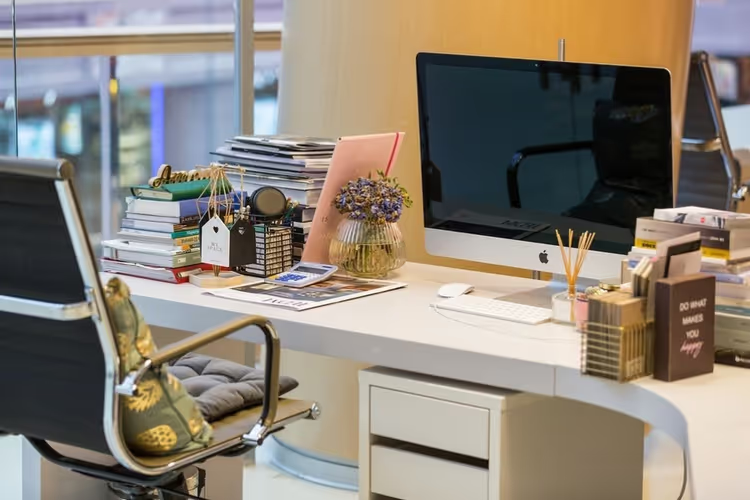
The desk is the foundation of your workspace. If it's too high, you hunch your shoulders. Too low, you slouch. The optimal height for most people: 75-80 cm. But the key criterion isn't the height itself, it's the angle at your elbows. When you place your hands on the keyboard, your forearms should be parallel to the floor, and the angle between your upper arm and forearm should be roughly 90 degrees.
Desk depth matters just as much as height. A minimum of 60 cm so the monitor isn't right up against your face. The comfortable range: 70-80 cm deep and 120-160 cm wide. Enough room for the monitor, keyboard, documents, and a coffee cup. Material and color matter too. A matte surface in light shades produces less glare and visually expands the space.
Note: if you have a sit-stand desk, alternate positions. The ideal scenario: 20-30 minutes standing, then 40-50 minutes sitting. This reduces spinal load and improves blood circulation in your legs.
The chair: where you can't afford to cut corners

If you're going to invest money in one thing, invest in the chair. A regular kitchen chair or a "office chair" from a big-box store for 3,000 hryvnias will make itself known with lower back pain within a month.
What a good computer chair must have:
- Height adjustment. The seat is set so your feet rest fully on the floor and your thighs are parallel to the floor.
- Lumbar support. The backrest follows the natural curve of your spine. In advanced models, the lumbar cushion adjusts for height and depth.
- Backrest tilt. A range from 5° forward to 30° back lets you change posture and relieve load from the same muscle groups.
- Armrests. Height-adjustable. When your arms rest on the armrests, your shoulders are relaxed, not raised.
- Base. A five-point base with casters. Four-point chairs tip over: tested in practice.
You can find a suitable model in the catalogs: computer chair with filters for adjustments and price. For the Ukrainian version of the catalog: крісло для комп'ютера.
And one more point: a chair doesn't have to be expensive. Mid-range models with basic adjustments perform just as well as premium ones. The main thing: don't buy a "designer" chair that looks beautiful but hurts after an hour.
Monitor and keyboard: the right distance
The monitor: the second most important element after the chair. Three rules worth following.
Distance. The screen should be at arm's length: roughly 50-70 cm from your eyes. Any closer, and your eye muscles overstrain. Any farther, and you start involuntarily leaning forward, straining your neck.
Height. The top edge of the monitor sits at eye level or slightly below. If the screen is too high, you tilt your head up. Too low, you bend your neck. Both lead to chronic tension. For a laptop, use a stand and definitely an external keyboard, otherwise your hands end up in an unnatural position.
Viewing angle. The screen should be tilted slightly back: 10-20 degrees from vertical. The top edge is slightly farther from your eyes than the bottom edge. This is more comfortable for the eyes: the eyelids stay partially closed, and the cornea dries out less.
The keyboard sits 10-15 cm from the front edge of the desk. Your wrists rest on the surface, not hover in the air. When typing, your hands continue the line of your forearms, with no upward or downward bend. Place the mouse next to the keyboard: don't reach halfway across the desk for it.
Lighting: how not to ruin your eyesight
Natural light: the best option. But you can't rely on the window alone. On a cloudy day or in winter it's insufficient, and direct sunlight creates glare. The correct lighting scheme is two-level.
Overhead light provides general room illumination. A desk lamp provides directed light onto the work area. For right-handed users, the lamp goes on the left so your hand doesn't cast a shadow on documents. For left-handed users, on the right. Power: 40-60 W for an incandescent bulb or 6-10 W for the LED equivalent. The light should be warm (2700-3000K). Cool white light strains the eyes during prolonged work.
The main placement tip: never position the monitor directly facing a window or with your back immediately to it. The optimal setup is sideways, so light falls from the side. Curtains or blinds are essential for controlling brightness throughout the day.
Correct posture and movement
Even a perfectly set up workspace won't save you if you sit in one position for hours. The body is built for movement, and monotonous static posture is stress for it.
Basic posture at the computer: feet fully on the floor, knees bent at a 90-100 degree angle, thighs parallel to the floor. Your back pressed against the chair's backrest in the lumbar area. Shoulders relaxed and lowered. Wrists straight, with no bend.
But what matters more than "correct posture" is changing postures. Every 40-50 minutes, stand up. Walk to the kitchen. Do five squats. Look out the window for 20 seconds: this relaxes the eye's accommodative muscles (the 20-20-20 rule: every 20 minutes, look at an object 20 feet away, roughly 6 meters, for 20 seconds).
A simple exercise works for the back: standing, clasp your hands behind your back, squeeze your shoulder blades together, and hold for 10 seconds. Repeat 5 times. This compensates for the rounded posture you sit in for hours.
Desk and cable organization
A cluttered desk is distracting. Every unnecessary item in your field of vision claims a share of your attention, even if you don't realize it. Organizers, paper trays, and small-item stands solve the problem in one go.
Keep only what you use daily on the desk: monitor, keyboard, mouse, lamp, notepad. Everything else goes into drawers or onto a shelf. Tuck cables into a cable channel: the visual noise from a tangle of wires creates a subconscious sense of disorder.
And don't place the desk in a high-traffic area. Constant movement behind you is a source of micro-interruptions that break focus. If you have no choice, turn the monitor so the walkway is visible in your peripheral vision, but not directly behind the screen.
Video: setting up your workspace in 10 minutes
Watch a visual ergonomics breakdown from an expert: how to correctly set the height of your desk, chair, and monitor.
⁉️🤔 Frequent questions
Can you work on a laptop without an external monitor and keyboard?
If you work more than an hour a day, no. The laptop screen sits too low, which keeps your neck constantly tilted forward. Every centimeter of head tilt adds load to the cervical spine equivalent to an extra 4-5 kg of weight. An external keyboard and a laptop stand solve the problem for 2,000-3,000 hryvnias. Your health is worth more.
Which desk is better: adjustable or regular?
An adjustable (sit-stand) desk gives more flexibility and is objectively better for your back due to posture changes. But if the budget is tight, get a regular desk at the correct height and compensate with frequent movement breaks. An adjustable desk without the habit of standing up every 40 minutes turns into a regular desk, and the extra cost loses its point.
Is it mandatory to buy an expensive "ergonomic" chair?
No. Price doesn't guarantee ergonomics. A chair for 15,000 hryvnias may suit you worse than a model for 6,000 if it lacks lumbar support adjustment or the armrests aren't adjustable. The key criteria: adjustable height, lumbar support, a five-point base, and the ability to adjust everything to your body. The rest are options.
How long can you sit at a computer without harm?
There is no safe continuous time. What matters isn't the total hours per day, but the duration of a single session without movement. The gold standard: 45-50 minutes of work, then 5-10 minutes of movement. At least stand up and walk around. Over an 8-hour day, that gives you 7-8 micro-breaks. Enough to keep your spine and eyes from accumulating fatigue.
What if your back still hurts after all the adjustments?
Check three things. First: are you really sitting correctly, or do you slide back into your habitual posture after 10 minutes? Ask someone to photograph you in the middle of the workday: your real posture often differs from the posed one. Second: are you compensating for an incorrect desk height with the chair height? If the desk is too high, you'll raise the chair, and your feet will dangle. You need a footrest. Third: if the pain persists for more than two weeks after fixing the ergonomics, see an orthopedist. The problem may not be the chair, but an already developed postural issue.
What really matters and what is marketing
Workplace ergonomics boils down to three rules that cost nothing: correct screen height, lumbar support, and movement every 40-50 minutes. Everything else, $2,000 desks, chairs with heating and massage, are nice additions, but not a replacement for the basics.
Start with the chair. Then adjust the monitor height and distance. Add a lamp and eliminate glare. And most importantly: stand up at least once an hour. That will do more for your health than the most expensive electric sit-stand desk at which you sit motionless from nine to six.

A professional team of writers and editors specializing in creating quality content.