














🔗 Related posts in Elementor via a custom query filter
The standard Posts widget in Elementor Pro can do three things: recent posts, by category, and a manual list. But when you need a "Related Posts" block beneath an article, matching the current post by tags and categories, there is no built-in option. Yes, the Source dropdown has had a "Related" item since version 2.5, but the logic is primitive: posts from the same categories with no regard for match weight. The result is predictable: the block looks like a random selection rather than a meaningful recommendation.
The goal: keep the card design of Elementor but hand the query off to a third-party plugin that calculates relevance across all attached taxonomies at once. The outcome is a "Related Posts" block where every next post is genuinely closer to what the reader is viewing right now, instead of merely filling the grid.
The method runs on pure PHP, with no extra add-ons and no template editing. Elementor renders the card, the Related Posts By Taxonomy plugin computes the IDs, and the elementor/query/{$query_id} hook ties the two together. Ten minutes of setup, and the block is live.
💡 Quick overview:
- Install the free plugin
Related Posts By Taxonomy: it finds related posts by shared categories, tags, and custom taxonomies, with no frontend overhead. - In the Posts widget of Elementor Pro, set a unique Query ID; this string will become the hook name for intercepting
WP_Query. - Add a PHP snippet to your site: the function fetches an array of IDs from the plugin and passes it to the Elementor query via
post__in. - Fine-tune the count, sort order, output template, and caching through the plugin's filters to suit your needs.
Related Posts by Taxonomy: what's under the hood
The Related Posts By Taxonomy plugin has lived in the official WordPress.org repository since 2014. As of June 2026, version 2.7.9, tested up to WordPress 7.0, 10,000+ active installations. The author, Kees Meijer, maintains the plugin consistently: the latest release came out just days before this publication.
The main selling point is a minimal footprint. No admin panel in the dashboard, no extra scripts on the frontend, no database writes. All configuration is done through filters and shortcode attributes. For a developer, this is a plus: a clean install, predictable behavior, zero bloat.
The algorithm ranks posts by the number of shared taxonomy terms. A post that accumulates the most matches on categories and tags with the current article gets the highest priority. The plugin works not only with standard categories and tags; it picks up custom taxonomies registered through WooCommerce, ACF, or CPT UI. And since it supports custom post types, the "Related Posts" block can appear on portfolio pages and in custom sections as well.
Setting up the Posts widget in Elementor
Add the Posts widget from the Elementor Pro library to your Single Post Template page. Configure the skin (Cards or Classic) and get the design you want: featured image, title, date, excerpt. At this stage the widget displays the latest blog posts, and that is expected.
Now the key step. In the editing sidebar, open the Query tab. Find the Query ID field and enter a unique identifier, for example related_posts_by_tax. This exact string will become the hook name elementor/query/related_posts_by_tax, which we will use to intercept the query.
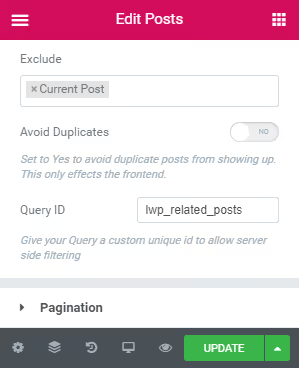
The Query ID parameter has been available in Elementor Pro since version 2.0. It was designed specifically for developers: you set a string identifier and then attach your callback function to the elementor/query/{your_id} hook. Detailed documentation is on the Elementor developer portal.
Leave the remaining Query settings (Post Type, Taxonomies, Order By) as they are. They continue to apply, and our filter is added on top. For example, if the widget's Post Type is set to "Posts," the Related Posts By Taxonomy plugin will search for related entries only among blog posts.
PHP snippet: connecting the two plugins
The code consists of a single add_action call and a short function. It calls the km_rpbt_get_related_posts() method from the plugin, retrieves an array of relevant post IDs, and passes it to WP_Query via the post__in parameter.
Add the snippet to your child theme's functions.php or through the Code Snippets plugin:
1 /** 2 * Replaces the Elementor Posts widget query with related posts. 3 * Uses the Related Posts By Taxonomy plugin. 4 * 5 * @param \WP_Query $query The Elementor query object. 6 */ 7 add_action( 'elementor/query/related_posts_by_tax', 'sdstudio_related_posts' ); 8 function sdstudio_related_posts( $query ) { 9 global $post; 10 11 $related_ids = km_rpbt_get_related_posts( 12 $post->ID, 13 array( 'fields' => 'ids' ) 14 ); 15 16 if ( ! empty( $related_ids ) ) { 17 $query->set( 'post__in', $related_ids ); 18 $query->set( 'orderby', 'post__in' ); 19 } 20 }
Line-by-line breakdown:
elementor/query/related_posts_by_taxis the hook whose name matches the Query ID in the widget. If you used a different ID, replace the string.global $postgives access to the current post, which serves as the starting point.km_rpbt_get_related_posts()is the plugin function that returns an array of related post IDs. The'fields' => 'ids'parameter speeds up the query: the plugin does not fetch full objects.$query->set( 'post__in', $related_ids )strictly limitsWP_Queryto only the found posts.$query->set( 'orderby', 'post__in' )preserves the order returned by the plugin, from most relevant to least.
Technically two queries run: first the plugin finds the IDs, then Elementor fetches the full objects by those IDs. In practice, with 3-5 related posts the overhead is negligible. For maximum performance, enable the plugin's persistent cache option; it caches results for a specified duration.
Fine-tuning the output
The snippet above is the basic version. From here, the query can be customized for your specific needs.
Limiting the count. By default the plugin returns up to 5 posts. To change the limit, pass the posts_per_page parameter:
1 $related_ids = km_rpbt_get_related_posts( 2 $post->ID, 3 array( 4 'fields' => 'ids', 5 'posts_per_page' => 3, 6 ) 7 );
Excluding the current post. The plugin does this automatically, but if you want an extra safeguard, add $query->set( 'post__not_in', array( $post->ID ) ).
Limiting by date. Show only posts from the last 12 months:
1 $related_ids = km_rpbt_get_related_posts( 2 $post->ID, 3 array( 4 'fields' => 'ids', 5 'limit_month' => 12, 6 ) 7 );
Changing the output template. The plugin supports custom HTML templates through the rpbt_template filter. Place a related-posts-by-taxonomy.php file in your theme folder, and the markup is entirely yours. Documentation with examples is on the author's site; for a free plugin it is impressively detailed.
Ajax mode. If the related-posts block sits far below the fold, enable lazy loading via the rpbt_ajax_load filter; the plugin will fetch posts asynchronously without affecting First Contentful Paint.
This video from the Elementor team demonstrates advanced query management in action, including related-post selection and date filtering:
⁉️🤔 Frequently asked questions
Is Elementor Pro required for this method?
Yes, the custom query filter
elementor/query/{$query_id}is available only in Elementor Pro. The free version does not have a Posts widget with a Query ID field.
What if the plugin finds no related posts?
Make sure your posts share common taxonomies. The plugin looks for matches across all public taxonomies attached to the post type. If posts are spread across non-overlapping categories, there will be no related posts. Set up a fallback: for example, show the latest posts from the same category.
Can this approach be used with custom post types?
Yes. Specify the desired Post Type in the Elementor widget's Query settings, and the
Related Posts By Taxonomyplugin will automatically pick up the taxonomies registered for that type. The method works with portfolios, WooCommerce products, and any CPT.
Does the method work with a block theme (Full Site Editing)?
The Elementor Pro Posts widget does not depend on the theme; it works in both classic and block themes. The key requirement is that the Single Post template is managed through the Elementor Theme Builder.
How is this method better than the built-in "Related" option in Elementor?
The built-in option simply filters posts by the same categories, without considering match count and without support for custom taxonomies.
Related Posts By Taxonomyranks posts across all attached taxonomies simultaneously and returns the most relevant ones, not just "from the same category."
Is the manual filter worth the effort
On small blogs with a handful of categories, the built-in "Related" option in Elementor Pro is more than enough. But as soon as custom taxonomies, multiple post types, or the need to precisely control the matching logic appear, a manual filter via elementor/query/{$query_id} becomes the only clean solution, without purchasing additional add-ons.
The Related Posts By Taxonomy plugin solves the problem at zero cost and adds no extra code to the frontend. Setup takes 10 minutes, and the result is a relevant "Related Posts" block that keeps visitors on your site longer than a random selection of recent publications.
Try it in a test environment: spin up a local WordPress, install the plugin and Elementor Pro, add the snippet, and verify that the method works exactly the way you need.

A professional team of writers and editors specializing in creating quality content.