














📊 WooCommerce Product Table review: honest breakdown of Barn2's flagship plugin
What is WooCommerce Product Table
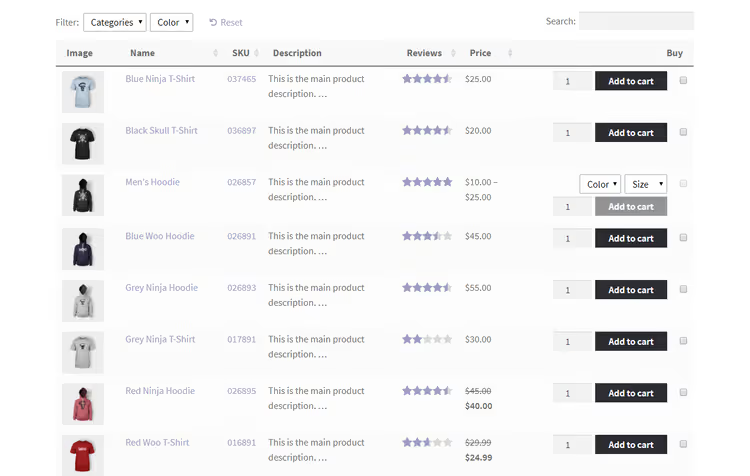
WooCommerce Product Table, a plugin from British studio Barn2, replaces the standard WooCommerce product grid with a searchable, sortable table. Instead of endless scrolling, customers see all key data, name, price, category, attributes, add to cart button, in one compact view.
The plugin runs on 20,000+ sites, holds a 4.97 rating based on 309+ reviews, and is updated to version 4.3.8. Barn2 has been developing the product since 2016 and has added over 50 features in that time, from lazy loading to integration with WPML and WooCommerce Product Add-Ons.
The traditional WooCommerce store layout, a grid of cards, handles catalogs of hundreds of items poorly: customers get tired of scrolling, can't see differences between products, and leave. Product Table solves this problem radically by showing exactly the information needed for quick comparison and ordering.
💡 Quick overview:
- Install the plugin, enter your license key, and choose a table template, basic setup takes less than 5 minutes
- Configure columns for your catalog: name, price, image, SKU, category, attributes, custom fields, display only what matters to the customer
- Add search, filters by categories and attributes, sorting by clicking column headers, customers find products in seconds
- Enable bulk add to cart through checkboxes and quantity selectors, wholesale orders complete with one click
Key features
Barn2 has built over 50 features into WooCommerce Product Table, covering each one in a single review is unrealistic, so we'll focus on those that provide the main boost to conversion and usability.
Responsive out of the box
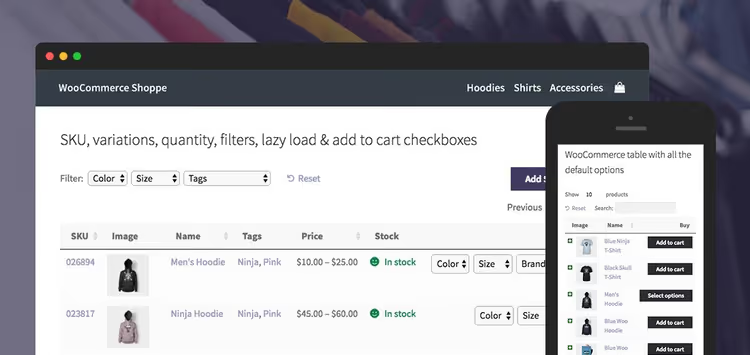
The plugin is 100% responsive, the table automatically adapts to screen width, and you can set column priorities: which to always show and which to hide on mobile. Barn2 documentation confirms full out-of-the-box responsiveness. On smartphones, hidden columns open with a tap on the "+" icon, customers don't lose data, they just get it in portions.
This isn't a rushed "flexible" layout: Barn2 has provided separate column visibility settings for desktop, tablet, and phone, plus an option to show hidden columns in a modal window.
Search, filters, and sorting
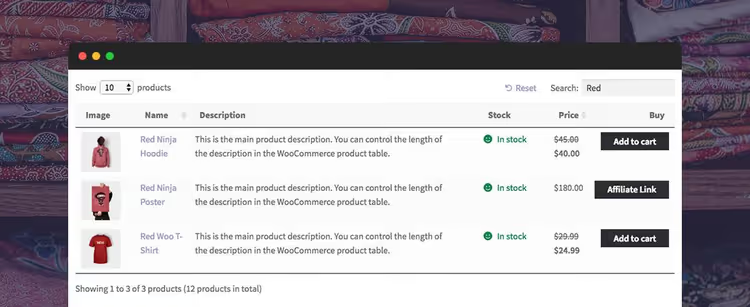
Instant AJAX search by keyword, dropdown filters by categories, tags, attributes, and custom taxonomies, sorting by clicking any column, all available without a single line of code. The table can be "pre-filtered", loaded with a search query already applied if the page is created for a specific product selection.
Worth mentioning separately is compatibility with native WooCommerce filter widgets (active filters, price slider, rating) and with the WooCommerce Product Filters plugin from the same Barn2, for stores with complex catalog structures, this combination covers all scenarios.
Bulk add to cart
Checkboxes next to each product, quantity and variation selectors right in the table, wholesale store or restaurant customers form orders on one screen. The "Add Selected to Cart" button is configurable: above the table, below, or in both places, text changes to anything (for example, "Add Selected" or "To Cart").
Variable products are supported in three modes: dropdown list of variations in the cart column, separate row for each variation, or button to go to the product page.
AJAX cart is supported, the page doesn't reload when adding a product, the customer doesn't lose position in the table.
Media content in the table
Unlike most table plugins, WooCommerce Product Table allows embedding audio, video, and media playlists directly in cells. Product images open in a lightbox with zoom, customers examine the product without leaving the table.
Performance: lazy loading and cache
Barn2 is famous for code quality, and this plugin is no exception. Built-in lazy loading (AJAX) allows displaying thousands of products without speed degradation, the table loads after the main page content, and data is loaded page by page.
Plus built-in object cache, with active use, loading time is reduced by multiples. For large catalog owners, this is critical: a table with 5000 SKUs doesn't kill site speed.
Compatibility with themes and WPML
The plugin is tested with dozens of themes and builders, from standard WooCommerce themes to custom builds. If a conflict arises, Barn2 support handles it rather than brushing it off as "your theme's problem".
WPML compatibility is full: tables work correctly in any language, including RTL (Hebrew, Arabic). Included are translations in 12 languages: French, German, Dutch, Italian, Greek, Portuguese, Swedish, Spanish, Hebrew, Norwegian, Polish, and Finnish.
Quick view

Through the free WooCommerce Quick View Pro addon, quick view buttons are added to the table, a modal window with full product information, variations, and purchase button. Quick view works with all main table features: variable products, lightboxes, WPML, WooCommerce Subscriptions.
Installation and configuration
WooCommerce Product Table is a premium plugin, it's not in the WordPress.org repository. It's purchased on the official Barn2 website.
Installation in 2 minutes
After purchase, download the .zip, go to the WordPress admin: Plugins → Add New → Upload Plugin → select the file → Install → Activate.
License entry and basic settings

Go to WooCommerce → Settings → Products → Product Table, enter the license key, and save. On this same page are all the main parameters:
- Table design: preset (inherits theme styles) or custom, with border color, cell background, header, and font settings
- Product selection: all products, or by categories, tags, ID, custom fields, date, status
- Columns: column selection and order, image size, description length, lightbox, product links
- Performance: enable/disable lazy loading and object cache
- Product limit: maximum number of items in the table
- Bulk add: whether to show checkboxes and "Add Selected to Cart" button
- Filters and sorting: enable/disable, default order settings
Creating a table via shortcode
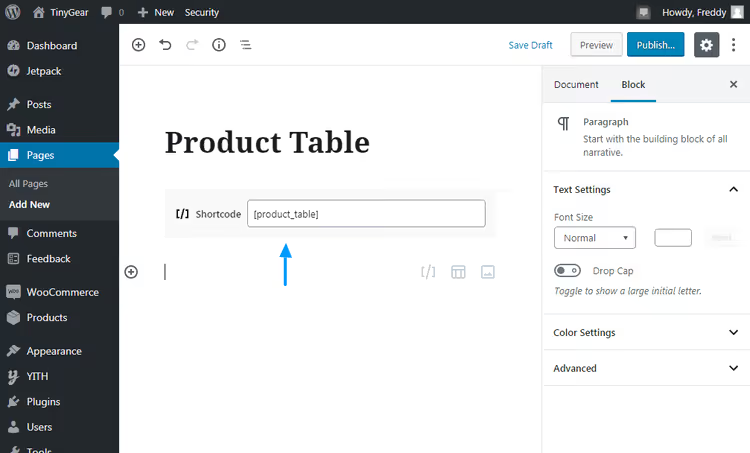
The finished table is inserted on any page with the [product_table] shortcode. The shortcode accepts dozens of parameters, columns, variations, cart button, filters, sorting, limit. Full list of options in Barn2 documentation.
By default, the table shows all store products. Through shortcode parameters, it's easy to limit the selection: specific category, tag, ID, or custom field. You can create multiple tables on one site, for example, one for retail catalog, another for wholesale price list.
Pricing and licenses
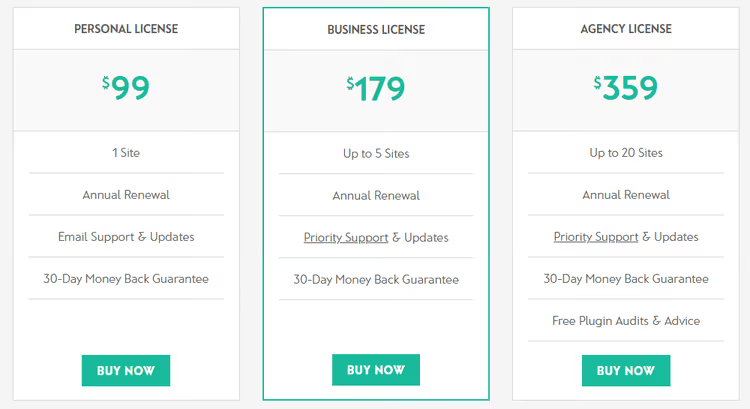
Barn2 offers three tiers with annual billing:
Plan | Sites | Support | Price |
|---|---|---|---|
Personal | 1 | Email support + updates | $99 / year |
Business | 5 | Priority support + updates | $179 / year |
Agency | 25 | Priority support + updates + free plugin audit | $359 / year |
All plans include a 30-day money-back guarantee, you can test the plugin on a real store risk-free. For freelancers and small studios, the Business tier at $179 per year looks optimal: five sites for the price of two separate Personal licenses.
What users say
The plugin collects consistently high ratings, 4.97 based on hundreds of reviews. Here are a few telling ones:
Product Table works great and is easy to configure. You can customize it however you want. Support is fast and answers to the point., Christian Madsen
The plugin is simple and intuitive, but if you need help, support responds instantly. Answers are always clear, fixes are easy to apply., Stein
The plugin is excellent. Very detailed documentation, training videos. Katie and the Barn2 team are incredibly responsive. Two big thumbs up!, Ryan
The common thread in reviews is praise not so much for functionality (which is expectedly good) as for quality of support and product documentation. For a plugin on which a store depends, this weighs more than a list of features.
⁉️🤔 Frequently asked questions
Is WooCommerce Product Table suitable for variable products?
Yes, and in three display variants. You can output a dropdown list of variations directly in the cart column, break out each variation into a separate table row, or provide a button to go to the product page. All three modes work simultaneously, you choose the one more convenient for a specific catalog.
Does the table slow down the site with a large catalog?
No, if lazy loading and object cache are enabled. Barn2 designed the plugin for catalogs of thousands of items: AJAX loading delivers data in portions, cache reduces repeat database queries. In practice, a table with 5000 products loads faster than a standard WooCommerce grid with a hundred.
Do you need a programmer for setup?
For basic launch, no. Standard scenario: bought, activated, entered key, chose template, inserted shortcode on page, five minutes. Deep customization (custom CSS, non-standard columns via ACF) may require a developer, but documentation covers most scenarios with code examples.
Does the plugin work with multilingual stores?
Yes, full compatibility with WPML. Tables display correctly in any language, including RTL direction (Hebrew, Arabic). Includes 12 language packs. For Polylang it also works, though officially only WPML support is stated.
Can I display a table not for the entire store but for a specific category?
Yes, through shortcode parameters. You specify category, tag, product ID, custom field, date, or status, the table will show only the filtered selection. You can create a dozen tables for different catalog sections on one site.
Is WooCommerce Product Table worth it
WooCommerce Product Table is the case where a plugin does exactly one task and does it flawlessly. It doesn't bloat the admin with extra menus, doesn't conflict with themes, doesn't kill speed. At the same time, it covers scenarios from a retail catalog of 50 products to a wholesale price list of 5000 SKUs with bulk ordering.
The main asset here is not the feature list (it's long but typical for the category), but quality of support and documentation. Barn2 responds quickly and to the point, the knowledge base covers all typical scenarios, and training videos lower the entry barrier. For a store owner who doesn't want to dig into code, this is the deciding factor.
If you have a typical store with 20-30 products with roughly the same characteristics, the standard WooCommerce grid may suffice. But as soon as the catalog exceeds a hundred items or the customer needs to compare products by parameters, Product Table pays for itself in the first month through increased conversion.
🔗 WooCommerce Product Table on Barn2

A professional team of writers and editors specializing in creating quality content.