













🖱 Smooth scroll to anchor: CSS, JavaScript and jQuery - three working approaches
The user clicks a link with an anchor, and the page instantly jumps to the target location. No animation, no smoothness, no understanding of where you landed. The jarring transition is disorienting, especially on long landing pages and documentation.
Adding smooth scroll to anchors takes 5 minutes. But the devil is in the details: the link might come from an external site, the URL already has a hash, and there's a fixed header on top that covers the anchor. Regular scroll-behavior: smooth doesn't solve these nuances.
Below are three working approaches: pure CSS, native JavaScript, and jQuery. Each with code you can copy and paste into your project. Plus, we separately cover external transitions so scrolling works even when the user arrives from another page or from search results.
💡 Quick overview:
- Enable smooth scroll with one CSS line, no JavaScript at all
- Add offset for fixed header using
scroll-margin-top - Write native JS with
scrollIntoViewfor external transitions and fine-tuning - Cover the jQuery variant with
animate()when you need custom speed and control - Handle external hash: page loaded, anchor in URL, and smoothly scroll to target
Why smooth scroll matters
Abrupt jumping to an anchor is disorienting. The user loses context: where was I, where did I land, what did I miss? Smooth scrolling maintains spatial orientation, giving the eye something to track while the page moves.
From a perception standpoint, a site with smooth scroll looks polished. This is especially noticeable on long pages: landing pages, documentation, FAQ sections, article tables of contents. The user clicks "Pricing" in the menu, and the page doesn't jerk but gently glides to the pricing block.
Technically, the task splits into two: scroll on click of an internal link (user is already on the page) and scroll on external transition (URL already contains #anchor). In the second case, the browser by default jumps to the anchor instantly even before full load, and this needs to be intercepted.
CSS scroll-behavior, one line instead of a script
The simplest and most modern approach. Browsers learned smooth scroll natively, just one CSS rule is enough:
1 html { 2 scroll-behavior: smooth; 3 }
That's it. Any transition via anchor link becomes smooth. No JavaScript, no libraries.
Support: all modern browsers since 2022: Chrome 61+, Firefox 36+, Safari 15.4+, Edge 79+. The only exception is IE11, but its traffic share is approaching zero.
Fixed header: scroll-margin-top
If a fixed header (sticky header) hangs above the content, the anchor after scrolling will end up underneath it. Fixed with one line:
1 h2, h3, [id] { 2 scroll-margin-top: 80px; /* header height + offset */ 3 }
The browser will automatically add offset when scrolling to the target element. Previously, people wrote hacks with padding-top and negative margin, now it's not needed.
Pure CSS limitations
The CSS approach has no control over animation speed and easing function. The browser uses a built-in curve, usually ease-in-out. If you need custom speed or non-linear animation, move on to JavaScript.
Native JavaScript: scrollIntoView
When CSS alone isn't enough, the scrollIntoView() method with the behavior: 'smooth' option comes to the rescue:
1 document.querySelectorAll('a[href^="#"]').forEach(anchor => { 2 anchor.addEventListener('click', function(e) { 3 e.preventDefault(); 4 const target = document.querySelector(this.getAttribute('href')); 5 if (target) { 6 target.scrollIntoView({ 7 behavior: 'smooth', 8 block: 'start' 9 }); 10 } 11 }); 12 });
This code intercepts clicks on all links with #, cancels the standard transition and launches smooth scroll. Works without jQuery and without additional libraries.
The advantage: you can control it programmatically: change speed through CSS scroll-behavior on <html>, add conditions (for example, exclude certain links), combine with scroll-margin-top for the header.
The downside: scrollIntoView doesn't let you set animation speed directly. For custom scroll time (say, 800 ms instead of browser's ~500 ms) you need either jQuery or manual requestAnimationFrame.
jQuery animate, full control over animation
If the project already uses jQuery or you need fine-tuning (speed, offset for header, link filtering), here's the current script. Below is an adapted version of the classic approach, rewritten for modern jQuery:
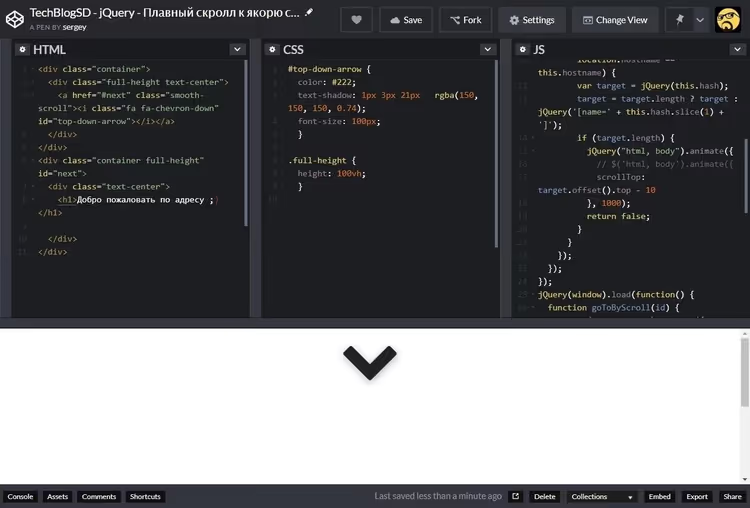
1 jQuery(document).ready(function($) { 2 // Smooth scroll on anchor link click 3 $('a[href*="#"]:not([href="#"])').on('click', function() { 4 if ( 5 location.pathname.replace(/^\//, '') === this.pathname.replace(/^\//, '') 6 && location.hostname === this.hostname 7 ) { 8 var target = $(this.hash); 9 target = target.length ? target : $('[name="' + this.hash.slice(1) + '"]'); 10 if (target.length) { 11 $('html, body').animate({ 12 scrollTop: target.offset().top - 80 13 }, 800); 14 return false; 15 } 16 } 17 }); 18 19 // Scroll on external transition with hash in URL 20 if (window.location.hash) { 21 var hash = window.location.hash.substring(1); 22 var $target = $('#' + hash); 23 if ($target.length) { 24 setTimeout(function() { 25 $('html, body').animate({ 26 scrollTop: $target.offset().top - 80 27 }, 800); 28 }, 100); 29 } 30 } 31 });
What changed here compared to old versions floating around blogs:
.bind()replaced with.on(),.bind()was declared deprecated in jQuery 3.0 and will be removed in jQuery 4.0.- Selector
'a:not(.spu-clickable)[href*="#"]:not([href="#"])'simplified, the specific class.spu-clickablerelated to a specific plugin (Popups by OptinMonster) and generally isn't needed. jQuery(window).bind("load", ...)removed, the second part of the script for external hash now lives in$(document).ready()and doesn't require a separateloadevent.- Added delay
setTimeout(..., 100)so the DOM is guaranteed to be rendered before calculating anchor position (relevant for pages with lazy loading of images and dynamic content).
Where to insert the code
Three options to choose from:
- Through theme file. Add the script to
functions.phpviawp_enqueue_script(), the standard method for a child theme. - Plugin Code Snippets. Insert the code as a new snippet with auto-run, won't be lost on theme update.
- Custom JS plugin. If the site already uses a plugin for inserting arbitrary JavaScript (for example, WPCode), add the code there.
Handling external transition with hash, detailed breakdown
The trickiest part of the task. The user follows a link https://site.com/page/#pricing from another site or from search. The browser by default instantly jumps to #pricing as soon as the element appears in the DOM, without animation and often before the page fully loads.
The jQuery script above solves this in two steps:
- Detects hash presence via
window.location.hash. If hash exists, reads its value (without#). - Finds target and scrolls.
$('#' + hash)finds the element,setTimeoutgives the page time to render,animate()leads to the target with 80 pixel offset.
The 100 millisecond delay is empirical. On fast pages 50 ms is enough, on heavy ones (landing pages with background video, maps, charts) it's better to increase to 200-300 ms. Alternative: wait for the window.load event instead of document.ready, but then scrolling will only happen after all images load, which can take a while.
What to do if anchor doesn't find target
Sometimes the hash in URL points to a non-existent element. For example, the user made a typo or the page was changed. In this case, neither CSS nor JS approach will fail with an error, simply nothing will happen. The browser will ignore the non-existent anchor. Smooth scroll will also work silently (the if (target.length) condition won't let it proceed further).
Comparison of three approaches
Criterion | CSS scroll-behavior | JS scrollIntoView | jQuery animate |
|---|---|---|---|
Implementation complexity | 1 line CSS | 10-15 lines JS | 25-30 lines JS + jQuery |
Speed control | No | No (browser default) | Yes (ms) |
External hash | Yes, natively | Requires extra code | Requires extra code |
Header offset |
|
| Manual in |
Dependencies | None | None | jQuery 3.x |
Browser support | 96%+ | 96%+ | 99%+ (with jQuery) |
For most modern projects, the CSS approach is optimal: one line, zero dependencies, native performance. If you need offset for header, add scroll-margin-top. If you need custom speed or support for ancient browsers, jQuery with animate().
Below is a video with live demonstration of all three approaches, from CSS to jQuery:
⁉️🤔 Frequently asked questions
Why doesn't smooth scroll work on mobile devices?
In iOS Safari before version 15.4,
scroll-behavior: smoothwasn't supported. Now support exists (Safari 15.4+, March 2022). If scroll doesn't work on old iPhones, add a JavaScript fallback withscrollIntoVieworrequestAnimationFrame. Also check that scroll isn't blocked byoverflow: hiddenonbody, some mobile menus set it when opening. As of June 2026, global support forscroll-behavioris 96.3% of browsers (Can I Use data).
How to make smooth scroll not to an anchor but to an arbitrary element on button click?
Give the element an
idand use the same JavaScript, but bound to a button instead of an anchor link. For example, "Back to top" button:document.querySelector('#back-to-top').addEventListener('click', () => window.scrollTo({ top: 0, behavior: 'smooth' })). For the jQuery variant:$('#back-to-top').on('click', () => $('html, body').animate({ scrollTop: 0 }, 600)). No anchors needed, scroll to coordinates.
Is it necessary to include jQuery just for smooth scroll in 2026?
No. jQuery weighs about 87 KB in min version (30 KB gzip). If jQuery isn't used anywhere else on the site, including it for one scroll is irrational. Take the CSS approach with
scroll-behavior: smoothor nativescrollIntoView. jQuery is justified only if the site is already built on it (jQuery themes, legacy projects) and you want to add scroll to the existing codebase.
Can you animate scroll with different speed, fast first, then slow?
Yes, through
$.animate()with jQuery UI or throughrequestAnimationFramewith an easing function. Standard jQueryanimate()uses linear or swing function. For non-standard curves, includejquery.easingor write your own loop onrequestAnimationFramewith a custom easing function, for example, easeInOutQuad. This gives full control over speed, trajectory and doesn't require external libraries.
How to verify that scroll works on external transition with hash?
Open a new tab, paste URL with anchor (for example,
https://yoursite.com/page/#contacts) and press Enter. The page should load and smoothly scroll to the block. Second option: in browser console on the open page, executelocation.hash = '#contacts'. If scroll is smooth, the script works. If the page jerked instantly, the external hash handler isn't configured.
Which approach to choose for your task
If the site is modern, without jQuery, CSS scroll-behavior: smooth covers the vast majority of scenarios. One line, instant result. Add scroll-margin-top for the header, and you're done.
If the site is on WordPress with jQuery in the theme, jQuery script with animate(). Gives control over speed and offset, handles external transitions, doesn't conflict with other plugins.
If you're writing from scratch and don't want to pull in a library, native scrollIntoView() with external hash handler. The golden middle: clean, fast, no dependencies.
Take the code from the article, paste it into your project and check external transition, this is the only case that's easy to miss during testing.

A professional team of writers and editors specializing in creating quality content.