














🔧 WordPress and the EU cookie law: how to make your site compliant
Cookies are tiny text files that a website stores in the visitor's browser. Without them, shopping carts, personal accounts, and authentication would not work. Yet the same cookies can track user behavior, collect browsing history, and pass that data to advertising networks, which is exactly the territory European legislation regulates.
Ignoring these requirements is a risk. The penalty for violating the ePrivacy Directive and GDPR can reach €20 million or 4% of annual turnover, whichever is greater. For a WordPress site owner with a European audience, cookie compliance is not optional; it is a mandatory condition for operating.
Getting your site in order is easier than it sounds. Three steps, one plugin, and half an hour of your time will bring your WordPress site into full compliance with current 2026 requirements.
💡 Quick overview:
- What cookies are, which types track users, and how WordPress uses them out of the box
- What the ePrivacy Directive (the EU cookie law) requires in conjunction with GDPR
- Three compliance steps: a cookie policy, a consent banner, and script blocking until explicit consent
- A review of working plugins: from minimalist notices to full-featured consent management platforms
What cookies are and how WordPress uses them
A cookie is a block of information that the server sends to the browser, which the browser returns with every subsequent request. Technically, it is a "key=value" pair with attributes for expiration, domain, and security flags. From a regulatory standpoint, cookies fall into two broad groups.
The first group is strictly necessary cookies. Without them, the site does not work: the session cookie PHPSESSID, the WooCommerce cart woocommerce_cart_hash, and the authentication cookie after logging into the admin panel. These require only disclosure, not consent.
The second group is everything else: analytics cookies (_ga, _gid from Google Analytics), advertising cookies (Facebook Pixel, Google Ads), and functional cookies (YouTube player, maps, social widgets). These are the cookies that require explicit, informed consent before any script writes them to the browser.
WordPress out of the box sets several cookies. Upon logging into the admin panel, it creates wordpress_logged_in_[hash] for authentication, wp-settings-{time}-[UID] for interface personalization, and a few other technical cookies. Comments store a cookie with the commenter's name, email, and website for a year so they do not have to fill in the fields again. All of this is strictly necessary; disclosure is required, consent is not.
But a real WordPress site rarely runs on the bare core. A push notification plugin adds its own cookies, Google Analytics adds its own, and advertising networks add theirs. This is where a consent banner becomes unavoidable.
What the EU cookie law requires in 2026
The term "EU cookie law" typically refers to two documents: the ePrivacy Directive 2002/58/EC (with 2009 amendments) and the GDPR (General Data Protection Regulation, which took effect in 2018). The ePrivacy Directive provides specific regulation for cookies and similar technologies, while the GDPR covers personal data in general.
The key requirement is that cookies that are not strictly necessary may only be set after the user has given explicit consent. Silence, page scrolling, or continued navigation no longer count as consent (since 2020, following the EU Court ruling in the Planet49 case).
What a WordPress site owner specifically needs to do:
- Create a cookie policy, either a separate document or a section of the privacy policy, listing all cookie types, collection purposes, and retention periods
- Display a prominent cookie notice banner on the site before any tracking scripts load
- Provide the user with a choice: accept all cookies, reject all (except necessary ones), or configure categories
- Block scripts that set cookies until explicit consent is given, not after
Since 2024, another layer has been added: Google Consent Mode v2 is required for sites using Google Ads and Google Analytics with an EU audience. Without consent signals, Google simply will not display personalized advertising and will limit data collection in Analytics. The good news is that modern consent plugins support Consent Mode out of the box.
Non-compliance carries risks beyond fines. Loss of user trust, blocked advertising revenue, and lawsuits from privacy activists are all real business consequences.
Step 1. Prepare the cookie policy
A cookie policy is a document that explains to users what cookies your site uses, why, who sets them, and how to opt out. The law requires this document to be easily accessible; typically, a link to it is placed in the footer and within the consent banner.
What must be included:
- A direct statement that the site uses cookies
- An explanation of what cookies are, briefly, in one or two sentences
- A list of cookie types used: necessary, analytics, advertising, functional, indicating which ones you set and which come from third parties
- For each category, the purpose and retention period
- Instructions on how users can disable cookies in their browser settings or withdraw consent they have already given
WordPress makes this easier. In Settings → Privacy, there is a built-in privacy policy template. You can edit it to add information about your site's specific cookies and publish it as a separate page. For a typical blog with a couple of plugins, this is sufficient.
If you need a more detailed document with automatic cookie scanning and generation tailored to your specific site, specialized services can help. Iubenda, for example, scans your site, finds all active cookies, and generates a policy that meets ePrivacy and GDPR requirements. The free tier covers basic needs.

Step 2. Add a consent banner to the site
A consent banner is the first thing an EU visitor sees when entering the site. Its purpose is to inform them about cookie usage and obtain explicit consent before scripts begin writing data to the browser.
Minimum elements of a banner:
- Notice text: "We use cookies for analytics and to improve site performance," stated specifically and without vague wording
- An "Accept" button for consent to all cookie categories
- A "Reject" button for only necessary cookies (mandatory; a banner without a reject button does not comply with GDPR)
- A link to the cookie policy, labeled "Learn more" or "Settings"
- Category settings, optional but recommended for transparency
The banner should appear in a visible area of the screen on first load, usually as a bar at the bottom or centered with an overlay. It should not disappear until the user makes a choice.
There are three ways to implement a banner technically:
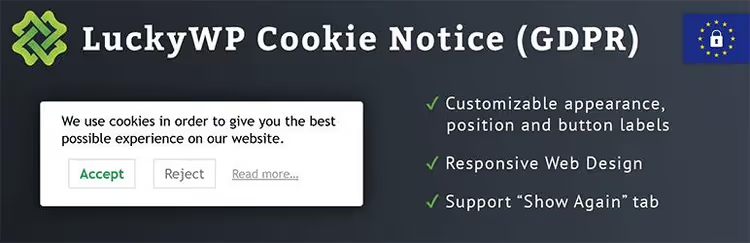
The simplest option is the free plugin LuckyWP Cookie Notice (GDPR). It adds a customizable bar with "Accept" and "Reject" buttons, a link to the policy, and the ability to set the consent duration. The plugin is lightweight, does not burden the site, and covers the basic requirements of the ePrivacy Directive.

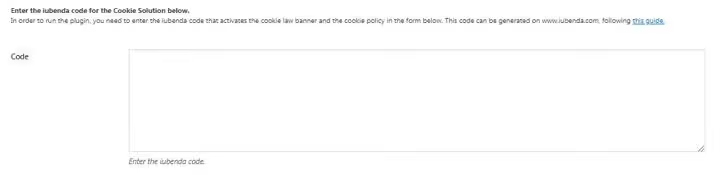
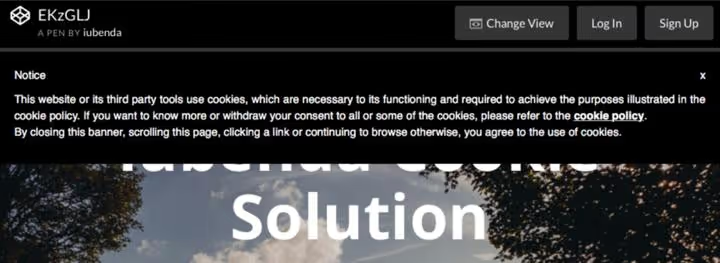
A more powerful tool is Iubenda All-in-one Compliance. It is not just a banner but a full consent management platform: automatic cookie scanning on the site, script blocking until consent is obtained, integration with Google Consent Mode v2, and a privacy policy generator. After installation, the plugin adds an Iubenda tab to the admin panel where you paste the code from your account dashboard.
From there, configure the banner's appearance and behavior: top or bottom of the screen, color scheme, and the list of scripts to block. After saving, the banner appears on the site.
This is also where you set the banner position, color scheme, and the list of scripts to block automatically. Iubenda lets you flexibly configure which third-party services (Google Analytics, Facebook Pixel, Hotjar) should wait for consent.
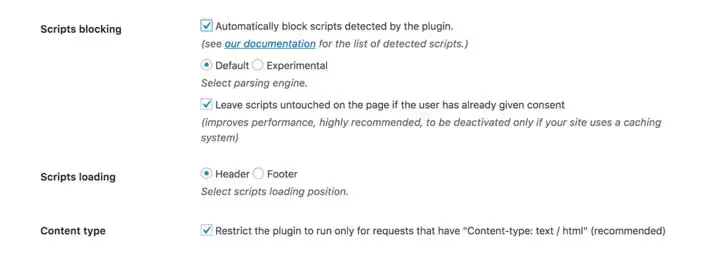
After selecting all parameters, click "Save Changes" and the banner will immediately appear on the site.
The third option is GDPR Cookie Compliance by Moove Agency (300,000+ active installations). The plugin stores all consent data locally in WordPress, supports Consent Mode v2 in the premium version, and includes a consent log for auditing. It suits those who want to avoid external services and keep compliance entirely on their own server.

Step 3. Block scripts until consent is obtained
The most common mistake is that the banner is displayed while Google Analytics and Facebook Pixel have already loaded and set cookies. This is a direct violation; scripts must be blocked until the user explicitly clicks "Accept."
The blocking mechanism works as follows. The consent plugin intercepts <script> tags containing known tracking identifiers (Google Analytics, Meta Pixel, Hotjar, LinkedIn Insight) and prevents them from executing. When the visitor gives consent, the plugin unblocks the scripts and they run normally. If the visitor clicks "Reject," the scripts remain blocked, and the only cookies on the site are strictly necessary ones.
Iubenda does this automatically: it scans the page, detects scripts associated with cookies, and blocks them until consent. It also allows you to manually specify additional scripts to block in the plugin settings. LuckyWP Cookie Notice offers a field where you paste scripts that should only run after consent, so you move your Google Analytics and other service codes from the site header there.
A separate scenario involves YouTube videos. Embedding a standard iframe from youtube.com sets cookies immediately when the page loads, even if the visitor has not pressed Play. The solution is to use youtube-nocookie.com (privacy-enhanced mode) or the GDPR Helper for YouTube Videos plugin, which replaces the iframe with a placeholder that requests consent.
The video above is a visual demonstration of setting up the WPConsent solution in 10 minutes. The operating principle is similar across all modern plugins: scan cookies, configure the banner, and verify that scripts are blocked until consent.
⁉️🤔 Frequently asked questions
Am I required to comply with the EU cookie law if my site is not physically located in Europe?
Yes, if your audience includes users from the EU. The law applies extraterritorially: any site that collects data from European users through cookies must comply with the ePrivacy Directive and GDPR regardless of where the server is located. If European traffic is insignificant for you, a simple informational banner may suffice, but technically the requirements are the same.
Do I need to obtain consent for strictly necessary cookies?
No. Strictly necessary cookies, those without which the site does not function (session cookies, cart, authentication), do not require consent. However, you must inform the user about their use in the privacy policy. An important nuance: if a cookie is needed for functionality that the user explicitly requested (for example, remembering the interface language), it may be considered necessary, but regulators interpret this narrowly.
How does the ePrivacy Directive differ from GDPR regarding cookies?
The ePrivacy Directive (2002, updated in 2009) is a specific law covering cookies, electronic communications, and terminal equipment privacy. The GDPR (2018) is a general regulation on personal data. Regarding cookies: ePrivacy requires consent to set cookies, while GDPR requires consent to process the personal data that cookies collect. In practice, they work together: a consent banner satisfies both requirements if implemented correctly.
Can I use a cookie banner without a "Reject" button?
No. The EU Court ruling in the Planet49 case (2019) explicitly requires that refusing cookies be as easy as accepting them. A banner with only an "OK" or "Accept" button and no option to reject all non-essential cookies does not comply with GDPR. The "Reject" button must be equally visible, not gray on a gray background.
What happens if I simply ignore the requirements?
Formally, a fine of up to €20 million or 4% of annual turnover. In practice, EU supervisory authorities (DPAs) most actively pursue large companies and sites with significant European audiences. But even for a small site, risks include user complaints to their country's DPA, blocked Google advertising revenue (without Consent Mode v2), and loss of audience trust. Installing a consent plugin takes 20 minutes; the proportionality of effort to risk is obvious.
What to do today: a three-step plan
Cookie compliance for a WordPress site does not require a lawyer and costs nothing. Three actions that resolve the issue:
- If the site is simple, install LuckyWP Cookie Notice, set up the banner with "Accept" and "Reject" buttons, and add a link to the privacy policy page
- If you need automatic script blocking and Consent Mode v2 compliance, use Iubenda (free tier for basic compliance) or GDPR Cookie Compliance
- Test the result: open the site in incognito mode, verify that Google Analytics and other trackers do not load until consent, and that after clicking "Accept," they do load
The best time to bring your site into compliance was yesterday. The second best time is today.

A professional team of writers and editors specializing in creating quality content.