













 AIIllustrative image: AI-generated
🔗 10 FeedBurner alternatives for RSS feeds in 2026
Subscribers are getting lost, statistics are glitching, and the last FeedBurner update was in 2012. The problem isn't whether the service works today; it's whether it will work tomorrow. Google offers no guarantees.
Below are 10 FeedBurner alternatives for managing RSS feeds on WordPress in 2026. From built-in solutions at no extra cost to professional platforms with email newsletters, subscriber migration, and multi-channel delivery.
💡 Quick overview:
- Find out why keeping RSS on FeedBurner in 2026 is a risk to your subscriber base
- Compare 10 working alternatives with detailed breakdowns of features, pricing, and use cases
What is RSS and why does a website owner need it
In the early 2000s, readers had to open dozens of tabs every morning and manually check if anything new had appeared. RSS (Really Simple Syndication) solved this problem once and for all: the technology allows websites to automatically notify subscribers about new publications, and readers can gather updates from hundreds of sources in a single RSS reader.

The RSS reader audience has been steadily growing in recent years. People are tired of algorithmic feeds on social networks, where half the posts come from obscure advertisers.
For a WordPress site owner, RSS remains the only direct communication channel with readers that doesn't depend on Facebook, Google, or Twitter rules. No one can cut reach, block the account, or filter posts. Your content goes directly to the subscriber.
Why FeedBurner is a dead end in 2026
FeedBurner was the RSS management standard for over a decade. Google acquired the service in 2007, added statistics, email digests, and auto-publishing to social networks. Development stopped in 2012. Google closed the API, disabled monetization through AdSense, and stopped updating documentation. The forum is abandoned.
For WordPress sites, integration works through workarounds, and plugins are outdated. The service might run for another year, or it might shut down tomorrow. Migration takes an hour; losing your subscriber base can happen in a day.
10 FeedBurner alternatives for RSS feeds in 2026
Service | For whom | Price | Email newsletter | FeedBurner migration |
|---|---|---|---|---|
Built-in WordPress RSS | Minimalists | Free | No | Not needed |
FeedBlitz | RSS+email combo | From $19/mo | Yes | Yes |
follow.it | FeedBurner replacement | From $5/mo | Yes | Yes |
Mailchimp | Email-first | Free up to 500 subs | Yes | No |
RSS.app | Content aggregation | From $8/mo | No | No |
Below is a detailed breakdown of each option with pros, cons, pricing, and use cases. Three items from the original 2020 list have been replaced with modern alternatives: Feedity shut down in 2023, Mad Mimi was closed by GoDaddy in August 2024, and FeedPress has slowed development and is losing support.
1. Built-in WordPress RSS feed
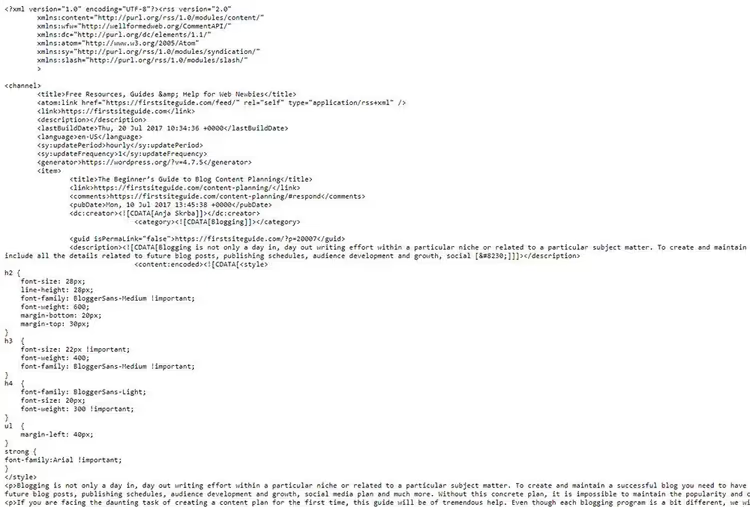
The first option is to not connect any third-party services at all. WordPress generates RSS out of the box at yourblog.com/feed. Any RSS reader sees it automatically.
- Pros: free, won't break on updates, doesn't depend on a third party
- Cons: no statistics, no email newsletter, basic feed without branding
- For whom: small blog without analytics needs
2. FeedBlitz

FeedBlitz is the most feature-rich FeedBurner alternative. Beyond RSS management, the platform includes a commenting system, an advertising network for monetization, and a FeedBurner migration wizard.
RSS-to-email turns posts into a newsletter with a customizable template and supports scheduled delayed sending. Built-in analytics shows open rates, clicks, and geography. Pricing starts at $19 per month for 2,500 subscribers.
- Pros: all-in-one for RSS, email, monetization, live support, migration wizard
- Cons: more expensive than competitors, overkill for simple statistics
- For whom: content project with a monetization plan
3. follow.it

follow.it emerged as a replacement for Mad Mimi after GoDaddy shut it down in August 2024. The service is tailored to replace FeedBurner: migration in a few clicks, analytics, and tag filtering.
Multi-channel delivery lets subscribers choose their format: email digest, Telegram, RSS, or a news web page. The free tier includes 20 feeds, with premium starting at $5 per month.
- Pros: migration wizard, free for 20 feeds, multi-channel delivery
- Cons: no monetization, not suitable for podcasts
- For whom: leaving FeedBurner while keeping your subscriber base
4. Mailchimp

Mailchimp is an email marketing platform with RSS-to-email. You create a campaign based on a feed, customize the template, and set the frequency. Free up to 500 subscribers, paid plans start at $13 per month.
- Pros: free up to 500, well-known brand, templates out of the box
- Cons: RSS is secondary, no FeedBurner migration
- For whom: small blog without email costs
5. RSS.app

RSS.app generates feeds from sites without RSS, including Twitter/X, Facebook, Instagram, and Reddit. It sends updates to Discord, Slack, and Telegram. Free for 2 feeds, premium starts at $8 per month.
This replaced Feedity (shut down in 2023). Suitable for aggregating content from dozens of sources.
- Pros: generates RSS from anywhere, integration with messengers, webhooks and API
- Cons: only 2 feeds free, no email newsletter
- For whom: content aggregator for teams and channels
6. Simple Feed Stats
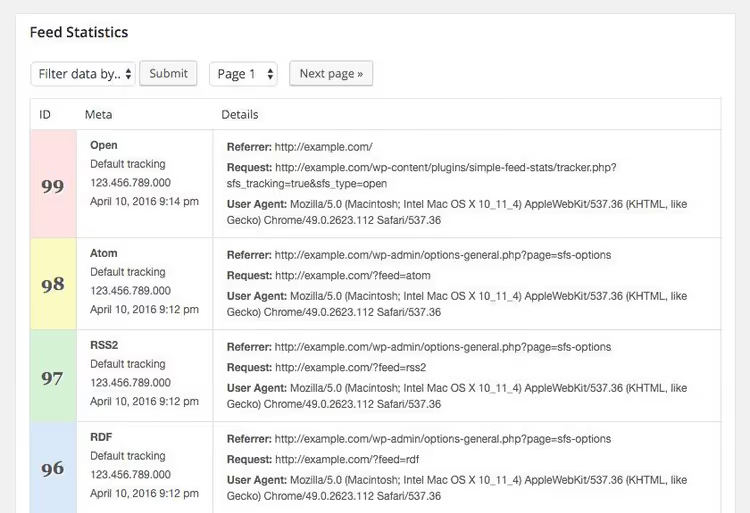
A free plugin for analytics on built-in WordPress RSS. It tracks subscribers, referrer, user-agent, and displays statistics via shortcodes. Runs on your server.
- Pros: free, no third-party dependencies
- Cons: analytics only, no migration, no email
- For whom: blog without paid services
🔗 Simple Feed Stats on WordPress.org
7. Aweber

A veteran email marketing platform with RSS-to-email. You connect a feed, choose a schedule, and send digests after articles accumulate. From $19 per month for 500 subscribers.
- Pros: proven platform, flexible digest scheduling
- Cons: expensive for simple RSS, RSS is secondary
- For whom: frequent publications, email digests
8. RapidFeeds
A web service for RSS management with a focus on statistics. FeedManager provides subscriber stats, geography, clicks, and user-agent. Custom domain for your feed, auto-posting to Twitter, and password protection.
- Pros: detailed statistics, auto-posting to Twitter, custom domain
- Cons: no email newsletter, no migration
- For whom: RSS statistics and Twitter
9. SpecificFeeds

Subscribe not to the entire feed, but to specific categories, tags, or keywords. For sites with diverse content, this reduces unsubscribes. Free.
- Pros: free, category-based subscriptions, reduces unsubscribes
- Cons: minimalist interface, no analytics, no email
- For whom: diverse content
10. FeedPress

The ideological successor to FeedBurner with RSS management, analytics, and migration. A white-label solution with your domain in the feed. From $4 per month, WordPress plugin.
Since 2023, development has slowed down. The service is alive, but prospects are unclear.
- Pros: white-label, statistics, auto-publishing to Facebook and Twitter
- Cons: development has slowed, support delays
- For whom: white-label without long-term plans
🔗 FeedPress | 🔗 Plugin on WordPress.org
⁉️🤔 Frequently asked questions
Do I need anything besides built-in WordPress RSS?
If you just want RSS readers to see your content, the built-in WordPress feed is completely sufficient. It works with any reader, requires no setup, and doesn't break on WordPress updates. But as soon as you want to see subscriber statistics or send posts by email, you need an additional tool from the list above.
FeedBurner still works; should I just leave it as is?
FeedBurner hasn't been updated since 2012. Users report statistics glitches: the counter jumps, data doesn't match Google Analytics. Google hasn't announced a shutdown date, but keeping critical infrastructure on an abandoned service is a risk. Migration takes an hour; losing your subscriber base can happen in a day.
How does follow.it differ from FeedBlitz?
FeedBlitz is an all-in-one platform: RSS, email, monetization, comments. If you want a single "all-in-one" platform and are willing to pay from $19 per month, go with it. follow.it is lighter and cheaper: it focuses on multi-channel delivery (email, Telegram, web), has a free tier for 20 feeds, and offers the simplest FeedBurner import. For "set it and forget it" migration, follow.it wins.
Why aren't Feedity and Mad Mimi on the list?
Feedity, a service for generating RSS from web pages, shut down in 2023. We replaced it with RSS.app, which does the same thing but is actively developing and supports messenger integration. Mad Mimi was closed by GoDaddy in August 2024; its place was taken by follow.it with similar RSS-to-email mechanics and a more modern interface.
Which service should I choose with a budget of fewer than 500 subscribers?
The most logical start is Mailchimp (free up to 500 subscribers, email newsletter out of the box) paired with built-in WordPress RSS or Simple Feed Stats for basic statistics. When your audience outgrows the free limit, you'll already know which features are in demand, and you can move to follow.it or FeedBlitz with full awareness.
Which FeedBurner alternative to choose in 2026
There is no universal answer; it all depends on your priorities and use case:
- Zero budget, only need statistics: Simple Feed Stats paired with built-in WordPress RSS. Free, no third-party services, all data on your server.
- Leaving FeedBurner and want to keep subscribers: follow.it. Migration wizard in a few clicks, free tier for 20 feeds, delivery where readers prefer (email, Telegram, web).
- Need email marketing with RSS as an addition: Mailchimp (up to 500 subscribers free) or Aweber (from 500 subscribers, more powerful but paid from day one).
- Want an all-in-one for RSS, email, monetization: FeedBlitz. The most functional option in this collection, regularly updated, suitable for content projects with a monetization plan.
- Aggregating feeds from dozens of sites, including social networks: RSS.app. The only tool on the list that can generate RSS from anywhere and send to messengers.
Don't put off migrating from FeedBurner. The service might run for another year, or it might shut down tomorrow; Google offers no guarantees. Choose an option from the table, set up a redirect from your old feed to the new one, and sleep easy.

A professional team of writers and editors specializing in creating quality content.